
Self-host RomM
5.4.1Self-hosted ROM manager with in-browser play and save sync
- Stars
- 14 389
- CPU
- any modest CPU
- RAM
- 512 MB RAM (minimum), 2 GB RAM (comfortable)
- Port
- 8080 (HTTP web server)
rommapp/romm
What is RomM?
RomM (ROM Manager) is a self-hosted web application for organizing and playing retro game collections. It scans ROM folders, pulls metadata from providers like IGDB, ScreenScraper, LaunchBox, MobyGames, SteamGridDB and RetroAchievements, and supports over 400 platforms. Games can be played directly in the browser using EmulatorJS (for consoles up to ~N64/PS1) and Ruffle (for Flash). Save states and SRAM are synced across devices, with official companion apps for Playnite (Windows), Argosy (Android handhelds) and Grout (custom firmware handhelds). User management includes granular permissions and OIDC single sign-on (Authelia, Authentik, Keycloak, etc.). The stack runs via Docker Compose with MariaDB and Valkey/Redis, and there are platform-specific guides for Unraid, Synology, TrueNAS SCALE, Kubernetes and more. Licensed AGPL-3.0 with no paid tiers or tracking.
RomM alternatives
 Gaseous ServerSelf-hosted ROM manager with in-browser emulation via EmulatorJS. Fetches metadata from IGDB/Hasheous, supports 2FA and OIDC auth, runs via Docker or Windows.CompareGaseous Server with RomM
 retroassemblySelf-hosted web app for retro games from NES, SNES, Genesis, Game Boy, Arcade and more with cloud sync, auto box art, save states, rewind, and gamepad navigation.Compareretroassembly with RomM
 HoardSelf-hosted, open-source game save backup/sync with full version history and SHA-256 verification. Auto-detects 20,000+ games. Runs on Windows, macOS, Linux, Steam Deck.CompareHoard with RomM
 OwnfoilSelf-hosted Nintendo Switch game library manager turning your collection into a customizable shop with multi-user auth, supporting Tinfoil, Sphaira, CyberFoil.CompareOwnfoil with RomM
 PlayerrAn open-source game library manager and PVR for self-hosting that automates collections with smart scanning and metadata from IGDB and Steam.ComparePlayerr with RomM
 tickletickle is a self-hosted, open-source game portal for indie developers to showcase games on their own server — like a personal itch.io without fees.Comparetickle with RomM
 OpenSaveFree open-source tool syncing game saves peer-to-peer. Auto-finds saves for 20,000+ titles, uses self-hostable relay for internet sync, keeps snapshot history.CompareOpenSave with RomM
 MediaManagerSelf-hosted, open-source media manager for TV and movie libraries: discover releases, score them, hand downloads to qBittorrent or SABnzbd, with OIDC sign-in.CompareMediaManager with RomM
Should you self-host RomM?
RomM scores 79/100 on selfhost.directory (how scoring works) and ranks #1 of 5 in Emulation. It has 14 389 GitHub stars, +834 in the last 30 days.
It shipped 10 stable releases in the past year. The latest, 5.4.1, came out on 22 October 2026. New versions land roughly every 2 weeks.
Setup is moderate: expect some configuration beyond a single command. An official Docker image is available. It is AGPL-3.0-licensed and written mostly in Python.
Its closest alternative on selfhost.directory is daedalOS (71/100, 13 099 stars). RomM scores higher overall. See RomM vs daedalOS side by side.
Features
- 400+ platform support
- Emulator streaming
- In-browser emulation
- Kiosk Mode
- Metadata Enrichment
- Multi-user with permissions
- Netplay
- OIDC Single Sign-On
- Physical games support
- REST API
- ROM conversion
- ROM patcher
- Save state sync
RomM README



Scan, enrich, browse and play your ROM collection from one beautiful & free self-hosted app. Metadata from 10+ providers, save sync across your devices, and support for over 400 platforms. RomM is a must-have for anyone who plays on emulators.
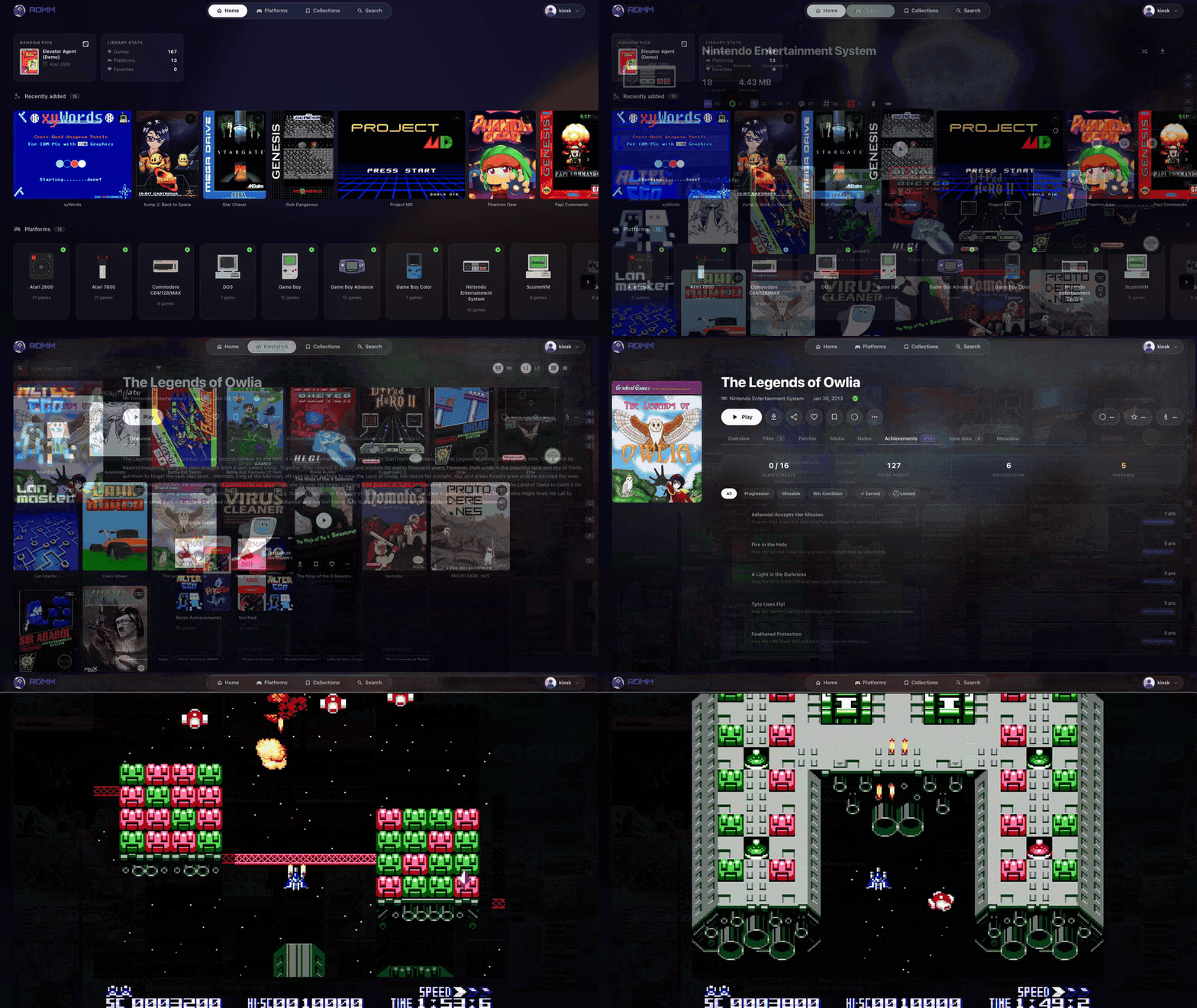
How to install RomM
Install RomM with Docker Compose
ROMM_AUTH_SECRET_KEY, DB_HOST, DB_NAME, DB_USER, DB_PASSWD, SCREENSCRAPER_USER, SCREENSCRAPER_PASSWORD, RETROACHIEVEMENTS_API_KEY, STEAMGRIDDB_API_KEY, HASHEOUS_API_ENABLEDversion: "3" volumes: mysql_data: romm_resources: romm_redis_data: services: romm: image: rommapp/romm:latest container_name: romm restart: unless-stopped environment: - DB_HOST=romm-db - DB_NAME=romm - DB_USER=romm-user - DB_PASSWD= - ROMM_AUTH_SECRET_KEY= - SCREENSCRAPER_USER= - SCREENSCRAPER_PASSWORD= - RETROACHIEVEMENTS_API_KEY= - STEAMGRIDDB_API_KEY= - HASHEOUS_API_ENABLED=true volumes: - romm_resources:/romm/resources - romm_redis_data:/redis-data - /path/to/library:/romm/library - /path/to/assets:/romm/assets - /path/to/config:/romm/config ports: - 80:8080 depends_on: romm-db: condition: service_healthy restart: true romm-db: image: mariadb:latest container_name: romm-db restart: unless-stopped environment: - MARIADB_ROOT_PASSWORD= - MARIADB_DATABASE=romm - MARIADB_USER=romm-user - MARIADB_PASSWORD= volumes: - mysql_data:/var/lib/mysql healthcheck: test: [CMD, healthcheck.sh, --connect, --innodb_initialized] start_period: 30s start_interval: 10s interval: 10s timeout: 5s retries: 5
Requires Docker and Docker Compose. Edit paths and secrets before starting.
RomM releases & version history
Caution
This release includes mitigations for the recent eMudhra CA compromise as well as general dependency upgrades. While we don't believe RomM instances are vulnerable, we recommend upgrading as soon as possible.
What's Changed
- docs(readme): move corporate sponsors above friends by @gantoine in #5219
- chore(deps-dev): bump handlebars from 4.7.9 to 4.7.10 in /frontend by @dependabot[bot] in #5221
- fix(deps): bump certifi to 2026.10.19 to distrust compromised eMudhra intermediates by @gantoine in #5283
- chore(deps): bump uv to 0.13.4 by @gantoine in #5284
- chore(trunk): Upgrade trunk by @github-actions[bot] in #5225
- chore(deps): update github actions by @renovate[bot] in #5244
- chore(deps): bump aiohttp from 3.14.3 to 3.14.4 by @dependabot[bot] in #5276
- chore(deps-dev): bump vite from 8.3.1 to 8.3.4 in /frontend by @dependabot[bot] in #5285
- chore(deps): bump follow-redirects from 1.16.0 to 1.16.1 in /frontend by @dependabot[bot] in #5286
- docs: list the ROM patcher env vars in env.template by @pcbeingused333 in #5265
- chore(deps): update dependency pillow to v13 [security] by @renovate[bot] in #5288
- chore(deps): update dependency storybook to v10.6.2 [security] by @renovate[bot] in #5291
- chore(deps): bump Node to 24.22.1 for the October 2026 security release by @gantoine in #5295
- fix(docker): upgrade the image's pip to 26.2.2 by @gantoine in #5298
- chore(deps): update github/codeql-action action to v4.39.0 by @renovate[bot] in #5299
New Contributors
- @pcbeingused333 made their first contribution in #5265
Full Changelog: 5.4.0...5.4.1
AI summary Migrations rewrite and backfill ROMs table
Caution
Give the first start 15-20 mintes to finish its migrations.
Several of this release's migrations rewrite the roms table and backfill it in batches, which can take a while on a large library. Don't restart the container while they run.
Warning
Cross-origin requests are denied by default.
An unset or empty ROMM_CORS_ALLOWED_ORIGINS used to allow every origin, and now allows none. If a browser-based client on another origin talks to your RomM, list its origin in ROMM_CORS_ALLOWED_ORIGINS. A * still answers any origin, but without credentials, so a client that signs in with the session cookie needs its origin listed explicitly. #4699
Warning
Add a reverse proxy on a public address to FORWARDED_ALLOW_IPS.
RomM now trusts X-Forwarded-For only from loopback and private ranges. A proxy outside those ranges has to be added, or every request is logged and rate limited as coming from the proxy's address. #4748
Technical changes
🌎 ENVIRONMENT VARIABLES
Notifications and email
| variable | default | description |
|---|---|---|
| SMTP_HOST | - |
SMTP server; email stays off until this and SMTP_FROM are set |
| SMTP_PORT | 587 |
SMTP server port |
| SMTP_USERNAME | - |
Login for the SMTP server, if it needs one |
| SMTP_PASSWORD | - |
Password for the SMTP server |
| SMTP_FROM | - |
Sender address, such as romm@example.com |
| SMTP_SECURITY | starttls |
starttls, tls (implicit TLS, usually port 465) or none |
Audit log
| variable | default | description |
|---|---|---|
| AUDIT_LOG_RETENTION_DAYS | 90 |
Days to keep audit events; 0 keeps them forever |
Library conversion
| variable | default | description |
|---|---|---|
| ROM_CONVERTO_ENABLED | false |
Enable the "Convert library" task and ?format= download conversions |
| ROM_CONVERTO_TIMEOUT | 600 |
Seconds per rom-converto operation |
| ROM_CONVERTO_MAX_CONCURRENCY | 2 |
Concurrent conversions per web or task worker |
Devices and sync
| variable | default | description |
|---|---|---|
| DEVICE_INSTALL_ENABLED | true |
Let users push a ROM to one of their devices for install |
| DEVICE_INSTALL_REQUEST_TTL_DAYS | 2 |
Days an unfinished install request waits for its device; 0 waits forever |
| DEVICE_INSTALL_EXCLUDED_PLATFORM_SLUGS | win,win3x,win9x,windows-apps |
Platforms that can never be pushed to a device |
| SYNC_RETROARCH_PSP_SERIAL_MAP | {} |
JSON map of PSP serial to extensionless ROM file name, for RetroArch PSP saves whose title matches no ROM |
Scheduled cleanups
| variable | default | description |
|---|---|---|
| ENABLE_SCHEDULED_CLEANUP_NETPLAY | true |
Clean up empty netplay rooms |
| SCHEDULED_CLEANUP_NETPLAY_CRON | */30 * * * * |
When that cleanup runs |
| ENABLE_SCHEDULED_CLEANUP_UPLOAD_TMP | true |
Clean up abandoned chunked uploads |
| SCHEDULED_CLEANUP_UPLOAD_TMP_CRON | 0 * * * * |
When that cleanup runs |
| ENABLE_SCHEDULED_CLEANUP_ZIP_CACHE | true |
Clean up stale cached ZIP files |
| SCHEDULED_CLEANUP_ZIP_CACHE_CRON | 0 4 * * * |
When that cleanup runs |
| ENABLE_SCHEDULED_CLEANUP_SYNC_SESSIONS | true |
Fail sync sessions no client completed |
| SCHEDULED_CLEANUP_SYNC_SESSIONS_CRON | 23 * * * * |
When that cleanup runs |
General
| variable | default | description |
|---|---|---|
| ⚠️ ROMM_CORS_ALLOWED_ORIGINS | - |
Empty now allows no cross-origin requests; a * allows any origin but never credentials |
| ⚠️ FORWARDED_ALLOW_IPS | local/loopback addresses | Proxies trusted to report the client's address; was * |
| DISABLE_EASYRPG | false |
Disable the EasyRPG player for everyone |
| SEVEN_ZIP_TIMEOUT | 180 |
Timeout for 7-Zip operations in seconds, was 60 |
📡 API CHANGES
| Change | Description | | --- | --- | | ⚠️ CORS denied by default | `ROMM_CORS_ALLOWED_ORIGINS` now defaults to empty instead of `*`; browser clients on another origin must be allowlisted (#4699) | | CORS wildcard drops credentials | With `*` in `ROMM_CORS_ALLOWED_ORIGINS`, responses no longer send `Access-Control-Allow-Credentials` (#4699) | | Invalid credentials are unauthenticated | A malformed Basic header or an invalid/expired JWT bearer no longer 500s; the request proceeds unauthenticated and gets the route's 401/403 (#4799) | | ⚠️ `PermissionGroupSchema.is_system` removed | Replaced by `system_key` (`SystemGroupKey` or null) (#4767) | | Age limits on permissions | `PermissionGroupSchema/Create/Update` and `UserPermissionsSchema/Update` gain `age_limit`, `hide_unrated_roms`; updates apply them only with `set_age_settings: true` (#5081) | | Collection `rom_count` is computed | `rom_count` on collection, smart and virtual collection schemas is now read-only, derived from the visible `rom_ids` (#4930) | | ⚠️ Collection name errors | Duplicate name on create or rename returns 409 (was 500); names over 400 chars return 422 (#4997) | | ⚠️ `GET /api/netplay/list` | Scope `assets.read` - `roms.read`; `game_id` is now an integer ROM id, 404 for a missing or hidden ROM (#4700) | | ⚠️ Netplay socket rooms | `open-room` and password-less `join-room` require a signed-in user with `roms.read` who can see the ROM; the room password moved from `extra.room_password` to top-level `password` (#4700) | | ⚠️ `GET /api/play-sessions` | Without `devices.read`, only allowed when `device_id` equals the calling token's device; no longer defaults `device_id` from the token (#4956) | | ⚠️ `PlaySessionSchema.sync_session_id` removed | Field dropped from play session responses (#4670) | | Page params on play and sync sessions | `GET /api/play-sessions` and `GET /api/sync/sessions` use shared page params (`limit` 1 to 10000, `offset`); sync sessions gains `offset` (#4715) | | ⚠️ Sync `delete` operation | `SyncOperationSchema.action` adds `delete` (slot emptied on the server); `SyncNegotiateResponse` adds `total_delete` (#4674) | | `POST /api/sync/negotiate` payload | New `restore_unlisted` and `emulators` fields to re-offer unlisted saves and filter by emulator (#5091) | | Save sync baselines | `POST /api/saves` and `PUT /api/saves/{id}` take a `content_hash` query param; `POST /api/saves/{id}/downloaded` takes `content_hash` in the body (#4768) | | Save/state uploads validated | `emulator` must be a single folder name (max length enforced); file names over 255 bytes return 400; uploads to a hidden ROM return 404 (#4851, #4997) | | `SaveSchema` / `StateSchema` annotations | New `is_favorite` and `labels`; masked to defaults on another user's shared save or state (#4714) | | `StateSchema.core` | New field naming the RetroArch core that wrote the state (#4862) | | ⚠️ `PUT /api/roms/{id}` rename errors | Renaming onto an existing file returns 409 (was 500); an invalid or overlong `fs_name` returns 400 before any metadata fetch (#4997) | | `PUT /api/roms/{id}` manual metadata | `raw_manual_metadata` is validated, 422 when malformed; `ManualMetadata` gains `alternative_names` (#5111) | | `POST /api/roms/{id}/convert-to-folder` | Also returns 409 when an `.m3u` beside the file lists it; upload and walkthrough routes reject the same case (#5076) | | `GET /api/roms` relevance ordering | Empty `order_by` with a search term ranks by relevance on every database; `char_index` is empty under relevance order (#4996) | | `GET/HEAD /api/roms/{id}/content/{file_name}` | New `?format=` for converted single-file downloads (202 + `Retry-After` while converting, 406 when unavailable) (#4999) | | `GET /api/roms/{id}/content/{file_name}` | New `purpose=download\|play` query param, recorded in the audit log (#4748) | | `DetailedRomSchema.download_formats` | Formats the caller can request with `?format=` (#5000) | | `is_easyrpg_game` on ROM schemas | New boolean on `SimpleRomSchema` and `DetailedRomSchema` (#5077) | | Pinned media | `RomUserSchema.pinned_media` and `RomUserData.pinned_media` (ordered media keys, null for default) (#4764) | | ROM metadata fields | LaunchBox box art `box2d_*`/`box3d_*` (url and path), `video_path` now nullable (#5129); SS `physical_disc`/`physical_extra_discs` (#4885); SS and Hasheous `dump_regions/languages/tags` (#4740); RA `hash_match` (#4816) | | `PlatformSchema` | New computed `abbreviation` and `alternative_names` (#5107) | | `MusicTrackSchema.file_name` | New field (#5079) | | `DeviceSchema.capabilities` | New `capabilities` map on device schema and on `POST`/`PUT /api/devices` payloads (#4835) | | `GET /api/heartbeat` | Adds `EMULATION.DISABLE_EASYRPG` (#5077), `NOTIFICATIONS` (#4735), `DEVICE_INSTALL` (#4835), `CONVERTO` (#4999) | | `GET /api/config` | Adds `CONVERTO` and `CONVERTO_LIBRARY_TARGETS` (#4999) | | `POST /api/tasks/run/{task_name}` | Returns 409 when a single-instance task is already queued or running; `TaskInfo` adds `destructive` (#5000) | | `POST /api/reset-password` | Enforces the password policy with 400, leaving the reset link usable (#5106) | | OIDC callback | A provider error redirects to `/login?bypass_autologin=true` instead of 500 (#4746); an account linked to a different provider identity gets 403 (#4892) | | `POST /api/activity/heartbeat` | Returns 404 for a ROM hidden from the caller (#5117) | | ⚠️ `activity:update` socket event | Sent only to users who can see the ROM, instead of broadcast to every client (#5121) | | ⚠️ `scan` socket event payload | Validated strictly (`ScanPayload`, unknown keys rejected); invalid options, no scan worker, or a scan in flight emit `scan:done_ko` (#5014) | | `scan:scanning_rom` | Payload adds `is_new` (#4867) | | `sync:conflict` | Payload adds `rom_name` (#4552) | | Socket session revocation | Logging out or revoking a session disconnects the sockets it opened (#4732) | | Streaming session routes | Control routes take `container` and `claimed_at` query params; launch socket payloads add `claimed_at`, `core`, `core_tier`, import `refusals`; `StreamingContainerSchema` adds `supports_live_states`, `import_kinds`, `state_core`; 409 bodies use `ContainerBusyDetail` (#4631, #4691, #4796, #4859, #4862) |Notifications
| Method | Path | Description |
|---|---|---|
| GET | /api/notifications |
List the caller's notifications, newest first (#4732) |
| POST | /api/notifications |
Send a notification to yourself, or to other users with users.write (#4732) |
| POST | /api/notifications/read |
Mark the given notifications (or all) read (#4732) |
| DELETE | /api/notifications/{notification_id} |
Dismiss one notification (#4732) |
| DELETE | /api/notifications |
Dismiss all notifications (#4732) |
Notification channels
| Method | Path | Description |
|---|---|---|
| GET | /api/notification-channels |
List the caller's channels (Apprise, webhook, email) (#4735) |
| POST | /api/notification-channels |
Create a channel; email addresses get a confirmation code (#4735) |
| PATCH | /api/notification-channels/{channel_id} |
Update a channel (#4735) |
| DELETE | /api/notification-channels/{channel_id} |
Delete a channel (#4735) |
| POST | /api/notification-channels/{channel_id}/test |
Send a test notification now (#4735) |
| POST | /api/notification-channels/{channel_id}/confirm |
Confirm an email channel with its code (#4735) |
| POST | /api/notification-channels/{channel_id}/resend-code |
Resend the email confirmation code (#4735) |
| GET | /api/notification-channels/apprise-services |
List Apprise services and their fields (admin) (#4769) |
| POST | /api/notification-channels/apprise-services/parse |
Parse a service or Apprise URL into fields (admin) (#4769) |
Audit events
| Method | Path | Description |
|---|---|---|
| GET | /api/audit-events |
Paginated audit log, filterable by actor, action, category, target, time range and search; admins with users.read see everyone (#4748) |
Device installs
| Method | Path | Description |
|---|---|---|
| GET | /api/devices/online |
IDs of the caller's devices with an open /devices socket (#4835) |
| POST | /api/devices/{device_id}/installs |
Queue a ROM install on a device (#4835) |
| GET | /api/devices/{device_id}/installs |
List the device's pending and taken install requests (#4835) |
| POST | /api/devices/{device_id}/installs/claim |
Device claims its pending requests (device-bound token only) (#4835) |
| PUT | /api/devices/{device_id}/installs/{request_id} |
Device reports done, already_installed or failed (#4835) |
| DELETE | /api/devices/{device_id}/installs/{request_id} |
Cancel a pending or taken request (#4835) |
| GET | /api/roms/{id}/installs |
The caller's open install requests for a ROM (#4835) |
RetroArch Cloud Sync (WebDAV)
| Method | Path | Description |
|---|---|---|
| OPTIONS | /api/sync/retroarch/{path} |
Advertise DAV support (#3904) |
| PROPFIND | /api/sync/retroarch/{path} |
Read-only browsing of roms/, saves/ and states/ (#3904) |
| GET, HEAD | /api/sync/retroarch/{path} |
Serve the manifest or a save/state file (#3904) |
| PUT | /api/sync/retroarch/{path} |
Upload a save/state, matched to a ROM by file name (#3904) |
| DELETE, MOVE | /api/sync/retroarch/{path} |
Remove a save/state the client dropped (#3904) |
| MKCOL, LOCK, UNLOCK | /api/sync/retroarch/{path} |
Accepted no-ops for WebDAV clients; uses HTTP Basic with a 401 challenge (#3904) |
Saves and states
| Method | Path | Description |
|---|---|---|
| PUT | /api/saves/{id}/favorite |
Set is_favorite on a save (#4714) |
| PUT | /api/saves/{id}/labels |
Replace a save's labels (#4714) |
| PUT | /api/saves/{id}/file-name |
Rename a save file and its screenshot (#4749) |
| PUT | /api/states/{id}/favorite |
Set is_favorite on a state (#4714) |
| PUT | /api/states/{id}/labels |
Replace a state's labels (#4714) |
| PUT | /api/states/{id}/file-name |
Rename a state file and its screenshot (#4749) |
Collections
| Method | Path | Description |
|---|---|---|
| PUT | /api/collections/{id}/visibility |
Share or unshare a collection (owner only) (#4749) |
| PUT | /api/collections/smart/{id}/visibility |
Share or unshare a smart collection (owner only) (#4749) |
ROMs, tasks and config
| Method | Path | Description |
|---|---|---|
| POST | /api/tasks/scan |
Queue a library scan with a ScanPayload body; 202, 409 if one is in flight, 503 with no worker (#5014) |
| GET | /api/roms/{id}/easyrpg/{path} |
Serve the EasyRPG index.json and game/RTP files for RPG Maker 2000/2003 games (#5077) |
| PUT | /api/config/converto_settings |
Update download conversion settings (#4999) |
Socket.IO events
| Method | Path | Description |
|---|---|---|
| Server to client | notifications:new / notifications:read / notifications:dismissed |
Notification created, marked read, or dismissed for the user (#4732) |
| Server to client | install:updated |
An install request changed, sent to the owner's tabs (#4835) |
| Server to client | install:queued / install:cancelled |
Sent to a device on the new /devices namespace (device-bound client token required) (#4835) |
| Server to client | activity:refresh |
Signals clients to refetch the activity list (#5125) |
Highlights
Notifications
RomM now keeps a notification inbox for each user. Scans and tasks that finish or fail, a role change, or someone ending your stream all leave a notification that is pushed to every open tab and still waits for you the next time you open RomM. Admins can send their own from the Send tab on the Notifications page, and any API client can post one through POST /api/notifications. #4732
Each user can also forward their notifications to channels, filtered by level and topic. A RomM webhook sends a JSON payload (signed with HMAC-SHA256 when you give it a secret), and email works once the SMTP_* variables are set, which also sends password reset links by email. Admins can additionally pick any of the services Apprise supports, such as Discord, Telegram, Slack, ntfy, Gotify or Matrix, and fill in that service's fields or paste its URL. #4735 #4769

RetroArch Cloud Sync
RomM is now a Cloud Sync target for RetroArch. Point RetroArch's Cloud Sync at https://<your-romm>/api/sync/retroarch/ (the trailing slash matters) and sign in with your RomM username and password (setup guide). Saves and states sync straight into your library, web player states show up in RetroArch's numbered load slots, and RetroArch registers itself as one of your devices on its first sync. #3904
The config, thumbnails and system file categories sync too, stored per user. PSP save folders are bundled into one save per folder; if a folder's title matches no ROM, map its serial with SYNC_RETROARCH_PSP_SERIAL_MAP. Generic WebDAV clients can browse the same path read-only. #3931
Browser saves sync, and installs on your devices
All five in-browser players (EmulatorJS, EasyRPG, js-dos, PICO-8 and Ruffle) now sync saves through device sync. Each browser profile registers as a device, named like "Firefox on macOS", and negotiates its saves with the server when a game launches, so a save made in one browser is waiting in another and a conflicting copy is archived instead of overwritten. A new Devices page at /devices lets you rename your devices, turn sync off for one, or remove it. #5091
You can also send a game to a device from the web UI. "Install on device" in a game's menu adds it to the download queue of the devices you pick, and the device downloads it the next time it's online. Only devices whose app reports it accepts installs are listed. Turn the feature off with DEVICE_INSTALL_ENABLED=false, and keep platforms out of it with DEVICE_INSTALL_EXCLUDED_PLATFORM_SLUGS. #4835

Parental controls
Give a permission group an age limit, and its members only see games rated for that age or younger. Each user can replace their group's limit, and a "Hide unrated games" switch hides games no rating covers. Admins are never limited. Set them in the group and user dialogs under Administration. #5081 #5083
A game's age comes from the strictest of its IGDB, ScreenScraper, LaunchBox (ESRB) and Steam ratings, and a manual rating list replaces the providers' ratings. The limit applies everywhere a game can show up: the gallery, search, collections, stats, the Jukebox and feeds. See Parental controls for the details.

Audit log
RomM now records who did what: downloads and player launches, play sessions, uploads and edits, collection changes, scans and tasks, and security events like sign-ins, failed sign-ins and permission changes. Admins read it in the new Events tab under Settings › Logs, filtered by user, category and date, with a search over names and IP addresses. Events are kept for 90 days, set by AUDIT_LOG_RETENTION_DAYS (0 keeps them forever). See Audit log for everything that's recorded. #4748

Library conversion with rom-converto
Pick a storage format per platform, and the new "Convert library" task converts every matched game on it in place, so a game keeps its saves and collections. Only lossless conversions are offered, and because the task deletes the originals it asks you to type a confirmation first. Set ROM_CONVERTO_ENABLED=true and choose formats under the new Conversion settings page, or in config.yml (setup guide). #4999
With download_conversion_enabled on, the game page's More menu offers "Download as" in any format the file can be converted to, and clients can ask for one with ?format= on the download URL. #5000
converto:
  download_conversion_enabled: true
  platform_formats:
    psx: chd
    ngc: rvz
RPG Maker 2000/2003 in the browser
RPG Maker 2000 and 2003 games on the rpg-maker platform now play in the browser on the EasyRPG web player. The free EasyRPG RTP ships with it, so games that rely on the RTP start, though some assets (mostly in battles) are missing from it. Games need to be extracted folders, since the web player can't read archives. Disable it with DISABLE_EASYRPG. #5077

Alternative titles and relevance in search
Search now matches the alternative titles your metadata providers know about, including localized names, so a Japanese title finds the game listed under its English name and the other way around. You can add your own in the new "Alternative titles" field of the Edit dialog, such as "ACNH" or a fan translation's name. Already matched IGDB and Hasheous games pick up their regional titles on their next metadata refresh. #5111
The Search page also orders results by relevance until you pick a sort, with exact title matches first. #4995 #4996
Minor changes
- feat: Offer the desktop shell's emulator from the save/state play page by @sdornan in #4541
- feat(metadata): take region and language from the dump a hash matched by @sdornan in #4664
- feat(metadata): read a fan translation's tag and target language by @sdornan in #4665
- feat(saves): favorite and label saves and states by @zurdi15 in #4714
- feat(v2): multi-select saves and states by @zurdi15 in #4725
- feat(metadata): tag a dump from the flags ScreenScraper raises on it by @sdornan in #4666
- feat(v2): wider state cards and one timestamp across save and state views by @zurdi15 in #4736
- feat(sync): surface save conflicts detected by negotiate by @sdornan in #4552
- feat: promote platforms that have games in PlatformSelect by @andest01 in #4599
- feat: rename saves and states, and one public/private look across v2 by @zurdi15 in #4749
- feat(v2): surface WebSocket transport fallback in BackendStatusBanner by @andest01 in #4645
- feat(streaming): reap abandoned streaming sessions every minute by @LoneAngelFayt in #4632
- feat(sync): tell a device when the save it holds was deleted here by @sdornan in #4674
- feat(streaming): resume from a foreign emulator's save or state via declared import by @LoneAngelFayt in #4691
- feat(v2): pin any media to the game overview by @gantoine in #4764
- feat(streaming): name containers by their label, and harden import archives by @LoneAngelFayt in #4796
- feat(sync): record a per-device save baseline to prove what did not change by @sdornan in #4768
- feat(streaming): per-platform RetroArch core override by @LoneAngelFayt in #4859
- feat(streaming): RetroArch states carry the core that wrote them by @LoneAngelFayt in #4862
- feat(v2): add an opt-in setting to show the game logo in place of the title on the v2 game page by @sdornan in #4888
- feat(soundtrack): control playback through the Media Session API by @sdornan in #4904
- feat(v2): promote platforms with games in the scan picker by @andest01 in #4897
- feat(search): search the gallery by providers' alternative titles by @sdornan in #4941
- feat: read play sessions across devices and page sync sessions by @beemines in #4956
- feat: make netplay and upload cleanup schedules configurable by @beemines in #4957
- feat(search): rank multi-word searches by phrase on PostgreSQL by @sdornan in #4977
- feat(input): let the D-pad move through and out of text fields by @gantoine in #4993
- feat(search): Search provider aliases through search_titles and drop generated_search_aliases by @sdornan in #5003
- feat(converto): read per-file title ids with rom-converto during scans by @gantoine in #5031
- feat(i18n): follow the browser's language by default, with an "Auto" language option by @sdornan in #5051
- feat(api): Add a REST endpoint to start a library scan by @ilyas-hallak in #5014
- feat(soundtrack): play SPC, VGM, VGZ and GYM soundtracks in the browser by @sdornan in #5079
- feat(v2): add an
activetoggle state to RBtn by @sdornan in #5090 - feat(v2): resume jukebox music after a reload by @gantoine in #5095
- feat(v2): scope stored preferences to the signed-in user by @gantoine in #5098
- feat(launchbox): scrape box front, back, spine and 3D box art by @sdornan in #5129
- feat: search platforms by slug, abbreviation and alternative names by @sdornan in #5107
- feat(v2): show a top-bar indicator while a "Download as" conversion runs by @gantoine in #5157
- feat(sync): sync RetroArch Cloud Sync saves through save slots by @gantoine in #5170
- feat(permissions): gate emulator streaming and in-browser play behind group permissions by @LoneAngelFayt in #5185
Fixes
- fix(cloud-sync): remap web-player states into RetroArch's numbered load slots by @fmustafayaman in #3933
- fix(roms): order a playlist by disc number, not by file name by @sdornan in #4737
- fix(v2): run desktop list rows to the screen edges by @zurdi15 in #4739
- fix(roms): order lettered discs like numbered ones by @sdornan in #4738
- fix(scan): keep a hash source's tags when a scan skips it by @zurdi15 in #4740
- fix(docker): stop the watchdog from spawning duplicate RQ workers by @zurdi15 in #4743
- fix(hltb): retry a separated title with the separator dropped by @sdornan in #4759
- fix(v2): handle copy to clipboard over plain HTTP in logs and files tab by @sdornan in #4757
- fix(hltb): match search results by their aliases too by @sdornan in #4760
- fix(hltb): accept token-only sessions and discover the endpoint when GitHub fails by @sdornan in #4758
- fix(v2): version ROM file URLs with the file's own timestamp by @gantoine in #4762
- fix(auth): redirect instead of 500 when the OIDC callback is rejected by @andest01 in #4746
- fix(streaming): bind every session action to the claim that owns it by @LoneAngelFayt in #4631
- fix(sync): give a sync session the life of one launch, and drop the dead play-session link by @sdornan in #4670
- fix(steam): read appdetails envelope keyed by another app ID by @sdornan in #4774
- fix(scan): keep title-id settled file categories and report id-only changes on refresh by @tmgast in #4720
- fix(security): deny cross-origin requests by default by @sdornan in #4699
- fix(backend): detect top-level rom files at any folder depth by @sdornan in #4776
- fix(soundtrack): fall back to the default cover when a game has no artwork by @sdornan in #4779
- fix(security): authorize netplay rooms on ROM access by @sdornan in #4700
- fix(backend): replace the legacy Query API with Select and type the session decorators by @sdornan in #4730
- fix(frontend): only request platform icons that ship by @gantoine in #4792
- fix(player): make all Amiga Kickstarts available to PUAE by @yiannias in #4741
- fix(auth): treat invalid bearer and basic credentials as unauthenticated by @gantoine in #4799
- fix(auth): rename seeded permission groups to Viewer and Editor by @sdornan in #4767
- fix(sync): make deleted-save tracking exact, complete, and effective on filled slots by @sdornan in #4789
- fix(sync): follow-ups to deleted-save tracking by @gantoine in #4807
- fix(scan): compute RA hash for archives whose member read fails by @sdornan in #4806
- fix(player): assign a gamepad already connected when EmulatorJS boots by @gantoine in #4808
- fix(v2): drop the CRT overlay's backdrop grade on phones by @gantoine in #4809
- fix(playmatch): skip unhashed lookups of folder ROM members by @gantoine in #4812
- fix(v2): skip the post-upload scan while a scan is already running by @gantoine in #4810
- fix(v2): keep the focused platform tile in view when moving up the grid by @gantoine in #4811
- fix(ra): count RomM's own RA hash match as RetroAchievements verification by @sdornan in #4816
- fix(saves): stamp save and state file names with local time by @gantoine in #4815
- fix(ra): keep a hash match when RA's details request fails by @sdornan in #4822
- fix(ra): accept null Developer, Publisher and Genre from RetroAchievements by @sdornan in #4840
- fix(hasheous): match multi-file roms when one file is unknown by @sdornan in #4846
- fix(backend): restart the log forwarder and harden three Redis call sites by @sdornan in #4847
- fix(v2): stop URL query writes from dropping history entries; bump vue-router to 5.3.1 by @sdornan in #4861
- fix(player): boot cue/gdi/ccd/mds disc sets whole by default by @gantoine in #4848
- fix(ss): map Win9x to ScreenScraper's generic Windows system by @gantoine in #4849
- fix(assets): reject emulator names that are not a single folder on upload by @gantoine in #4851
- fix(v2): keep the checkbox's native input inside its label by @gantoine in #4856
- fix(scan): raise the 7-Zip timeout default and keep partial bytes out of the fallback hash by @gantoine in #4852
- fix(v2): mount one PDF viewer at a time in the Media tab by @gantoine in #4853
- fix(scan): anchor rom file category to the folder below the rom root by @gantoine in #4854
- fix(v2): move focus by arrow key and D-pad between page regions by @gantoine in #4855
- fix(v2): show TheGamesDB logo on server stats coverage chips by @sdornan in #4866
- fix(scan): kill a stalled 7-Zip extractor at the timeout by @gantoine in #4868
- fix(scan): stop rescans inflating live platform game counts by @sdornan in #4867
- fix(platforms): stop labeling C128 as Commodore 64 in the platform picker by @gantoine in #4874
- fix(player): keep disabled EmulatorJS cheats out of the core by @gantoine in #4876
- fix(player): restart the core after loading a save it did not boot with by @gantoine in #4877
- fix(roms): pick grouped representatives among siblings the user can see by @gantoine in #4878
- fix(player): keep arcade BIOS archives whole on EmulatorJS 4.2.3 by @gantoine in #4879
- fix(tests): redact provider credentials when recording VCR cassettes by @sdornan in #4886
- fix(netplay): connect over websocket only by @gantoine in #4889
- fix(ss): keep ScreenScraper disc art for every disc of a multi-disc game by @sdornan in #4885
- fix(auth): trust OIDC_TLS_CACERTFILE alongside the default CAs by @gantoine in #4891
- fix(oidc): fetch claims missing from the ID token from the UserInfo endpoint by @gantoine in #4893
- fix(auth): match OIDC users by their sub claim so an email change still logs in by @gantoine in #4892
- fix(v2): pin trailing: false on native reprobe throttle by @sdornan in #4928
- fix(frontend-v2): show the gallery scrollbar and add a back-to-top button by @gantoine in #4894
- fix(v2): match RSelect stacked label spacing to text fields by @sdornan in #4942
- fix(scan): reuse unchanged empty files on quick scan by @sdornan in #4949
- fix: serialize single-file ROM promotion across gunicorn workers by @sdornan in #4898
- fix(streaming): let the Webstation frame use camera, microphone and clipboard by @LoneAngelFayt in #4923
- fix(auth): hash passwords with bcrypt directly and upgrade to bcrypt 5 by @sdornan in #4916
- fix(roms): list the plain filename first in Content-Disposition by @gantoine in #4939
- fix(backend): keep derived rom state in step with its source by @sdornan in #4931
- fix(ra): match RetroAchievements by RA hash only, never by Hasheous' game ID by @sdornan in #4962
- fix(v2): hide the game Achievements tab when the ROM has no achievements by @sdornan in #4968
- fix(player): EmulatorJS multi-disk boot, Safari fullscreen quit, sparse gamepads, netplay audio, mame2003_plus default by @gantoine in #4953
- fix(a11y): dark mode typography is WCAG AA safe by @andest01 in #4955
- fix(tools): make generate_test_data work on PostgreSQL by @sdornan in #4978
- fix(tests): give each event loop its own fake async Redis client by @sdornan in #4979
- fix(streaming): let the desktop session own the controller by @LoneAngelFayt in #4974
- fix(v2): render the v2 pair page and share the auth footer by @gantoine in #4980
- fix(firmware): store uploads under the name written to disk by @LoneAngelFayt in #4986
- fix(v2): check the active sort in the gallery sort menu by @sdornan in #4998
- fix: eight bugs from hand-maintained lists drifting apart by @gantoine in #4991
- fix(v2): size gallery bulk actions for whole-result selections by @gantoine in #4896
- fix(api): return 4xx for overlong names and duplicate collections by @LoneAngelFayt in #4997
- fix(converto): refuse cue sheets that reach outside their folder by @gantoine in #5008
- fix(player): fix EmulatorJS keyboard-lock listener leak; use VueUse for v2 listener pairs by @sdornan in #5012
- fix(v2): hide match rename toggle when the file name would not change by @sdornan in #5016
- fix(backend): disable redis-py maintenance notifications probe by @sdornan in #5015
- fix(player): let the browser Back button leave a running player by @sdornan in #5020
- fix(v2): fix useResponsiveColumns observer leak; use VueUse for v2 resize observers by @sdornan in #5019
- fix(v2): say what a native launch reports when its session expired or a save was deleted by @sdornan in #5021
- fix(v2): enlarge region and language flags on v2 game cards by @gantoine in #5022
- fix(docker): print the configured ROMM_PORT in the startup log by @gantoine in #5023
- fix(streaming): release a failed claim from one place by @gantoine in #5024
- fix(v2): copy over plain HTTP and skip task polling in hidden tabs by @sdornan in #5040
- fix(v2): size the re-sort skeleton to the known result count by @sdornan in #5042
- fix(scan): refresh screenshots when only their order changes by @gantoine in #5029
- fix(scan): keep an uploaded manual when the rom had no scraped one by @gantoine in #5030
- fix(input): show the focus ring when arrow keys move focus in Firefox by @andest01 in #5066
- fix(db): keep iterated query results away from the cyclic GC by @LoneAngelFayt in #5068
- fix(v2): draw under the iOS status bar and respect safe-area insets by @sdornan in #5075
- fix(rom): keep a disc an .m3u lists in place when promoting to a folder by @sdornan in #5076
- fix(v2): unsubscribe from the emitter on unmount via useEmitterEvent by @sdornan in #5085
- fix(v2): input follow-ups: phantom-pad right stick, LB/RB on gallery routes by @sdornan in #5086
- fix(v2): validation, spinner, nested button and label bugs by @sdornan in #5088
- fix(i18n): correct es_ES "Platform updated" string by @sdornan in #5089
- fix(v2): draw region flags on Chromium/Windows and center them in card chips by @sdornan in #5101
- fix(auth): validate reset passwords and make the last-admin guard atomic, with tests by @sdornan in #5106
- fix(v2): vertically align icons in Playable and LIVE chips by @sdornan in #5109
- fix(v2): don't re-roll header stats when switching platform tabs by @sdornan in #5110
- fix(sync): use only the device's own SSH key; test push-pull sync and the folder watcher by @sdornan in #5108
- fix(metadata): one UTC helper for release dates, a lint rule against local-time parsing, and Flashpoint tests by @sdornan in #5114
- fix(sync, activity): folder scan crash and hidden-ROM heartbeat; test both by @sdornan in #5117
- fix(patcher): read the patcher's report from its last JSON line; test the patch endpoint by @sdornan in #5120
- fix(activity): send play activity only to users who can see the ROM by @sdornan in #5121
- fix(metadata): five provider fixes; test RetroAchievements, SteamGridDB, MobyGames, Playmatch and Pouët by @sdornan in #5123
- fix(feeds): keep Switch files with uppercase extensions in the Tinfoil feed by @NotAFlightRisk in #5115
- fix(activity): coalesce activity refreshes and keep one list request in flight by @sdornan in #5125
- fix(metadata): five provider fixes; test UPC, LaunchBox media, Demozoo, ScreenScraper and HLTB by @sdornan in #5126
- fix(metadata): four provider fixes; test Hasheous, TGDB, CSDb, gamelist and libretro by @sdornan in #5128
- fix(igdb): harden Twitch auth; test the IGDB client and handler by @sdornan in #5133
- fix(sync): store RetroArch Cloud Sync blobs under the assets volume by @gantoine in #5155
- fix(v2): name dialogs and select listboxes; axe-check story overlays by @sdornan in #5151
- fix(frontend): guard network-quiesced dispatch after DOM teardown by @sdornan in #5167
- fix(streaming): keep a slow broker from hiding save imports by @LoneAngelFayt in #5172
- fix(sync): keep RetroArch Cloud Sync from stalling the event loop by @gantoine in #5171
- fix(streaming): file RetroArch streaming exits as raw saves by @LoneAngelFayt in #5174
- fix(platforms): give platforms missing from IGDB a family by @gantoine in #5187
- fix(devices): count a device that polls claim as online by @gantoine in #5190
- fix(docker): boot when the container runs as a non-default UID by @gantoine in #5189
- fix(sync): resolve RetroArch paths across emulators sharing a core folder by @gantoine in #5191
- fix(sync): serve the newest on-disk RetroArch state in a slot by @gantoine in #5193
- fix(security): check collection ownership in the ROM filters by @gantoine in #5201
- fix(scan): reassociate a moved ROM by title id when its hashes changed by @gantoine in #5202
- fix(saves): make a deduplicated slot upload the slot head by @gantoine in #5204
- fix(oidc): match any of the comma-separated groups in OIDC_ROLE_* by @gantoine in #5203
- fix(v2): keep a save uploaded for a core in autosave by @gantoine in #5205
- fix(streaming): share RetroArch stream saves and states with Cloud Sync by @LoneAngelFayt in #5197
- fix(sync): file a screenshot sent ahead of its state past a stream capture by @gantoine in #5208
- fix(streaming): keep a stream capture Cloud Sync serves from its slot by @gantoine in #5209
- fix(config): migrate retired filesystem folder keys instead of exiting by @gantoine in #5211
Other changes
- chore(deps): update mariadb docker tag to v13 by @renovate[bot] in #4537
- test(backend): catch column nullability drift between models and migrations by @sdornan in #4756
- perf(backend): read the gallery sorts out of an index by @sdornan in #4647
- perf(sync): batch RetroArch manifest hashing and list PROPFIND paths unhashed by @gantoine in #4761
- build(deps): bump uvicorn to 0.53 and uvicorn-worker to 0.4 by @sdornan in #4729
- chore(deps): upgrade vitest and @vitest/ui to v5 by @sdornan in #4747
- chore(deps): bump fastapi to 0.141.1 and replace fastapi-pagination with a local page model by @sdornan in #4715
- docs(claude): trim root CLAUDE.md and split stack guidance into nested files by @gantoine in #4790
- ci: run mypy in its own workflow instead of through Trunk by @sdornan in #4724
- chore(mypy): require coded ignores and flag stale ones, type protected_route by @sdornan in #4794
- ci: nightly image, index annotations and SBOMs by @sdornan in #4731
- chore: delegate llm tasks to static analysis tools. by @andest01 in #4742
- chore(docker): verify downloads with ADD --checksum and pin RAHasher by commit by @sdornan in #4781
- refactor(backend): move engine-specific query SQL out of handlers into utils/sql_dialect.py by @sdornan in #4793
- chore(mypy): require full annotations outside tests, type the setup responses by @sdornan in #4795
- fix(deps): bump mariadb connector to 1.1.14 for Python 3.14 by @gantoine in #4814
- chore(mypy): switch to strict mode with listed exceptions by @sdornan in #4817
- chore(mypy): give every generic its type arguments by @sdornan in #4818
- test(sync): isolate RetroArch blob and PSP pending dirs per test by @sdornan in #4824
- refactor(backend): move FORCE INDEX hint and FULLTEXT match into sql_dialect by @sdornan in #4825
- chore(mypy): drop warn_return_any and validate provider responses with strict JSON by @sdornan in #4826
- chore(backend): enforce mypy's disallow_untyped_calls and disallow_untyped_decorators by @sdornan in #4827
- chore(mypy): report untyped imports instead of disabling the check by @sdornan in #4828
- chore(deps): upgrade Authlib to 1.8 and joserfc to 1.7 by @sdornan in #4829
- chore(deps): move from httpx to httpx2 by @sdornan in #4830
- chore(backend): replace zstandard with stdlib compression.zstd by @sdornan in #4831
- chore(deps): bump uv to 0.12.19 and relax required-version for Dependabot by @sdornan in #4832
- fix(deps): bump asyncssh, click, pygments and requests for open advisories by @sdornan in #4833
- perf(gamelist): list each ES-DE media folder once per platform by @sdornan in #4841
- chore(deps): bump redis to 8.1 and fakeredis to 2.38, drop types-redis by @sdornan in #4844
- perf(scan): download a rom's media files concurrently by @sdornan in #4842
- chore(skills): vendor humanizer and run it after pr-ready and the release drafts by @gantoine in #4845
- chore(mypy): replace type-ignore defaults with typed injection sentinels by @sdornan in #4843
- perf(backend): pipeline multi-command Redis writes by @sdornan in #4858
- chore(lint): ban double-cast ROM fixtures in tests by @gantoine in #4863
- docs: consolidate agent instructions into AGENTS.md and add a shared dev environment setup by @sdornan in #4869
- ci: cache mypy between runs and install only Playwright's headless shell by @sdornan in #4873
- chore(trunk): upgrade plugins and linters, automate upgrades, scan all files weekly by @sdornan in #4870
- chore(trunk): Upgrade trunk by @github-actions[bot] in #4880
- ci: coverage upload, Docker PR check, API type drift check and other CI maintenance by @sdornan in #4875
- docs: fix the cloud environment setup script command in AGENTS.md by @sdornan in #4882
- chore(trunk): remove the no-emdash Trunk linter after a one-time sweep by @gantoine in #4884
- chore(storybook): Save State support by @andest01 in #4727
- perf: run the chroma-key placeholder check off the event loop by @sdornan in #4899
- ci: sign release images, gate on critical CVEs and scan for malware by @gantoine in #4890
- chore(deps): update dependency @types/node to v24 by @renovate[bot] in #4908
- chore(deps): update dependency @floating-ui/vue to v2 by @renovate[bot] in #4907
- chore(deps): update dependency pytest-cov to v7 by @renovate[bot] in #4911
- chore(deps): update dependency certifi to v2026 by @renovate[bot] in #4915
- test(tasks): cover scheduled cron description in TasksSection by @sdornan in #4918
- chore(deps): update dependency cronstrue to v3 by @renovate[bot] in #4917
- chore(deps): update dependency ipykernel to v7 by @renovate[bot] in #4919
- chore(deps): update dependency globals to v17 by @renovate[bot] in #4913
- chore(deps): update dependency streaming-form-data to v2 by @renovate[bot] in #4924
- chore(deps): update dependency vite-plugin-mkcert to v2 by @renovate[bot] in #4925
- chore(deps): update dependency md-editor-v3 to v7 by @renovate[bot] in #4920
- chore(deps): update dependency @vueuse/core to v15 by @renovate[bot] in #4909
- refactor(frontend): derive state that was stored and synced by hand by @sdornan in #4929
- chore(deps): update github actions by @renovate[bot] in #4910
- perf(scan): read only the selected ROMs' gamelist entries by @sdornan in #4940
- perf(gamelist): validate media tag paths once per directory by @sdornan in #4943
- test(frontend): pin the timezone for pending-asset capture names by @sdornan in #4948
- chore(lint): remove the no-emdash-in-comment ESLint rule after a one-time sweep by @gantoine in #4887
- chore(deps): update dependency pinia to v4 by @renovate[bot] in #4921
- chore(deps): update md-editor-v3 to v7 and fix its breaking changes by @sdornan in #4922
- chore(deps): update dependency vuetify to v4 by @renovate[bot] in #4927
- refactor(db): drop stored columns that duplicate derivable data by @sdornan in #4930
- ci: grant issues: write to the build scan job by @sdornan in #4934
- chore(deps): bump markdown-it from 14.2.0 to 14.3.2 in /frontend by @dependabot[bot] in #4960
- chore(deps): bump urllib3 from 2.7.0 to 2.8.0 by @dependabot[bot] in #4964
- chore(deps): update dependency axios to v1.20.0 [security] by @renovate[bot] in #4966
- chore(deps-dev): bump brace-expansion from 2.1.4 to 2.1.7 in /frontend by @dependabot[bot] in #4961
- test(backend): build test rows through shared factories and enforce them with ruff by @sdornan in #4972
- chore(deps): update typescript to 6.0.3 and hold below 7 by @gantoine in #4963
- refactor: remove unused code and deduplicate copied helpers by @sdornan in #4975
- refactor(db): follow-ups to the derived-state fixes by @sdornan in #4969
- refactor(db): escape LIKE searches with SQLAlchemy's autoescape by @sdornan in #4976
- docs: recommend pytest-xdist for local backend test runs by @sdornan in #4983
- perf(search): keep the FULLTEXT index on searches with short words or stopwords by @sdornan in #4970
- chore(deps): bump tornado from 6.5.8 to 6.5.9 by @dependabot[bot] in #4985
- chore(wcag): AA misc fixes by @andest01 in #4971
- perf: trim idle memory of the backend processes by @gantoine in #4981
- perf: keep task code out of the cron scheduler and idle RQ workers by @gantoine in #4982
- chore(deps): update frontend dependencies by @renovate[bot] in #4989
- chore(deps): update backend dependencies by @renovate[bot] in #4990
- chore(deps): upgrade SQLAlchemy to 2.1 by @sdornan in #5007
- refactor(db): replace deprecated noload() with raiseload() by @sdornan in #5009
- refactor(v2): share popover dismissal across RSelect, RComboboxField, RDateField and RMenu by @sdornan in #5010
- refactor(v2): route v2 server-backed search boxes through useDebouncedSearch by @sdornan in #5011
- refactor(v2): route remaining v2 clipboard writes through useClipboard by @sdornan in #5017
- test(backend): fix order-dependent test_saves / test_states db handler tests by @sdornan in #5018
- refactor(v2): track AppNav's window scroll with useWindowScroll by @sdornan in #5025
- test(frontend): auto-unmount every test's wrappers from the global setup by @sdornan in #5026
- test(frontend): give every test a fresh Pinia from the global setup by @sdornan in #5028
- test(frontend): share the vue-i18n test mock and let Vitest reset mocks, stubs and env by @sdornan in #5027
- refactor(v2): use VueUse for v2 debounces, intervals, the page title and avatar preview by @sdornan in #5035
- refactor(v2): use useTimeoutFn for v2's one-shot timers and useEventListener for hotkeys by @sdornan in #5037
- refactor(v2): add useRouteQueryParam for URL-backed v2 view state by @sdornan in #5039
- refactor(v2): load self-fetching v2 components through useFetchState by @sdornan in #5038
- test(frontend): restore real timers globally and echo params from the shared i18n mock by @sdornan in #5043
- refactor(v2): use VueUse for v2's rAF loops, listener pairs and grid observers by @sdornan in #5045
- chore(storybook): fix the RTooltip ParentAttach story so the tooltip renders by @sdornan in #5047
- refactor(v2): share v2's visible-tab poll and move the last timers and RTooltip to VueUse by @sdornan in #5048
- refactor(v2): use VueUse for v2's image previews, remaining observers, rAF loops and timers by @sdornan in #5052
- chore(frontend): tighten frontend typechecking by @sdornan in #5053
- chore(frontend): enable strictVModel and make RSelect, PlatformSelect and RTabNav generic by @sdornan in #5055
- chore(converto): bump rom-converto to v0.23.2 in both images by @DevYukine in #5041
- ci: cache frontend node_modules and skip npm ci on a lockfile match by @sdornan in #5044
- ci(e2e): copy frontend/assets into the preview build by @gantoine in #5056
- chore(frontend): split the frontend tsconfig into project references by @sdornan in #5057
- chore(frontend): prepare the gallery and grid-nav composables for noUncheckedIndexedAccess by @sdornan in #5058
- refactor(v2): render v2 QR codes with useQRCode from @vueuse/integrations by @sdornan in #5060
- chore(frontend): prepare the rest of the v2 app code for noUncheckedIndexedAccess by @sdornan in #5061
- chore(frontend): prepare the shared frontend code for noUncheckedIndexedAccess by @sdornan in #5062
- chore(frontend): enable noUncheckedIndexedAccess by @sdornan in #5063
- chore(frontend): prepare v2 and shared code for exactOptionalPropertyTypes by @sdornan in #5065
- chore(frontend): enable exactOptionalPropertyTypes by @sdornan in #5067
- perf(scan): skip the second write and reload for newly inserted roms by @LoneAngelFayt in #5070
- perf(roms): faster smart collection and filter value queries by @LoneAngelFayt in #5069
- refactor(backend): route ROM visibility through a single RomVisibilityFilter by @sdornan in #5064
- perf(config): read config.yml values with a plain dict walk by @LoneAngelFayt in #5071
- test(db): give worktree runs their own temporary test database by @gantoine in #5074
- perf(tests): faster database setup and cleanup in the backend suite by @LoneAngelFayt in #5073
- perf(frontend): smaller first load and faster vitest setup by @LoneAngelFayt in #5072
- refactor(v2): simplify keyboard/gamepad handling by @sdornan in #5084
- perf(frontend): load md-editor on demand instead of with the app by @LoneAngelFayt in #5080
- refactor(v2): share the scan form's hash-matcher switches and scan-type select by @sdornan in #5099
- chore(deps): update frontend dependencies by @renovate[bot] in #5103
- chore(deps): update backend dependencies by @renovate[bot] in #5104
- chore(deps): update actions/upload-code-coverage action to v1.4.4 by @renovate[bot] in #5105
- chore(deps): upgrade apprise to 2.0 by @sdornan in #5102
- test(tasks): cover the WebP conversion task by @sdornan in #5112
- test(utils): read tags and covers from real audio files in each format by @sdornan in #5113
- test: platform fixture factories for the backend and frontend by @sdornan in #5119
- test: typed ROM fixtures, and no model casts in tests or stories by @sdornan in #5122
- refactor(metadata): share the indexed filename lookup across IGDB, Moby and SS by @sdornan in #5130
- refactor(metadata): share provider request retries and error mapping by @sdornan in #5132
- refactor(metadata): share heartbeats, filename id tags and the Moby rom builder by @sdornan in #5134
- chore(e2e): Update playwright with smaller focus by @andest01 in #4932
- chore(deps): update backend dependencies by @renovate[bot] in #5136
- chore(e2e): check every page for accessibility violations with axe by @andest01 in #4951
- chore(trunk): pin the CLI download to its sha256 by @gantoine in #5140
- chore(trunk): Upgrade trunk by @github-actions[bot] in #5137
- chore(trunk): fix the scheduled trunk check-all failures by @gantoine in #5141
- chore(deps): update dependency md-editor-v3 to v7.1.0 by @renovate[bot] in #5142
- chore(v2): let the theme toolbar drive every lib story by @sdornan in #5150
- refactor(v2): extract RSortHeader and make the index lists real tables by @sdornan in #5149
- chore(eslint): adopt @vue/eslint-config-typescript and lint with type information by @sdornan in #5148
- chore(dev): DEV_PROXY_TARGET to run the frontend against a remote RomM by @gantoine in #4763
- chore(storybook): add an input modality toolbar by @gantoine in #4791
- chore(locales): it_IT translation by @dms1e4 in #5006
- chore(v2): switch Storybook docgen to vue-component-meta and enable autodocs by @sdornan in #5152
- test(frontend): run Storybook stories and a11y checks in Chromium via addon-vitest by @sdornan in #5153
- chore(deps): bump source-map-js from 1.2.1 to 1.2.2 in /frontend by @dependabot[bot] in #5164
- chore(deps): bump multidict from 6.7.1 to 6.9.1 by @dependabot[bot] in #5165
- chore(deps): bump mako from 1.3.12 to 1.4.2 by @dependabot[bot] in #5166
- chore(deps): bump postcss-selector-parser from 7.1.5 to 7.1.6 in /frontend by @dependabot[bot] in #5163
- ci: check that PR titles follow Conventional Commits by @gantoine in #5143
- perf(scan): batch restored-ROM hydration reads by @Shreeniwas1 in #5145
- perf(scan): replace superseded-folder prefix scans with ancestor set by @Shreeniwas1 in #5146
- perf(tasks): batch RetroAchievements progress sync reads by @Shreeniwas1 in #5144
- docs(readme): refresh community projects list by @gantoine in #5176
- ci: add network timeouts and retries to setup-backend apt calls by @gantoine in #5181
- ci: keep CI jobs off Ubuntu apt mirrors by @gantoine in #5182
- perf(tasks): batch RetroAchievements status writes, make add_rom_user race-safe by @gantoine in #5179
- perf(frontend): serve only the mdi icons the app uses by @andest01 in #5118
- docs(readme): add Vita RomM to community projects by @gantoine in #5188
- perf(sync): resolve RetroArch core aliases in one query by @gantoine in #5192
- perf(frontend): serve the small cover to 1x screens by @andest01 in #5184
- refactor(config): parse every comma-separated env var with one helper by @gantoine in #5207
- refactor(streaming): let the backend pick the resume picker's states by @gantoine in #5210
New Contributors
- @fmustafayaman made their first contribution in #3931
- @yiannias made their first contribution in #4741
- @beemines made their first contribution in #4956
- @dms1e4 made their first contribution in #5006
- @ilyas-hallak made their first contribution in #5014
- @NotAFlightRisk made their first contribution in #5115
- @Shreeniwas1 made their first contribution in #5145
Full Changelog: 5.3.1...5.4.0
Minor changes
Fixes
- fix(config): show folder mappings whose folder name is not lowercase by @sdornan in #4676
- fix(router): re-read the rom on every entry to the details route by @sdornan in #4685
- fix(streaming): put every container in a pool, and reach later pools by key by @LoneAngelFayt in #4596
- fix(security): patch OS packages in the published image and scope workflow permissions by @gantoine in #4592
- fix(docker): move the bases to Alpine 3.24 and nginx 1.30.5 by @sdornan in #4602
- fix(frontend): eliminate import cycles and gate them with eslint by @andest01 in #4643
- fix(security): revoke the target account's sessions on a credential change by @sdornan in #4653
- fix(v2): declare color-scheme with the v2 theme palettes by @sdornan in #4701
- fix(tooling): repair mypy's exclude regex and align its version with CI by @sdornan in #4655
- fix(frontend): keep the page title across query-only navigations by @gantoine in #4657
- fix(frontend): tolerate null filter_value lists from the API by @andest01 in #4680
- fix(v2): restore gamepad navigation on the platforms grid and every player by @gantoine in #4681
- fix(v2): pad focus follow-ups to #4681 by @gantoine in #4707
- fix(backend): correct three small typing faults mypy now reports by @sdornan in #4709
- fix(v2): descenders in chips are displayed by @andest01 in #4682
- fix(v2): rebuild the gallery list view for phones by @zurdi15 in #4654
- fix(backend): make type ignores honest and replace mypy trunk-ignores with fixes by @sdornan in #4711
- fix(backend): type fastapi-pagination pages and params for mypy by @sdornan in #4713
- fix(hltb): send a browser user agent so HLTB's firewall lets requests through by @sdornan in #4717
- fix(backend): cap music page size at the largest page the jukebox asks for by @sdornan in #4716
- fix(backend): type DML row counts from Session.execute for mypy by @sdornan in #4718
- fix(backend): build streaming response schemas directly instead of dicts by @sdornan in #4719
- fix(backend): clear the remaining mypy errors outside roms_handler by @sdornan in #4723
- fix(security): check endpoint ownership and consume invites atomically by @sdornan in #4694
- fix(sigil): bump the pin so GameCube save targets name a .gci on disk by @tmgast in #4687
Other changes
- docs: add a draft-announcement skill by @gantoine in #4667
- chore(deps): update astral-sh/setup-uv action to v10.2.0 by @renovate[bot] in #4668
- chore: expand ts typecheck to
frontend/scripts/**/*.tsby @andest01 in #4575 - build(frontend): prefix CSS in dev as well as production by @sdornan in #4609
- chore(security): harden Actions and Renovate, credit Socket in the readme by @gantoine in #4660
- test: fix the type errors mypy can now see in the test suite by @sdornan in #4708
- test(backend): simulate the CHD permission error without chmod by @sdornan in #4712
- ci: scan the published images, and stop scanning the lockfiles twice by @gantoine in #4683
- chore(v2) storybook viewport mirrors vue installBreakpointAttribute by @andest01 in #4710
Full Changelog: 5.3.0...5.3.1
AI summary Filesystem structure must be explicitly declared
Caution
Breaking changes
Filesystem structure must be explicitly declared
We no longer detect the filesystem layout by default, and an instance will refuses to start until explicitly declared in your config.yml. This is the equivalent of structure A:
filesystem:
  structure:
    default: "roms/{platform}/{game}"
    firmware: "bios/{platform}"
And the equivalent of structure B:
filesystem:
  structure:
    default: "{platform}/roms/{game}"
    firmware: "{platform}/bios"
filesystem.roms_folder and filesystem.firmware_folder have also been removed. An instance that still sets either will refuse to start and print the equivalent template.
See Custom library structure and the filesystem.structure schema.
Warning
Emulator streaming config is now one entry per container, not one per emulator.
A container's host, protocol and label become the defaults for every platform it serves, and a platform block only overrides what differs. Existing streaming setups need their config.yml rewritten before the feature will come back up.
See Emulator Streaming for the new schema.
Note
Environment variables
Emulation
| variable | default | description |
|---|---|---|
| MAX_SAVES_PER_SLOT | 50 |
Versions kept per save slot, newest first (0 disables) |
| STREAMING_LAUNCH_TIMEOUT | 600 |
Seconds to wait for a streamed emulator to launch |
| STREAMING_STATE_HISTORY_LIMIT | 50 |
Save states kept per ROM, emulator and user |
Physical games
| variable | default | description |
|---|---|---|
| UPC_LOOKUP_ENABLED | true |
Barcode lookups when adding a physical game |
| UPC_LOOKUP_API_KEY | - |
Key for the UPC lookup service |
| UPC_LOOKUP_URL | https://api.upcitemdb.com/prod/trial/lookup |
UPC lookup endpoint |
Recommendations
| variable | default | description |
|---|---|---|
| ENABLE_SCHEDULED_BUILD_RECOMMENDATIONS | true |
Nightly rebuild of the recommendation index |
| SCHEDULED_BUILD_RECOMMENDATIONS_CRON | 30 5 * * * |
When that rebuild runs |
Browser players
| variable | default | description |
|---|---|---|
| DISABLE_JSDOS | false |
Disable the js-dos player for everyone |
| DISABLE_PICO8 | false |
Disable the PICO-8 player for everyone |
Metadata providers
| variable | default | description |
|---|---|---|
| DEMOZOO_API_ENABLED | false |
Enable the Demozoo metadata provider |
| POUET_API_ENABLED | false |
Enable the Pouët metadata provider |
| CSDB_API_ENABLED | false |
Enable the CSDb metadata provider |
| STEAM_API_ENABLED | false |
Enable the Steam storefront metadata provider |
| HASHEOUS_API_URL | https://hasheous.org/api/v1 |
Use a self-hosted Hasheous instance |
General
| variable | default | description |
|---|---|---|
| SCAN_WORKERS | 4 |
Parallel scan workers, was 1 |
| WEB_SERVER_CONCURRENCY | 4 |
API server workers, was 1 |
| DB_POOL_RECYCLE_SECONDS | 300 |
Recycle pooled DB connections after this many seconds |
Highlights
Custom library structure
Instead of guessing between two folder structures, describe your exact library layout in config.yml. {platform} is the platform folder, the final {game} is where a game starts, and anything else in {braces} is just a folder you use to organize things. You can override the layout per platform, and give a platform a list of layouts when its games sit at more than one depth. #3571
ROM identity is now content-hashed, so you can move files around and keep their saves, favorites, play history and collections. And if you came from Batocera, RetroBat or ES-DE, their platform folder names are recognized out of the box, so most libraries need no mapping at all. #4345
filesystem:
  structure:
    default: "roms/{platform}/{game}"
    firmware: "bios/{platform}"
    ps3: "roms/{platform}/{category}/{game}"
    snes: "roms/{platform}/{region}/{game}"
    nes:
      - "roms/{platform}/{game}"
      - "roms/{platform}/{category}/{game}"
Docs: Custom library structure, Folder name aliases
Emulator streaming
A massive update to emulator streaming. You configure one entry per container instead of one per emulator, a platform can pool several containers and grab whichever one is free, and platforms that do both browser and streamed play now get separate Play and Stream buttons. #4314
Saves and save states made while streaming are pulled back into your library with history and thumbnails. Multi-disc games get a disc-swap control, and whichever disc was mounted when you saved is the one remounted when you load. PS2 and GameCube can sync a whole memory card instead of individual save files, with a memory card library to create, rename, version, share and download them. Admins get a desktop session for setting up an emulator with no game running, plus a fleet view to force-release sessions across every container.
Docs: Emulator Streaming
Physical games
Own a game on a cartridge or disc, but have no ROM for it? You can now add it anyway, by name or by scanning its barcode with your camera, and it gets matched to metadata like any other game. #3848
Docs: Physical Games

Walkthroughs
Walkthroughs are now documents on a game, sitting next to its manuals. Upload your own, or paste a GameFAQs URL and have it fetched directly (as plain text). It'll even remember where you left off and show a progress bar for each user. #3816
Docs: Walkthroughs

Title IDs read from the binary
Scans now pull a game's native Title ID straight out of its binary on PSX, PS2, PS3, PSP, PS Vita, Switch, 3DS, Wii, Wii U, GameCube, Dreamcast, Xbox and Xbox 360. It identifies games on the platforms we don't hash, so a renamed or moved file keeps its saves and collections, and it tells the system where a game writes its saves, so device sync knows what to look for. #3925
Docs: Title ids read from the binary
Jukebox
A soundtrack player for your whole library that follows you as a mini player anywhere in the app. Browse by album, platform, artist or genre, or just put a playlist on: Free Radio picks a randomized, album-balanced hour, and there's a Decade Mix, recently added, and your personal favorites. #4197
Docs: Jukebox

JS-DOS and PICO-8 in the browser
Windows 3.x and 9x games now run on js-dos and its DOSBox-X backend. Note that js-dos saves stay in your browser and are not synced back to the server. #4061
PICO-8 cartridges (.p8 and .p8.png) are also now playable, on FAKE-08, with keyboard + mouse, gamepad, or touch input. #4400

Four new metadata sources
Steam is now a metadata source for the win, linux and mac platforms, no API key required! It's in the scan, in the Match ROM dialog when a PC game was missed or matched to the wrong app, and in the cover picker alongside SteamGridDB. #4241 #4498 #4500
Demozoo, Pouët and CSDb cover demoscene productions on platforms we already support. Tag a file (demozoo-108), or paste an id or a production URL into the ROM editor. #4221
scan:
  priority:
    metadata:
      - steam # PC platforms only
Docs: Metadata Providers
EmulatorJS cores and multi-disc games
A multi-disc game is handed to EmulatorJS all at once now, so you can swap discs from the emulator's own menu instead of going back and reloading. Set emulatorjs.disable_batch_bootup to boot only the disc you launched, if a core mishandles the batch. #3988
You can also preselect a core per platform with emulatorjs.default_cores. That sets the starting point, and anyone who has already picked a core on their device keeps their choice. #4452
Docs: Cores, Multi-disc games
Library-aware recommendations
Recommendations are now built from your own library, blending metadata overlap, the list pulled from IGDB, and what you actually play. You'll find them under Similar games on a game's page, and in a new Recommended for you row on the home screen. Enable it by setting ENABLE_SCHEDULED_BUILD_RECOMMENDATIONS=true in your env vars. #4174
Docs: Recommendations

Saves
A save syncs automatically with the server seconds after its stored in the browser. The player watches the emulator's SRAM while you play and uploads a new version as soon as one appears, so your progress is saved even if the tab is closed or the browser crashes. #4378 #4558
Saves are also organized into slots, the same model used by the sync clients. Ordinary play goes to the autosave slot, which keeps a capped history; a named slot on launch keeps every version. Each version carries a screenshot from the moment it was written, and the server prunes a slot to MAX_SAVES_PER_SLOT (50 by default). #4517 #4540
In-game, the Export and Import save buttons are replaced by a single Load save or state picker that restarts the game from the save you pick. #4600 #4615
emulatorjs:
  auto_save_sync: false # opt ou & Quit
Docs: Saves & States
Sort and filter by game length
You can now sort and filter the gallery by how long a game takes, straight from the gallery rather than having to build a collection for it. It's based on the HowLongToBeat main story time, so it needs HLTB_API_ENABLED and a scan that matched the game. #4392
Docs: Game length
Minor changes
- feat(v2): link Server Stats platform rows to their platform by @sdornan in #4252
- feat(gallery): pick a game's default version by region priority by @sdornan in #4260
- feat: split company metadata into publishers and developers by @gantoine in #3898
- feat(saves): scope save discovery to a set of ROM IDs by @gantoine in #4304
- feat(hasheous): make the Hasheous API URL configurable by @closer in #4300
- feat(scan): refresh files scan and uploads into rom folders by @zurdi15 in #4277
- feat(player): confirm before leaving a running game by @gantoine in #4308
- feat(v2): make game header tags clickable by @gantoine in #4372
- feat(v2): zoom the game cover, and dismiss the lightbox from anywhere on the backdrop by @gantoine in #4373
- feat(home): add a game anniversary widget by @Spinnich in #4396
- feat(firmware): let missing firmware be found, cleaned up, and kept out of the player by @Spinnich in #4077
- feat(v2): show a reading-progress bar in the manual and walkthrough viewers by @gantoine in #4470
- feat(streaming): let the launch screen pick which save to restore by @LoneAngelFayt in #4507
- feat(v2): polish upload actions and pickers across details, player and scan settings by @zurdi15 in #4576
- feat(v2): open the EmulatorJS and js-dos launch views without a page load by @zurdi15 in #4567
- feat(v2): phone-friendly tabs, subtabs and patch picker in game details by @zurdi15 in #4578
- feat(v2): phone-friendly list rows, soundtrack header and mini player by @zurdi15 in #4580
- feat(v2): unify platform/collection settings and fill the viewport by @zurdi15 in #4618
- feat(frontend): tie gallery sorting to URL query params, add a grid sort-axis selector by @sdornan in #4641
Fixes
- fix(v2): Fix missing v2 auth notifications by @Florian-Cullmann in #4246
- fix(v2): remember the core a game was launched with by @gantoine in #4251
- fix(frontend): keep collection ROM counts in step with the gallery by @sdornan in #4261
- fix(hltb): keep a pinned HowLongToBeat match through a rescan by @sdornan in #4262
- fix(roms): Fix N+1 and entity sort in GET /api/roms by @tmgast in #4264
- fix(auth): send PKCE on the OIDC authorization request by @jgarcesres in #4267
- fix: Preserve nested arcade ROM filenames by @mvanhorn in #4271
- fix: map Neo Geo MVS/AES to the RetroAchievements Arcade console by @gantoine in #4282
- fix: restore HowLongToBeat lookups and repair endpoint discovery by @sdornan in #4286
- fix(scan): let update metadata scans refresh artwork, and record uploads explicitly by @sdornan in #4160
- fix(screenscraper): map mega-duck-slash-cougar-boy to ss id 90 by @gantoine in #4307
- fix(platforms): add doom as a platform with its standalone provider mappings by @gantoine in #4309
- fix(roms): stop a racing upload from undoing a folder conversion by @tmgast in #4316
- fix(manual): only ask where a manual goes when the answer is open by @tmgast in #4315
- fix(logs): stop a multi-line record painting over the rows after it by @sdornan in #4303
- fix: allow INI files in library scans by @mvanhorn in #4328
- fix(frontend): Add crossorigin attribute to manifest link so CloudFlare Tunnels does not break site.webmanifest by @Macleykun in #4332
- fix(player): Show a clear message instead of the generic error for threaded cores over non-secure origins by @TRusselo in #4313
- fix(v2): read the date picker's value in UTC, not local time by @sdornan in #4322
- fix(backend): Rate limit the unauthenticated metadata heartbeat endpoint by @gantoine in #4327
- fix(download): make cached zips readable by nginx and serialize their builds by @tmgast in #4329
- fix(scan): Follow-ups to the sigil title ID branch by @gantoine in #4333
- fix(export): write gamelist media where ES-DE and Batocera frontends find it by @sdornan in #4344
- fix(retroachievements): don't match ROMs against games with no achievement set by @Spinnich in #4352
- fix(scan): let a complete rescan clear the ids it rematched by @Spinnich in #4353
- fix(collections): honor "Show autogenerated collections" on the v2 collections page by @Spinnich in #4355
- fix(hashing): read zips zipfile can't decode through 7zz by @sdornan in #4357
- fix(db): make virtual_collections and generated columns collation-agnostic by @gantoine in #4374
- fix(v2): don't reload the page on reconnect while a game is running by @gantoine in #4369
- fix(db): make migrations collation-agnostic on MariaDB by @gantoine in #4371
- fix(export): share the ES-DE media folders with the Pegasus export by @sdornan in #4370
- fix(auth): require platforms.write and enforce platform visibility on the export endpoints by @gantoine in #4376
- fix(export): merge gamelist.xml and metadata.pegasus.txt instead of overwriting by @sdornan in #4368
- fix(screenscraper): let the daily-quota breaker recover by @Spinnich in #4360
- fix(server): default to 4 API workers and fix the WEB_SERVER_CONCURRENCY guidance by @Spinnich in #4385
- fix(gallery): join roms_metadata before the grouped dedup window by @gantoine in #4390
- fix(docker): bump sigil past the zstd asm link failure by @sdornan in #4404
- fix(firmware): 404 the content endpoints when the file is gone by @gantoine in #4405
- fix(v2): read the webp flag the heartbeat actually sends by @gantoine in #4406
- fix(auth): sanitize the username an OIDC provider hands us by @gantoine in #4407
- fix(ra): return achievements in RetroAchievements' display order by @gantoine in #4408
- fix(v2): keep a click in selection mode from navigating away by @gantoine in #4409
- fix(db): recycle pooled connections before the server drops them by @gantoine in #4411
- fix(v2): keep the player from booting a rom's media instead of the game by @gantoine in #4412
- fix(ss): let region_mode decide the title, not just the artwork by @gantoine in #4413
- fix(scan): tell the clients when SCAN_TIMEOUT killed the scan by @gantoine in #4414
- fix(roms): keep unplayed games when sorting by a rom_user column by @zurdi15 in #4424
- fix(player): keep RomM chrome off the emulator on mobile by @zurdi15 in #4425
- fix(tasks): match a running task by its registry key by @sdornan in #4430
- fix(tasks): refill the Switch TitleDB store a schema bump drops by @sdornan in #4432
- fix(frontend): 404 unmatched URLs in v2 instead of "not migrated yet" by @sdornan in #4455
- fix(frontend): stop ESLint and Prettier fighting over formatting by @sdornan in #4456
- fix(v2): announce the hash chip's disclosure state and action by @zurdi15 in #4451
- fix(v2): give the gallery a real Select all in both layouts by @zurdi15 in #4453
- fix(roms): sort unset per-user and metadata keys last on every engine by @zurdi15 in #4454
- fix(migrations): let every 5.3.0 revision be replayed by @gantoine in #4484
- fix(roms): invalidate a user's gallery sidecars on rom_user writes by @zurdi15 in #4463
- fix(roms): sort grouped galleries by the best sibling's key by @zurdi15 in #4465
- fix(v2): dismiss tooltips when an overlay opens over them by @sdornan in #4482
- fix(patcher): apply patches to ROMs inside ZIP archives by @kylebenzo in #4472
- fix(streaming): prefer the emulator's own screenshot for save-state thumbnails by @LoneAngelFayt in #4478
- fix(tasks): fill the scan counters a job's stored stats predate by @sdornan in #4480
- fix(migrations): name the fix when the server denies trigger DDL by @gantoine in #4490
- fix(v2): address review findings on the shared metadata provider card by @zurdi15 in #4516
- fix(frontend-v2): center the recommendation caption under the card by @sdornan in #4510
- fix(scan): send Playmatch as a metadata source so the UI switch works by @gantoine in #4519
- fix(player): stop hiding EmulatorJS's own messages by @gantoine in #4520
- fix(collections): pick the current user's favorites collection by @gantoine in #4521
- fix(player): never boot a multi-disc playlist on its own by @gantoine in #4524
- fix(player): give a gamepad a way onto the Play button by @gantoine in #4525
- fix(v2): compare typed confirmations on the rendered phrase by @gantoine in #4523
- fix(v2): remove double border on selected game cards by @zurdi15 in #4547
- fix(v2): make the Missing games selection actionable by @gantoine in #4527
- fix(v2): stop offering a missing rom's files for download by @gantoine in #4528
- fix(player): attach a real screenshot to a manual save state by @gantoine in #4526
- fix(tasks): refuse a manual task run when no worker is listening by @zurdi15 in #4548
- fix(tasks): read older cleanup stats, and check the worker where it enqueues by @zurdi15 in #4551
- fix: treat every disc descriptor as a disc, not just .cue by @sdornan in #4532
- fix(v2): jukebox in the settings sidebar, launch-view titles, match overlay by @zurdi15 in #4555
- fix(v2): make the player back links and the details Play button real links by @zurdi15 in #4560
- fix(streaming): pool same-origin webstation containers and keep a claim on its own container by @LoneAngelFayt in #4533
- fix(scan): don't report an unanswered lookup as a confirmed miss by @gantoine in #4534
- fix(streaming): make broker save-clearing configurable and date the picker by its sort key by @LoneAngelFayt in #4542
- fix(tools): repair the test-data seeder's imports and rom digests by @sdornan in #4554
- fix(v2): stop the layout's min-height leaking into the gallery shell by @sdornan in #4563
- fix(v2): line the placeholder rows up with the rows they stand in for by @sdornan in #4561
- fix(v2): invoke the view transition callback once by @sdornan in #4574
- fix(v2): stop probing platform icon variants that cannot exist by @sdornan in #4573
- fix(v2): stop the unhandled rejection when a view transition is preempted by @sdornan in #4570
- fix(scan): read PSX and PS2 serials sigil missed and identify multi-disc roms by their first disc by @tmgast in #4566
- fix(deps): bump engine.io-client past the ws memory-exhaustion advisory by @sdornan in #4571
- fix(v2): close the launch-path gaps found by the pr-ready gauntlet by @gantoine in #4579
- fix(frontend): restate the player isolation URLs instead of reading nginx by @gantoine in #4583
- fix(about): show current git branch instead of "development" by @zurdi15 in #4617
- fix(roms): answer the id endpoints without building every Rom by @sdornan in #4584
- fix(backend): return identifiers without building an ORM row per id by @sdornan in #4586
- fix(roms): read note authors off the joined user by @sdornan in #4588
- fix(collections): project identifier columns instead of loading whole collections by @sdornan in #4589
- fix(roms): load the parent rom with a rom file so the file schema validates by @sdornan in #4593
- fix(v2): UI/UX polish: unified empty states, smoother loading, tab query cleanup by @zurdi15 in #4594
- fix(gallery): hold the v2 list-view columns still while rows load by @sdornan in #4598
- fix(v2): drop the box behind platform icons in the list row by @sdornan in #4601
- fix(v2): right-align the list-view quantity columns by @sdornan in #4603
- fix(v2): align HLTB column values across the strip by @sdornan in #4604
- fix(v2): restore blurred glass off Safari and guard the unguarded subgrid by @sdornan in #4607
- fix(upload): accept empty ROM files by @zurdi15 in #4610
- fix(upload): refuse an empty file that declares chunks by @zurdi15 in #4611
- fix(upload): style the pending-files Add button as a primary add action by @zurdi15 in #4612
- fix(covers): keep animated covers animated after they are applied by @zurdi15 in #4613
- fix(states): fold core groups from the whole header, center card actions by @zurdi15 in #4614
- fix(covers): rework the search cover dialog layout by @zurdi15 in #4616
- fix(i18n): route hard-coded UI strings through the locale files by @sdornan in #4619
- fix(a11y): translate the v2 primitives' own control labels by @sdornan in #4620
- fix(upload): mask a hidden platform on the chunked upload start by @gantoine in #4633
- fix(patcher): budget a zip member as it is extracted by @gantoine in #4634
- fix(security): keep CSRF in force when a session cookie is present by @sdornan in #4648
Other changes
- chore(agents): add a review-polish skill from recurring PR corrections by @gantoine in #4250
- chore(deps): bump starlette from 1.0.1 to 1.6.0 by @sdornan in #4254
- refactor(v2): give the metadata provider taxonomy one home by @sdornan in #4263
- chore(deps-dev): Bump brace-expansion from 2.0.3 to 2.1.4 in /frontend by @dependabot[bot] in #4266
- chore(deps): Bump asyncssh from 2.23.0 to 2.23.1 by @dependabot[bot] in #4292
- refactor(v2): extract a shared player shell by @gantoine in #4301
- refactor(assets): make rom_ids the only ROM scope on saves and states by @gantoine in #4305
- docs(skills): merge pre-pr-verification into review-polish by @gantoine in #4311
- chore(deps): Bump tornado from 6.5.7 to 6.5.8 by @dependabot[bot] in #4324
- chore(deps-dev): Bump postcss-selector-parser from 7.1.1 to 7.1.5 in /frontend by @dependabot[bot] in #4325
- chore(deps-dev): Bump browserslist from 4.28.1 to 4.28.8 in /frontend by @dependabot[bot] in #4326
- chore(deps-dev): Bump fast-uri from 3.1.5 to 3.1.7 in /frontend by @dependabot[bot] in #4330
- chore(deps-dev): Bump @humanfs/node from 0.16.7 to 0.16.8 in /frontend by @dependabot[bot] in #4331
- chore: drop the vcrpy exclude-newer override by @sdornan in #4334
- refactor(tasks): schedule with RQ instead of rq-scheduler by @sdornan in #4274
- docs(agents): never run the full backend test suite locally by @gantoine in #4336
- perf(scan): give scans their own queue and worker by @sdornan in #4275
- ci: Bump GitHub Actions to Node 24 runtimes by @sdornan in #4341
- chore(deps): Bump cryptography from 49.0.0 to 50.0.0 by @dependabot[bot] in #4342
- perf(scan): coalesce scan progress reports, and give the rom refetch one home by @gantoine in #4340
- chore(dev): move the Authentik stack into docker-compose.oidc.yml by @gantoine in #4367
- chore(python): move the backend to Python 3.14 by @sdornan in #4359
- perf(tests): stop the suite waiting on connections it never wanted by @gantoine in #4375
- perf(backend): add missing gallery indexes and reconcile model/schema index drift by @sdornan in #4384
- perf(scan): read files in 256 KiB chunks instead of 8 KiB by @Spinnich in #4387
- perf(scan): default to 4 scan workers instead of 1 by @Spinnich in #4386
- chore(tasks): Quiet RQ per-tick scheduler heartbeat log line by @gantoine in #4393
- chore(deps-dev): bump vitest from 4.1.8 to 4.1.11 in /frontend by @dependabot[bot] in #4399
- chore(deps-dev): bump js-yaml from 4.3.1 to 4.3.2 in /frontend by @dependabot[bot] in #4401
- security: strip control characters from names reaching the mod_zip manifest by @gantoine in #4402
- perf(gallery): materialize the ids sibling_roms matches on by @Spinnich in #4394
- chore(agents): Add a pr-ready skill chaining the four PR review passes by @sdornan in #4415
- perf(metadata): stop storing the metadata dumps twice over in the cache by @gantoine in #4416
- perf(metadata): compress the cache-only metadata dump records by @sdornan in #4426
- docs: add a one-click deploys section to the README by @gantoine in #4427
- chore(deps): upgrade rq to 2.12 by @sdornan in #4428
- ci: align and manage the Docker service image pins by @sdornan in #4433
- docs: tighten the README copy by @gantoine in #4438
- ci: build each arch on a native runner and cache layers by @sdornan in #4437
- chore(deps): update astral-sh/setup-uv action to v10.1.0 by @renovate[bot] in #4440
- chore(deps): update postgres docker tag to v18 by @renovate[bot] in #4444
- chore(deps): update github actions (major) by @renovate[bot] in #4445
- ci: pin the amd64 image build to ubuntu-24.04 by @sdornan in #4458
- ci: run trunk check on master pushes by @sdornan in #4457
- chore(deps): update ghcr.io/goauthentik/server docker tag to v2024.12.5 by @renovate[bot] in #4441
- docs(examples): drop the gc override from the config example by @sdornan in #4461
- chore(ci): drop the docs and website release triggers by @gantoine in #4491
- perf(migrations): add the 5.3.0 roms columns in one table copy by @gantoine in #4501
- perf(docker): upgrade nginx to 1.29.8 and tune the serving layer by @sdornan in #4468
- docs: correct stale Vuetify claims in v2 skills and architecture doc by @sdornan in #4474
- chore(translation): translate the remaining untranslated zh_CN strings by @wolfg1969 in #4489
- refactor(roms): give the ROM filters a single home, and match them against the facets mirror by @sdornan in #4487
- ci: gate the preview-build report job on the build-preview label by @sdornan in #4475
- perf(frontend): precompress built assets and serve them with gzip_static by @sdornan in #4471
- chore(deps): update github actions by @renovate[bot] in #4513
- chore(uv): bump to 0.12.13 and make pyproject the single source for the version by @sdornan in #4469
- refactor(v2): unify metadata provider cards behind a shared component by @zurdi15 in #4515
- refactor(frontend): native fullscreen where it exists, one path for all players by @sdornan in #4514
- refactor(player): route the mount-time Play focus through the shared check by @gantoine in #4538
- chore(deps): update docker/setup-buildx-action action to v4.4.1 by @renovate[bot] in #4544
- style(player): one presentation for save and state facts by @zurdi15 in #4545
- docs: require screenshots and mermaid diagrams in PR descriptions by @gantoine in #4549
- chore(uploads): manual file uploads into a ROM across the Files and Media tabs by @zurdi15 in #4550
- chore(deps): bump nanoid from 3.3.16 to 3.3.19 in /frontend by @dependabot[bot] in #4530
- chore(deps-dev): bump @babel/core from 7.29.0 to 7.29.7 in /frontend by @dependabot[bot] in #4531
- docs: upload PR screenshots with gh --attach by @gantoine in #4625
- chore(frontend): upgrade vue-tsc to 3.x and raise the TypeScript floor by @sdornan in #4622
- chore(deps): bump md-editor-v3 from 5.8.5 to 6.5.4 in /frontend by @dependabot[bot] in #4627
- chore(storybook): light and dark theme switch work in storybook by @andest01 in #4626
- docs(claude): add a knowledge-base skill for Greptile's repo docs by @zurdi15 in #4595
- perf(backend): resolve roms without the related load in the file and props routes by @sdornan in #4590
- perf(backend): check rom-note visibility without the related load by @sdornan in #4587
- test(backend): stop the suite emitting warnings by @sdornan in #4597
- docs(files): state what actually guards an inline HTML document by @gantoine in #4636
- style: apply the formatting requires-python already implies by @sdornan in #4638
- docs: drop the Aikido badge from the readme by @gantoine in #4659
New Contributors
- @jgarcesres made their first contribution in #4267
- @bphenriques made their first contribution in #4061
- @axelquack made their first contribution in #4221
- @closer made their first contribution in #4300
- @Macleykun made their first contribution in #4332
- @TRusselo made their first contribution in #4313
- @kylebenzo made their first contribution in #4472
- @andest01 made their first contribution in #4626
Full Changelog: 5.2.0...5.3.0
AI summary Improved scan settings, search, and home widget functionality
Minor changes
- feat(screenscraper): pace and report scans against the account's reported limits by @Spinnich in #3989
- feat: reorderable region and language priority lists in scan settings by @gantoine in #4015
- feat(frontend): autofocus the search field on the Search view by @gantoine in #4022
- feat(home): make the random pick widget clickable and denser by @gantoine in #4056
- feat(rating): show provider ratings by @wadiebs in #4096
- feat(soundtrack player): improve artwork by @wadiebs in #4168
- feat(v2): previous / next game buttons on the details page by @gantoine in #4012
- feat(v2): search platforms by slug, folder, category and family by @Spinnich in #4136
- feat(hasheous): map famicom to the NES platform by @sdornan in #4162
- feat(v2): show IGDB ports on the game overview by @sdornan in #4184
Fixes
- fix(steamgriddb): skip DMCA-locked grids when scraping SteamGridDB by @gantoine in #4004
- fix(security): close three permission gaps found auditing 5.1.0 by @gantoine in #3993
- fix(backend): re-run the Hasheous hash lookup on a hashes scan by @gantoine in #4013
- fix(v2): keep RSelect menus inside the viewport and tidy the selection text by @gantoine in #4014
- fix(roms): give each FPKGi package a unique name within its rom by @gantoine in #4021
- fix(backend): scope ScreenScraper French fallback to taxonomy fields by @gantoine in #4026
- fix(v2): pivot to a filtered search from the overview info grid by @gantoine in #4023
- fix(backend): tolerate calendar-invalid gamelist dates on PostgreSQL by @gantoine in #4024
- fix(player): skip the save load a state immediately discards by @gantoine in #4025
- fix(roms): search the gallery by CRC32, MD5, SHA-1 and RA hash by @Spinnich in #4032
- fix(docker): always start the RQ scheduler by @XenuIsWatching in #4033
- fix(backend): scope the kiosk read-only cap to the anonymous visitor by @Spinnich in #4047
- fix: batch of open bug fixes (#4027, #4034, #4035, #4038, #4040, #4043, #4045) by @gantoine in #4051
- fix(scan): report only newly discovered firmware by @gantoine in #4055
- fix(rom-details): render the manual viewer on mobile by @gantoine in #4058
- fix(hasheous): read the CHD and DOS signature sources by @gantoine in #4060
- fix(stats): pluralize the platform game count and lift meta legibility by @gantoine in #4065
- fix(config): map tic80 to the tic-80 platform slug by @XenuIsWatching in #4090
- fix(docker): keep the Redis password out of the RQ worker command line by @gantoine in #4093
- fix(v2): make hashes recoverable without HTTPS and show all firmware hashes by @Spinnich in #4083
- fix(home): stop scanning the library filesystem on every home page load by @Spinnich in #4069
- fix(auth): accept a stale user-bound CSRF token on anonymous requests by @bikeborb in #4086
- fix(v2): drop a random pick after leaving the platform by @Spinnich in #4113
- fix(states): repoint the row when a re-upload changes emulator by @TowyTowy in #4112
- fix(v2): keep Playmatch selectable when providers are set to All by @sdornan in #4120
- fix(hashing): extract CHD SHA-1 for folder-based ROMs by @sdornan in #4129
- fix(v2): compute game-card cover width instead of deriving it by @sdornan in #4135
- fix(media): stop recording paths for media that never landed by @sdornan in #4131
- fix(screenscraper): report rejected credentials instead of a bare 403 by @Spinnich in #4130
- fix(launchbox): match ROMs during a scan the way Match ROM does by @sdornan in #4121
- fix(hltb): renew rejected HLTB sessions instead of failing the scan by @sdornan in #4125
- fix(v2): drop a random pick that lands after leaving the gallery by @Spinnich in #4138
- fix(ss): store the ScreenScraper box-2D front locally by @sdornan in #4139
- fix(v2): show a running scan on pages loaded mid-scan by @sdornan in #4142
- fix(resources): fetch each cover once instead of once per size by @Spinnich in #4143
- fix(metadata): identify archives and folder ROMs by the right file by @Spinnich in #4146
- fix(match-rom): show the saving overlay above the grid match panel by @sdornan in #4147
- refactor(i18n): name gallery filters by property instead of "Show X" by @sdornan in #4149
- fix(v2): bulk favorite no-ops on a fresh instance and reports the wrong direction by @Spinnich in #4151
- fix: refresh the v2 gallery when a ROM is edited or matched by @sdornan in #4153
- fix(v2): pin mobile bottom nav with sticky instead of fixed by @nickybmon in #4155
- fix(export): stop miximage_v2 colliding with miximage, persist gamelist back covers by @sdornan in #4156
- fix(hashing): surface unreadable zip and tar archives by @sdornan in #4163
- fix: remove double URL-encoding of MobyGames search terms by @justinjd00 in #4181
- fix(i18n): correct Breton pt_BR player-count and align ja_JP/tr_TR by @sdornan in #4183
- fix(i18n): translate pt_BR strings left in English by @sdornan in #4185
- fix(v2): close open overlays when the route changes by @sdornan in #4193
- Changed default compose, will explain more in pull by @danblu3 in #4202
- fix(v2): drop the roms from the gallery when they leave the collection on screen by @sdornan in #4204
- fix(scan): normalize region and language tags to one canonical spelling by @sdornan in #4206
- fix: demote uvicorn HTTP access logs to WARNING/DEBUG only by @gantoine with @Copilot in #4214
- fix: Add
.xdeltasupport to server-side ROM patcher and v2 patcher UI by @gantoine with @Copilot in #4215 - fix(states): enforce ROM visibility when uploading a state by @gantoine in #4216
- fix(auth): build invite links from ROMM_BASE_URL by @sdornan in #4217
- fix(scan): re-read filename tags on a complete rescan by @sdornan in #4218
- fix(libretro): cache missing thumbnail listings by @sdornan in #4219
- fix(launchbox): match titles differing only by punctuation by @sdornan in #4224
- fix(hltb): match titles whose series prefix the catalogue omits by @sdornan in #4225
- fix(ss): don't use the Switch icon URL as the manual URL by @TowyTowy in #4228
- fix(resources): publish downloaded resources atomically by @sdornan in #4230
- fix(i18n): translate route titles once locale messages are loaded by @sdornan in #4231
- fix(i18n): add the missing playlists permission entity label by @sdornan in #4234
- fix(hltb): fetch metadata when a HowLongToBeat ID is set by hand by @sdornan in #4235
- fix(launchbox): match LaunchBox dumps that separate words with underscores by @sdornan in #4239
- fix(backend): make filters match against all grouped versions instead of only the main version of each game entry by @darkpaul91 in #4240
- feat(metadata): warn when ScreenScraper dev credentials are missing by @gantoine in #4243
- fix(scan): ignore Windows Zone.Identifier files by @Florian-Cullmann in #4245
Other changes
- perf(roms): stop the Missing tab scanning the whole library by @Spinnich in #4005
- perf(scan): stop hashing single-file ROMs twice by @XenuIsWatching in #4017
- perf(collections): serve smart and standard collections from a composed query by @Spinnich in #4039
- perf(roms): extend the sibling covering index to cover the ROM grouping query by @Spinnich in #4054
- perf(roms): let a gallery window fetch skip the library count by @Spinnich in #4062
- perf(roms): pick a random rom without paging to a random offset by @Spinnich in #4071
- perf(roms): sort metadata fields on the indexed roms column by @Spinnich in #4078
- perf(gallery): resolve the random rom button in one request by @Spinnich in #4097
- perf(home): stop counting the whole library for the two home rows by @Spinnich in #4110
- perf(scan): scope a rom-id scan to the selected roms by @sdornan in #4188
- perf(scan): cut scan memory and drop a quadratic file listing check by @XenuIsWatching in #4198
- perf(scan): stop re-hashing unchanged firmware on every scan by @sdornan in #4211
- test: fix flaky LaunchBox release date property test (DST fold) by @sdornan in #4242
- chore(deps): bump aiohttp from 3.14.1 to 3.14.3 by @dependabot[bot] in #4115
- chore(deps-dev): bump fast-uri from 3.1.4 to 3.1.5 in /frontend by @dependabot[bot] in #4118
- chore(deps): bump socket.io-parser from 4.2.6 to 4.2.7 in /frontend by @dependabot[bot] in #4119
- chore(deps-dev): bump js-yaml from 4.2.0 to 4.3.1 in /frontend by @dependabot[bot] in #4189
Note
API changes
| Change | Description |
|---|---|
GET /roms/random |
Retrieve one rom picked at random, or null when the scope holds none. Accepts platform_ids, collection_id, virtual_collection_id and smart_collection_id. |
GET /roms |
Now accepts a with_total parameter (default true). Set it to false when the caller already knows the total; total then comes back null unless the rom id index is being built and already carries it. |
GET /setup/library |
existing_platforms now comes back empty once the database holds roms, instead of walking every platform directory. |
POST /states |
Now rejects an upload against a rom the caller cannot see. |
DELETE /roms/{rom_id}/files/{file_id} |
Now requires the ROMS/DELETE grant instead of ROMS/WRITE. |
GET /feeds/fpkgi |
Package names are deduplicated within a rom, so two packages that share a title id no longer overwrite each other on the console. |
GET /collections/smart/{id} |
The cached rom_ids, rom_count and covers are now resolved as the collection owner, not the requesting viewer. The live rom listing is still per-requester. |
CustomLimitOffsetPage[SimpleRomSchema] |
total is now nullable. |
InviteLinkSchema |
Adds url, the full registration link built from ROMM_BASE_URL, or null when that points at loopback. |
MetadataSourcesDict |
Adds SS_DEV_CREDENTIALS_SET. |
RomSSMetadata |
Adds box2d_path. |
RomGamelistMetadata |
Adds box2d_back_path, fanart_path and title_screen_path. |
RomHasheousMetadata |
Adds mame_redump_match. |
Streaming endpoints
These moved from ROMS_READ to ROMS_USER_WRITE, which is always-on for authenticated users but absent from the read-only set a kiosk visitor gets.
New Contributors
- @wadiebs made their first contribution in #4096
- @sdornan made their first contribution in #4120
- @nickybmon made their first contribution in #4155
- @justinjd00 made their first contribution in #4181
- @danblu3 made their first contribution in #4202
- @darkpaul91 made their first contribution in #4240
- @Florian-Cullmann made their first contribution in #4245
Full Changelog: 5.1.0...5.2.0
@ Every self-hosted release, weekly
One Monday email with the week's stable releases across the directory.
FAQ
Who runs RomM?
A small team of maintainers plus active community contributors. Support via Open Collective.
Can I use RomM without the internet?
Internet is needed for initial metadata scans, Docker image pulls, and OIDC login. After setup, browsing and playing can work offline.
How do I back up?
mysqldump the database and rsync the /romm/assets and /romm/config volumes nightly. Full procedure in Backup & Restore docs.
Can guests browse without an account?
Yes, set KIOSK_MODE=true in environment variables for anonymous read-only access.
Can I share my library with friends?
Yes, add them as users via the invite flow. Expose publicly behind a reverse proxy with TLS, or keep private and share over VPN/Tailscale.
Can I play PS3 or newer consoles in the browser?
No. In-browser emulation handles 4th-gen and earlier systems well. Saturn, PS1, and N64 are hit-or-miss. PSP and newer are mostly unplayable.
How do I update?
Run 'docker compose pull rommapp/romm' then 'docker compose up -d romm'. Read release notes before minor or major upgrades.
How much RAM/CPU does it need?
Minimum: 512 MB RAM, any modest CPU. Comfortable: 2 GB RAM, 2 cores. Heaviest CPU usage is during scans.
Is RomM legal?
The software itself is legal, but the legality of ROMs depends on your jurisdiction. RomM does not ship ROMs or firmware.
Do I need metadata API keys?
RomM runs without API keys, but games won't match against metadata sources, so you won't get covers, descriptions, or ratings.
Is it free?
Yes, RomM is licensed under AGPL-3.0 and is completely free with no tracking, no paid features, and no upsells.
More in Emulation
 daedalOSDesktop environment in the browser
 dockerify-androidSelf-hosted, open-source Dockerized Android emulator with ARM app translation, Magisk root and PICO GAPPS, streamed in the browser via scrcpy-web.
- Gaseous ServerSelf-hosted ROM manager with in-browser emulation via EmulatorJS. Fetches metadata from IGDB/Hasheous, supports 2FA and OIDC auth, runs via Docker or Windows.
 PKVaultPKVault is a self-hosted, open-source Pokemon save editor and storage manager based on PKHeX with centralized storage, unified Pokedex, and cross-generation conversion.
 redroidSelf-hosted open-source Android-in-Cloud solution running GPU-accelerated Android containers on Linux via Docker, supporting arm64 and amd64 with Android 8.1 through 16.
- retroassemblySelf-hosted web app for retro games from NES, SNES, Genesis, Game Boy, Arcade and more with cloud sync, auto box art, save states, rewind, and gamepad navigation.
 RetromOpen-source, self-hosted game library service focused on emulation, with desktop clients for Windows, macOS, Linux and a built-in web client.
0 comments