
Self-host overleaf
v0.1.3Collaborative real-time LaTeX editor for your own server
- Stars
- 18 342
- CPU
- 2 cores
- RAM
- 3GB
- Requires
- MongoDB
sharelatex/sharelatex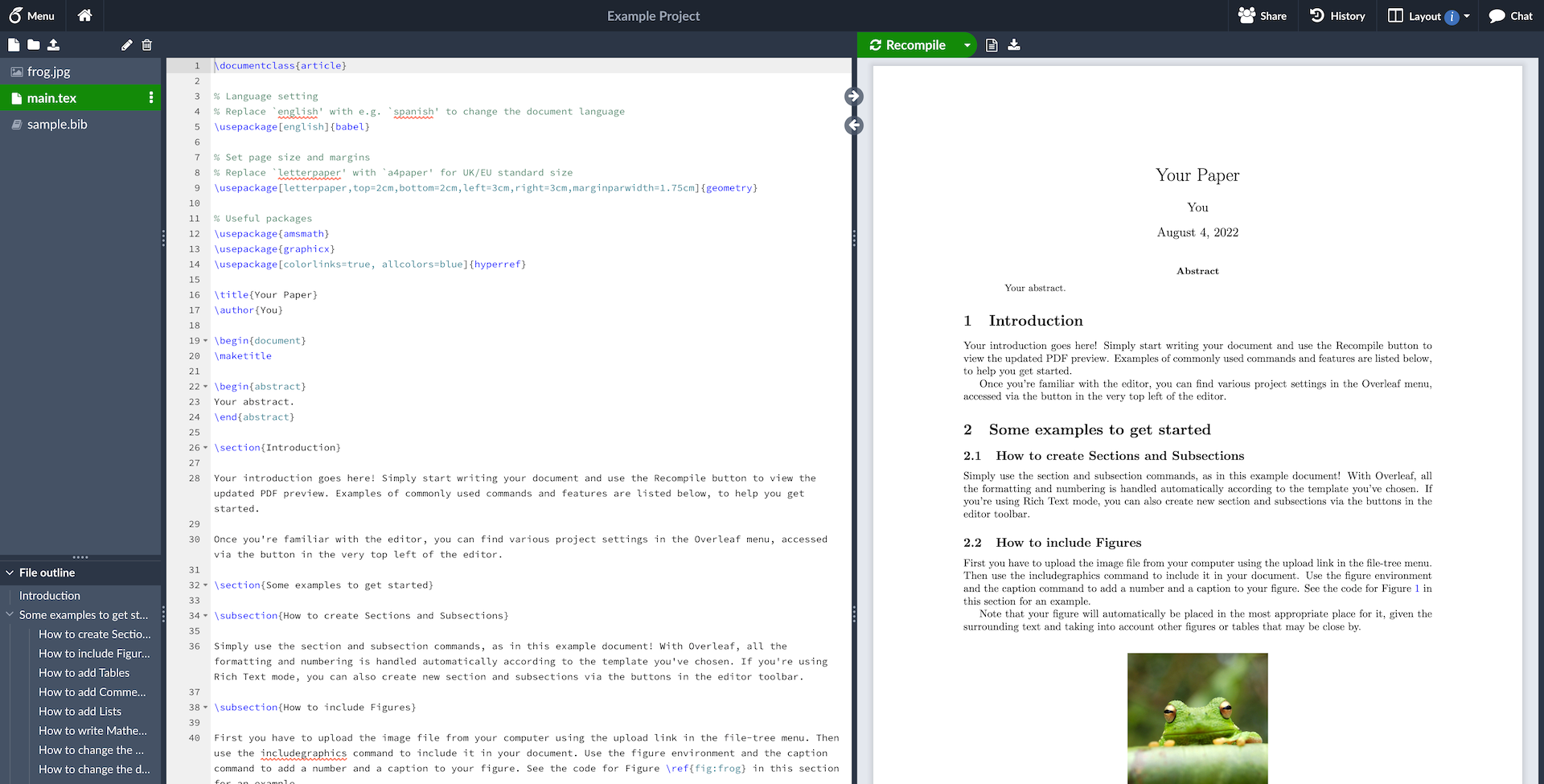
What is overleaf?
Overleaf is an open-source, web-based editor for LaTeX documents where several people write in the same project at the same time and see the compiled PDF beside the source. The self-hosted Community Edition ships as the sharelatex/sharelatex Docker image and is normally driven by the Overleaf Toolkit, a small repository of scripts that wrap docker compose: you clone it, run bin/init, bin/up and bin/doctor, and MongoDB plus Redis containers are pulled up alongside the app. An NGINX proxy with TLS certificates can be initialised with bin/init --tls for HTTPS access. The community version assumes every user is trusted, because LaTeX compiles run with the container's own privileges — the isolated Sandbox Compiles are not available there. The commercially supported Server Pro edition of the same software adds single sign-on with LDAP or SAML, administration controls, tracked changes and sandboxed compiling. The code is AGPL-3.0 and released in version series such as 6.x, with a Community Edition image built for each release.
overleaf alternatives
 DocsOpen-source collaborative text editor with live cursors, comments and version history — a self-hosted alternative to Notion or Google Docs, built on Django and React.CompareDocs with overleaf
 texlyreSelf-hosted open-source web editor for LaTeX and Typst with real-time co-editing, offline-first design, and in-browser compilation.Comparetexlyre with overleaf
 ONLYOFFICESelf-hosted, open-source online office suite: Document, Spreadsheet, Presentation, PDF and form editors with real-time collaborative editing and format conversion.CompareONLYOFFICE with overleaf
 etherpadAn open-source, self-hosted real-time collaborative document editor that attributes every keystroke to its author and keeps full revision history.Compareetherpad with overleaf
 docmostSelf-hosted, open-source collaborative wiki with real-time editing, diagrams, AI features, and enterprise SSO as a Confluence/Notion alternative.Comparedocmost with overleaf
 LeafWikiLeafWiki is a self-hosted, open-source wiki storing content as plain Markdown files with SQLite — no external database needed. Runs as a single Go binary.CompareLeafWiki with overleaf
 evc-team-relaySelf-hosted open-source server that brings real-time collaborative editing and web publishing to Obsidian, with SSO auth and Docker Compose setup.Compareevc-team-relay with overleaf
 folderhostA self-hosted, open-source cloud platform offering file sharing, real-time collaboration, and user management in a ~19MB binary as a lightweight Nextcloud alternativeComparefolderhost with overleaf
Should you self-host overleaf?
overleaf scores 73/100 on selfhost.directory (how scoring works) and ranks #5 of 83 in Notes & Editors. It has 18 342 GitHub stars, +118 in the last 30 days.
There was no stable release in the past 12 months, so check the repository's recent activity before you rely on it.
Setup is moderate: expect some configuration beyond a single command. An official Docker image is available. It is AGPL-3.0-licensed and written mostly in JavaScript.
Its closest alternative on selfhost.directory is Trilium Notes (85/100, 38 956 stars). It scores higher overall, so compare the two before you pick. See overleaf vs Trilium Notes side by side.
Features
- Air-gapped installation
- HTTPS via bundled NGINX proxyEnabled with bin/init --tls and NGINX_ENABLED.
- LaTeX compilation with PDF preview
- Maintenance page
- Multiple editor tabs
- Project link sharing
- Project-wide searchIntroduced in 6.1.0.
- Real-time collaborative editing
- Sandboxed LaTeX compilesCommunity Edition only; available in Server Pro.
- Single sign-on (LDAP / SAML)Server Pro only, not part of the Community Edition.
- Tracked changesServer Pro only.
- User accounts and admin role
overleaf README

Wiki • Server Pro • Contributing • Mailing List • Authors • License

Figure 1: A screenshot of a project being edited in Overleaf Community Edition.
More in Notes & Editors
 owlisticSelf-hosted open-source notetaking app with WYSIWYG editor, real-time sync, notebooks, inline todos, dark mode. Runs via Docker Compose with PostgreSQL and NATS.
 Personal Management SystemOpen-source, self-hosted personal data hub: notes, contacts, encrypted passwords, payments, schedules and files, run via Docker Compose with MariaDB.
 Phoenix CodeOpen-source AGPL code editor for HTML, CSS and JavaScript with live preview, Git and a terminal. Self-hosted desktop apps for Windows, macOS and Linux.
 pigaPiga is a self-hosted, open-source list editor for power users with keyboard shortcuts, hierarchical tasks, tags, and multi-document support.
 PlainpadSelf-hosted, open-source note-taking app with multi-user accounts, per-user database encryption, instant search and a built-in REST API. Runs on Docker or PHP plus MySQL.
 plumioplumio is a self-hosted, open-source markdown note app with live preview, encryption, multi-user/org support, webhooks, API keys, and backups.
 PoznoteA free, open-source, self-hosted notes app offering rich text, Markdown, tasks, boards, graphs, an AI chat, and an MCP server — replacing Notion on your own server.
 PrismicalAn open-source AI note-taking app that records and transcribes meetings locally using Whisper or cloud models — no bots join calls. Works on desktop, mobile, and web.
 privateglue-publicPrivateGlue is a self-hosted, open-source web app linking devices, Markdown notes, and encrypted credentials for freelancers and homelabbers.
 QBinSelf-hosted pastebin alternative with Monaco editor, Cherry Markdown, PWA offline, customizable paths, OAuth2 login, and multi-level caching.
 QCueQCue is a self-hosted, open-source capture-first second brain that turns thoughts into a living Markdown wiki using your own LLM keys.
 quillnote-serverSelf-hosted Go server emulating Nextcloud Notes API for Quillnote/Quillpad app sync with SQLite storage.
0 comments