
Self-host Docs
v6.1.0Real-time collaborative text editor and knowledge base
docker compose up -d- Stars
- 16 987
- Ports
- 8083 (Frontend container (nginx serving the editor and proxying the rest) as advertised to the reverse proxy in the compose example), 3002 (Collaboration server (yhub) HTTP endpoint, including /collaboration/ready/v1)
- Requires
- OpenID Connect identity provider (e.g. Keycloak), PostgreSQL, Redis, S3-compatible Object Storage
lasuite/impress-frontend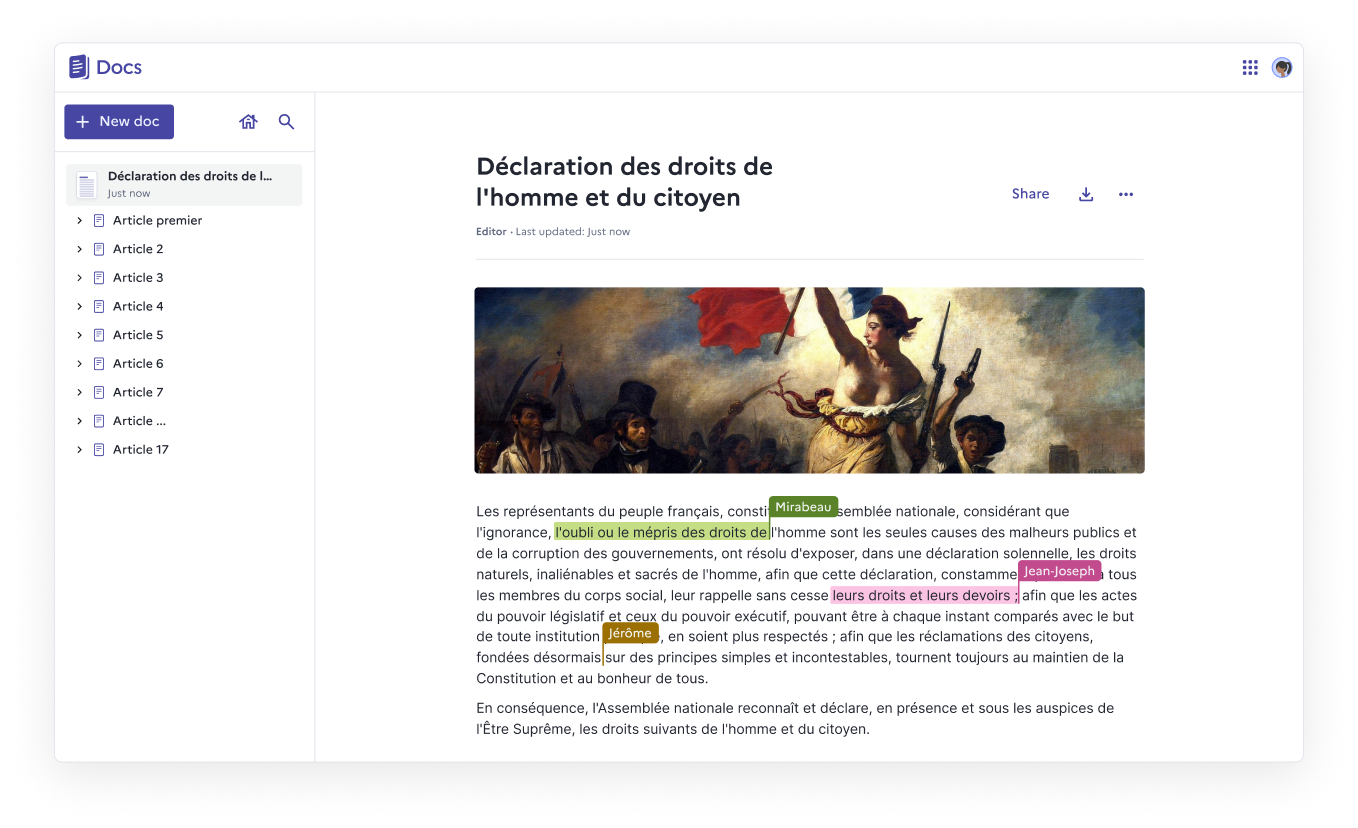

What is Docs?
Docs is a web-native collaborative text editor for teams, public organizations and open communities that want to write and organize knowledge together. Editing is block-based with slash commands and Markdown-style formatting; several people can work on the same document at once with live cursors, presence and comments, and access can be set per person to view, comment or edit, or opened through a shareable link. Pages nest into hierarchies to form a searchable knowledge base, every save becomes a restorable version, and an already-open document stays editable offline and re-syncs when you reconnect. Files can be brought in as .docx or .md, and saved out as .docx, .odt or PDF — note that the Word and PDF converters come from GPL-licensed BlockNote XL packages and are left out when building with PUBLISH_AS_MIT. Optional AI features (summarize, rewrite, translate, fix typos) are model- and gateway-agnostic and need only a base URL plus an API key for an OpenAI- or Mistral-compatible endpoint. Resource-server and server-to-server APIs allow integrations such as pushing meeting transcripts from La Suite Meet into Docs. Self-hosting runs the editor via Docker Compose or Kubernetes, and you must provide an OpenID Connect identity provider, S3-compatible storage, PostgreSQL and Redis, plus a separate Valkey for the collaboration server; community paths include Nix, YunoHost, Podman and Scalingo. The project is MIT-licensed, incubated by France's DINUM, and a verified Digital Public Good; documents are not yet end-to-end encrypted, so it is not meant for classified content.
Docs alternatives
 Paperless-AIAI extension for Paperless-ngx providing automatic document classification and semantic search using OpenAI-compatible APIs and Ollama for natural language queries.ComparePaperless-AI with Docs
 react-glass-keepSelf-hosted notes app similar to Google Keep with dark mode, real-time collaboration, private AI assistant, and native apps for Windows, macOS, Android.Comparereact-glass-keep with Docs
 StackResumeSelf-hosted AI resume builder with multi-agent pipeline, JD tailoring, and export to PDF, Word, and OpenDocument.CompareStackResume with Docs
 folderhostA self-hosted, open-source cloud platform offering file sharing, real-time collaboration, and user management in a ~19MB binary as a lightweight Nextcloud alternativeComparefolderhost with Docs
 LeafWikiLeafWiki is a self-hosted, open-source wiki storing content as plain Markdown files with SQLite — no external database needed. Runs as a single Go binary.CompareLeafWiki with Docs
 overleafOpen-source self-hosted collaborative LaTeX editor with real-time editing and PDF compiles, run through the Docker-based Overleaf Toolkit; Server Pro adds SSO.Compareoverleaf with Docs
All self-hosted alternatives to Google Docs → All self-hosted alternatives to Notion →
Should you self-host Docs?
Docs scores 75/100 on selfhost.directory (how scoring works) and ranks #4 of 83 in Notes & Editors. It has 16 987 GitHub stars, +81 in the last 30 days.
It shipped 18 stable releases in the past year. The latest, v6.1.0, came out on 13 November 2026. New versions land roughly every 10 days.
Setup is advanced: plan for several services and some ongoing maintenance. An official Docker image is available. It is MIT-licensed and written mostly in Typescript.
Its closest alternative on selfhost.directory is Memos (85/100, 64 437 stars). It scores higher overall, so compare the two before you pick. See Docs vs Memos side by side.
Features
- AI Writing AssistantDisabled by default (AI_FEATURE_ENABLED=false); the AI toolbar / AI cursor variant is beta.
- Block-based editorSome blocks (multi-column) come from GPL-licensed BlockNote XL packages unless built with PUBLISH_AS_MIT.
- Comments
- Custom theming
- Document Search
- Granular Access Control
- Import / Exportdocx/pdf exporters rely on GPL BlockNote XL packages that are not MIT-compatible; they can be excluded via PUBLISH_AS_MIT.
- Markdown Support
- Offline Editing
- Presentation Mode
- Real-time collaborative editing
- REST API
- Sub-pages and hierarchy
- Templates
- Version History
Docs README
Chat on Matrix • Documentation • Try Docs • Contact us
Docs, where your notes can become knowledge through live collaboration.
FAQ
How can I contribute?
Issues and pull requests are welcome on GitHub, and you can join the conversation on Matrix.
Who maintains Docs?
A community of contributors develops Docs in the open; it was originally incubated by France's DINUM within La Suite numérique and is now a recognized Digital Public Good.
Can I restore an older version?
Yes — every save creates a version, and any earlier version can be restored from the document's history at any time.
Can I work offline?
If the document is already open in your browser you can keep editing offline, and your changes sync automatically once you reconnect.
How does saving work?
Docs saves automatically as you type, with no save button; a save triggers after about a minute of inactivity, shared across co-editors.
Is there a hosted version I can just use?
Yes, several public instances are run by community members and organizations; there is a list of public instances and a live demo document.
Can I really self-host Docs?
Yes — Docs supports Kubernetes and Docker Compose, plus community-maintained methods such as Nix and YunoHost, with an installation guide in the repository.
More in Notes & Editors
 DoskaAn open-source Kanban app with Markdown cards that runs offline in the browser and syncs through a self-hosted server. Includes OIDC sign-on and MCP for AI agents.
 dropmindSelf-hosted capture inbox to instantly save links, notes, screenshots, and files from any device with PWA, dark mode, and Docker deployment.
 DumbPadDumbPad is a self-hosted, open-source notepad with auto-save, dark mode, PIN protection, markdown preview, fuzzy search, and real-time collaborative editing.
 EchoEcho is a self-hosted, open source AI journal for capturing thoughts via text or voice, transcribing with Whisper, and chatting with entries via local LLMs — all offline.
 EdgeEverSelf-hosted open-source knowledge base replacing Evernote & Obsidian. Classic three-pane layout with AI agent protocols (MCP/ACP), instant sync on Cloudflare or Docker.
 EnclosedSelf-hosted, open-source pastebin-style app for end-to-end encrypted notes and file links with passwords, expiry and self-destruction.
 EpicenterOpen-source, local-first app suite — notes, voice transcription, and a CRDT sync server you run self-hosted on Bun or Cloudflare Workers.
 etherpadAn open-source, self-hosted real-time collaborative document editor that attributes every keystroke to its author and keeps full revision history.
- Feather WikiA self-hosted, open-source wiki that fits in a single browser-run HTML file, with Markdown or WYSIWYG editing and optional save-back to your own web server.
 Files.mdA self-hosted, open-source Markdown workspace for notes, journaling, tasks and checklists that keeps files local in your browser, with a Go sync server and Telegram bot.
 flatnotesSelf-hosted, open-source note app storing every note as a plain markdown file — no database. Full-text search, tags, wikilinks, dark theme, REST API.
 FlowSelf-hosted, open-source time and event management application with calendar, tasks, notes, places, and multi-user support across web, desktop, and mobile platforms.
0 comments