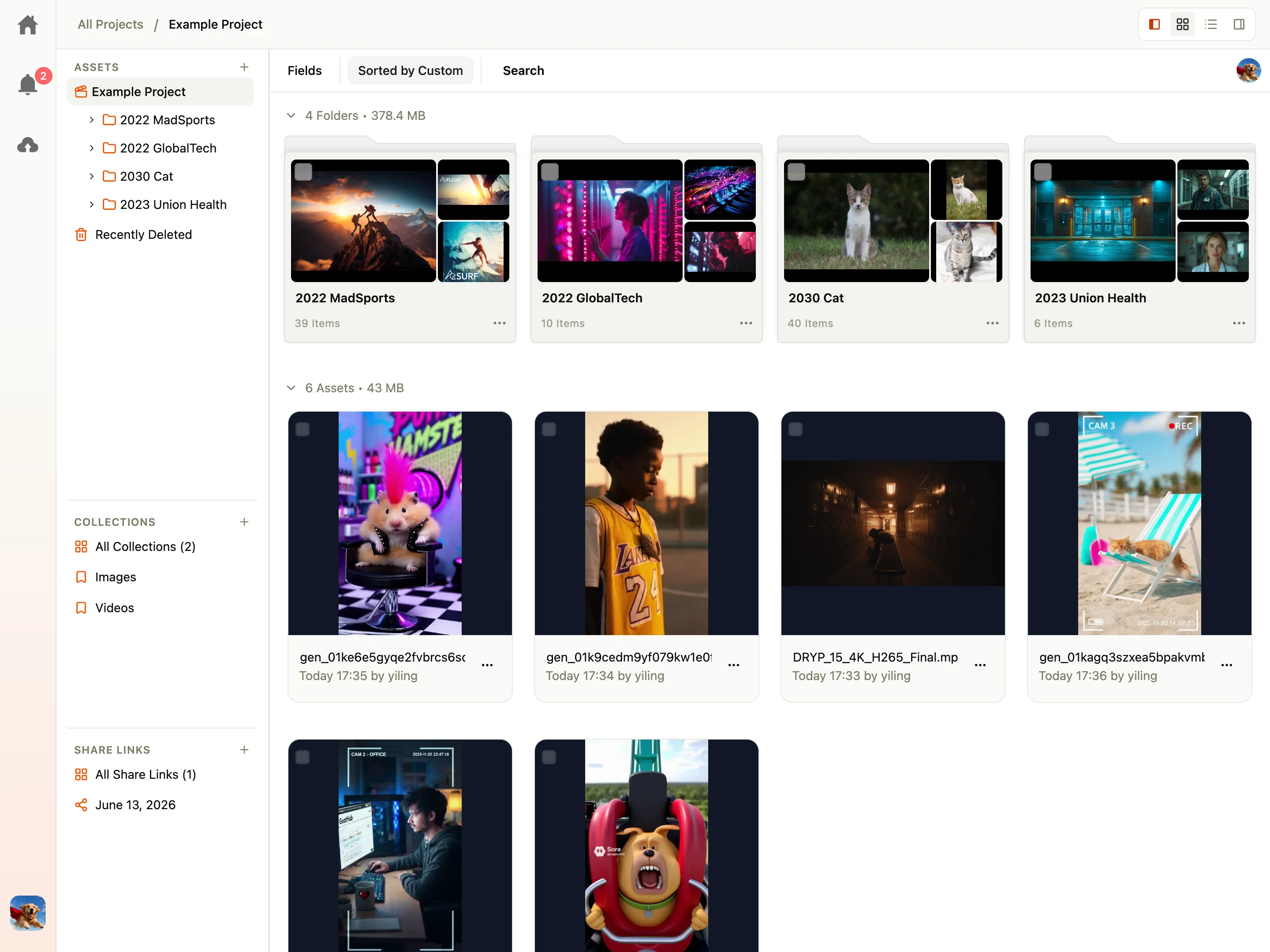
Shumai is an open-source, self-hosted alternative to Frame.io built for creative teams. It centralizes asset management with S3-compatible and local storage, enables frame-accurate annotations and comments on video and image files, provides secure sharing with collections and watermarking, and offers granular role-based access control. The platform includes AI agents with Model Context Protocol (MCP) support, isolated sandbox execution, semantic search, 3D asset turntable previews, document PDF conversion via Gotenberg, NLE export to Premiere Pro, DaVinci Resolve, Final Cut Pro, and Avid, plus a built-in Kanban board for task management. It runs via Docker Compose with PostgreSQL (pgvector) and optional embedding server, turntable renderer, and Gotenberg. Licensed under MIT.
It shipped 10 stable releases in the past year. The latest, v0.6.1, came out on 24 October 2026. New versions land roughly every 4 days.
Setup is moderate: expect some configuration beyond a single command. An official Docker image is available. It is MIT-licensed and written mostly in Typescript.
Built-in Kanban BoardAgentic Kanban is work in progress
Custom Asset Metadata
Durable Workflows via DBOS
Frame-by-Frame Annotations & Comments
Granular Access Control
NLE Export & Premiere Pro PluginExperimental Premiere Pro plugin
S3-Compatible & Local Storage
Scalable Deployment on Kubernetes
Secure Sharing & Collections
Semantic Search
Share Link Watermarking
Wide File Format Support
Shumai README
How to install Shumai
Install Shumai with Docker Compose
Environment variables
SHUMAI_SERVER_PORT, STORAGE_BACKEND, AWS_ENDPOINT_URL_S3, S3_BUCKET, S3_ACCESS_KEY_ID, S3_SECRET_ACCESS_KEY, S3_REGION, BETTER_AUTH_SECRET, ENABLE_WEAKER_NESTED_SANDBOX, and many more (see Environment Variables docs)
Create and navigate to a new directory for your configuration and data volumes:
mkdir shumai && cd shumai
Download your preferred docker-compose.yaml configuration based on your needs and available RAM:
Lite (Suggested RAM: 2 GB+): Minimal deployment containing Shumai and PostgreSQL database.
SHUMAI_SERVER_PORT controls the port the Shumai server listens on. The default is 3000.
By default, Shumai uses the bundled local storage service in this Docker Compose setup. To use an external S3-compatible storage instead, configure the environment variables for your S3 provider.
Start the services in detached mode:
docker compose up -d
Open your browser and access Shumai at http://localhost:3000 (or http://<your-server-ip>:3000 for remote deployments).
Three variants: Lite, With Embedding Server, Full. GPU hardware acceleration optional via hwaccel.transcoding.yaml.
How to configure Shumai
ANTHROPIC_API_KEYAPI key for Anthropic provider.
API key for Anthropic provider.
APP_URLThe public URL of the web application. Used for notification email deep links (falls back to BETTER_AUTH_URL).
The public URL of the web application. Used for notification email deep links (falls back to BETTER_AUTH_URL).
AWS_ENDPOINT_URL_S3=http://localhost:3000 (respects SHUMAI_SERVER_PORT fallback if unset)Endpoint for S3 storage or local storage. Used by the browser to build file upload URLs. Must include port if deploying remotely or using custom ports.
Endpoint for S3 storage or local storage. Used by the browser to build file upload URLs. Must include port if deploying remotely or using custom ports.
BETTER_AUTH_SECRETA secure, random 32-byte secret used to sign session cookies and JWTs.
A secure, random 32-byte secret used to sign session cookies and JWTs.
values: Generate with openssl rand -base64 32
BETTER_AUTH_URL=http://localhost:3000 (respects SHUMAI_SERVER_PORT fallback)The public URL of your Hono backend API. Used for redirect flows and notification email links fallback.
The public URL of your Hono backend API. Used for redirect flows and notification email links fallback.
CONCURRENCY_AGENT=5Maximum concurrent AI tasks executed by workers. Set to 1 when running local embedding-server.
Maximum concurrent AI tasks executed by workers. Set to 1 when running local embedding-server.
CONCURRENCY_TRANSCODE=1Maximum concurrent media transcoding tasks executed by workers.
Maximum concurrent media transcoding tasks executed by workers.
DATABASE_URL=postgresql://user:pass@localhost:5432/db?schema=publicPostgreSQL connection URL. Must target a database with the pgvector extension installed.
PostgreSQL connection URL. Must target a database with the pgvector extension installed.
EMBEDDING_CHUNK_DURATION=60.0The duration in seconds for each video chunk when generating video embeddings.
The duration in seconds for each video chunk when generating video embeddings.
EMBEDDING_CHUNK_OVERLAP=5.0The duration in seconds to overlap video chunks when generating video embeddings.
The duration in seconds to overlap video chunks when generating video embeddings.
MAX_REQUEST_BODY_SIZE=10737418240Maximum allowed size for request bodies (e.g., for large file uploads). Default is 10GB in bytes.
Maximum allowed size for request bodies (e.g., for large file uploads). Default is 10GB in bytes.
OPENAI_API_KEYAPI key for OpenAI provider.
API key for OpenAI provider.
POD_NAMEKubernetes pod name, used to provide stable per-pod worker identity across StatefulSet restarts.
Kubernetes pod name, used to provide stable per-pod worker identity across StatefulSet restarts.
PRESIGNED_URL_EXPIRES_IN=5Number of hours for which generated presigned download/upload links are valid.
Number of hours for which generated presigned download/upload links are valid.
S3_ACCESS_KEY_ID=minioadminAccess key credentials for S3.
Access key credentials for S3.
S3_BUCKET=shumaiS3 bucket name.
S3 bucket name.
S3_REGION=autoS3 storage region.
S3 storage region.
S3_SECRET_ACCESS_KEY=minioadminSecret key credentials for S3.
Secret key credentials for S3.
SHUMAI_SERVER_PORT=3000The port on which the Shumai web server will listen.
The port on which the Shumai web server will listen.
SHUMAI_WORKER_IDOptional explicit instance ID for worker replicas in multi-node deployments (auto-derived from hostname and process ID if unset).
Optional explicit instance ID for worker replicas in multi-node deployments (auto-derived from hostname and process ID if unset).
SHUMAI_WORKERS=allQueues listened to by the web server. Options: all (default), none (API/UI only), agent (or ai), transcode.
Queues listened to by the web server. Options: all (default), none (API/UI only), agent (or ai), transcode.
values: all, none, agent, transcode
STORAGE_BACKEND=localStorage type. Use local for local file system storage, or s3 for S3-compatible cloud storage.
Storage type. Use local for local file system storage, or s3 for S3-compatible cloud storage.
values: local or s3
TURNTABLE_RENDERER_BASIC_AUTH_PASSWORD=secretPassword when Basic Authentication is enabled on the turntable renderer (alias: TURNTABLE_RENDERER_PASSWORD).
Password when Basic Authentication is enabled on the turntable renderer (alias: TURNTABLE_RENDERER_PASSWORD).
TURNTABLE_RENDERER_BASIC_AUTH_USERNAME=adminUsername when Basic Authentication is enabled on the turntable renderer (alias: TURNTABLE_RENDERER_USERNAME).
Username when Basic Authentication is enabled on the turntable renderer (alias: TURNTABLE_RENDERER_USERNAME).
TURNTABLE_RENDERER_URL=http://turntable-renderer:3000Base URL of the external turntable-renderer service.
Base URL of the external turntable-renderer service.


 smart-comfyui-gallerySelf-hosted, open-source Digital Asset Manager for ComfyUI outputs. Features AI-powered search, queue monitoring, mobile-friendly UI, and client-facing Exhibition portal.
 Snipe-ITSelf-hosted, open-source ITAM system to track hardware, software licenses, accessories and consumables, with barcode checkout, LDAP/SAML SSO and a REST API.
 SureSelf-hosted open-source personal finance app forked from Maybe Finance: track bank, stock and crypto accounts in any currency, budget, and query an AI assistant.
 TracktorSelf-hosted vehicle tracking app for managing fuel logs, maintenance history, insurance and PUCC compliance, reminders, and expenses across a fleet.
 trier-osSelf-hosted, open-source industrial operations platform for plant-floor work orders, maintenance, safety, parts, and asset management.
 WarrackerA self-hosted warranty tracker for organizing product coverage, monitoring expirations, storing receipts, and receiving alerts via email or push notifications.
 WealthfolioOpen-source, local-first investment tracker for holdings, net worth and spending, with free desktop, mobile and self-hosted Docker editions.
 AtticSelf-hosted home inventory app to catalog belongings with locations, categories, warranties, and automated imports from external databases.
 AurelioOpen-source, self-hosted personal finance app for tracking net worth, investments, ETFs, cash and debts, with an optional AI advisor connected through OpenRouter.
 Chinese Webfont ProjectSelf-hosted free CJK web font library enabling online font loading and font information viewing with font splitting for full character coverage across websites.
 CinekiveSelf-hosted visual archive for filmmakers: search frames by look, mood, technique via AI embeddings, import video/web links, build moodboards — all on your hardware.
 CollectiveAccessSelf-hosted, open-source collections management for museums and archives with configurable metadata, media support, GraphQL API, and public publishing via Pawtucket2.
0 comments