
Self-host Wealthfolio
v3.13.0Local-first portfolio, net worth and spending tracker
- Stars
- 9 437
- Port
- 8088 (HTTP server, serving both the REST API and the static web frontend)
wealthfolio/wealthfolio


What is Wealthfolio?
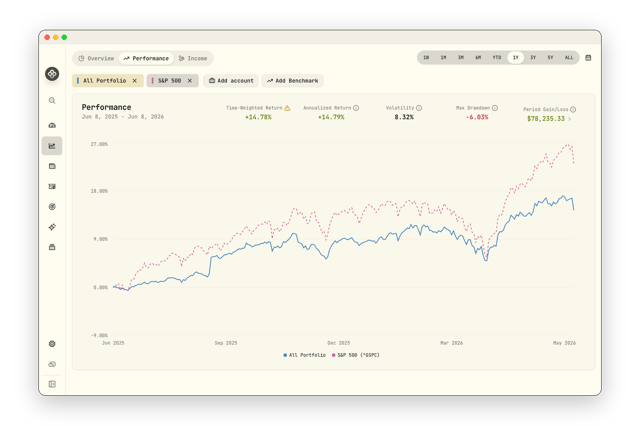
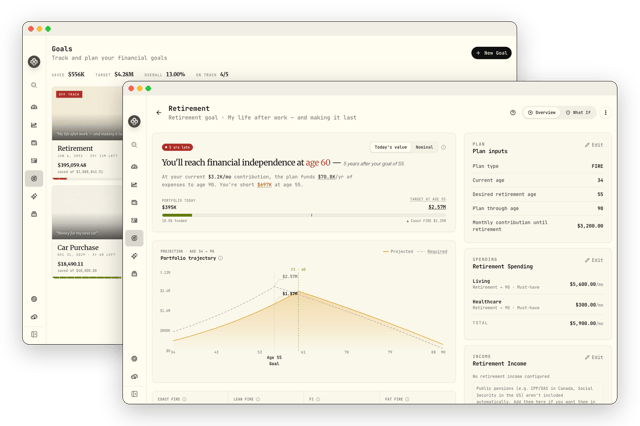
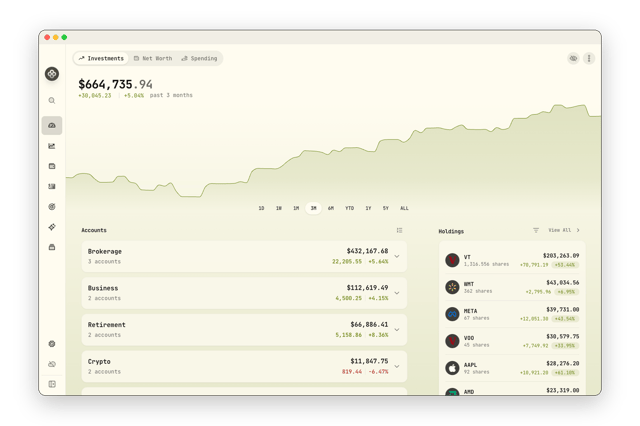
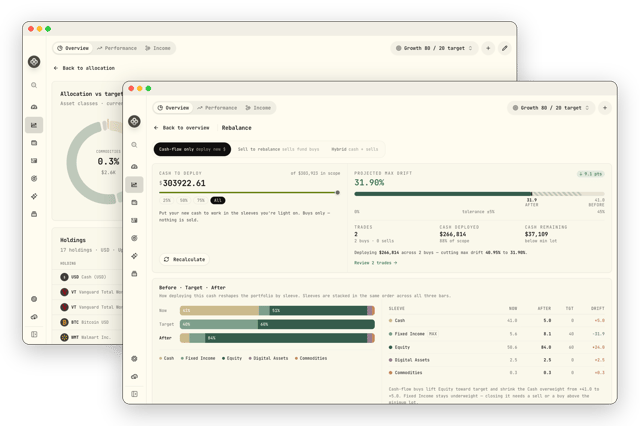
Wealthfolio is an open-source money and portfolio tracker that keeps its database on hardware you control, so no vendor account is involved. It logs buys, sells, dividends, deposits and other activity across multiple accounts, reports money-weighted per-account and time-weighted portfolio returns that can be benchmarked against an index fund, follows assets and liabilities as net worth, and groups cash flow into categories and budgets. On the planning side it offers goal glide paths, IRA / 401(k) / TFSA contribution-room tracking and a Monte Carlo retirement and FIRE simulator. Holdings can be denominated in many currencies, with dated FX conversion you can override manually, and quotes come from built-in providers such as Yahoo Finance plus custom JSON, HTML or CSV feeds; CSV statement import is available for any broker. Desktop and mobile builds are Tauri + Rust over an embedded SQLite file, while the web edition adds an Axum API server and an optional SQLCipher encryption requirement for databases. Deployment is a single multi-arch container on port 8088: generate a 32-byte secret key and an Argon2id password hash, then follow the Docker, Compose, Unraid, Proxmox or Coolify guide; OIDC sign-in, an MCP endpoint for AI agents and a TypeScript add-on system are documented for the self-hosted build. Automatic broker imports, cross-device sync and managed cloud backups live outside the free app, in the optional Wealthfolio Connect subscription priced from $2.99 per month.
Wealthfolio alternatives
 家庭账房 · Family LedgerSelf-hosted family finance app with monthly snapshots, true returns (XIRR/TWR), fund look-through, and AI portfolio diagnostics — all on your server.Compare家庭账房 · Family Ledger with Wealthfolio
 SureSelf-hosted open-source personal finance app forked from Maybe Finance: track bank, stock and crypto accounts in any currency, budget, and query an AI assistant.CompareSure with Wealthfolio
 TrackMyRupeeSelf-hosted, open-source personal finance tracker for Indian professionals with manual entry, net worth tracking, loan management, and multi-currency support.CompareTrackMyRupee with Wealthfolio
 RotkiSelf-hosted, open-source crypto portfolio tracker that decodes on-chain and exchange history into readable events and local profit/loss tax reports.CompareRotki with Wealthfolio
 ezbookkeepingSelf-hosted, open-source personal finance app for recording transactions, importing CSV/OFX/QIF statements and charting spending; starts with one Docker command.Compareezbookkeeping with Wealthfolio
 OcularOcular is an open-source, self-hosted budgeting app for tracking personal finances across multiple years with dashboards, dark mode, PWA, and Google Sheets import.CompareOcular with Wealthfolio
 assetgridappAssetgrid is a self-hosted, open-source personal finance manager for organizing financial data with CSV imports, categorization, and net worth reporting.Compareassetgridapp with Wealthfolio
 blissBliss is a self-hosted, open-source personal finance platform for multi-currency accounts, investments, and expenses with AI classification and portfolio tracking.Comparebliss with Wealthfolio
Should you self-host Wealthfolio?
Wealthfolio scores 74/100 on selfhost.directory (how scoring works) and ranks #4 of 63 in Personal Finance. It has 9 437 GitHub stars, +286 in the last 30 days.
It shipped 23 stable releases in the past year. The latest, v3.13.0, came out on 11 November 2026. New versions land roughly every 10 days.
Setup is easy: most people get it running in one sitting. An official Docker image is available. It is AGPL-3.0-licensed and written mostly in Rust.
Its closest alternative on selfhost.directory is Sure (85/100, 14 682 stars). It scores higher overall, so compare the two before you pick. See Wealthfolio vs Sure side by side.
Features
- Add-on System
- AI Assistant
- Brokerage account syncOnly through the optional paid Wealthfolio Connect subscription; manual entry and CSV import are free.
- CSV Import
- Encrypted device syncPart of the optional Wealthfolio Connect subscription.
- Goal planning
- MCP server for AI agentsEnabled with WF_MCP_ENABLED=true on the web edition.
- Multi-currency Support
- Net worth tracking
- Performance AnalyticsLIFO and weighted-average cost are planned, not available yet.
- Portfolio Tracking
- Retirement and FIRE planner
- Spending and budgets
Wealthfolio README

The open-source, private portfolio tracker — investments, net worth, spending, and simulations.
Local-first: your data lives on your device.
Website
·
Discord
·
Twitter
·
Releases
⬇️ Download for macOS · Windows · Linux · 📱 iOS App · 🤖 Android App · 🐳 Docker



FAQ
Can I self-host? Do I still need Connect?
Self-hosting is free and enough for manual imports; Connect is only needed for automatic broker sync, encrypted device sync or automatic encrypted backups.
Is there a per-broker recipe?
Yes, several brokers such as Schwab, Fidelity, Vanguard, IBKR, Robinhood and Trading 212 have documented import recipes in the CSV Import guide.
Will re-importing the same file duplicate activities?
No, exact duplicates matched on date, symbol, quantity, price and amount are skipped, and the preview shows how many rows are new.
Can I import a cash-only or bank account?
Yes, by using the $CASH-<CCY> symbol on deposit, withdrawal, interest, fee and tax rows, which the importer treats as pure cash activities.
Why is my import failing with "missing symbol" or "$ in price"?
Every row needs a symbol (use $CASH-<CCY> for pure cash flows), and price fields must have currency symbols and thousands separators stripped.
What does the CSV need to look like?
UTF-8 with a header row, ISO dates, decimal points rather than commas and one activity per row; the importer's mapping step aligns broker columns to Wealthfolio fields.
Does Wealthfolio track me or collect data?
No analytics or telemetry; the app only calls market-data providers for prices and the updater to check for new versions.
Can I sync across devices?
Yes, through Wealthfolio Connect; the sync is end-to-end encrypted on your devices so the service cannot read your portfolio.
How do I move Wealthfolio to a new computer?
Copy the data directory to the same location on the new machine, or export the full database SQL on the old one and import it on the new one.
How do I back up before a big change?
Use Settings → Exports and pick the full database (SQL) option for a restorable snapshot; CSV and JSON exports cover individual collections.
Where is my data stored?
In a local SQLite database inside the app's per-platform data directory (or the container's data volume when self-hosted); Connect encrypts data on-device before syncing.
What's the fastest way to get started?
Seed existing positions with a TRANSFER_IN activity marked External and one DEPOSIT for cash, then start logging buys and sells from that point.
Is the core app free?
Yes, the desktop app and the self-hosted core cost nothing forever, including manual exports and backups; only Connect is a subscription.
Which platforms is Wealthfolio on?
Desktop apps for macOS, Windows and Linux, native iOS and Android apps, plus a self-hosted web edition; each platform keeps its own local database.
What is Wealthfolio?
A local-first, open-source investment tracker whose core app is free and keeps data on your device; Wealthfolio Connect is the optional paid service for broker sync, encrypted sync and cloud backups.
More in Personal Finance
 whisper-moneySelf-hosted personal finance app for tracking spending, categorizing transactions, and understanding finances with privacy-first approach and optional local AI.
 WYGIWYHOpen-source, self-hosted personal finance tracker with multi-currency accounts, transaction rules, a built-in DCA tracker and an automation REST API.
 yaffaSelf-hosted personal finance web app for long-term planning with multi-currency, budgets, investments, and AI receipt processing.
 yuvomiYuvomi is a self-hosted, open-source family planner replacing multiple paid apps with one private server for tasks, calendar, meals, shopping, budget, and documents.
 zakupnik3ZAKUPNIK 3 is a self-hosted, open-source expense tracker for home spending. Runs via Docker or Node.js with SQLite storage and mobile-friendly UI.
 zubloZublo is an open-source, self-hosted subscription tracker with a clean web UI, calendar views, statistics, REST API, and AI chat with multiple LLM providers.
 不用記帳 (ALL SET)Self-hosted, open-source Taiwan finance dashboard syncing banks, cards, investments, and e-invoices into one net-worth view on Cloudflare Workers.
- 家庭账房 · Family LedgerSelf-hosted family finance app with monthly snapshots, true returns (XIRR/TWR), fund look-through, and AI portfolio diagnostics — all on your server.
 ActualSelf-hosted, open-source personal finance app using envelope budgeting with multi-device sync, end-to-end encryption, and bank sync via goCardless and SimpleFIN.
 actual-mcp-serverOpen-source MCP server connecting AI assistants to self-hosted Actual Budget with 84 tools for transactions, budgets, and bank sync. Runs via Docker, npm, or stdio.
- assetgridappAssetgrid is a self-hosted, open-source personal finance manager for organizing financial data with CSV imports, categorization, and net worth reporting.
 assetsAssets is a self-hosted portfolio tracker consolidating investments across brokers with Yahoo Finance data, multi-user support, CSV import, and a REST API.
0 comments