
Self-host LinkWarden
v2.17.0Collaborative bookmark manager with full-page archiving
docker compose up- Stars
- 20 434
- Port
- 3000 (Linkwarden web app (UI and API))
- Requires
- PostgreSQL
ghcr.io/linkwarden/linkwarden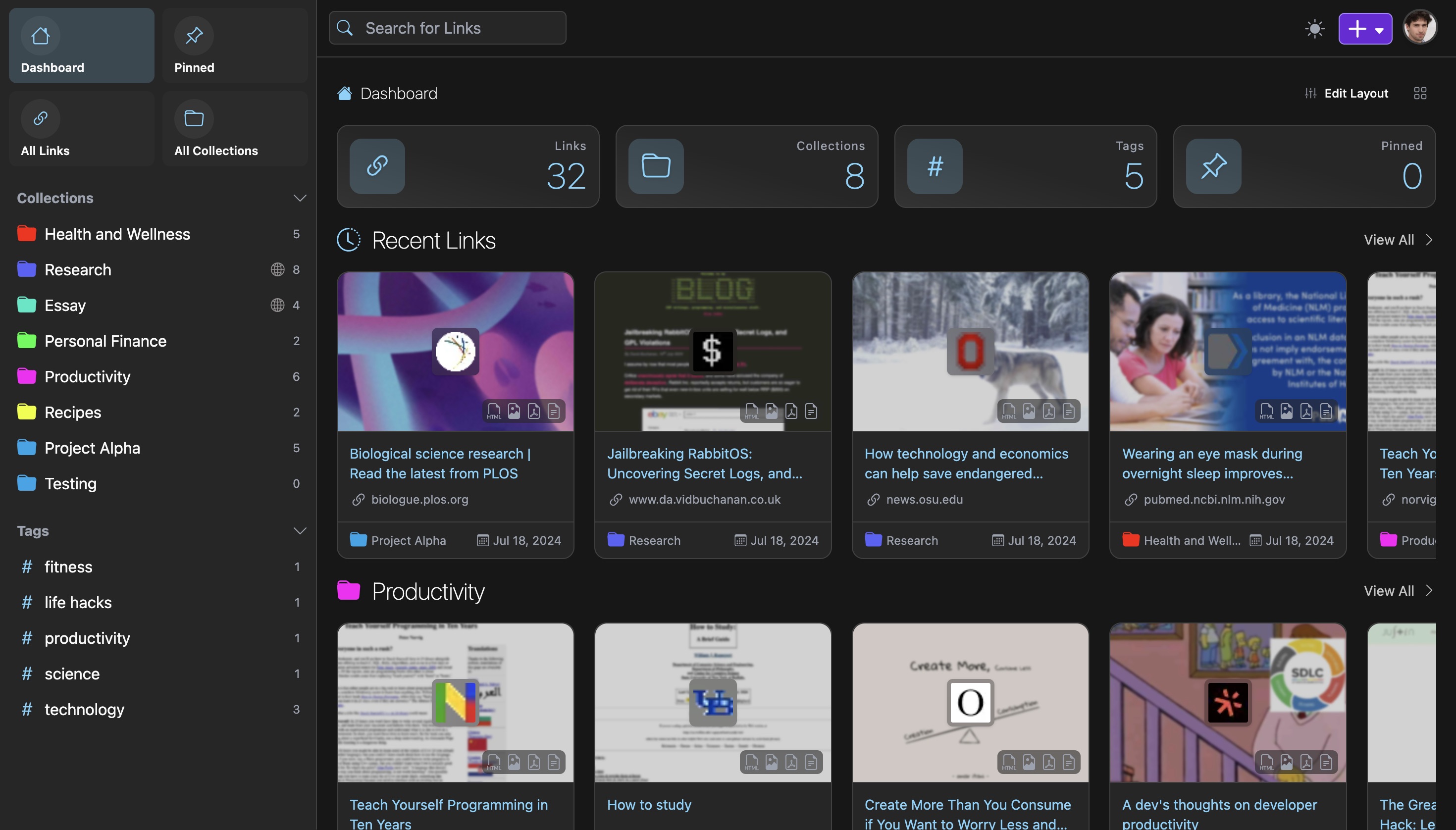
What is LinkWarden?
Linkwarden is a collaborative bookmark manager you can run on your own server, aimed at readers who want saved pages to stay available even after the original site changes or disappears. Rather than only keeping an address, the app fetches each entry server-side and stores several renditions of it — a full-page JPEG, a printed PDF, a self-contained HTML file and cleaned-up article text — and can hand the URL to the Wayback Machine as well. Bookmarks are sorted into collections, sub-collections and tags; a reader view lets you highlight passages and attach notes, and search reaches the whole library. Collections support multiple members with individual permission levels and can also be published as a public list. Other documented capabilities include RSS feed subscriptions, bookmark import from your browser via Floccus, page uploads from SingleFile, image and PDF uploads, bulk editing, user administration, token-based API access and single sign-on through OIDC providers. Self-hosting follows a Docker Compose guide that also starts PostgreSQL and Meilisearch, with a manual Node.js route for more technical setups; containers exist for x86-64 and ARM64 and the app serves on port 3000. Development is open source under AGPL-3.0, with a hosted Cloud plan priced per user per month as the paid option.
LinkWarden alternatives
 BukuAn open-source, self-hosted command-line bookmark manager with encrypted portable databases, browser import, and an optional Bukuserver web UI with REST API.CompareBuku with LinkWarden
 reminiscenceA self-hosted, open-source Django bookmark manager that archives web pages as HTML, PDF or full-page PNG, with auto tagging, search, annotations and multi-user sharing.Comparereminiscence with LinkWarden
 OmnivoreSelf-hosted, open-source read-it-later app with highlights, notes, labels, RSS feeds, newsletter email import, PDF support and native iOS and Android apps.CompareOmnivore with LinkWarden
 Django-link-archiveSelf-hosted, open-source link database and RSS reader aggregating bookmarks, YouTube, Reddit, and email into a searchable archive with dark mode.CompareDjango-link-archive with LinkWarden
 GrimoireOpen-source, self-hosted local-first bookmark manager: saves and extracts pages, PDFs, and YouTube, with keyword, semantic, or hybrid search and optional AI providers.CompareGrimoire with LinkWarden
 webarchiveSelf-hosted web archiving tool for personal use. Saves pages as PDF, single-file HTML, or raw headers via REST API and optional web UI.Comparewebarchive with LinkWarden
 dropmindSelf-hosted capture inbox to instantly save links, notes, screenshots, and files from any device with PWA, dark mode, and Docker deployment.Comparedropmind with LinkWarden
 tiesties is a self-hosted, open-source federated bookmark manager for organizing, sharing, and discovering web pages via ActivityPub federation.Compareties with LinkWarden
All self-hosted alternatives to Pinboard → All self-hosted alternatives to Pocket → All self-hosted alternatives to Raindrop →
Should you self-host LinkWarden?
LinkWarden scores 79/100 on selfhost.directory (how scoring works) and ranks #2 of 46 in Bookmarks & Link Sharing. It has 20 434 GitHub stars, +375 in the last 30 days.
It shipped 13 stable releases in the past year. The latest, v2.17.0, came out on 10 November 2026. New versions land roughly every 2 weeks.
Setup is moderate: expect some configuration beyond a single command. An official Docker image is available. It is AGPL-3.0-licensed and written mostly in Typescript.
Its closest alternative on selfhost.directory is Karakeep (81/100, 30 536 stars). It scores higher overall, so compare the two before you pick. See LinkWarden vs Karakeep side by side.
Features
- AI auto-taggingOptional; needs Ollama or an OpenAI-compatible endpoint on self-hosted instances
- Browser bookmark sync
- Collaborative Collections
- Collections and tags
- Full-page archiving
- Full-text search and filteringAdvanced search operators rely on Meilisearch
- Public Sharing
- Reader view with highlights and annotations
- Wayback Machine snapshotsOptional
LinkWarden README


Linkwarden is a self-hosted, open-source collaborative bookmark manager to collect, read, annotate, and fully preserve what matters, all in one place.
The objective is to organize useful webpages and articles you find across the web in one place, and since useful webpages can go away (see the inevitability of Link Rot), Linkwarden also saves a copy of each webpage as a Screenshot and PDF, ensuring accessibility even if the original content is no longer available.


FAQ
How do I view the current number of seats in my subscription?
The seat count is shown on the Billing page, though the page may need a refresh right after adding or removing seats.
What happens to the links and collections owned by a user if they are removed from a seat?
Their saved links and collections are kept, and the user can subscribe on their own with the same account to get them back.
How do I view and manage my current subscription plan?
Open the Billing page in your account and click "Billing Portal" to reach the Stripe-managed portal, where you can change the plan, update the payment method and see billing history.
More in Bookmarks & Link Sharing
 LynxSelf-hosted open-source page builder for creating link-in-bio pages, portfolios, venue menus, and event pages with visual editing, analytics, and newsletter features.
 MARKMARK is a self-hosted, open-source image bookmarking tool for personal use that saves images via bookmarklet or drag-and-drop into a file-based collection.
 NeonLinkNeonLink is a simple, open-source, self-hosted bookmark service with tags, search, auto metadata fetching, and customizable backgrounds — ideal for Raspberry Pi.
- OmnivoreSelf-hosted, open-source read-it-later app with highlights, notes, labels, RSS feeds, newsletter email import, PDF support and native iOS and Android apps.
 omnomOmnom is a self-hosted, open-source web content preservation service with full-page snapshots, RSS feeds, and ActivityPub Fediverse integration.
 osmondOsmond is a self-hosted, open-source EmailThis alternative that extracts articles from web pages and emails them as HTML or PDF via a bookmarklet.
 PostmarksPostmarks is a self-hosted, open-source bookmarking site connecting to the Fediverse via ActivityPub to interact with Mastodon and other platforms.
 ReadeckSelf-hosted, open-source bookmark and read-it-later app that keeps full article text and images offline, with labels, highlights, full-text search and EPUB/OPDS export.
- reminiscenceA self-hosted, open-source Django bookmark manager that archives web pages as HTML, PDF or full-page PNG, with auto tagging, search, annotations and multi-user sharing.
 rs-shortrs-short is a minimal, lightweight, and privacy-focused link shortener written in Rust, designed for self-hosting. It supports SQLite, PostgreSQL, and MySQL, and includes features like phishing detection, CAPTCHA, dark mode, and localization.
 ServasA self-hosted bookmark management tool.
 shaarkShaark is a self-hosted, open-source platform for web links, markdown posts, passwords, and photos with tagging, search, RSS, dark mode, and PWA.
0 comments