
Self-host Cloudreve
4.19.1Self-hosted cloud drive with multi-storage backends
- Stars
- 28 978
- Ports
- 5212 (Default HTTP listening port for the web UI and API (System.Listen, host mapping 5212:5212)), 443 (SSL listening port (SSL section of conf.ini; not enabled unless a certificate is configured))
cloudreve/cloudreve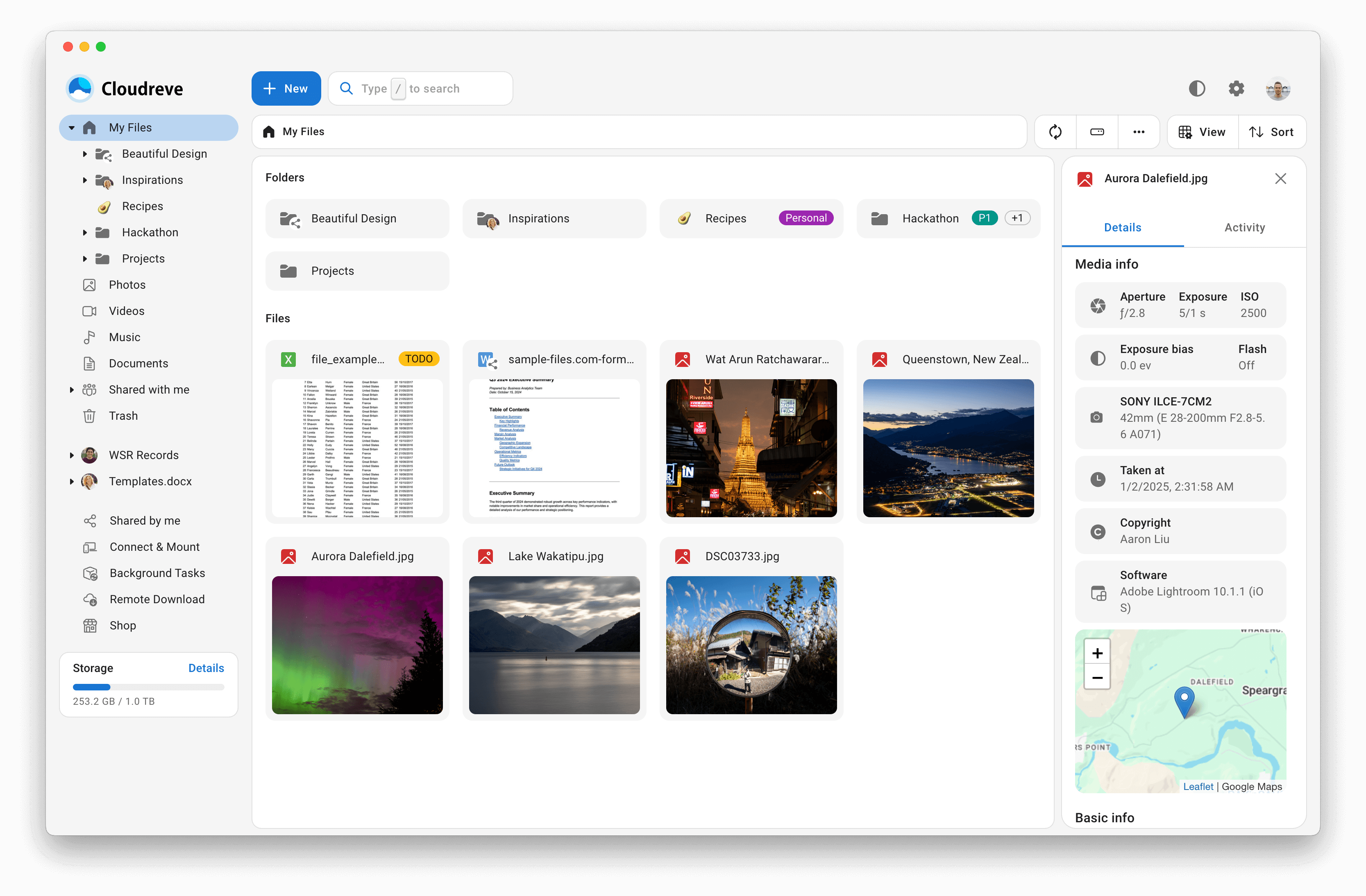
What is Cloudreve?
Cloudreve is a self-hosted drive and file-sharing platform written in Go, intended for running a private or public cloud storage service of your own. It layers a virtual file system over your database, so content can live on local disks, on attached slave nodes, or with external providers such as OneDrive, S3-compatible services, Qiniu, Alibaba OSS, Tencent COS, Huawei OBS, Kingsoft KS3 and Upyun, while transfers flow straight between browser and storage without a server relay. Everyday capabilities include drag-and-drop and resumable uploads, share links with expiry rules, in-browser preview of video, images, audio and ePub, office editing through WOPI servers such as Collabora Online or OnlyOffice, WebDAV endpoints, background torrent fetching with Aria2 or qBittorrent, thumbnails and metadata search, tag filters, compression and batch downloads, plus multi-user registration with groups and a graphical admin panel. Login can rely on its own accounts, FIDO2 keys, two-factor codes or OIDC single sign-on. Operator options are a single Docker image, the project's Docker Compose stack bundling PostgreSQL and Redis, a Supervisor-managed process, or a pre-compiled binary for Linux, Windows, macOS and LoongArch that listens on port 5212 and falls back to embedded SQLite when no database is set. The paid Pro tier unlocks per-group multi-storage policies, granular share permissions, paid sharing and OIDC, and its license is tied to a root domain; some advanced search stacks (Meilisearch, Apache Tika) are optional add-ons.
Cloudreve alternatives
 AListAList is a self-hosted, open-source file list program that aggregates 30+ cloud storages into a single web UI with WebDAV, file previews, and dark mode.CompareAList with Cloudreve
 pingvin-share-xOpen-source self-hosted file sharing platform and WeTransfer alternative with link sharing, expiration, passwords, ClamAV scanning, S3 support, and OIDC/LDAP auth.Comparepingvin-share-x with Cloudreve
 filestashSelf-hosted, open-source web file manager that puts S3, SFTP, WebDAV, SMB, FTP and around 20 more storage protocols behind one Dropbox-style interface.Comparefilestash with Cloudreve
 spacedriveAn open-source, self-hosted file manager that unifies local drives, NAS, servers and cloud buckets into one searchable, indexed filesystem across your devices.Comparespacedrive with Cloudreve
 beamdropBeamDrop is an open-source, self-hosted file server with S3-compatible API, web UI, shareable links, and Prometheus metrics in a single ~39 MB binary.Comparebeamdrop with Cloudreve
 GokapiAn open-source, self-hosted Firefox Send alternative: expiring download links, end-to-end encryption, user roles, file requests and optional S3-compatible storage.CompareGokapi with Cloudreve
 cloud-torrentCloud Torrent is a self-hosted remote torrent client in Go. Start downloads on a server, stream files via HTTP. Embedded search, real-time UI, basic auth, TLS.Comparecloud-torrent with Cloudreve
 FileRiseFileRise is a self-hosted, open-source file manager with per-folder ACLs, WebDAV, sharing, and optional encryption. Runs on Docker or PHP without a database.CompareFileRise with Cloudreve
Should you self-host Cloudreve?
Cloudreve scores 77/100 on selfhost.directory (how scoring works) and ranks #2 of 11 in Cloud Storage. It has 28 978 GitHub stars, +149 in the last 30 days.
It shipped 13 stable releases in the past year. The latest, 4.19.1, came out on 18 September 2026. New versions land roughly every 2 weeks.
Setup is easy: most people get it running in one sitting. An official Docker image is available. It is GPL-3.0-licensed and written mostly in Go.
Its closest alternative on selfhost.directory is SeaweedFS (80/100, 36 102 stars). It scores higher overall, so compare the two before you pick. See Cloudreve vs SeaweedFS side by side.
Features
- Admin Panel
- Background torrent & URL download
- Compress, extract & batch download
- Desktop sync client
- Direct client-to-storage transfer
- File Encryption
- Full-text & AI semantic search
- Metadata extraction & tag search
- Multi-node (master/slave) clustering
- Multiple cloud storage backends
- Multi-user with groups & registration
- Office document collaboration via WOPI
- Online preview & editing
- Share links with expirationAdvanced share permissions and paid sharing require the Pro edition.
- WebDAV
Cloudreve README



More in Cloud Storage
 docker-duplicatiSelf-hosted, open-source Docker image of the Duplicati backup client: encrypted changed-only backups to disks, S3, OneDrive, Google Drive, with a web UI on port 8200.
 Docker Volume BackupSelf-hosted, open-source Docker companion container that archives volumes locally or to S3, WebDAV, SSH or Azure storage on a cron, with rotation and GPG encryption.
 drivebaseDrivebase is a self-hosted, open-source file manager unifying Google Drive, S3, Dropbox, and local files into a desktop-like web UI with real-time transfers.
 DriveLiteDriveLite is a self-hosted, open-source Google Drive alternative with end-to-end encryption, MinIO/S3 storage, built with SvelteKit and Go for privacy-first file storage.
 DuplicacySelf-hosted command-line backup tool with lock-free deduplication and client-side encryption, pushing snapshots to local disks, SFTP servers, or a dozen cloud storages.
 DuplicatiOpen-source, self-hosted backup client that encrypts with AES-256 and stores incremental, compressed backup copies on cloud storage services or remote file servers.
- filestashSelf-hosted, open-source web file manager that puts S3, SFTP, WebDAV, SMB, FTP and around 20 more storage protocols behind one Dropbox-style interface.
 FirefilesFirefiles is a self-hosted, open-source file manager that connects multiple cloud storage providers through a modern web UI with dark mode, file previews, and tagging.
 folderhostA self-hosted, open-source cloud platform offering file sharing, real-time collaboration, and user management in a ~19MB binary as a lightweight Nextcloud alternative
 garageOpen-source, self-hosted S3-compatible object store in Rust for small geo-distributed clusters, shipped as a single dependency-free binary needing no external service.
- GokapiAn open-source, self-hosted Firefox Send alternative: expiring download links, end-to-end encryption, user roles, file requests and optional S3-compatible storage.
 GoSƐSelf-hosted, open-source web file uploader that stores everything in S3-compatible object storage, with chunk de-duplication, resumable uploads and no database.
0 comments