
Self-host drivebase
v4.0.0Desktop-class file manager unifying cloud and local storage
- Stars
- 595
- Ports
- 3000 (HTTP (Caddy reverse proxy serving web UI and proxying API)), 4000 (GraphQL API (internal, proxied by Caddy))
- Requires
- PostgreSQL, Redis
What is drivebase?
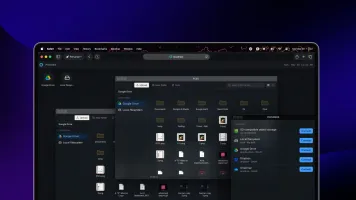
Drivebase is a self-hosted file management platform that brings together multiple cloud storage services — Google Drive, AWS S3 and compatible stores like Cloudflare R2, Wasabi, Backblaze B2, and MinIO, plus Dropbox, OneDrive, and local filesystems — into one desktop-like web interface. The UI works like a browser-based OS with movable, resizable windows for Files, Providers, and Settings. Core features include batch operations across providers with preflight conflict checks, live progress via server-sent events, resumable chunked uploads, direct S3 presigned multipart uploads, per-provider storage usage tracking, and a pluggable provider interface. All functionality is available through a typed GraphQL API. The stack uses Bun, React 19, GraphQL Yoga, BullMQ workers, PostgreSQL with Drizzle ORM, Redis, and Better Auth for cookie-based auth. Self-hosting options: Docker (single image with Caddy, API, and workers on port 3000) or manual setup with Bun, PostgreSQL 15+, and Redis 7+. The core is MIT-licensed; a managed cloud offering starts at $9.99/month.
Should you self-host drivebase?
drivebase scores 51/100 on selfhost.directory (how scoring works) and ranks #17 of 34 in File Management. It has 595 GitHub stars.
It shipped 2 stable releases in the past year. The latest, v4.0.0, came out on 3 June 2026. New versions land roughly every 2 months.
Setup is moderate: expect some configuration beyond a single command. It is MIT-licensed and written mostly in Typescript.
Its closest alternative on selfhost.directory is AList (83/100, 50 365 stars). It scores higher overall, so compare the two before you pick. See drivebase vs AList side by side.
Features
- Batch Operations
- Desktop shell interface
- Direct S3 uploads
- GraphQL API
- Multi-Provider Support
- Pluggable provider system
- Real-time progress
- Resumable Uploads
- Smart conflict resolution
- Storage usage tracking
- Unified file browser
drivebase README
FAQ
How is this different from rclone?
rclone is a CLI. Drivebase is a self-hosted web app with an OS-like windowed UI, real-time transfer progress over SSE, and a typed GraphQL API.
Is my data private?
When self-hosted, everything runs on your infrastructure. Provider credentials live in your own database, secrets are auto-generated, and nothing routes through Drivebase.
Does it sync or copy files locally?
Neither by default. Drivebase talks to each provider's API directly, so you browse and transfer in place.
Which providers are supported?
Today: Google Drive, Amazon S3 (and S3-compatible stores like Cloudflare R2), Dropbox, and local filesystem. OneDrive, Box, and more are on the way.
Self-hosted or cloud?
Both. Run it on your own box with Docker, or spin up a managed instance at cloud.drivebase.io.
Is Drivebase really free?
Yes, the core is open source (MIT) and free to self-host forever. Managed cloud instances start at $9.99/mo.
More in File Transfer & Sync
 DropgateSelf-hosted file sharing with hosted uploads, P2P transfers, E2EE, web UI, desktop client, and TypeScript library.
 erfanzadeh.irA self-hosted, open-source file sharing server in Go with drag-and-drop uploads, auto-eviction at 10 GB, and download tracking — no accounts needed.
 ErugoErugo is an open-source, self-hosted file sharing platform with memorable URLs, password protection, expiration dates, download limits, and a customizable dashboard.
 filestashSelf-hosted, open-source web file manager that puts S3, SFTP, WebDAV, SMB, FTP and around 20 more storage protocols behind one Dropbox-style interface.
 FileZilla (LinuxServer.io)Self-hosted Docker container running FileZilla FTP/FTPS/SFTP client, streaming its GUI to a browser via HTTPS using LinuxServer.io's Selkies platform.
 FTPGrabFTPGrab is a self-hosted, open-source CLI tool that pulls files from FTP/SFTP servers on a schedule with filtering, deduplication, and notifications.
 GopeedOpen-source Gopeed is a self-hosted download manager written in Go and Flutter, handling HTTP, BitTorrent, magnet and ed2k links, plus a web UI, REST API and CLI.
 Goploadergoploader is a self-hosted, open-source file sharing server with server-side encryption that works with curl, wget, and a CLI client for terminal uploads.
 hdropSelf-hosted open-source file sharing with browser-side encryption, S3/local storage, no accounts, and Prometheus metrics.
 LufiSelf-hosted Docker deployment of Lufi, a file sharing service supporting temporary links, password protection, LDAP authentication, and multiple database backends.
 Mediary ScoutSelf-hosted AI agent that fetches media into your cloud drives (Quark, 115, GuangYaPan, 123, Tianyi), verifies transfers, and auto-fills missing episodes.
 PairDropOpen-source, self-hosted file-sharing web app inspired by AirDrop and forked from Snapdrop: peer-to-peer transfers via WebRTC, pairing and public rooms, no signup.
0 comments