
Self-host cloud-torrent
v0.9.4Remote torrent client with web UI
- Stars
- 6 250
- Port
- 3000 (HTTP web UI and file streaming)
jpillora/cloud-torrent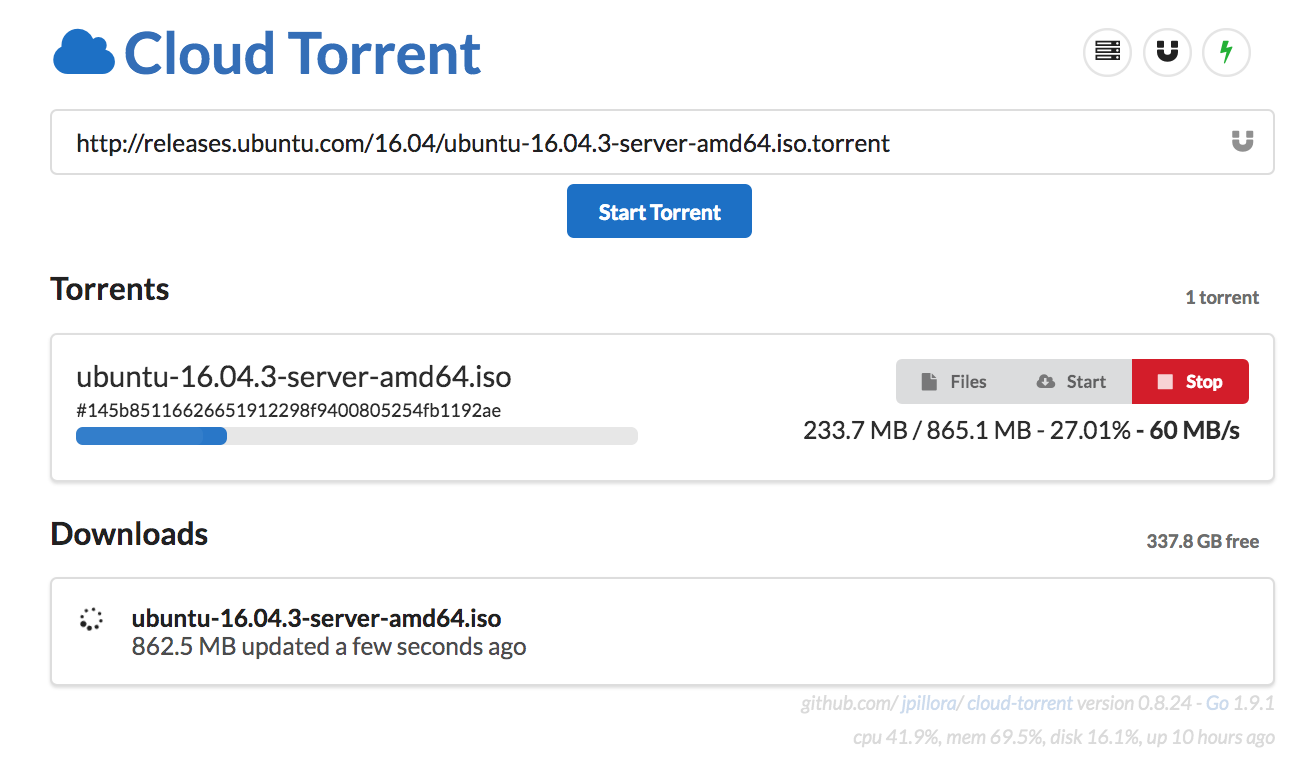
What is cloud-torrent?
This Go-based torrent client runs on your server and exposes a web UI for adding torrents remotely. Downloads are stored locally and served over HTTP for direct access or streaming. The single binary requires no external dependencies and works across platforms. The interface includes built-in torrent search, live progress updates, and a responsive layout for mobile. Optional basic auth and custom TLS certificates secure access. Settings are managed via a JSON config file or environment variables. Deploy via Docker, a curl installer, or compile from source. Licensed AGPL-3.0 with donation links for PayPal and Bitcoin.
cloud-torrent alternatives
 distribrrSelf-hosted orchestrator distributing torrent downloads across multiple servers via qBittorrent agents with token-based auth.Comparedistribrr with cloud-torrent
 qBittorrent (LinuxServer.io)Self-hosted Docker image for qBittorrent, a cross-platform BitTorrent client with web UI, packaged by LinuxServer.io with regular updates and multi-architecture support.CompareqBittorrent (LinuxServer.io) with cloud-torrent
 viewscreenViewscreen is a self-hosted, open-source video streaming server with built-in torrent client, automatic HTTPS via Let's Encrypt, and video transcoding to MP4.Compareviewscreen with cloud-torrent
 TiramisuSelf-hosted BitTorrent engine with FUSE virtual filesystem for Plex/Jellyfin streaming 4K HDR from swarm. Runs on Pi 4 with auto sync from TMDB/Prowlarr.CompareTiramisu with cloud-torrent
 cloudboxioA lightweight Go-based file server you host yourself, offering JWT login, shareable links, a themed web interface, and embedded SQLite storage.Comparecloudboxio with cloud-torrent
 TransmissionSelf-hosted, open-source BitTorrent client: native macOS, Windows and Linux GUIs plus a lightweight headless daemon with a web UI and JSON-RPC API for remote control.CompareTransmission with cloud-torrent
 folderhostA self-hosted, open-source cloud platform offering file sharing, real-time collaboration, and user management in a ~19MB binary as a lightweight Nextcloud alternativeComparefolderhost with cloud-torrent
 rdt-clientSelf-hosted web UI for debrid torrents and usenet. Emulates qBittorrent and SABnzbd APIs so Sonarr and Radarr can use it as a download client.Comparerdt-client with cloud-torrent
Should you self-host cloud-torrent?
cloud-torrent scores 59/100 on selfhost.directory (how scoring works) and ranks #6 of 12 in Bittorrent. It has 6 250 GitHub stars, +4 in the last 30 days.
There was no stable release in the past 12 months, so check the repository's recent activity before you rely on it.
Setup is easy: most people get it running in one sitting. An official Docker image is available. It is AGPL-3.0-licensed and written mostly in Go.
Its closest alternative on selfhost.directory is qBittorrent (84/100, 41 695 stars). It scores higher overall, so compare the two before you pick. See cloud-torrent vs qBittorrent side by side.
Features
- Basic Authentication
- Configuration via JSON or env vars
- Cross-platform
- Embedded Torrent Search
- Fast content server
- File Streaming
- Real-time updates
- Single Binary
- TLS/SSL Support
cloud-torrent README

More in Bittorrent
 cross-seedSelf-hosted, open-source cross-seeding tool that automatically matches your torrents across private trackers using Torznab indexers and popular torrent clients.
 fertilizerA self-hosted, open-source utility that creates cross-seed torrents for Redacted and Orpheus, with optional automatic injection into torrent clients.
 GopeedOpen-source Gopeed is a self-hosted download manager written in Go and Flutter, handling HTTP, BitTorrent, magnet and ed2k links, plus a web UI, REST API and CLI.
 pt-toolsSelf-hosted open-source PT automation: RSS downloads, IYUU cross-seeding, media library, multi-site stats, unified qBittorrent/Transmission management.
 qBittorrentqBittorrent is an open-source, cross-platform BitTorrent client with a WebUI for remote management, aiming to be a free alternative to µTorrent.
 quiOpen-source, self-hosted web UI for qBittorrent: one binary manages many instances, with cross-seed, automation rules, backups, OIDC and a proxy endpoint for Sonarr.
 rfloodSelf-hosted web interface for rTorrent using the Flood UI, packaged as a Docker image with built-in WireGuard VPN support and XML-RPC/JSON-RPC endpoints.
 rustatioRustatio is an open-source BitTorrent ratio tool that mimics popular clients. It runs as a desktop program or a containerized server with a browser interface.
 ruTorrentSelf-hosted, open-source web UI for the rTorrent BitTorrent client, with a bundled plugin system for RSS, search, ratio groups and multi-user setups.
 rutorrent-crazymaxSelf-hosted open-source Docker image bundling rTorrent with ruTorrent web UI, featuring multi-platform builds and optional basic auth.
 speedrrSelf-hosted Python tool that dynamically adjusts qBittorrent/Transmission speeds based on Plex/Jellyfin/Emby streams and time schedules.
 torrentinimSelf-hosted, open-source torrent search engine and crawler with a JSON API, designed for Sonarr and Radarr integration, using ~24 MB RAM.
0 comments