
Self-host Music Assistant
2.10.12One music library for every service and speaker
$ docker run -v <dir>:/data --network host ghcr.io/music-assistant/server- Stars
- 3 343
- CPU
- Raspberry Pi 4 or newer, or equivalent
- RAM
- 2GB of RAM
- Ports
- 8095 (Web interface / API), 8097 (Audio stream server for players)
- Requires
- Ffmpeg
ghcr.io/music-assistant/server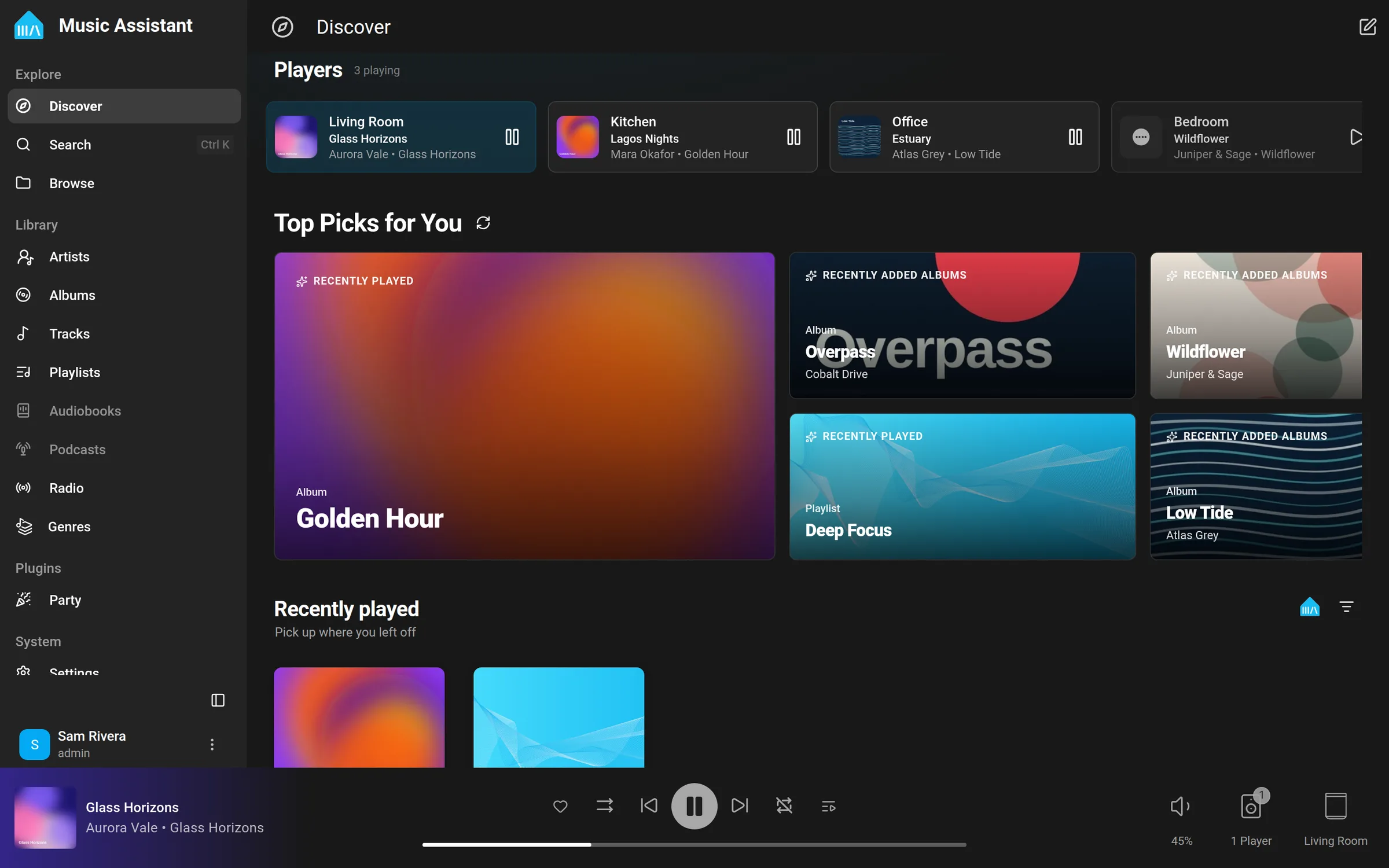




What is Music Assistant?
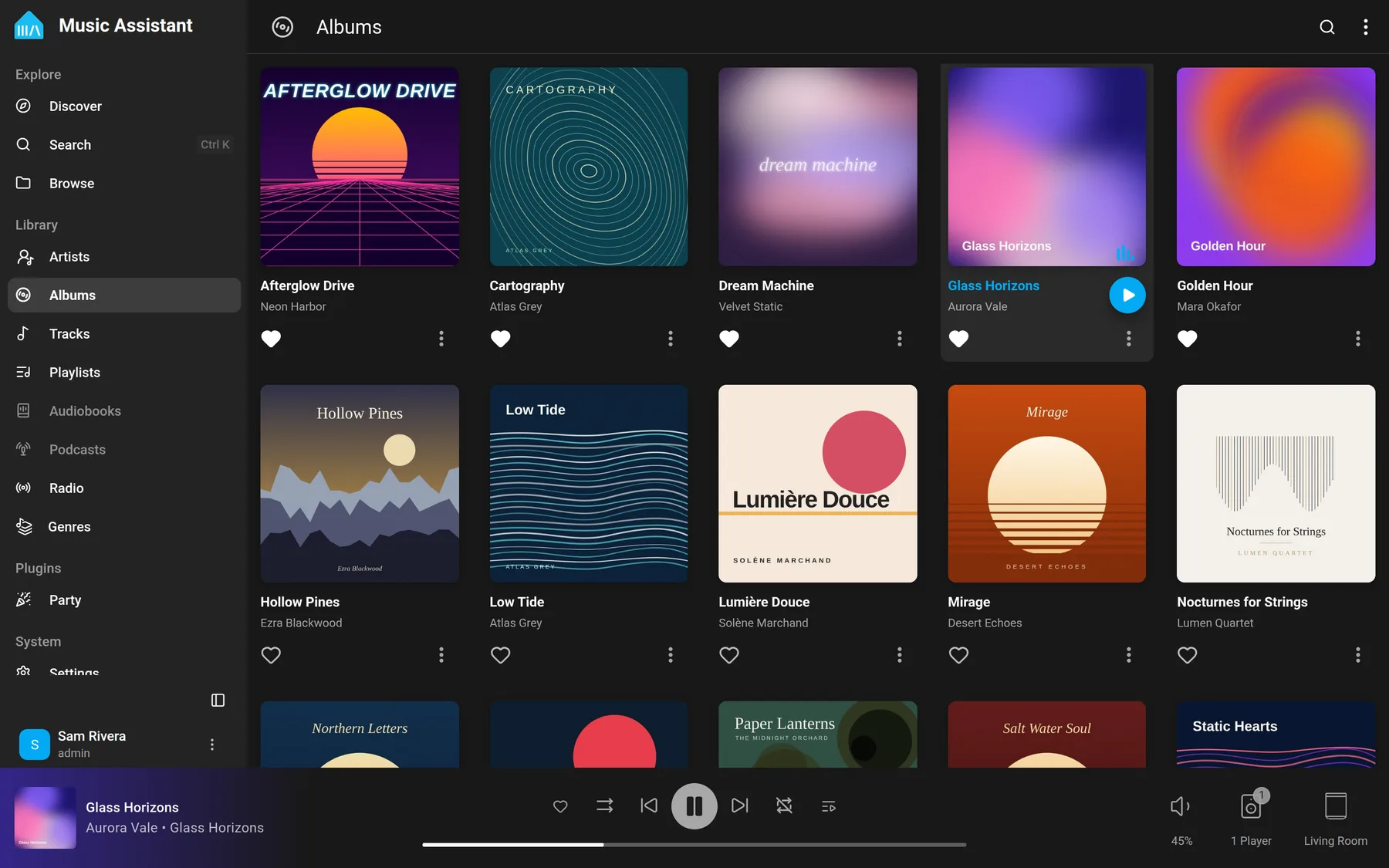
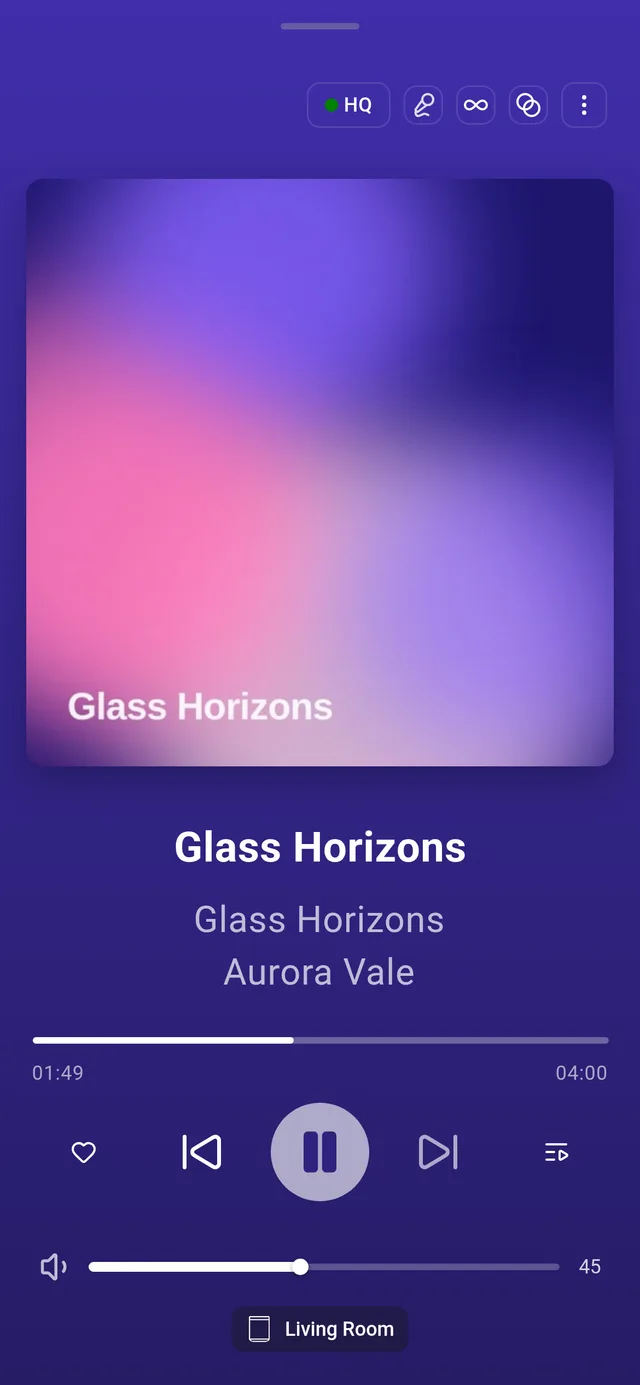
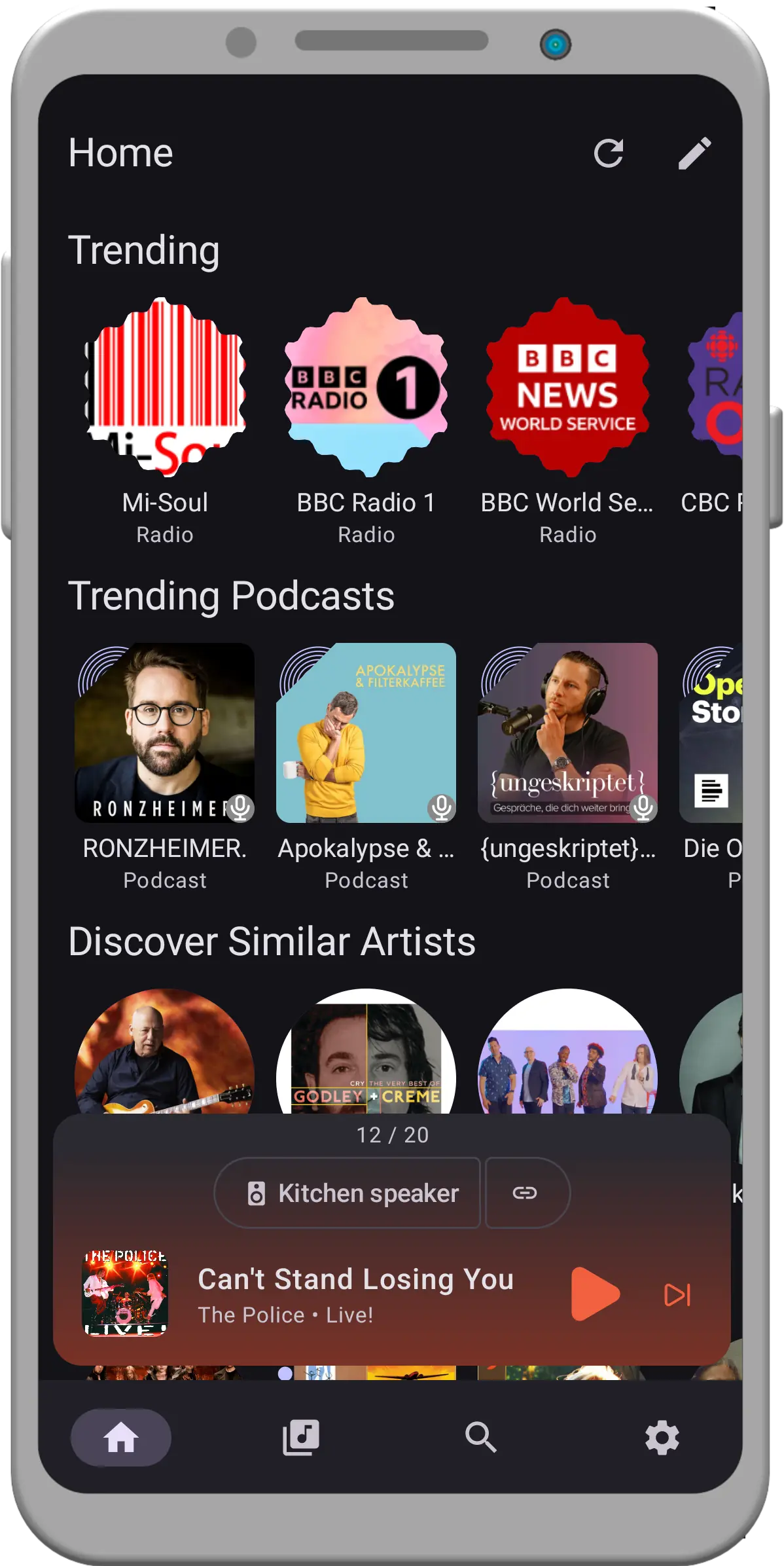
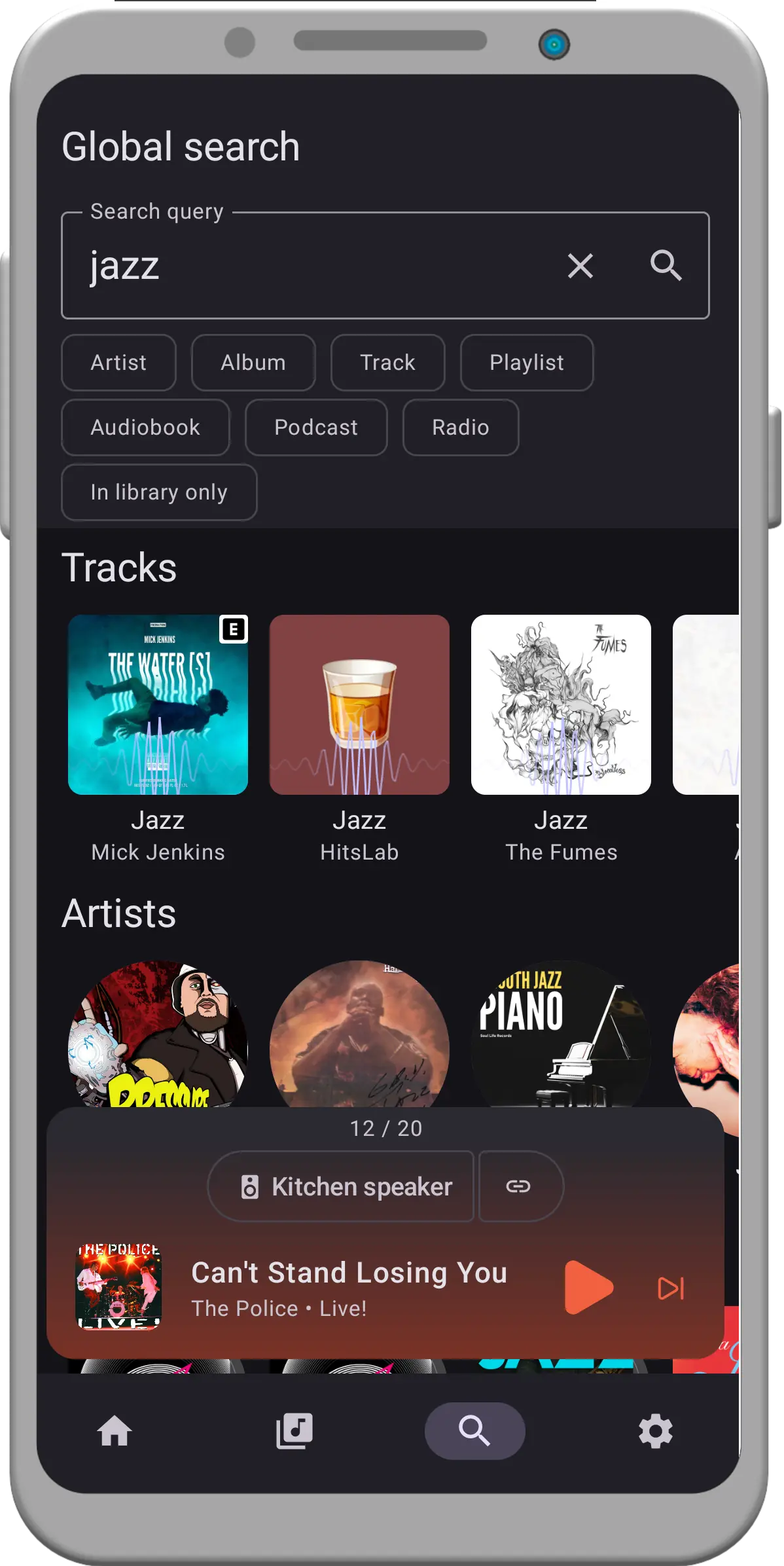
Music Assistant is an open-source media library manager that pulls music from subscription services and from your own files, and also handles radio, podcasts and audiobooks. Releases found on several services are merged into a single entry, playlists may mix providers, and metadata providers supply artwork, lyrics and artist details. The server owns playback state, so music carries on after you close the tab and a queue can be handed to another speaker; group hardware from different brands (Sonos, AirPlay, Google Cast, DLNA, Squeezelite and others) for synchronized multiroom listening, with gapless output, crossfade, loudness levelling and per-player DSP filters. Its web UI listens on port 8095, a JSON API with long-lived tokens supports automation, and several accounts with roles plus per-user player or source restrictions can share one installation. It pairs closely with Home Assistant for automations, voice control and ducking announcements, while plugins add party mode, quizzes, lyrics and AI Radio. Install it from the HA App store, the recommended route, or from the ghcr.io container image using host or macvlan networking so mDNS and uPnP discovery work. Plan for a 64-bit machine that never sleeps, with 2GB of RAM as the floor. The server is deliberately not on PyPI, distro packages are unsupported, and every music service still needs its own subscription.
Music Assistant alternatives
 airsonic-advancedSelf-hosted, open-source web media streamer forked from Airsonic: faster scanning, websocket UI updates, Sonos, Chromecast and ListenBrainz support.Compareairsonic-advanced with Music Assistant
 SnapcastSnapcast is an open-source, self-hosted multiroom audio system that syncs playback across clients with sub-millisecond precision.CompareSnapcast with Music Assistant
 SoulSyncSelf-hosted open-source platform replacing Lidarr, Radarr, Sonarr. Downloads from Soulseek, Tidal, Qobuz, YouTube, verifies via AcoustID, syncs playlists to Plex/JellyfinCompareSoulSync with Music Assistant
 MeeloSelf-hosted Music Server. Focused on metadata integration & UICompareMeelo with Music Assistant
 app-plexSelf-hosted Plex Media Server packaged as a Home Assistant Community add-on, letting you organize and stream personal media libraries through Home Assistant.Compareapp-plex with Music Assistant
 AudioMuse-AIOpen-source, self-hosted sonic-analysis tool that builds playlists, a 2D music map and semantic search for Navidrome, Jellyfin, Emby, Plex, LMS and Lyrion libraries.CompareAudioMuse-AI with Music Assistant
 qm-musicQM-Music is a self-hosted, open-source music server built on Subsonic. It runs in Docker with ~150MB RAM and works with Feishin and StreamMusic clients.Compareqm-music with Music Assistant
 PlexistSelf-hosted tool syncing playlists from Spotify, Apple Music, Deezer, Tidal, Qobuz into Plex with multi-service sync support.ComparePlexist with Music Assistant
Should you self-host Music Assistant?
Music Assistant scores 71/100 on selfhost.directory (how scoring works) and ranks #3 of 59 in Music Streaming. It has 3 343 GitHub stars, +179 in the last 30 days.
It shipped 50 stable releases in the past year. The latest, 2.11.0b9, came out on 14 November 2026. New versions land roughly every 3 days.
Setup is moderate: expect some configuration beyond a single command. An official Docker image is available. It is Apache-2.0-licensed and written mostly in Python.
Its closest alternative on selfhost.directory is koel (74/100, 17 351 stars). It scores higher overall, so compare the two before you pick. See Music Assistant vs koel side by side.
Features
- Broad player support
- Cross-service item matching
- Discover view
- Gapless playback and crossfade
- Metadata Enrichment
- Multiroom speaker groupingSynchronization depends on speakers and group type
- Multi-user accounts with permissions
- Per-player DSP filters
- Playlist sync between servicesAvailability depends on the destination service catalogue
- Plugin System
- Queue transfer between players
- Server-hosted playback queue
- Smart Playlists
- Unified music library
- Volume Normalization
Music Assistant README
Music Assistant Server
Music Assistant is a free, opensource Media library manager that connects to your streaming services and a wide range of connected speakers. The server is the beating heart, the core of Music Assistant and must run on an always-on device like a Raspberry Pi, a NAS or an Intel NUC or alike.
How to install Music Assistant
Install Music Assistant with Docker
LOG_LEVELdocker run -v <dir>:/data --network host ghcr.io/music-assistant/server
Docker compose (recommended):
services:
  music-assistant-server:
    image: ghcr.io/music-assistant/server:latest # <<< Desired release version here (or use beta to get the latest beta version)
    container_name: music-assistant-server
    restart: unless-stopped
    # Network mode must be set to host for MA to discover and stream to players (see networking note below)
    network_mode: host
    volumes:
      - ${USERDIR:-$HOME}/docker/music-assistant-server/data:/data/
      # Optional: expose local music to MA by bind-mounting it read-only
      - /path/to/your/music:/media:ro
    environment:
      # Provide logging level as environment variable.
      # default=info, possible=(critical, error, warning, info, debug)
      - LOG_LEVEL=info
/data is the persistent data volume; mount local music read-only. Bridge networking with explicit 8095/8097 mappings only works for software players and is not supported by the team.
Install Music Assistant with Home Assistant
The Music Assistant App repository is available in Home Assistant. Browse the App store within Home Assistant to install or click on the following button:

Recommended method; on HAOS the interface is also reachable through Ingress.
How to configure Music Assistant
LOG_LEVEL=infoLogging level, provided as environment variable in the docker compose setup.values: critical, error, warning, info, debug
--log-levelCommand-line log level when running the server module directly (development).values: debug and other levels
Music Assistant releases & version history
📦 Beta Release
Changes since 2.11.0b8
🚀 New Providers
- Add the Sunshine Live provider (by @jordiboehme in #7406)
- Add DR LYD provider (by @mikkelke in #7488)
- Add CBC Listen provider (by @iwismer in #7556)
🚀 Features and enhancements
- Easier setup code copy option in setup flow for Tidal/Spotify/Audible music provider (by @afeldman1 in #6268)
- Let synced lyrics lead the AI Radio post onset (by @jpittelkow in #6882)
- OpenSubsonic: move a track within a playlist (by @pcc0x in #7032)
- Party: add configurable number of votes required to skip a song (by @martinbuergi in #7081)
- Let the sleep timer stop at the end of the current item or chapter (by @fmunkes in #7209)
- Add bookmarks for audiobooks and podcast episodes (by @fmunkes in #7292)
- Sync YouTube Music podcast progress (by @OzGav in #7293)
- Show and control an app on a linked protocol player MA did not start (by @Simanias in #7312)
- Pair Sendspin players on the Home Assistant host with their local token (by @chrisuthe in #7315)
- Update metadata now replaces outdated details (by @OzGav in #7338)
- Refresh item now clears a track's measured volume (by @OzGav in #7339)
- Support bookmarks in the Audiobookshelf provider (by @fmunkes in #7344)
- Give speakers a bit more lead on just-in-time music sources (by @marcelveldt in #7355)
- Refuse playlist edits whose positions no longer hold the expected tracks (by @pierosavi in #7359)
- Raumfeld: follow the host to a new address (by @Simanias in #7364)
- Raumfeld: call the speakers and the host's web service without hassfeld (by @Simanias in #7367)
- Raumfeld: follow the host's rooms and zones without hassfeld (by @Simanias in #7368)
- Raumfeld: show each speaker's software version (by @Simanias in #7369)
- Allow smart playlists to exclude favorites (by @dmoo500 in #7372)
- Allow admins to combine statistics of several users (by @fmunkes in #7375)
- Sort artist releases by full release date before paging (by @dmoo500 in #7376)
- Play the live Apple Music radio stations (by @jordiboehme in #7377)
- Feature/auracast provider improvements (by @Yagoor in #7379)
- Builtin MCP server for AI assistants and Home Assistant (by @marcelveldt in #7381)
- Tell which player holds Spotify instead of waiting 15 seconds (by @marcelveldt in #7382)
- Spotify Soloist: no more silence between tracks (by @marcelveldt in #7384)
- Play artists faster on providers without an artist tracks listing (by @apophisnow in #7390)
- Keep disliked genres out of radio, mixes and autoplay (by @apophisnow in #7393)
- Squeezelite: report the player names set in Music Assistant to the clients (by @lawrence-jeff in #7402)
- Play Deezer hi-res tracks at their real sample rate and bit depth (by @jpmenil in #7403)
- Spotify setup: Soloist as the default engine and updated wizard text (by @marcelveldt in #7416)
- Offer this device as the Music Quiz venue player (by @marcelveldt in #7417)
- Swap descriptions to the new language after a language change (by @OzGav in #7423)
- Add seek support to the AriaCast receiver (by @meiser79 in #7426)
- Raumfeld: follow the speakers' events instead of polling them (by @Simanias in #7427)
- Deezer: sync playback with the Deezer app (by @jdaberkow in #7428)
- Stop adding MediaItemImage objects for images outside of subsonic (by @khers in #7431)
- Turn on offline players through their power control (by @marcelveldt in #7435)
- Default MusicCast players to MP3 output (by @jerome-pouiller in #7440)
- Deezer: more metadata and a few small improvements (by @jdaberkow in #7441)
- Power off idle players through their power control (by @marcelveldt in #7446)
- Add a queue's items to an existing playlist (by @pierosavi in #7447)
- Choose how long a paused player stays paused before it stops (by @marcelveldt in #7451)
- Subsonic setup refactor (by @khers in #7456)
- Handle m4a albumartists tag (by @NasaGeek in #7459)
- Jump to a letter in the artist, album and track libraries (by @OzGav in #7468)
- Pick between provider and own resume progress by one rule everywhere (by @fmunkes in #7482)
- Add resume timestamps to providers where available (by @fmunkes in #7483)
- Grey out library podcasts and radio stations if their provider no longer has them (by @OzGav in #7490)
- Put the speaker's queue back after a Music Quiz game (by @marcelveldt in #7491)
- Support higher sample rate and bit depth for Sendspin sources (by @maximmaxim345 in #7506)
- Play line-ins on Sendspin players at the source's sample rate (by @maximmaxim345 in #7507)
- Deezer: play hi-res and add a stream quality setting (by @jdaberkow in #7512)
- Add player options to the Sonos provider (by @fmunkes in #7531)
- Make Subsonic provider use the last modified bookmark date (by @khers in #7536)
- Re-order M3U playlists (by @OzGav in #7539)
- Sync Hue lamps on Home Assistant's ZHA without a Hue bridge (by @marcelveldt in #7540)
- Reorder tracks in Spotify playlists (by @OzGav in #7543)
- Reorder tracks in Qobuz playlists (by @OzGav in #7544)
- YouTube Music: edit and reorder your playlists (by @MarvinSchenkel in #7553)
- Add icon for the statistics controller (by @MarvinSchenkel in #7555)
- Add playlist reordering to the Audiobookshelf provider (by @fmunkes in #7572)
- Add a perceived energy level to track audio metadata (by @MarvinSchenkel in #7589)
- Send supported artist types with the provider (by @fmunkes in #7595)
- Replace the MilkDrop color tint setting with the artwork palette (by @jozefKruszynski in #7622)
- Keep the order of in-progress audiobooks and podcasts when providers sync progress (by @fmunkes in #7658)
- Report the progress time from Audiobookshelf, gPodder and Overcast (by @fmunkes in #7659)
- Link an artist to a newly added music service when its page is opened (by @marcelveldt in #7689)
🐛 Bugfixes
- Use LMS synchronisation logic for squeezelite sync groups (by @Carunga in #6477)
- Keep the last Squeezelite volume when its cache entry expires (by @thelad-dev in #6944)
- Fix Spotify Connect position counting the pause after a resume (by @maximmaxim345 in #7040)
- Keep same-name artists on one streaming provider apart via MusicBrainz (by @OzGav in #7124)
- Fix Home Assistant player updates failing on non-text media_content_id (by @MarvinSchenkel in #7152)
- Fix Bluesound multi-zone players missing on routed networks (by @MarvinSchenkel in #7159)
- Keep ICY flow streams flowing in small writes instead of one write per metadata interval (by @MarvinSchenkel in #7166)
- Raumfeld: a room of several speakers keeps its player (by @Simanias in #7180)
- Stop album and track refreshes from renaming shared artists (by @OzGav in #7201)
- Fix Roku Media Assistant player queue stalls and end-of-stream detection (by @kees in #7217)
- Hide source-only Sendspin devices from the player menu by default (by @maximmaxim345 in #7223)
- Give a DIDL player the whole track's duration for a flow stream (by @Simanias in #7224)
- Allow pairing a Sendspin device again after it was unpaired (by @maximmaxim345 in #7337)
- Keep SoundCloud signed in by refreshing its access token (by @robsonke in #7343)
- Time out hanging MAC address lookups (by @OzGav in #7346)
- Load chapters of audiobooks played from a listing (by @fmunkes in #7349)
- Raumfeld: a speaker keeps its player when it moves to another room (by @Simanias in #7350)
- Fix Open Subsonic remote image URLs being passed to getCoverArt (by @anatosun in #7351)
- Fix Apple TV pairing not working (by @cleverer in #7352)
- Fix missing played status on a Spotify podcast episode page (by @OzGav in #7353)
- Link artists whose MusicBrainz page uses a play.qobuz.com link (by @OzGav in #7354)
- Re-form a speaker group faster and keep the next track ready when its leader drops (by @marcelveldt in #7356)
- Fix Sendspin output staying unavailable on some AirPlay and Cast speakers (by @maximmaxim345 in #7357)
- Keep a playing group on Sendspin when a Sendspin speaker joins (by @maximmaxim345 in #7358)
- Fix misleading reconnect text on Sendspin devices another server took (by @maximmaxim345 in #7361)
- Start at 0:00 when seeking to the start of an audiobook or episode (by @fmunkes in #7363)
- Keep regular providers off in safe mode (by @marcelveldt in #7394)
- Keep Sonos playing when the queue changes under it (by @marcelveldt in #7395)
- Squeezelite: start announcements on the small buffer (by @lawrence-jeff in #7400)
- Fix missing search_name indexes on upgraded libraries (by @CasperNaudts in #7404)
- Keep HLS radio playing through stalls of its CDN (by @jordiboehme in #7407)
- Say at once that Spotify is busy elsewhere instead of after loading the playlist (by @marcelveldt in #7408)
- Keep Spotify playing after a speaker drops a track instead of skipping through the queue (by @marcelveldt in #7409)
- Reject control characters in concat file lists (by @chrisuthe in #7412)
- Strip control characters from AirPlay now-playing metadata (by @chrisuthe in #7413)
- Don't store a disabled state for providers that can't be disabled (by @marcelveldt in #7414)
- Fix iBroadcast tracks with additional genres being skipped during sync (by @flagoworld in #7415)
- Recognize the browser's own web player when opened from the Home Assistant sidebar (by @marcelveldt in #7418)
- Fix AriaCast receiver playback on a linked protocol player (by @meiser79 in #7425)
- Fix Music Quiz rounds stuttering at the start on Sendspin players (by @marcelveldt in #7433)
- Fix Spotify going silent for 20 s at a track change (by @marcelveldt in #7436)
- Add Legacy Auth option to subsonic setup flow (by @khers in #7439)
- Fix abrupt Spotify song changes when your account has crossfade on (by @marcelveldt in #7442)
- Stop refreshing the YouTube Music session from Music Assistant (by @bbauti in #7448)
- Fix Sendspin group going silent after a leader switch with a visualizer member (by @MarvinSchenkel in #7461)
- Fix the first Music Quiz round stuttering at the start (by @marcelveldt in #7466)
- Keep an artist's other folders when its artist.nfo changes (by @marcelveldt in #7475)
- Squeezelite: give the visualization setting a plain string default (by @lawrence-jeff in #7476)
- Accept whole numbers for float API arguments (by @pierosavi in #7477)
- Keep queue state and log unload errors when the server stops (by @marcelveldt in #7478)
- Fix ARD Sounds search failing when a show or station has no social media links (by @OzGav in #7496)
- Fix AirPlay group members drifting apart after a corrected cold start (by @cTopher in #7503)
- Check player access for every player in a grouping command (by @marcelveldt in #7511)
- Play media on the player you picked when it is in a group (by @marcelveldt in #7518)
- Reconnect the MPD player when its connection drops silently (by @lucamartinetti in #7522)
- Reassemble chunked client messages on the remote access API channel (by @jozefKruszynski in #7537)
- Prevent clipping when volume normalization raises a quiet track (by @marcelveldt in #7538)
- Fix missing covers in Music Assistant playlists (by @OzGav in #7546)
- Fix stale album links of local files whose album tag changed (by @OzGav in #7548)
- Stop Cast speakers replaying earlier tracks at the end of a queue (by @marcelveldt in #7549)
- Stop the end of a queue being cut off on Cast and Bluesound speakers (by @marcelveldt in #7550)
- Back off AirPlay control reconnects for receivers that keep failing (by @MarvinSchenkel in #7554)
- Fix Cast speakers dropping out during longer playback (by @marcelveldt in #7559)
- Replace the HTTP profile setting with a fixed content length toggle (by @marcelveldt in #7560)
- Bound ffprobe/ffmpeg tag probes with a timeout (by @OzGav in #7584)
- Tidal: name album artists and playlist owners in search results (by @jozefKruszynski in #7585)
- Give up on a play request that takes longer than a minute (by @marcelveldt in #7601)
- Stop artists from fetching their whole catalogue when played or opened (by @marcelveldt in #7602)
- Skip post load work for a provider unloaded while registering (by @jozefKruszynski in #7612)
- Fix silent HomePod mini 2 and failing AirPlay group starts (airplay-cli v0.5.10) (by @musicassistant-bot[bot] in #7615)
- Fix AirPlay pairing with Apple TV and HomeView on OS 27.2 (by @marcelveldt in #7632)
- Fix AirPlay pairing on OS 27.2 and show HomePod controls in the Home app (airplay-cli v0.5.11) (by @musicassistant-bot[bot] in #7633)
- Fix silent AirPlay 2 playback on Shairport Sync receivers (by @marcelveldt in #7662)
- Reject oversized ID3 tags before scanning local audio files (by @marcelveldt in #7667)
- Fix silent Shairport Sync speakers after the first AirPlay 2 stream (airplay-cli v0.5.12) (by @musicassistant-bot[bot] in #7668)
- Release AirPlay speakers on stop and let another app take them over (by @marcelveldt in #7671)
- Release AirPlay speakers on stop and notice when another app takes them over (airplay-cli v0.5.13) (by @musicassistant-bot[bot] in #7673)
🎨 Frontend Changes
- Show the item type icon when there is no artwork (by @OzGav in #3084)
- Move genre details to shared hero (by @dmoo500 in #3076)
- Show a spinner while opening an album that is not in your library (by @OzGav in #3082)
- Fix the top artist card and page scrolling on the statistics page (by @pierosavi in #3088)
- Fit the statistics page on small screens (by @stvncode in #3087)
- Show same-named artists in search results (by @NasaGeek in #2999)
- Stop the load more spinner once every item is loaded (by @stvncode in #3083)
- Remember the Discover statistics row period across reloads (by @OzGav in #3102)
- Improve waveform seek preview with 3-level brightness (by @dmoo500 in #2146)
- Load only English and German translations in tests (by @stvncode in #3101)
- Bump eslint from 10.13.0 to 10.14.0 (by @dependabot[bot] in #3092)
- Bump sass from 1.105.0 to 1.107.1 (by @dependabot[bot] in #3095)
- Bump @lucide/vue from 1.61.0 to 1.66.0 (by @dependabot[bot] in #3097)
- Bump ts-pattern from 5.9.0 to 5.9.2 (by @dependabot[bot] in #3098)
- Bump @tabler/icons-vue from 3.48.0 to 3.50.0 (by @dependabot[bot] in #3093)
- Bump marked from 18.1.1 to 18.1.2 (by @dependabot[bot] in #3094)
- Bump vite from 8.3.4 to 8.3.5 (by @dependabot[bot] in #3096)
- Bump zod from 4.6.6 to 4.6.7 (by @dependabot[bot] in #3099)
- Bump @tanstack/vue-virtual from 3.13.39 to 3.13.50 (by @dependabot[bot] in #3100)
- Use the library sort and filter controls on album, playlist, podcast and radio pages (by @OzGav in #3110)
- Show who maintains each integration (by @marcelveldt in #3115)
- Play the Music Quiz on the device that shows it (by @marcelveldt in #3124)
- Offer to move Spotify playback here when another player holds it (by @marcelveldt in #3122)
- Minimize the fullscreen player when a search result is opened (by @pierosavi in #3131)
- Show the played state of audiobook collections and keep their covers when filtered (by @fmunkes in #3034)
- Show the played state of audiobook collections and keep their covers when filtered (by @fmunkes in #3034)
- Add optional copy text button in setup dialog (by @afeldman1 in #2710)
- Use one subtle hover effect for clickable settings cards (by @pierosavi in #3117)
- Make first-time setup clearer (by @marcelveldt in #3169)
- Recolour the visualizer from the artwork palette (by @jozefKruszynski in #3172)
- Show a music service's albums on the artist page when your library has none (by @marcelveldt in #3184)
Other Changes
- Revert "Pair Sendspin players on the Home Assistant host with their local token" (by @chrisuthe in #7370)
- Fix the Home Assistant player test that broke dev (by @marcelveldt in #7473)
🧰 Maintenance and dependency bumps
79 changes
- Bump pywam from 0.2.0 to 0.2.3 (by @FSund in #7322)
- Bump av from 18.1.0 to 19.0.2 (by @dependabot[bot] in #7324)
- Bump astral-sh/setup-uv from 10.3.2 to 10.3.3 (by @dependabot[bot] in #7340)
- Clear up two misleading log lines (by @marcelveldt in #7362)
- Mark every provider as core or community maintained (by @marcelveldt in #7383)
- Let new models sort fields and listing types land without failing the server (by @marcelveldt in #7389)
- Use the reverse-DNS _meta key for the Home Assistant user in MCP tool calls (by @marcelveldt in #7396)
- Fix rare Spotify playback hangs and wrong settings after the session rework (by @marcelveldt in #7397)
- Add regression tests for the image loader, ingress sign-in and playlist mapping guards (by @chrisuthe in #7398)
- Fix five flaky tests that block the merge queue (by @fmunkes in #7405)
- Bump CodSpeedHQ/action from 5.6.0 to 5.6.3 (by @dependabot[bot] in #7411)
- Skip upstream-only workflows on forks (by @balloob in #7420)
- Core player queues replace 'music provider' with 'music source' (by @remon1496 in #7432)
- Install the frontend from its GitHub release instead of PyPI (by @marcelveldt in #7434)
- Similar tracks and the Discover row no longer freeze the server on large libraries (by @marcelveldt in #7437)
- Bump the music-assistant-libs group with 3 updates (by @dependabot[bot] in #7443)
- Revert "Default MusicCast players to MP3 output" (by @fmunkes in #7458)
- Run the nightly release an hour earlier (by @marcelveldt in #7460)
- Raumfeld: test connecting to the host, registering rooms and the setup flow (by @Simanias in #7464)
- Drop a stale comment in the Pandora error handler (by @chrisuthe in #7469)
- Document community providers: merging your own, fixes and backports (by @chrisuthe in #7470)
- Show the right YouTube Music podcast progress when an episode starts (by @OzGav in #7471)
- Bump docker/login-action from 4.7.0 to 4.8.0 (by @dependabot[bot] in #7479)
- Drop the settings migrations for upgrades from 2.9 (by @marcelveldt in #7481)
- Give Home Assistant a token for the MCP server (by @marcelveldt in #7485)
- Bump usearch to 2.26.6 and numkong to 7.8.7 (by @chrisuthe in #7495)
- Complete onboarding when the setup wizard finishes, not when the first provider is added (by @marcelveldt in #7509)
- Refill the speaker's buffer faster after a short server hiccup (by @marcelveldt in #7513)
- Keep audio pipes off the disk so a busy disk cannot freeze playback (by @marcelveldt in #7514)
- Keep Spotify audio steady after a short server hiccup (by @marcelveldt in #7515)
- Check player access for the sleep timer commands (by @marcelveldt in #7516)
- Let a user switch off their own speaker while it is part of a group (by @marcelveldt in #7517)
- Check player access for commands that are passed on to a group (by @marcelveldt in #7523)
- Keep a group playing when a play request on one of its players cannot start (by @marcelveldt in #7524)
- Remove Auracast (by @OzGav in #7527)
- Play on a speaker right after it leaves its group (by @marcelveldt in #7529)
- Stop two tests failing when a task list update lands mid-test (by @marcelveldt in #7530)
- Stop a storage test failing when the CI runner stalls briefly (by @marcelveldt in #7532)
- Faster Sonos grouping right after an earlier group change (by @marcelveldt in #7534)
- Update the Hue Entertainment library to 0.6.0 (by @marcelveldt in #7535)
- Keep Sonos playing when another Music Assistant server on the network restarts (by @marcelveldt in #7545)
- Require ffmpeg 8.0 or newer (by @marcelveldt in #7558)
- Keep playing while an Endless Mix fetches new tracks (by @marcelveldt in #7564)
- Describe both Hue Lights Sync backends in the setup notes (by @marcelveldt in #7567)
- Mark everything that ships with the server as built-in (by @marcelveldt in #7575)
- Remove the ffmpeg 7.1.1 workaround for niconico video audio (by @marcelveldt in #7587)
- Auto Release skips empty releases and waits for the stable backport PR (by @MarvinSchenkel in #7590)
- Bump peter-evans/create-pull-request from 8.1.2 to 8.1.3 (by @dependabot[bot] in #7597)
- Document that one action never fans out over a music service's catalogue (by @marcelveldt in #7598)
- Stop playback from requesting music services that asked us to wait (by @marcelveldt in #7600)
- Stop a whole library folder from being played in one go (by @marcelveldt in #7604)
- SoundCloud: make far fewer requests and respect rate limits (by @marcelveldt in #7605)
- Deezer: respect rate limits on all requests (by @marcelveldt in #7606)
- Show at most 100 releases of an artist so big discographies stay quick (by @marcelveldt in #7607)
- YouTube Music: make fewer requests and respect rate limits (by @marcelveldt in #7608)
- Spotify: list album tracks with one request instead of two (by @marcelveldt in #7609)
- Load the texts of a provider that is installed later (by @marcelveldt in #7613)
- Let the server load providers from a second folder (by @marcelveldt in #7614)
- Install the requirements of community providers next to the server, never over it (by @marcelveldt in #7616)
- Fix a test-order failure in the built-in favorites playlist tests (by @marcelveldt in #7621)
- Make the queue transfer tests independent of how fast the machine is (by @marcelveldt in #7626)
- Artist Events no longer queues a metadata refresh for every artist (by @marcelveldt in #7654)
- Rate limit the iTunes artwork and Genius lyrics lookups (by @marcelveldt in #7655)
- Rate limit requests to Audible (by @marcelveldt in #7656)
- Fix music files failing to import while the server is busy (by @marcelveldt in #7660)
- Last.fm top tracks list your own library instead of searching every music service (by @marcelveldt in #7663)
- Pausing a squeezelite group member on its own device now pauses the whole group (by @marcelveldt in #7669)
- Count only the albums and artists that are in your library (by @marcelveldt in #7675)
- Remove the old database alias for library items (by @marcelveldt in #7677)
- Collect metadata only for the artists and albums in your library (by @marcelveldt in #7678)
- State the artist albums limit in the development guide (by @marcelveldt in #7681)
- Test that a queue keeps its user when a play request runs out of time (by @marcelveldt in #7682)
- Keep the dependency report within the size GitHub allows for a comment (by @marcelveldt in #7683)
- Fetch a YouTube Music podcast once when its page opens (by @marcelveldt in #7684)
- Show Last.fm top tracks again after a failed request (by @marcelveldt in #7685)
- Count the genres the genre list shows (by @marcelveldt in #7686)
- Look up fewer tracks for Last.fm similar tracks and radio (by @marcelveldt in #7687)
- Open more discography albums by trying the editions that can be found (by @marcelveldt in #7688)
- Update aioslimproto to 3.4.1 (by @marcelveldt in #7691)
🙇 Thanks to our contributors
Special thanks to the following contributors who helped with this release:
@Carunga, @CasperNaudts, @FSund, @MarvinSchenkel, @NasaGeek, @OzGav, @Simanias, @Yagoor, @afeldman1, @anatosun, @apophisnow, @balloob, @bbauti, @cTopher, @chrisuthe, @cleverer, @dmoo500, @flagoworld, @fmunkes, @iwismer, @jdaberkow, @jerome-pouiller, @jordiboehme, @jozefKruszynski, @jpittelkow, @jpmenil, @kees, @khers, @lawrence-jeff, @lucamartinetti, @Lucide, @marcelveldt, @martinbuergi, @maximmaxim345, @meiser79, @mikkelke, @pcc0x, @pierosavi, @remon1496, @robsonke, @stvncode, @tabler, @TanStack, @thelad-dev
📦 Stable Release
Why this extra release? Music Assistant was sending more requests to music services than needed, which made playback slow or unreliable, with Spotify in particular. This release brings those requests back down. It also fixes several AirPlay problems: pairing on OS 27.2 and silent HomePod mini 2 and Shairport Sync speakers. Updating is recommended for everyone who uses Spotify or AirPlay.
Changes since 2.10.11
🐛 Bugfixes
- Reject control characters in concat file lists (by @chrisuthe in #7412)
- Strip control characters from AirPlay now-playing metadata (by @chrisuthe in #7413)
- Fix AirPlay group members drifting apart after a corrected cold start (by @cTopher in #7503)
- Bound ffprobe/ffmpeg tag probes with a timeout (by @OzGav in #7584)
- Keep playback within the request limits of music services (by @marcelveldt in #7599)
- Give up on a play request that takes longer than a minute (by @marcelveldt in #7601)
- Stop artists from fetching their whole catalogue when played or opened (by @marcelveldt in #7602)
- Fix silent HomePod mini 2 and failing AirPlay group starts (airplay-cli v0.5.10) (by @musicassistant-bot[bot] in #7615)
- Fix AirPlay pairing with Apple TV and HomeView on OS 27.2 (by @marcelveldt in #7632)
- Fix AirPlay pairing on OS 27.2 and show HomePod controls in the Home app (airplay-cli v0.5.11) (by @musicassistant-bot[bot] in #7633)
- Fix silent AirPlay 2 playback on Shairport Sync receivers (by @marcelveldt in #7662)
- Fix silent Shairport Sync speakers after the first AirPlay 2 stream (airplay-cli v0.5.12) (by @musicassistant-bot[bot] in #7668)
🎨 Frontend Changes
- Show an artist's top tracks on the party guest page when the service lists no artist tracks (by @marcelveldt in #3168)
🧰 Maintenance and dependency bumps
- Stop playback from requesting music services that asked us to wait (by @marcelveldt in #7600)
- Stop a whole library folder from being played in one go (by @marcelveldt in #7604)
- Fix music files failing to import while the server is busy (by @marcelveldt in #7660)
🙇 Thanks to our contributors
Special thanks to the following contributors who helped with this release:
📦 Stable Release
Changes since 2.10.9
🚀 Features and enhancements
- Allow multiple Pocket Casts instances (by @OzGav in #7328)
- Subsonic setup refactor (by @khers in #7456)
- Make Subsonic provider use the last modified bookmark date (by @khers in #7536)
🐛 Bugfixes
- Keep the last Squeezelite volume when its cache entry expires (by @thelad-dev in #6944)
- Fix Home Assistant player updates failing on non-text media_content_id (by @MarvinSchenkel in #7152)
- Fix Bluesound multi-zone players missing on routed networks (by @MarvinSchenkel in #7159)
- Fix a speaker group staying silent after its leader drops offline (by @marcelveldt in #7320)
- Fix Apple TV pairing not working (by @cleverer in #7352)
- Re-form a speaker group faster and keep the next track ready when its leader drops (by @marcelveldt in #7356)
- Fix Sendspin output staying unavailable on some AirPlay and Cast speakers (by @maximmaxim345 in #7357)
- Keep a playing group on Sendspin when a Sendspin speaker joins (by @maximmaxim345 in #7358)
- Start at 0:00 when seeking to the start of an audiobook or episode (by @fmunkes in #7363)
- Add Legacy Auth option to subsonic setup flow (by @khers in #7439)
- Fix Sendspin group going silent after a leader switch with a visualizer member (by @MarvinSchenkel in #7461)
- Fix ARD Sounds search failing when a show or station has no social media links (by @OzGav in #7496)
- Prevent clipping when volume normalization raises a quiet track (by @marcelveldt in #7538)
- Stop Cast speakers replaying earlier tracks at the end of a queue (by @marcelveldt in #7549)
- Stop the end of a queue being cut off on Cast and Bluesound speakers (by @marcelveldt in #7550)
- Fix Cast speakers dropping out during longer playback (by @marcelveldt in #7568)
- Tidal: name album artists and playlist owners in search results (by @jozefKruszynski in #7585)
🧰 Maintenance and dependency bumps
- Bump CodSpeedHQ/action from 5.6.0 to 5.6.3 (by @dependabot[bot] in #7411)
- Install the frontend from its GitHub release instead of PyPI (by @marcelveldt in #7434)
- Complete onboarding when the setup wizard finishes, not when the first provider is added (by @marcelveldt in #7509)
🙇 Thanks to our contributors
Special thanks to the following contributors who helped with this release:
@MarvinSchenkel, @OzGav, @cleverer, @fmunkes, @jozefKruszynski, @khers, @marcelveldt, @maximmaxim345, @thelad-dev
📦 Beta Release
Changes since 2.11.0b7
🚀 New Providers
- Add WLED Audio Sync plugin provider (by @netmindz in #5537)
- Add BookOrbit audiobook music provider (by @justinwoodland in #7009)
- Add FIP provider with live song details for FIP and its webradios (by @culmat in #7182)
- Add a Local metadata provider for a Kodi style artist information folder (by @OzGav in #7190)
🚀 Features and enhancements
- Jellyfin replaygain tags (by @Florin-Popescu in #4784)
- Allow impersonation on item reads and recommendations (by @fmunkes in #6802)
- Allow impersonation on playlist edits, queue commands and lyrics (by @fmunkes in #6809)
- Add AI generated covers and descriptions to the Playlist Metadata provider (by @ryanmac8 in #6901)
- Add a similar artists Autoplay mode (by @szsolt in #6940)
- Add the ability to reorder Tidal playlists (by @apophisnow in #7162)
- Add a command to move several playlist tracks as one block (by @apophisnow in #7163)
- Compute the metadata of collapsed collections over all their items (by @fmunkes in #7170)
- Let a Raumfeld group restart its stream when a room joins (by @Simanias in #7179)
- Auto pair Sendspin clients through Home Assistant (by @arturpragacz in #7181)
- Move YouSee Musik onto the shared 24-7 code (by @OzGav in #7192)
- Keep the Raumfeld renderers' UPnP actions, so switching stations starts a second sooner (by @culmat in #7198)
- Raumfeld: restart at once for a joined room that cannot hook into the stream (by @Simanias in #7214)
- Update Yandex Station provider to v1.5.24: option to stop mirroring Station volume to the intercept target (by @trudenboy in #7215)
- Raumfeld: show each track's cover, artist and album in the Raumfeld app in flow mode (by @Simanias in #7216)
- Raumfeld: default ICY metadata to basic (by @Simanias in #7218)
- Explain missing line-in autostart on Sendspin devices (by @maximmaxim345 in #7225)
- Update ABC Radio Network Provider to support multiple states in Australia (by @genesispc in #7226)
- Update FastMCP Server provider to v2.2.8: provider-registered commands, 401 resource metadata, guest token refusal (by @trudenboy in #7227)
- Ask for the line-in autostart target when setting up Sendspin devices (by @maximmaxim345 in #7229)
- Update Yandex Station provider to v1.7.9: Alice speech API commands and report-driven playback state (by @trudenboy in #7242)
- Identify more tracks on MusicBrainz by their ISRC (by @OzGav in #7261)
- Match an album's tracks to MusicBrainz in order when the whole album lines up (by @OzGav in #7262)
- Keep BookOrbit listening progress in the Music Assistant playlog (by @justinwoodland in #7281)
- Return every bucket in plays over time (by @stvncode in #7282)
- Return the artist with each listening time result (by @stvncode in #7283)
- Show song details from Italian RadioMediaset radio stations (by @OzGav in #7297)
- Show Qobuz editorial album lists as Discover recommendation rows (by @RobinFrcd in #7301)
- Match tracks to MusicBrainz when MusicBrainz links the album (by @OzGav in #7314)
- Add a Qobuz Discover row with new releases from your favorite artists (by @RobinFrcd in #7317)
- Support moving a track within a Deezer playlist (by @jdaberkow in #7319)
- Allow multiple Pocket Casts instances (by @OzGav in #7328)
- Add an experimental fast stream profile to YouTube Music (by @MarvinSchenkel in #7331)
- Filter an artist's discography by release type (by @OzGav in #7332)
🐛 Bugfixes
- Handle Sonos coordinator moves, session takeovers and announcement clip status (by @mnestrud in #6779)
- Keep radio playing when its stream url expires (by @MarvinSchenkel in #6959)
- Don't fail HEOS setup when one device's inputs can't be browsed (by @OzGav in #7114)
- Keep a track's length after its queue moves to another player (by @Simanias in #7136)
- Fix short dropouts on SiriusXM and other HLS radio (by @MarvinSchenkel in #7139)
- Play a Raumfeld group at a sample rate each of its rooms plays (by @Simanias in #7148)
- Keep a Universal Player's id when a stale native player claims its protocol (by @MarvinSchenkel in #7156)
- Stop pushing metadata to legacy AirPlay receivers that advertise none (by @OzGav in #7168)
- Give the Raumfeld host 10 s and three tries before dropping the connection (by @culmat in #7171)
- Fix Nicovideo playback and track details after the watch API change (by @Shi-553 in #7184)
- Report no song position for a stream that gives its song's duration but no position (by @culmat in #7187)
- Show the station image when a Live365 station has no track cover (by @OzGav in #7188)
- Run tini as PID 1 so orphaned child processes are reaped (by @cateim in #7191)
- Standardise User Agent to fix podcast episodes failing with 403 (by @OzGav in #7193)
- Raumfeld: don't poll a room the host no longer lists (by @Simanias in #7194)
- Chromecast: offer a cast app the controls it can take (by @Simanias in #7196)
- Tell Music Assistant FIP's streams are 48 kHz, so they are not resampled twice (by @culmat in #7197)
- Skip sonic analysis for audiobooks, podcasts and radio (by @OzGav in #7199)
- Fix Apple Music track lookup for library IDs (by @anthonws in #7203)
- Fix Qobuz performer names, paging and artists known only by name (by @OzGav in #7211)
- Follow artists and albums MusicBrainz merged into others (by @OzGav in #7212)
- Update Yandex Smart Home provider to v2.2.12: fix Direct-mode setup, setup-flow wording and test coverage (by @trudenboy in #7219)
- Fix Bluesound metadata for library playback without an input ID (by @imoamo72 in #7221)
- Fix adding library audiobooks to builtin playlists (by @fmunkes in #7241)
- Show why LRCLIB lookups fail and stop retrying them in background scans (by @MarvinSchenkel in #7243)
- Fix Spotify on Soloist stopping the queue at the end of every track (by @MarvinSchenkel in #7244)
- Pick the Cast HTTP profile default per receiver model (by @MarvinSchenkel in #7245)
- Keep other music sources' images when a library item is overwritten (by @GoatsAndMonkeys in #7246)
- Stop the MusicBrainz link run reporting merged items as failed (by @OzGav in #7248)
- Fix disconnected players showing as available and playing (by @MarvinSchenkel in #7249)
- Fix Snapcast queue not advancing to the next track (by @MarvinSchenkel in #7250)
- Fix Snapcast skipping music during an announcement (by @MarvinSchenkel in #7252)
- Fix Snapcast cutting off the end of short announcements (by @MarvinSchenkel in #7253)
- Fix Snapcast playing old audio when replaying after a stop (by @MarvinSchenkel in #7254)
- Link a playlist item's genres to the item's own media type (by @GoatsAndMonkeys in #7255)
- Show each item once in recently played (by @GoatsAndMonkeys in #7257)
- Offer overlay volumes of a container as media locations (by @GoatsAndMonkeys in #7258)
- Fix NetEase Cloud Music bitrate unit (bps to kbps) (by @lcisconl in #7263)
- Fix a restarted Squeezelite group member staying silent (by @MarvinSchenkel in #7264)
- Stop showing a disconnected player's queue as playing (by @MarvinSchenkel in #7265)
- Fix WiiM position not updating for up to 30 s after playback starts (by @MarvinSchenkel in #7266)
- Fix Snapcast timing with an external Snapserver (by @MarvinSchenkel in #7267)
- Release a disconnected player's prepared audio and pending next-track work (by @MarvinSchenkel in #7268)
- Fix Snapcast playing the old track for seconds after next (by @MarvinSchenkel in #7269)
- Show the TV input as the active source when a WiiM switches away from MA (by @GoatsAndMonkeys in #7270)
- Send album art to Home Assistant DLNA players (by @GoatsAndMonkeys in #7272)
- Fix Snapcast elapsed time after a native announcement (by @MarvinSchenkel in #7275)
- Fix Squeezelite group skipping the playing track after an announcement on a member (by @MarvinSchenkel in #7276)
- Fix resume restarting the track after a longer pause on players without native pause (by @MarvinSchenkel in #7277)
- Improve Listenbrainz_scrobble setup failure handling (by @Tommatheussen in #7279)
- Fix squeezelite position jumping ahead after resume or seek (by @MarvinSchenkel in #7280)
- Stop the Snapcast queue when its player goes unavailable (by @MarvinSchenkel in #7284)
- Fill in a track's recording codes when it is refreshed (by @OzGav in #7302)
- Stop tracks running short by storing the content length only for streams that ran to their end (by @mnestrud in #7306)
- Refetch track lyrics on a forced metadata refresh (by @OzGav in #7313)
- Fix a speaker group staying silent after its leader drops offline (by @marcelveldt in #7320)
- ytmusicapi fails on uploaded album playlist (by @whitty in #7330)
- Fix moving tracks in a Deezer playlist with an unavailable track (by @jdaberkow in #7333)
🎨 Frontend Changes
- Bump zod from 4.6.5 to 4.6.6 (by @dependabot[bot] in #3045)
- Bump dompurify from 3.4.16 to 3.4.17 (by @dependabot[bot] in #3044)
- Bump @vitest/ui from 5.0.0 to 5.0.5 (by @dependabot[bot] in #3043)
- Avoid background refresh to clear the name field in MusicQuiz (by @TimoPtr in #2944)
- Stop detail pages flashing while an item is refreshed (by @OzGav in #3048)
- Bump happy-dom from 20.11.6 to 21.0.4 (by @dependabot[bot] in #3046)
- Show song progress in radio stream when available (by @culmat in #3042)
- Select a range of items with shift-click (by @apophisnow in #3037)
- Hide the artist endless mix for authors and narrators (by @fmunkes in #3013)
- Keep source-only Sendspin devices in the player menu until they're set up (by @maximmaxim345 in #3051)
- Move the delete and disable user dialogs to shadcn-vue (by @pierosavi in #3036)
- Bump vue-tsc from 3.3.11 to 3.3.13 (by @dependabot[bot] in #3057)
- Bump vite-plugin-pwa from 1.3.0 to 2.0.0 (by @dependabot[bot] in #3062)
- Bump eslint from 10.11.0 to 10.13.0 (by @dependabot[bot] in #3061)
- Bump oxlint and eslint-plugin-oxlint (by @dependabot[bot] in #3060)
- Bump vitest from 5.0.3 to 5.0.5 (by @dependabot[bot] in #3059)
- Bump vue-i18n from 11.4.14 to 11.4.16 (by @dependabot[bot] in #3058)
- Bump marked from 18.0.14 to 18.1.1 (by @dependabot[bot] in #3056)
- Bump typescript-eslint from 8.71.0 to 8.72.0 (by @dependabot[bot] in #3055)
- Bump @lucide/vue from 1.51.0 to 1.61.0 (by @dependabot[bot] in #3063)
- Show library sort, view and filters in the title bar (by @stvncode in #3065)
- Merge thumbs view compact into thumbs view (by @pierosavi in #2926)
- Expose selected-player volume commands to the companion app (by @teancom in #3066)
- Replace the Vuetify Container wrapper with plain elements (by @pierosavi in #3073)
🧰 Maintenance and dependency bumps
14 changes
- Share the login and SSL config keys across providers (by @afeldman1 in #7177)
- Add documentation link to MusicBrainz manifest (by @OzGav in #7189)
- Bump aiosonos from 0.1.14 to 0.1.15 in the music-assistant-libs group (by @dependabot[bot] in #7205)
- Bump pytest-cov from 7.0.0 to 7.1.0 (by @dependabot[bot] in #7206)
- Bump soco from 0.31.2 to 0.32.0 (by @dependabot[bot] in #7207)
- Bump fastmcp from 4.1.0 to 4.1.3 (by @dependabot[bot] in #7208)
- Bump CodSpeedHQ/action from 5.5.0 to 5.6.0 (by @dependabot[bot] in #7230)
- Bump docker/login-action from 4.6.0 to 4.7.0 (by @dependabot[bot] in #7231)
- Bump astral-sh/setup-uv from 10.3.0 to 10.3.2 (by @dependabot[bot] in #7232)
- Bump actions/setup-python from 7.0.0 to 7.1.0 (by @dependabot[bot] in #7233)
- Let the critical-review gate act on Bot-MArley's findings (by @chrisuthe in #7300)
- Fix Spotify stopping for good after a speaker gives up on a track (by @marcelveldt in #7310)
- Bump the music-assistant-libs group with 2 updates (by @dependabot[bot] in #7323)
- Bump audible from 0.13.0 to 0.13.1 (by @dependabot[bot] in #7326)
🙇 Thanks to our contributors
Special thanks to the following contributors who helped with this release:
@Florin-Popescu, @GoatsAndMonkeys, @MarvinSchenkel, @OzGav, @RobinFrcd, @Shi-553, @Simanias, @TimoPtr, @Tommatheussen, @afeldman1, @anthonws, @apophisnow, @arturpragacz, @cateim, @chrisuthe, @culmat, @fmunkes, @genesispc, @imoamo72, @jdaberkow, @justinwoodland, @lcisconl, @Lucide, @marcelveldt, @maximmaxim345, @mnestrud, @netmindz, @pierosavi, @ryanmac8, @stvncode, @szsolt, @teancom, @trudenboy, @vitest, @whitty
📦 Stable Release
Changes since 2.10.8
🚀 Features and enhancements
- Auto pair Sendspin clients through Home Assistant (by @arturpragacz in #7181)
🐛 Bugfixes
- Don't fail HEOS setup when one device's inputs can't be browsed (by @OzGav in #7114)
- Keep a track's length after its queue moves to another player (by @Simanias in #7136)
- Keep a Universal Player's id when a stale native player claims its protocol (by @MarvinSchenkel in #7156)
- Stop pushing metadata to legacy AirPlay receivers that advertise none (by @OzGav in #7168)
- Report no song position for a stream that gives its song's duration but no position (by @culmat in #7187)
- Show the station image when a Live365 station has no track cover (by @OzGav in #7188)
- Chromecast: offer a cast app the controls it can take (by @Simanias in #7196)
- Skip sonic analysis for audiobooks, podcasts and radio (by @OzGav in #7199)
- Fix Qobuz performer names, paging and artists known only by name (by @OzGav in #7211)
- Fix adding library audiobooks to builtin playlists (by @fmunkes in #7241)
- Fix Spotify on Soloist stopping the queue at the end of every track (by @MarvinSchenkel in #7244)
- Pick the Cast HTTP profile default per receiver model (by @MarvinSchenkel in #7245)
- Fix disconnected players showing as available and playing (by @MarvinSchenkel in #7249)
- Fix Snapcast queue not advancing to the next track (by @MarvinSchenkel in #7250)
- Fix Snapcast skipping music during an announcement (by @MarvinSchenkel in #7252)
- Fix Snapcast cutting off the end of short announcements (by @MarvinSchenkel in #7253)
- Fix Snapcast playing old audio when replaying after a stop (by @MarvinSchenkel in #7254)
- Fix a restarted Squeezelite group member staying silent (by @MarvinSchenkel in #7264)
- Stop showing a disconnected player's queue as playing (by @MarvinSchenkel in #7265)
- Fix WiiM position not updating for up to 30 s after playback starts (by @MarvinSchenkel in #7266)
- Fix Snapcast playing the old track for seconds after next (by @MarvinSchenkel in #7269)
- Fix Snapcast elapsed time after a native announcement (by @MarvinSchenkel in #7275)
- Fix Squeezelite group skipping the playing track after an announcement on a member (by @MarvinSchenkel in #7276)
- Fix resume restarting the track after a longer pause on players without native pause (by @MarvinSchenkel in #7277)
- Fix squeezelite position jumping ahead after resume or seek (by @MarvinSchenkel in #7280)
- Stop the Snapcast queue when its player goes unavailable (by @MarvinSchenkel in #7284)
🙇 Thanks to our contributors
Special thanks to the following contributors who helped with this release:
@MarvinSchenkel, @OzGav, @Simanias, @arturpragacz, @culmat, @fmunkes
@ Every self-hosted release, weekly
One Monday email with the week's stable releases across the directory.
More in Music Streaming
 music-libraryMusic Library is a self-hosted, open-source music player that streams your local MP3 and FLAC files with a responsive web UI, live user activity, and metadata support.
 MusicseerrSelf-hosted music request app replacing Lidarr by driving slskd/Usenet, verifying via AcoustID, serving via OpenSubsonic/Jellyfin APIs.
 musikatSelf-hosted open-source music downloader that searches Deezer or Spotify, fetches audio from YouTube, tags files, and saves to Navidrome or local downloads.
 myMPDmyMPD is a self-hosted, open-source web-based MPD client written in C with a PWA frontend, offering jukebox mode, smart playlists, and Lua scripting.
 Navidrome Music Server🎧 Your Personal Streaming Service
 nomercy-media-serverSelf-hosted media server with automatic encoding, hardware transcoding (NVIDIA/Intel/AMD), and a polished web app plus mobile PWA for streaming movies, shows, and music.
 Octo-FiestaA self-hosted, open-source Subsonic API proxy that fills gaps in your Navidrome library by pulling in tracks from streaming services you already subscribe to.
 owntoneSelf-hosted, open-source audio server streaming your library and radio to AirPlay multiroom speakers, Chromecast, Roku and local output, with web and MPD control.
- PlexistSelf-hosted tool syncing playlists from Spotify, Apple Music, Deezer, Tidal, Qobuz into Plex with multi-service sync support.
 PolarisSelf-hosted, open-source music streaming server aimed at collections of 100,000+ songs, with a web player, multi-user playlists, FLAC/MP3/Opus support and mobile apps.
- qm-musicQM-Music is a self-hosted, open-source music server built on Subsonic. It runs in Docker with ~150MB RAM and works with Feishin and StreamMusic clients.
 ResonusResonus is a self-hosted music player for Android/iOS connecting to Navidrome, Jellyfin, Ampache with offline mode, downloads, synced lyrics, casting.
0 comments