
Self-host AudioMuse-AI
v3.7.2Sonic-analysis playlist generator for your music server
- Stars
- 2 962
- CPU
- 4-core Intel with AVX2 support (usually produced in 2015 or later) or ARM
- RAM
- 8 GB
- Storage
- NVME SSD
- Port
- 8000 (Web UI and REST API served by the Flask container)
- Requires
- PostgreSQL
ghcr.io/neptunehub/audiomuse-ai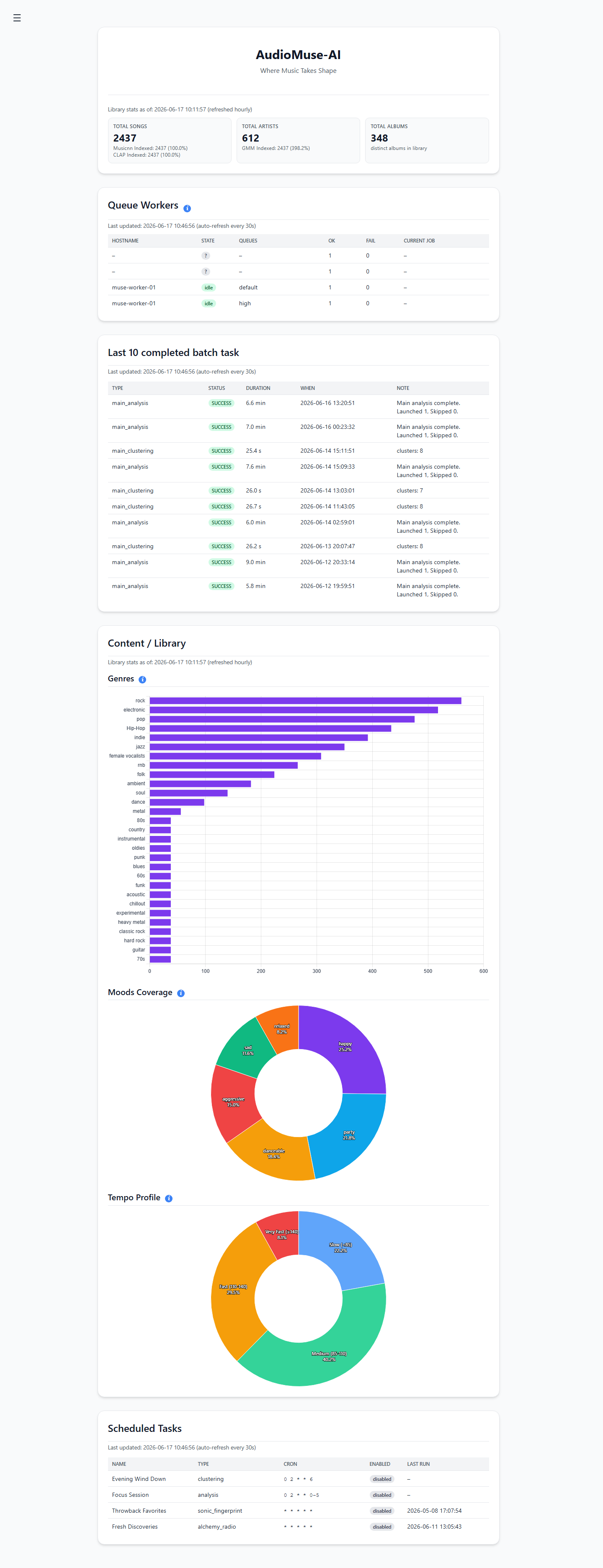

What is AudioMuse-AI?
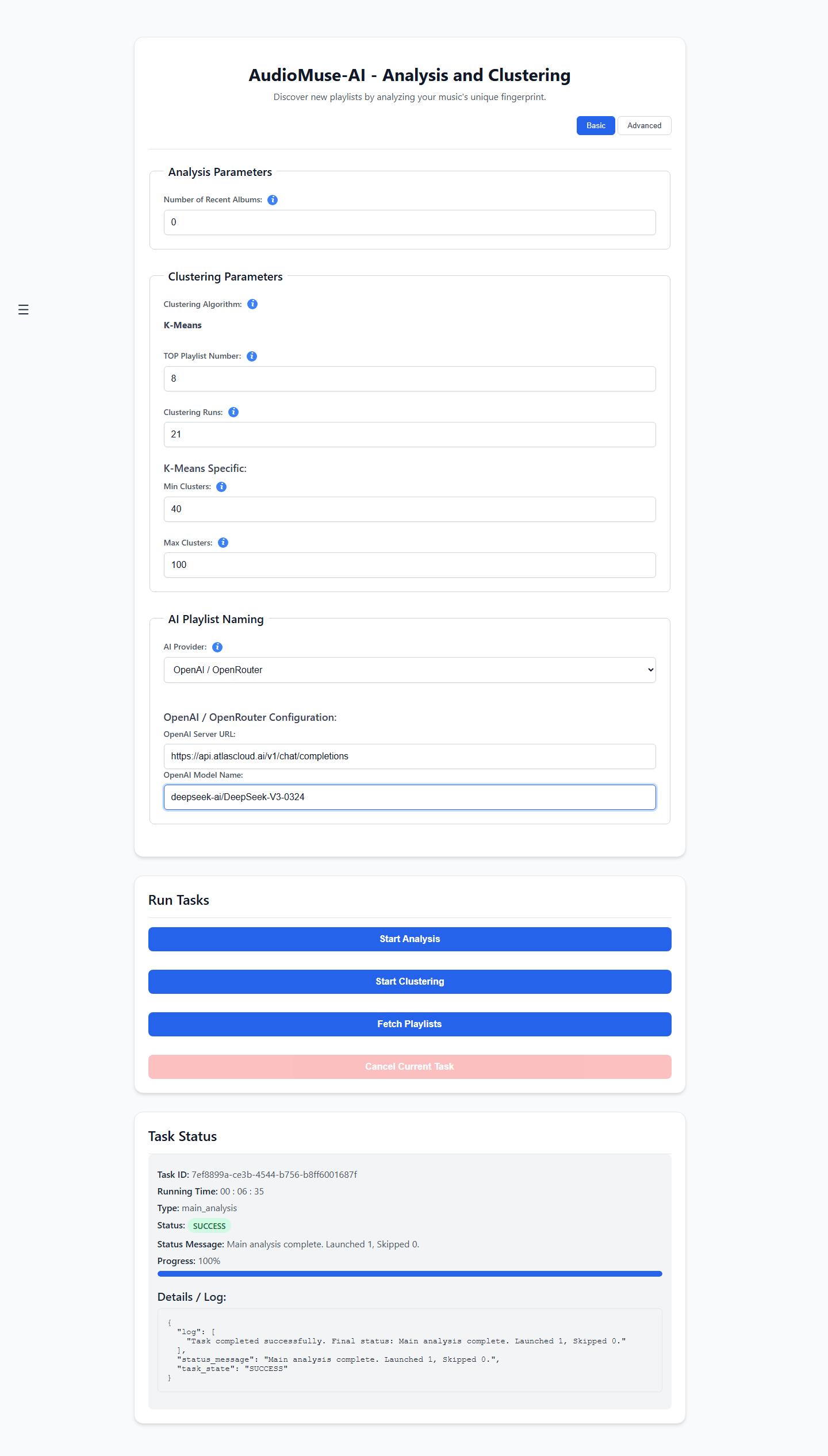
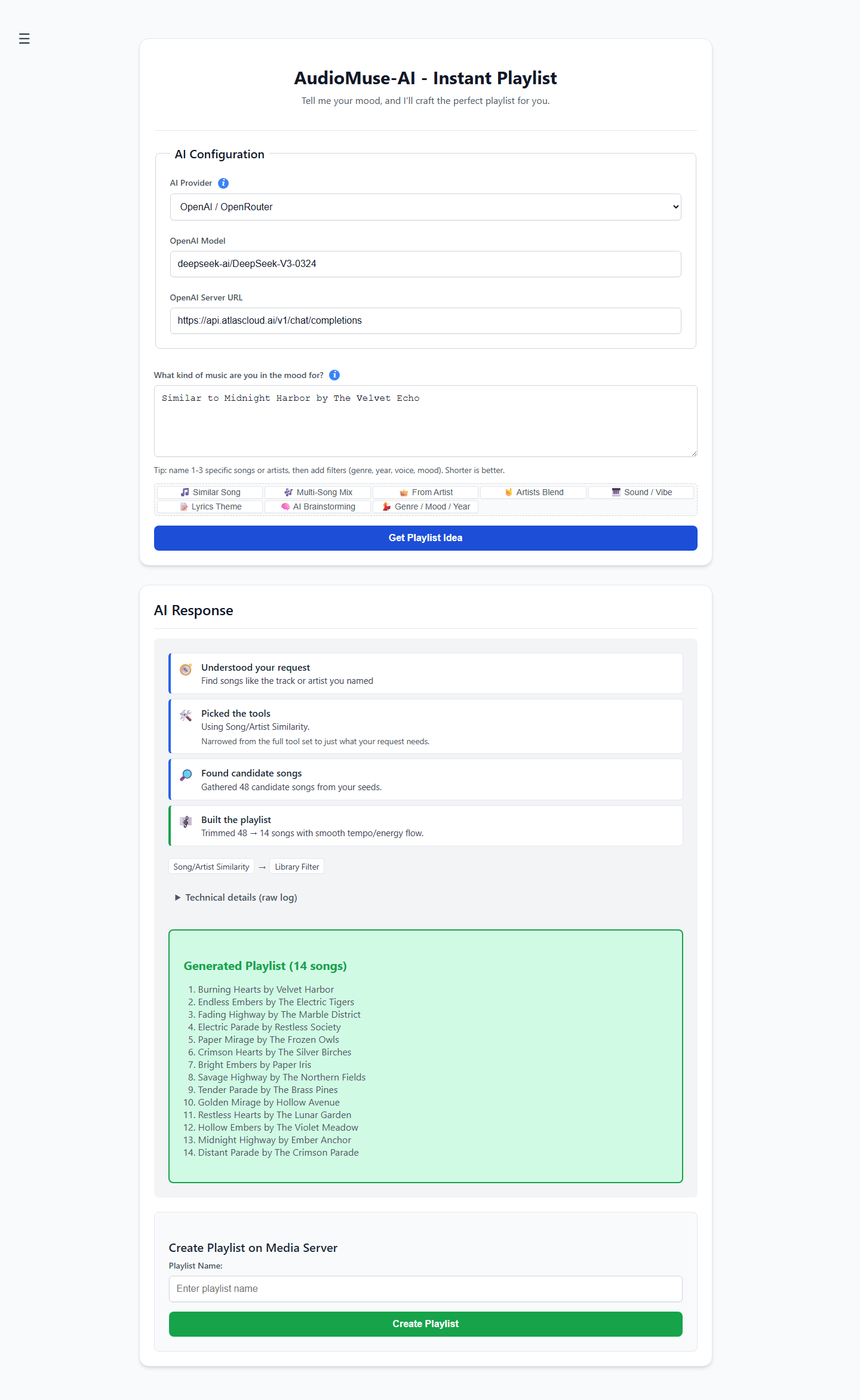
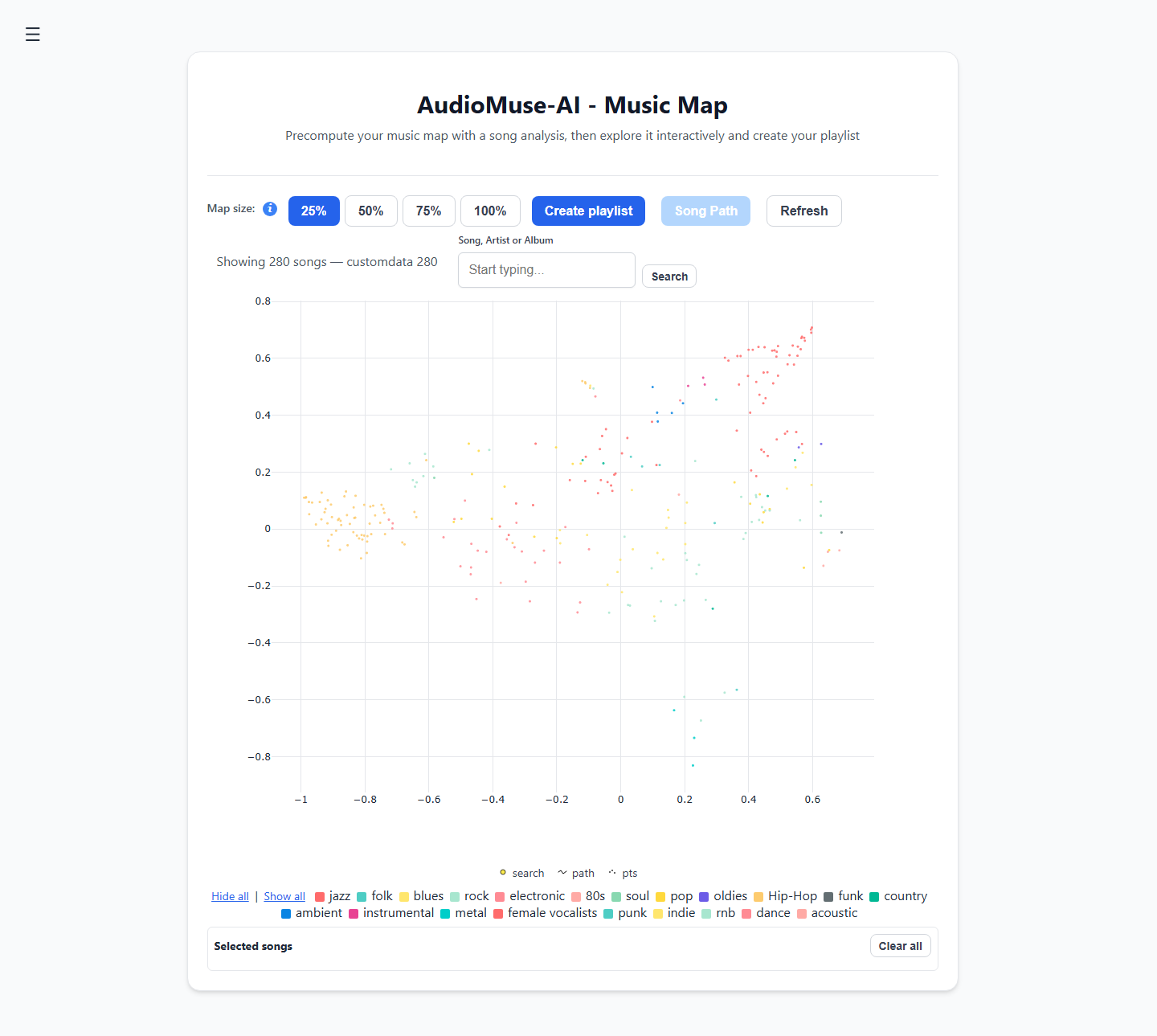
AudioMuse-AI is a self-hosted companion for a music library that listens to the actual audio instead of trusting tags: machine-learning models run over every track so playlists, search and discovery reflect how songs really sound. Once the first analysis pass is done, it can group similar tracks into genre-defying clusters, create a playlist from a plain-language request such as a tempo or mood description, draw the collection as a two-dimensional map, bridge two songs with a listening path, suggest tracks from what you play most, or mix an ideal vibe by marking songs to add and subtract. Search covers mood, instruments and genre, lyrical meaning across 72 languages, and even a short 20-second recording of whatever is nearby. It connects to Navidrome, Jellyfin, Emby, Plex, LMS and Lyrion, and one deployment can watch several servers at once while analyzing each unique song only one time. Container installs use Docker Compose, Podman Quadlets or Kubernetes with a published Helm chart against PostgreSQL 15; macOS, Linux and Windows packages bundle their own database and workers. The web UI and REST API listen on port 8000 behind a built-in username/password login with JWT sessions, and an optional NVIDIA image accelerates analysis and clustering. Running the initial analysis is mandatory before other features work and can take hours to days; Intel CPUs need AVX2 support. The code is AGPL-3.0 and extensible through community plugins.
AudioMuse-AI alternatives
 musikatSelf-hosted open-source music downloader that searches Deezer or Spotify, fetches audio from YouTube, tags files, and saves to Navidrome or local downloads.Comparemusikat with AudioMuse-AI
 LMSLightweight Music Server. Access your self-hosted music using a web interface.CompareLMS with AudioMuse-AI
 mixarrSelf-hosted music discovery for Lidarr connecting to Spotify, TIDAL, Last.fm and 9 more services with 56 subscription types, review queue, and AI recommendations.Comparemixarr with AudioMuse-AI
 aurralOpen-source self-hosted music discovery with personalized recommendations, rotating playlist flows, and library management. Works standalone or with Lidarr.Compareaurral with AudioMuse-AI
 MeeloSelf-hosted Music Server. Focused on metadata integration & UICompareMeelo with AudioMuse-AI
 qm-musicQM-Music is a self-hosted, open-source music server built on Subsonic. It runs in Docker with ~150MB RAM and works with Feishin and StreamMusic clients.Compareqm-music with AudioMuse-AI
 Melodia FlowSelf-hosted music acquisition: searches Spotify/Deezer, downloads from YouTube/SoundCloud/Bandcamp, tags metadata, syncs to Navidrome. Multi-user, 2FA, plugins.CompareMelodia Flow with AudioMuse-AI
 Lightweight Music Server (LMS)Self-hosted music streaming server with web UI and Subsonic API. Supports MusicBrainz, ListenBrainz, transcoding, multi-library.CompareLightweight Music Server (LMS) with AudioMuse-AI
Should you self-host AudioMuse-AI?
AudioMuse-AI scores 66/100 on selfhost.directory (how scoring works) and ranks #6 of 59 in Music Streaming. It has 2 962 GitHub stars, +244 in the last 30 days.
It shipped 41 stable releases in the past year. The latest, v3.7.2, came out on 16 November 2026. New versions land roughly every 3 days.
Setup is moderate: expect some configuration beyond a single command. An official Docker image is available. It is AGPL-3.0-licensed and written mostly in Python.
Its closest alternative on selfhost.directory is koel (75/100, 17 353 stars). It scores higher overall, so compare the two before you pick. See AudioMuse-AI vs koel side by side.
Features
- Audio clip identification
- Audio-content (sonic) analysis
- GPU AccelerationGPU clustering disabled by default
- Listening-habit playlists
- Lyrics / meaning search
- Multiple music servers with duplicate detection
- Music map visualization
- Natural-language playlist generation
- Plugin System
- REST API with Swagger docs
- Similar-song playlists
- Song Alchemy vibe mixing
- Song paths between two tracks
- Sonic similarity clustering
- Text search by mood, instrument, genre
AudioMuse-AI README
⭐ Leave a star on this project: One shines alone; together, they make it visible and keep it alive.
💛 Donate to AudioMuse-AI this Christmas
Over 2,521 Navidrome users rely on AudioMuse-AI today (based on Navidrome anonymous usage statistics), and that's before counting all our Jellyfin, Emby, Plex, LMS and Lyrion users.
What started as a personal project now powers music libraries all over the world. AudioMuse-AI will always remain free and open source because I believe sonic analysis should be accessible to everyone, regardless of their budget. No ads, no paywalls, no subscriptions. Your music library is analyzed on your own server, keeping your data completely under your control.
However, keeping the project alive and moving forward takes ongoing resources: AI licenses, homelab infrastructure, research, and countless hours spent on releases and user support.
If you choose to donate €10, or whatever feels right for you, you will help keep AudioMuse-AI alive and growing throughout 2027.
Every single contribution makes a difference.
Thank you,
NeptuneHub
Maintainer of AudioMuse-AI
FAQ
What happens if my music server IDs change?
Existing mappings can break, making tracks look missing or duplicated. Recover by restoring the music-server backup, running a provider migration, cleaning stale entries, or as a last resort re-analyzing everything.
How to backup and restore the database?
Both are under Administration > Backup and Restore. Restore into the same PostgreSQL major version the backup came from, since container and native builds may bundle different versions.
Clustering takes a lot of time, how can I run it faster?
Reduce the Clustering Runs value from its default 1000 iterations; a few hundred already gives usable results on a small library.
Clustering returns playlists with too many songs.
Increase the min and max cluster counts and lower the stratified sampling target percentile, or lower the maximum playlist size target when automatic discovery is on.
What do the bars under the Machine Learning Models mean?
Each bar shows how complete that model's search index is, from one lit segment (just starting) to five (ready, above 95 percent). If one stays short after a run, start the analysis again so skipped songs are retried.
How long does the analysis take, and what if I interrupt it?
It depends on library size and hardware, ranging from hours to days. An interrupted run is safe to restart because already analyzed songs are kept in the database.
How do I start using AudioMuse-AI?
Open the frontend on port 8000 and run the Analysis first; that pass is mandatory before any other feature becomes usable.
How do I get the Plex auth token (X-Plex-Token)?
Sign in to the Plex Web App, open the browser network tab, refresh a library and copy the X-Plex-Token value from a request to your server.
Why does the Setup Wizard connection test fail with Jellyfin?
Usually wrong credentials: Jellyfin must be configured with the user's UID rather than the username. The steps to find the User ID are in the parameters docs.
How can I make the analysis faster?
Configure a lyrics source so Whisper transcription is skipped, add more worker containers on other machines, or as a last resort disable some machine-learning models.
Can AudioMuse-AI support multiple music libraries?
Yes: give one server a comma-separated library or folder filter, or attach several media servers (even several of the same kind) to one instance. A song present on two servers is analyzed once and mapped to both.
How to deploy AudioMuse-AI?
Follow the README and the examples in the deployment folder; only PostgreSQL and TZ are set through environment variables and everything else is configured in the browser Setup Wizard.
Which are the hardware requirements?
It runs on both ARM and Intel; the suggested setup is 4 cores, 8 GB RAM and an SSD. The NVIDIA images want a GPU with about 8 GB VRAM.
More in Music Streaming
- aurralOpen-source self-hosted music discovery with personalized recommendations, rotating playlist flows, and library management. Works standalone or with Lidarr.
 Black CandySelf-hosted, open-source music streaming server you run in a single Docker container, with SQLite by default, optional PostgreSQL, and native iOS and Android apps.
 cicadaCicada is a self-hosted, open-source multi-user music streaming service with PWA, 2FA, lyrics, and music sharing. Runs as a single binary or via Docker.
 cloudtunesOpen-source, self-hosted web music player that unifies your Dropbox files and YouTube videos, with playlists, Last.fm scrobbling and MusicBrainz metadata.
 DeaftoneLightweight Rust music server for self-hosted streaming. Simple API, FLAC/MP3/Ogg support, SQLite storage. Alternative to Subsonic.
 euterpeEuterpe is an open-source, self-hosted music streaming server for your personal library. Runs as a single binary with web UI, REST API, and native mobile apps.
 feishinOpen-source desktop and web music player for Jellyfin, Navidrome and OpenSubsonic servers; the self-hosted Docker image serves the web client on port 9180.
 foamSelf-hosted PHP web player for Ampache music servers with Fomantic UI, featuring library browsing, playlists, queue management, and FLAC support.
 gonicSelf-hosted, open-source Subsonic server API implementation in Go for streaming your own music: transcoding, podcasts, multi-user, Last.fm and ListenBrainz scrobbling.
 hifiSelf-hosted Tidal music integration via OpenSubsonic API for Subsonic, Jellyfin, Plexamp clients. Requires valid Tidal subscription.
 homehostSelf-hosted, open-source Netflix-like web app for streaming your local media: movies, TV shows and music, with TMDb metadata and Spotify album lookup.
 JellyfinJellyfin is a self-hosted, open-source media server for streaming movies, shows, music, photos, books, and live TV to any device with no fees or tracking.
0 comments