
Self-host Jaeger
v2.23.0Open-source distributed tracing for monitoring microservices
- Stars
- 23 416
- Ports
- 16686 (Jaeger UI), 4317 (OTLP gRPC trace ingestion), 4318 (OTLP HTTP trace ingestion), 5778 (Sampling configuration API), 9411 (Zipkin-compatible span ingestion)
jaegertracing/jaeger


What is Jaeger?
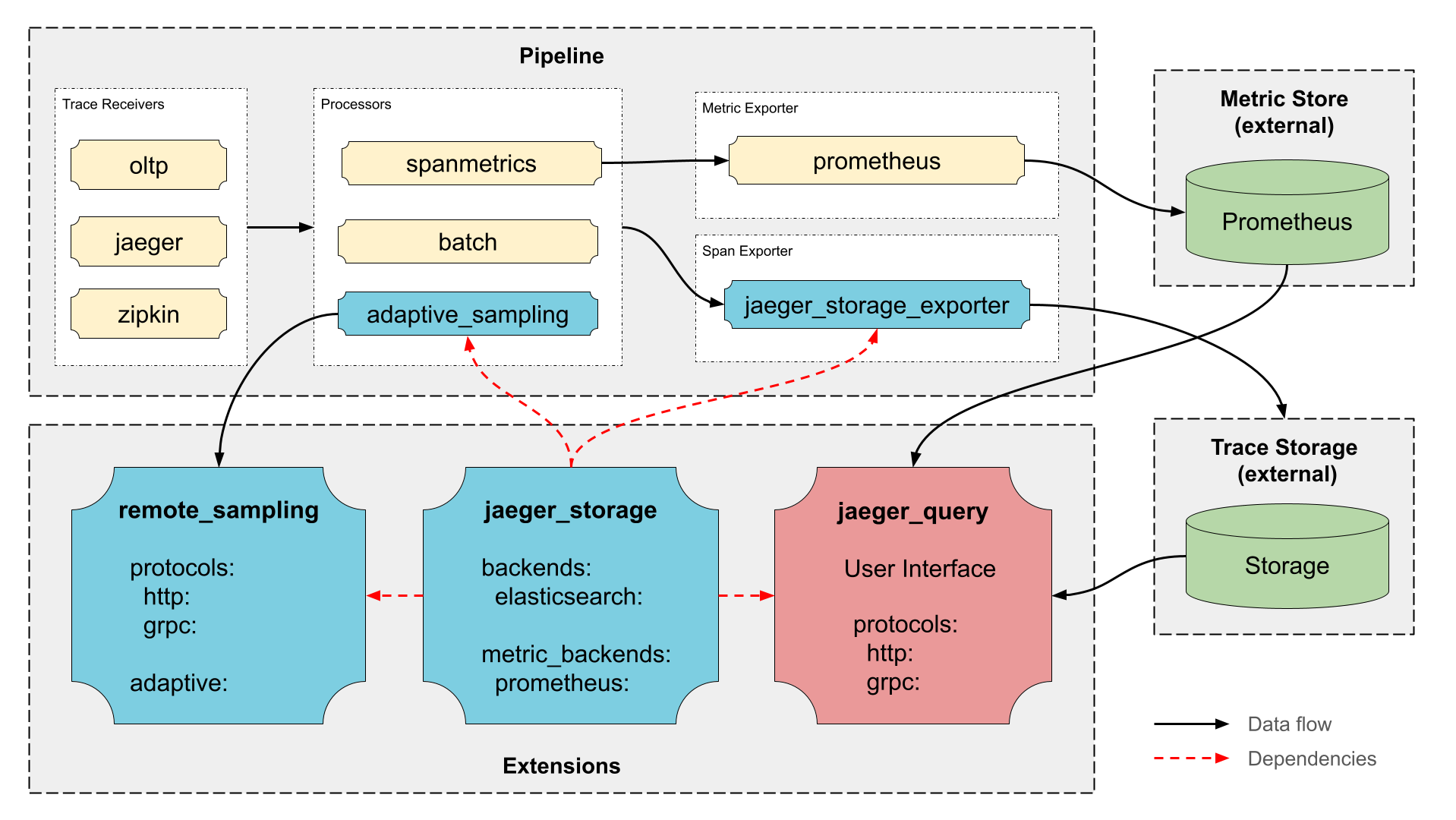
Jaeger is a distributed tracing system designed for microservice architectures. It traces requests as they flow through distributed applications, helping teams locate performance problems and errors. The platform ingests trace data via OTLP (gRPC or HTTP), stores it in backends like Elasticsearch, Cassandra, ClickHouse, Badger, or memory, and provides a web interface for querying and visualizing traces. Created by Uber and now a graduated CNCF project, Jaeger supports cloud-native deployments on Kubernetes, Docker, and various operating systems including Linux, macOS, and Windows.
Jaeger alternatives
 gigapipeSelf-hosted open-source observability backend merging four telemetry types into ClickHouse with Loki, Prometheus, Tempo and Pyroscope protocol support.Comparegigapipe with Jaeger
 corootSelf-hosted, open-source APM and observability platform where eBPF agents capture every telemetry signal without code changes, with service maps and SLO alerting.Comparecoroot with Jaeger
 wagglewaggle is a self-hosted, open-source OpenTelemetry viewer that ingests traces, logs, and metrics via OTLP into SQLite with a Honeycomb-style query interface.Comparewaggle with Jaeger
 monoscopeOpen-source, self-hosted observability that keeps logs, metrics and traces in your own S3 buckets, with plain-English queries, scheduled AI agents and session replay.Comparemonoscope with Jaeger
 pyroscopeOpen-source, self-hosted continuous profiling platform: ingest CPU/memory profiles via SDKs, Alloy or eBPF, store in object storage and query flame graphs in Grafana.Comparepyroscope with Jaeger
 Apache SkyWalkingOpen-source, self-hosted APM platform for cloud-native systems: tracing, metrics, logs, profiling and alerting on pluggable storage such as BanyanDB.CompareApache SkyWalking with Jaeger
 netdataNetdata is an open-source, self-hosted infrastructure monitoring platform with per-second metrics, automated dashboards, ML anomaly detection, and zero-config deployment.Comparenetdata with Jaeger
 signozOpen-source observability tool you host yourself, combining APM, logs, traces, and dashboards on OpenTelemetry to replace DataDog.Comparesignoz with Jaeger
Should you self-host Jaeger?
Jaeger scores 81/100 on selfhost.directory (how scoring works) and ranks #6 of 105 in Monitoring & observability. It has 23 416 GitHub stars, +123 in the last 30 days.
It shipped 13 stable releases in the past year. The latest, v2.23.0, came out on 5 November 2026. New versions land roughly every 4 weeks.
Setup is easy: most people get it running in one sitting. An official Docker image is available. It is Apache-2.0-licensed and written mostly in Go.
Its closest alternative on selfhost.directory is prometheus (92/100, 67 664 stars). It scores higher overall, so compare the two before you pick. See Jaeger vs prometheus side by side.
Features
- Cloud-Native
- Distributed Tracing
- Microservices observability
- Multiple Storage Backends
- OTLP support
- Web UI
Jaeger README

How to install Jaeger
Install Jaeger with Docker
Run Jaeger all-in-one (includes UI, collector, query, and in-memory storage)
docker run --rm --name jaeger
-p 16686:16686
-p 4317:4317
-p 4318:4318
-p 5778:5778
-p 9411:9411
cr.jaegertracing.io/jaegertracing/jaeger:2.22.0
All-in-one mode includes memory storage by default
Jaeger releases & version history
AI summary Removed unused ClickHouse feature gates
Backend Changes
⛔ Breaking Changes
- Fix(storage): remove unused clickhouse feature gates (@albertteoh in #9988)
- Fix(storage): resolve auth extension references deterministically (@jkowall in #9772)
- Chore(ai-sidecar): remove the gemini reference sidecar (@alishair7071 in #9841)
- Feat(clickhouse): require an explicit table engine when creating the schema (@ysh-bot in #9813)
✨ New Features
- Feat(mcp): accept a sql statement in the search_traces tool (@ysh-bot in #9925)
- Feat(query): add a sql query surface that compiles to rfc 0005 filters (@ysh-bot in #9922)
- Feat(query): serve storage search capabilities over api_v3 http (@ysh-bot in #9804)
- Feat(query): serve storage search capabilities over api_v3 grpc (@ysh-bot in #9803)
- Build(idl): bump jaeger-idl to v0.14.0 (@ysh-bot in #9802)
- Feat(clickhouse): route structured query filters to sql where (rfc 0005 m3) (@om7057 in #9701)
🐞 Bug fixes, Minor Improvements
- Fix(mcp): start the investigation strategy with read_skill (@lopster568 in #10038)
- Fix(otel-demo): add 30-day opensearch index retention (@jkowall in #9917)
- Fix(es): store non-finite doubles as otlp/json string tags (@jkowall in #9912)
- Fix(query): deduplicate shared span ids in linear time (@jkowall in #9764)
- Fix(query): recover from panics in query grpc and mcp handlers (@jkowall in #9766)
- Feat(query): forward captured identity headers onto the acp agent handshake (@ysh-bot in #10007)
- Fix(mcp): guard trace walks against duplicate span ids (@jkowall in #9763)
- Fix(query): check filter nesting depth before decoding api_v3 parameters (@jkowall in #10006)
- Feat(query): support prettyprint on the v3 http api (@sksingh2005 in #9990)
- Fix(jaegermcp): expose total_span_count in get_trace_topology (@alliasgher in #8530)
- Feat(storage): honor anchors and case folding in regex filter patterns (@ysh-bot in #9923)
- Fix(query): reject durations that overflow (@sublimemonk in #9877)
- Fix(query): render non-finite float attributes as strings (@ayush00git in #9901)
- Feat(query): add ai.auth to gate the ai endpoints with an authenticator (@ysh-bot in #9908)
- Fix(clickhouse): bind gettraces time bounds at nanosecond precision (@NUAAwqy in #9894)
- Fix(clickhouse): bound distributed trace searches (@zarna1parekh in #9882)
- Fix(jaegerai): start a new text message after each tool call (@ysh-bot in #9879)
- Fix(jaegerai): keep whitespace-only streaming chunks (@jkowall in #9878)
- Fix(query): reject non-positive lookback, step and rateper in metrics api (@sublimemonk in #9863)
- Refactor(ai): remove legacy acp tool routing (@alishair7071 in #9855)
- Fix(tenancy): reject empty tenant values on grpc (@jkowall in #9768)
- Fix(query): drop resource spans emptied by dedup (@jayhemnani9910 in #9836)
- Fix(query): reject non-positive lookback values (@sloemo01 in #9832)
- Fix(cassandra): stop duration search at depth (@sublimemonk in #9853)
- Feat(mcp): add streamable_http transport options to ai.mcp (@ysh-bot in #9857)
- Feat(memory): evaluate phrase and fulltext operators in memory store (@rishabhkumar92 in #9791)
- Feat(mcp): add ai.mcp.disable_localhost_protection for proxied deployments (@ysh-bot in #9849)
- Fix(remotesampling): wait for serve goroutines in shutdown (@stanleys12 in #9824)
- Fix(mcptools): set error status on spans for failed tool calls (@SoumyaRaikwar in #9809)
- Fix(storage/es): accept non-string index settings in getjaegerindices (@pujitha24 in #9252)
- Fix(cache): check ttl in compareandswap (@RudraDudhat2509 in #9736)
- Fix(query): reject inverted/zero time range in apiv2 getdependencies (@pranitaurlam in #9239)
- Fix(clickhouse): reject default_search_depth exceeding max_search_depth and negative dial_timeout (@padmasri-web in #9725)
- Fix(es): reject negative index retention (@viiccwen in #9123)
- Feat(es): record bulk request size metrics for the elasticsearch writer (@ysh-bot in #9787)
- Fix(badger): remove stale operations entries on service expiry (@bhavyamsharmaa in #9021)
- Fix(storage): sanitize remote storage exports (@viiccwen in #9062)
- Fix(examples): set max_span_age in opensearch demo (@sahilnyk in #9124)
- Fix(mcptools): always emit mcp.method.name attribute on mcp tracing spans (@Aryanbhargava18 in #9749)
- Fix(es): turn off the span search _id tie-breaker by default (@ysh-bot in #9783)
- Fix(docker): run images with a non-root primary group (@jkowall in #9771)
- Fix(query): treat non-string library attributes as conflicts instead of panicking (@jkowall in #9765)
- Fix(spm): escape service names in promql matchers (@jkowall in #9769)
- Fix(es-index-cleaner): escape index names in delete requests (@jkowall in #9770)
- Fix(deps): update apache thrift to v0.25.0 (@jkowall in #9756)
- Fix hardcoded metricstore es extended lookback (@HESleagacy in #9102)
👷 CI Improvements
- Fix(demo): give otel demo checkout enough memory to serve orders (@jkowall in #10005)
- Ci(publish): stop trusting fork ci summary artifacts (@jkowall in #9998)
- Fix(ci): let manual release runs build a given ref and flag commits past the tag (@albertteoh in #9985)
- Fix(ci): give the execution-mode step a token so the trust checks can call the api (@ysh-bot in #10013)
- Fix(ci): restore the clickhouse metrics snapshot filename (@jkowall in #9951)
- Chore(query): move the last v1 trace callers to the v3 api (@sksingh2005 in #10004)
- Fix(release): harden prepare.sh and start.sh against release-manager mistakes (@albertteoh in #9986)
- Feat(ocb): wire build-ocb to the workspace overwrite pattern (@iammdzaidalam in #8871)
- Ci: limit active prs per issue (@Harizz076 in #9800)
- Feat(clickhouse): test both supported clickhouse lts lines in ci (@ysh-bot in #9893)
⚙️ Refactoring
- Refactor(query): split the gateway's streamingclient into aguirun and acpclient (@ysh-bot in #10017)
- Chore(safeexpvar): remove the unused package (@AnKiT-GaRG2 in #9829)
- Refactor(query): move the ai configuration and routes into jaegerai (@ysh-bot in #9907)
- Refactor(clickhouse): name the search stages and share one rows loop (@ysh-bot in #9899)
📖 Documentation
- Docs(remote-storage): document the grpc port as a trusted interface (@jkowall in #9872)
- Docs(security): refresh threat model (@jkowall in #9821)
- Docs(release): land due feature-gate transitions before preparing a release (@albertteoh in #9984)
- [badger] document span kind index design in rfc 0020 (@Audio431 in #8402)
- Docs(rfc): name what the legacy filter rewrite carries for the flat backends (@ysh-bot in #9960)
- Docs(rfc): keep the flat backends on the legacy filter rewrite (@ysh-bot in #9959)
- Docs(mcp): document endpoint exposure and security setup (@shantanu-1607 in #9828)
- Docs(rfc): propose configurable clickhouse attribute hoisting (@rishabhkumar92 in #9902)
- Chore(clickhouse): pin images to the 26.8 lts line and link the policy to the pins (@ysh-bot in #9892)
- Docs(ai): require goose v1.55.0 for trace propagation (@ysh-bot in #9867)
- Docs(rfc): define the text-search operators and how a new operator lands (@ysh-bot in #9758)
📊 UI Changes
⛔ Breaking Changes
- Feat(trace): open the json views from the v3 trace api (@sksingh2005 in #4678)
- Refactor(api): migrate downloads to jaegerclient (@sksingh2005 in #4649)
✨ New Features
- Feat(trace): load native otlp traces (@sksingh2005 in #4605)
🐞 Bug fixes, Minor Improvements
- Fix(trace): keep cached traces on refetch errors (@sksingh2005 in #4692)
- Fix(assistant): keep lone underscores and asterisks in markdown (@jkowall in #4623)
- Fix(ui): keep detected base on this origin (@jkowall in #4679)
- Fix(api): read the nested v3 gateway error message (@sksingh2005 in #4675)
- Fix(ui): add accessible aria-label to icon-only standalone links (#4596) (@padmasri-web in #4597)
- Fix(ui): adjust edge label coordinates for self-referencing nodes in dag view (@harshitt13 in #3987)
- Fix(api): append the server message to http errors (@ysh-bot in #4670)
- Fix(search): extract messages from error bodies (@sksingh2005 in #4666)
- Fix(metrics): validate data and rethrow aborts (@sksingh2005 in #4665)
- Fix(timeline): use single shoulddisablecollapse implementation (@om7057 in #4594)
- Feat(trace): mark values read from non-standard genai names (@ysh-bot in #4654)
- Feat(trace): read unprefixed input and output genai attributes (@ysh-bot in #4653)
- Fix search page overflow and compare page nav offset (@lpmi-13 in #3792)
- Fix(ui): prevent long trace names from overflowing header flexbox (#4… (@shubhtrek in #4637)
- Fix(upload): clarify unsafe int64s, replace repeated ids, cap size (@sksingh2005 in #4644)
- Fix: correct timeline expand/collapse analytics (@Piyush4801 in #4613)
- Fix(api): accept non-finite double values (@alishair7071 in #4643)
- Fix(api): attach http error details to v3 client errors (@sksingh2005 in #4635)
- Fix(timeline): clear dropped side panel selection (@Sandipxg in #4621)
- Feat(upload): parse otlp files in browser (@sksingh2005 in #4634)
- Fix(trace): restore backend warnings in native trace spans (@sksingh2005 in #4622)
- Fix(trace): cancel unused trace requests (@alishair7071 in #4616)
- Fix(trace): add explicit reload for incomplete traces (@sksingh2005 in #4574)
- Feat(span): lazy-load large attributes to prevent ui stalls (@Harizz076 in #3899)
- Feat(api/v3): add validated otlp trace parser (@sksingh2005 in #4503)
- Fix(search): add accessible aria-label to resultitemtitle comparison checkbox (#4551) (@padmasri-web in #4552)
- Fix(analytics): preserve zero event values (@ADITYA-CODE-SOURCE in #4283)
- Fix: to validates invalid json trace files in upload (@NithinU2802 in #4431)
- Fix(model): align span fallback contracts (@sksingh2005 in #4584)
- Feat(genai): add trace execution summary (@Harizz076 in #4467)
- Fix/4386 flamegraph any types (@shubhtrek in #4509)
👷 CI Improvements
⚙️ Refactoring
- Refactor(assistant): lazy-load the ask jaeger dock (@ysh-bot in #4702)
- Refactor(api): delete the legacy jaegerapi client (@sksingh2005 in #4684)
- Refactor(api): migrate quality metrics client (@sksingh2005 in #4669)
- Chore: remove unsafe use of _get() for static paths (@DsThakurRawat in #4338)
- Refactor(timeline): move timeline analytics off the redux middleware (@sksingh2005 in #4674)
- Refactor(nav): move topnav inline styles to css (@lpmi-13 in #4663)
- Refactor(api): migrate metrics to jaegerclient (@sksingh2005 in #4647)
- Refactor(plexus): convert nodes component (@Harizz076 in #4582)
- Refactor(api): migrate dependency requests (@sksingh2005 in #4629)
- Refactor(api): move archive and decorations to jaegerclient (@sksingh2005 in #4602)
- Refactor(ui): migrate listview to react functional component (@Harizz076 in #3971)
- Refactor(tracestatistics): migrate to functional component (@om7057 in #4483)
- Refactor(tracepage): generalize scroll-page for element containers (@dolliecoder in #4158)
- Chore(plexus): use dedicatedworkerglobalscope in layout worker (@021nirav-blip in #4319)
- Perf(spanview): use set lookups in tracespanview filter (@zeeshan8281 in #4318)
- Refactor(model): extract attribute helpers (@sksingh2005 in #4576)
AI summary Numeric attribute indexing now configurable
Backend Changes
⛔ Breaking Changes
- Fix(es): configure numeric attribute indexing instead of gating it (@ysh-bot in #9694)
- Refactor(es): give the span index its own options type (@ysh-bot in #9693)
- Fix(remote-storage): configure the service from one confmap-decoded file (@ysh-bot in #9699)
- Fix(es): honor index-prefix in dependencies/sampling legacy templates (@zarna1parekh in #9684)
- Feat(es): promote the native trace summaries gate to stable (@ysh-bot in #9609)
- Feat(query): promote the structured filters feature gate to beta (@ysh-bot in #9607)
- Feat(query): give span searches their own query interceptor hooks (@ysh-bot in #9597)
- Feat(es): promote the omitparentspanidreference gate to beta (@ysh-bot in #9586)
✨ New Features
- Feat(es): declare span search and pagination (@baroquebobcat in #9729)
- Feat(memory): execute caller-selected span ordering (@ysh-bot in #9672)
- Feat(query): expose span ordering in api v3 (@ysh-bot in #9671)
- Feat(storage): forward span ordering over grpc (@ysh-bot in #9670)
- Feat(query): validate and bind span ordering (@ysh-bot in #9669)
🐞 Bug fixes, Minor Improvements
- Fix(memory): skip same-service parents when building dependency links (@lopster568 in #9090)
- Fix(es-rollover): reject unknown --unit values in lookback (takeover #9442) (@jkowall in #9732)
- Fix(jaegerquery,remotestorage): remove nil error wrap in start() (@g-k-s-03 in #8882)
- Fix(memory): use read locks for read-only samplingstore methods (@shayannab in #9005)
- Fix(es): return an error for a nil predicate instead of panicking (@RudraDudhat2509 in #9709)
- Feat(es): break span sort ties on the backing index and document id (@baroquebobcat in #9720)
- Feat(es): search spans in the core reader (@baroquebobcat in #9704)
- Fix(release): re-enable slsa provenance with valid tag reference (#9046) (@Kartikupadhyay44 in #9702)
- Feat(es): wire span search through the elasticsearch reader (@baroquebobcat in #9700)
- Feat(es): lower starttime comparisons into filter (rfc 0016 m4) (@baroquebobcat in #9697)
- Fix(ai-sidecar): point default mcp url to query port 16686 (@rautaditya2606 in #9658)
- Fix(memory): validate positive maxtraces (@DsThakurRawat in #9634)
- Fix(es): gate attribute ordering separately from typed attribute indexing (@ysh-bot in #9690)
- Fix(query): answer capability refusals with unimplemented instead of invalidargument (@ysh-bot in #9685)
- Fix(storage): apply timeout to grpc storage calls (@anishmehta24 in #9638)
- Fix(remotesampling): reject non-positive leader election lease refresh intervals (@pujitha24 in #9647)
- Fix(es): give the sync batch size half of the bulk cap as headroom (@ysh-bot in #9645)
- Fix(jptrace): tracesdata.marshaltosizedbuffer writes to buffer head instead of tail (@om7057 in #9629)
- Fix(config): batch and block on overflow in the kafka ingester configurations (@ysh-bot in #9624)
- Fix(query): copy the whole pagination struct before clamping (@ysh-bot in #9618)
- Fix(query): clamp the page size on a copy rather than through the caller pointer (@ysh-bot in #9617)
- Feat(query): admit rfc 0014 pagination into the query path (@om7057 in #9450)
- Feat(es): support span.traceid and span.spanid in structured filters (@prajak002 in #9610)
- Fix(anonymizer): write ui trace file when max-spans-count is reached (@DsThakurRawat in #9567)
- Feat(query): add findspans to the query service (@baroquebobcat in #9581)
- Fix(mcp): reject negative durations in search_traces before querying (@pujitha24 in #9575)
- Fix(mcp): back off to a rune boundary when truncating read_skill (@om7057 in #9589)
- Fix(query): refuse a trace filter that a later interceptor drops (@ysh-bot in #9606)
- Fix(es): prevent service-operation key collisions (@SaadShakeel1 in #9440)
- Fix(elasticsearch): support ordered built-in text filters (@alishair7071 in #9477)
- Fix(samplingstore): propagate write errors in insertthroughput and insertprobabilitiesandqps (@shashankvarma499 in #9533)
- Fix(es): retry failed writes in the synchronous kafka ingester config (@ysh-bot in #9593)
- Feat(query): add the rfc 0014 pagination contract to tracestore (@om7057 in #9570)
- Fix(es-rollover): reject non-positive unit-count in lookback action (@DsThakurRawat in #9568)
- Test(jaegerquery): add labeled trace fixtures and e2e coverage for the built-in skills (@SoumyaRaikwar in #9263)
- Fix(query): prevent archiving archive-only traces (@jkowall in #9391)
- Fix(es): do not double the separator when index-prefix already ends in "-" (@pujitha24 in #9551)
- Fix(tracegen): validate attr-keys and attr-values to prevent divide-by-zero (@shashankvarma499 in #9545)
🚧 Experimental Features
- Feat(storage): add findspans and search pagination to the memory backend (@om7057 in #9611)
- Feat(storage): add the rfc 0014 page token that paginating readers return (@ysh-bot in #9655)
- Feat(query): add the api_v3 findspans handler and http route (@om7057 in #9613)
- Feat(es): add the jaeger_storage_writer connector to dead-letter rejected spans (@ysh-bot in #9604)
- Feat(es): report terminally rejected bulk items in a typed error (@ysh-bot in #9598)
- Feat(query): rfc 0016 m2 - pt 1 - add searchspans to capabilities and findspans to reader (@baroquebobcat in #9578)
👷 CI Improvements
- Feat(release): draft the github release when the prepare pr merges (@albertteoh in #9740)
- Ci(backward-compat): build the earlier revision from the latest release tag instead of main (@alishair7071 in #9547)
- Ci(test): raise the storage integration test timeout to 20 minutes (@ysh-bot in #9680)
- Ci: check out the default branch explicitly in the pr quota workflow (@ysh-bot in #9591)
- Test(integration): support explicit upgrade scenarios in backward-compatibility harness (@Kartikupadhyay44 in #9566)
⚙️ Refactoring
- Refactor(memory): give filter values a kind instead of one flag per type (@ysh-bot in #9677)
- Refactor(tracestore): make searchdepth and pagesize unsigned on internal query types (@Kartikupadhyay44 in #9642)
- Refactor(query): give the query service its own request types (@ysh-bot in #9654)
- Refactor(jptrace): share the hex trace and span id parsers (@ysh-bot in #9632)
- Refactor(exporter): register jaeger_storage_exporter as a connector with a dead-letter output (@ysh-bot in #9622)
- Refactor(storage): export the storage exporter's write core as tracewriter (@ysh-bot in #9599)
- Refactor(query): name search query fields in plain english in refusals (@ysh-bot in #9616)
- Refactor(query): validate a search query once in the query service alone (@ysh-bot in #9612)
- Refactor(storage): generalize paginated reader results (@ysh-bot in #9585)
📖 Documentation
- Docs(rfc): mark rfc 0016 m3 delivered (@ysh-bot in #9759)
- Docs(rfc): split the deferred kafka consumer milestone into receiver-level batching and a worker pool (@ysh-bot in #9696)
- Docs(rfc): record the es/os pagination and tie-breaking decisions for span search (@ysh-bot in #9691)
- Docs(rfc): state the single-value rule that attribute ordering must settle (@ysh-bot in #9679)
- Docs(rfc): specify caller-selected span ordering (@ysh-bot in #9667)
- Docs(rfc): record the delivered rfc 0014 m2 plumbing (@ysh-bot in #9630)
- Docs(adr): record synchronous elasticsearch writes and lossless pipelines in adr-014 (@ysh-bot in #9621)
- Docs(rfc): propose streaming responses for the api v3 http gateway (@ysh-bot in #9620)
- Docs(rfc): compare the clickhouse schema with the clickstack exporter schema (@ysh-bot in #9596)
- Docs(rfc): unify paginated reader results (@ysh-bot in #9584)
📊 UI Changes
🐞 Bug fixes, Minor Improvements
- Fix(trace): prevent call-stack overflow on deeply nested traces (@jkowall in #4554)
- Fix(model): align parentage with the backend (@ysh-bot in #4569)
- Fix(jaeger-ui): guard missing array fields in otelspanfacade (@abhayrajjais01 in #4323)
- Fix(dependencygraph): include lookback in view traces url to prevent 400 error. (@kams19-ops in #4151)
- Feat(genai): add a json (deep) view that unwraps embedded json (@ysh-bot in #4544)
- Fix(genai): accept bare gen_ai.input and gen_ai.output (@ysh-bot in #4542)
- Fix(flamegraph): preserve search highlighting when collapsing nodes above (@padmasri-web in #4529)
- Fix(api/v3): drop out-of-range search timestamps gracefully (@padmasri-web in #4508)
- Fix: improve image alt text (@Piyush4801 in #4524)
- Fix: optimize span index to row index lookup (@Safian62 in #4500)
- Fix: correct deep dependencies endpoint (@Safian62 in #4484)
- Feat(api/v3): validate v3 trace wire contract at boundary (@sksingh2005 in #4455)
- Fix(trace-timeline): make span-details divider draggable from the header (@KKamJi98 in #4412)
👷 CI Improvements
- Feat(release): draft the github release when the prepare pr merges (@albertteoh in #4571)
- Ci(security): resolve scorecard alerts (@ysh-bot in #4557)
- Ci: check formatting across platforms (@ysh-bot in #4495)
⚙️ Refactoring
- Test(model): materialize otlp trace specs (@sksingh2005 in #4527)
- Refactor(model): rename trace display helpers (@ysh-bot in #4573)
- Refactor(ui): convert deepdependencies to functional component (@Harizz076 in #3970)
- Chore: drop _get from spantreeoffset hover handlers (@Priyanshu-byte-coder in #4358)
- Chore(lint): replace react-x plugin with oxlint's native versions (@akashchamp in #4463)
- Chore: eliminate as any cast on redux store in app provider (#4333) (@Kartikupadhyay44 in #4456)
- Feat(monitor): migrate metrics fetching from redux to react query (@parshipcy in #4048)
- Refactor(tracepage): decouple graph search logic (@sksingh2005 in #4176)
AI summary Removed v1 endpoints, updated MCP config, and fixed unsupported Elasticsearch keys
Backend Changes
⛔ Breaking Changes
- Feat(query)!: remove v1 http endpoints the ui no longer calls (@ysh-bot in #9260)
- Replace ai.enable_mcp with an optional ai.mcp config block (@SoumyaRaikwar in #9194)
- Fix(es): reject five unsupported elasticsearch config keys at startup (@ysh-bot in #9076)
- Feat(clickhouse): promote clickhouse storage feature gate to stable (@ysh-bot in #9058)
✨ New Features
- Feat(mcp): let search_traces omit the service name (@ysh-bot in #9262)
- Feat(storage): let backends declare that search can omit the service name (@ysh-bot in #9256)
🐞 Bug fixes, Minor Improvements
- Fix(memory): match unset-status spans in error=false trace search (@hharshhsaini in #9096)
- Fix(anonymizer): register the gogo codec (@DsThakurRawat in #9540)
- Fix(release): paginate the commits query in the release notes script (@ysh-bot in #9560)
- Fix(release): fail the release notes script on PRs that cannot be categorized (@ysh-bot in #9561)
- Fix(es): surface failed _msearch items instead of dropping traces silently (@hharshhsaini in #9008)
- Feat(featuregate): normalize Jaeger gate names (@maindevhoon in #9037)
- Fix(mcp): use inclusive bound for critical path child search (@Harizz076 in #9174)
- Feat(es): accept --feature-gates in esmapping-generator and es-rollover init (@ysh-bot in #9546)
- Fix(anonymizer): read the writer's zero-span capture without panicking (@DsThakurRawat in #9528)
- Validate targetsamplespersecond is positive (@Atul-Koundal in #9379)
- Fix(es-index-cleaner): quote index prefix in index name pattern (@DsThakurRawat in #9525)
- Feat(es): add optional index.mapping.total_fields.limit to the span index template (@zarna1parekh in #9523)
- Fix(mcp): respect search_depth when maxresults is unlimited (0) (@shashankvarma499 in #9517)
- Es tracestore: set flags("none") on tag regexpquery (#9387) (@SHIVANSH-ux-ys in #9454)
- Fix(query): cap searchdepth at 10000 and reject negatives (@jkowall in #9492)
- Fix(security): clear open codeql and scorecard token-permission alerts (@jkowall in #9488)
- Fix(otel-demo): upgrade opensearch to 3.7.0 (@jkowall in #9397)
- Fix(es): clear the span writer's service cache in purge (@ysh-bot in #9416)
- Fix(storage): remove the duplicate otelgrpc handler on the storage client (@ysh-bot in #9417)
- Fix(telemetry): trace the jaeger_storage extension (@ysh-bot in #9414)
- Fix(otel-demo): harden dashboards rollout diagnostics (@jkowall in #9393)
- Fix(query): name server spans after the route when middleware copies the request (@ysh-bot in #9406)
- Fix(es): bound service and operation query lookback (@ekagra1602 in #9400)
- Fix(mcp): cap read_skill output at max_read_file_size (@CedricConday in #8993)
- [query] add erraccessdenied sentinel for query interceptor access-control errors (@rishabhkumar92 in #9402)
- Fix(storage): remove http status heuristics (@HESleagacy in #9386)
- Feat(ai-gateway): send configurable headers on the acp agent handshake (@SoumyaRaikwar in #9395)
- Fix(query): default search_depth in api_v3 grpc handler (@vyncint in #9100)
- Feat(mcptools): add gen_ai.tool.call.arguments/result to the gateway's mcp tool-call span (@SoumyaRaikwar in #9304)
- Fix(clickhouse): apply config defaults at unmarshal so explicit zeros survive (@ysh-bot in #9345)
- Fix(otel-demo): expand opensearch volume online (@jkowall in #9315)
- Fix(otel-demo): allow explicit opensearch recovery waiver (@jkowall in #9313)
- Fix(ai-gateway): preserve message boundaries when reading acp over websocket (@SoumyaRaikwar in #9296)
- Fix(otel-demo): add tested opensearch recovery gate (@jkowall in #9306)
- Feat(jaeger): expose default component factories via jaegercli.components (@iammdzaidalam in #9073)
- Fix(jaeger): exclude e2e-only storage_cleaner from the production binary (@ysh-bot in #9300)
- Feat(storage): let remote storage report its search capabilities (@ysh-bot in #9269)
- Fix(examples): add an otel collector startup probe (@jkowall in #9257)
- Fix(memory): return copies of stored traces, not references (@ysh-bot in #9261)
- Feat(query): reject a search the storage backend cannot serve (@ysh-bot in #9259)
- Fix(examples): pin the otel demo chart (@jkowall in #9245)
- Fix(es): return non-error traces for error=false search (@hharshhsaini in #9210)
- Fix(apiv3): return notfound for missing trace (@ADITYA-CODE-SOURCE in #9151)
- Feat(jaegerai): add gen_ai.tool.call.arguments/result to sidecar tool-call spans (@SoumyaRaikwar in #9011)
- Feat(es): add optional poison-pill drop for synchronous writes (@ysh-bot in #9109)
- Feat(es): warn on misaligned synchronous-write batch sizing (@ysh-bot in #9098)
- Feat(es): add deterministic content-hash _id for idempotent span writes (@ysh-bot in #9094)
- Fix(es): add spanid tie-breaker to trace-read search_after pagination (@hharshhsaini in #9063)
- Feat(query): return a context from query interceptor hooks (@ysh-bot in #9082)
- Fix(elasticsearch): use post instead of get for _msearch requests (@magic-peach in #9027)
- Feat(es): rewire sniffing.enabled and log_level onto the esclient transport (@ysh-bot in #9077)
- Fix(es): restore gzip compression of elasticsearch request bodies (@iammdzaidalam in #9072)
- Refactor(storage): merge findtracesummaries into tracestore.reader (@ysh-bot in #9067)
🚧 Experimental Features
- Feat(es): index attribute values as numbers and order predicates on them (@ysh-bot in #9321)
- Feat(ai-gateway): serve both mcp mounts from one server and reap its sessions (@Nabil-Salah in #9216)
- Fix(query): let membership against an attribute reach the backend untyped (@ysh-bot in #9459)
- Feat(es): render and create span data-stream composable templates (@Me-Priyank in #8991)
- Feat(sdk): add a prototype python sdk for structured query filters (@ysh-bot in #9302)
- Fix(es): pin the flags on the regexp query (@DsThakurRawat in #9383)
- Feat(es): implement the structured query filter (@ysh-bot in #9350)
- Feat(query): show a query interceptor every predicate as a filter (@ysh-bot in #9360)
- Feat(query): accept a structured filter on api_v3 trace search (@ysh-bot in #9359)
- Feat(storage): carry the filter and its capabilities over remote storage (@ysh-bot in #9358)
- Feat(query): serve a filter query in the shape the backend understands (@ysh-bot in #9357)
- Feat(storage): let a reader declare which filters it evaluates (@ysh-bot in #9356)
- Feat(query): convert a filter between the wire and the ast (@ysh-bot in #9355)
- Feat(query): add a fluent builder for structured query filters (@yurishkuro in #9354)
- Build(idl): generate go for the shared filter expression proto (@yurishkuro in #9349)
- Fix(es): write the data stream @timestamp as an rfc 3339 string (@Me-Priyank in #9363)
- Feat(jaegerquery): serve operator skills from ai.skills_dir under custom/ (@SoumyaRaikwar in #9169)
- Fix(es): treat a bulk 409 as an idempotent success in the sync writer (@Me-Priyank in #9113)
- Refactor(ai-gateway): pass mcptools.config into the turn-scoped mcp endpoint (@SoumyaRaikwar in #9162)
- Feat(ai-gateway): announce the session-scoped mcp endpoint to the sidecar over http (@Nabil-Salah in #9009)
- Feat(es): add write_mode config to select synchronous elasticsearch writes (@ysh-bot in #9093)
- Feat(query): add pluggable pre/post query interceptor extension point (@ysh-bot in #9024)
👷 CI Improvements
- Ci: remove unused test tool installation (@ysh-bot in #9553)
- Ci: bump pnpm/action-setup to v6.1.0 for pnpm 12 support (@ysh-bot in #9562)
- Chore(deps): update dependency prometheus-client to v0.26.0 (@renovate[bot] in #9501)
- Test(integration): add backward-compatibility suites for cassandra and clickhouse (@iammdzaidalam in #9441)
- Fix(ci): collect unit-test coverage as counters and keep artifacts under .cover/ (@ysh-bot in #9509)
- Chore: upgrade go to 1.27 (@ysh-bot in #9478)
- Ci(setup-go): retry the module download on a transient fetch failure (@ysh-bot in #9429)
- Ci(lint): let a label waive the binary size gate (@ysh-bot in #9426)
- Ci(lint): keep nested checkouts out of the makefile source lists (@ysh-bot in #9412)
- Ci: stop the ci gate failing a commit on behalf of a superseded run (@ysh-bot in #9372)
- Ci(lint): give each checkout its own golangci-lint cache (@ysh-bot in #9322)
- Ci: wrap the pr quota script in a composite action (@ysh-bot in #9258)
- Ci: fail the pr quota job when it cannot label or comment (@ysh-bot in #9255)
- Fix(ci): skip the dco check on pushes to main (@ysh-bot in #9145)
- Feat(ci): collect coverage from the jaeger binary the e2e tests spawn (@ysh-bot in #9140)
- Feat(ci): fail loudly when codecov's upload threshold is unreachable (@ysh-bot in #9133)
- Fix(ci): realign codecov after_n_builds with the real upload count (@ysh-bot in #9130)
- Fix(ci): skip unused es image builds (@rootp1 in #9086)
- Fix(ci): skip es-index-cleaner/es-rollover image build for e2e cells (@hharshhsaini in #9088)
- Fix(es): disable disk thresholds in test stacks (@vyncint in #9085)
⚙️ Refactoring
- Refactor(query): move filter admission from jaeger-idl into jaeger (@ysh-bot in #9461)
- Refactor(es): move version-neutral elasticsearch code out of the v1 tree (@yurishkuro in #9409)
- Refactor(es): embed factorybase in the elasticsearch factory (@yurishkuro in #9408)
- Refactor(es): move the elasticsearch factorybase into the v2 package (@yurishkuro in #9407)
- Refactor(es): remove the unused v1 elasticsearch dependency store (@ysh-bot in #9401)
- Refactor(storage): remove unused applydefaults from es and cassandra configs (@ysh-bot in #9344)
- Refactor(query): ask storage for the search capability instead of capturing it (@ysh-bot in #9268)
- Refactor(es): unify bulk writes behind a single batch-write api (@ysh-bot in #9097)
📖 Documentation
- Docs(jaeger): contributing.md: include docker and uv in prereqs (@baroquebobcat in #9522)
- Docs(jaegerquery): add a skill-authoring guide and complete the operator guide (@SoumyaRaikwar in #9435)
- Docs: say how the debug image's delve upgrade reaches jaeger (@ysh-bot in #9481)
- Docs: promote the ai usage policy to a top-level ai_policy.md (@ysh-bot in #9479)
- Docs: fix grammar in security.md (@magic-peach in #9000)
- Docs(rfc): name the filter validator's current entry point in rfc 0005 (@ysh-bot in #9466)
- Docs(query): correct the list-type comments on the filter admission tests (@ysh-bot in #9464)
- Docs(rfc): let a list beside an attribute go untyped in rfc 0005 (@ysh-bot in #9458)
- Docs(rfc): align rfc 0014 with the delivered pagination protos (@ysh-bot in #9457)
- Docs(ai-sidecar): add a guide for running goose as the acp agent (@SoumyaRaikwar in #9418)
- Docs: tell agents to extend an existing mechanism, and when to ask (@ysh-bot in #9384)
- Docs: specify where the milestone checkmark goes in rfcs and adrs (@ysh-bot in #9378)
- Docs(rfc): mark the elasticsearch milestone delivered in rfc 0005 (@ysh-bot in #9377)
- Docs(rfc): detail the cassandra and badger pagination blockers in rfc 0014 (@ysh-bot in #9376)
- Docs(rfc): define what a comparison compares, and how a pattern is read (@ysh-bot in #9367)
- Docs(rfc): record the @timestamp precision rfc 0004's write path delivers (@ysh-bot in #9375)
- Docs(adr): record the in-run summary check as the coverage gating context (@ysh-bot in #9373)
- Docs(rfc): propose a span search that returns matching spans (@ysh-bot in #9371)
- Docs(rfc): settle the ast's reference terms, vocabulary policy, and validation stages (@ysh-bot in #9366)
- Docs(rfc): rename the instrumentation level to scope, and diagram the query's path (@ysh-bot in #9364)
- Docs(rfc): reflect the design rfc 0005's implementation settled on (@ysh-bot in #9353)
- Docs: say that an rfc under implementation is meant to be rewritten (@ysh-bot in #9352)
- Docs(rfc): add status markers to the rfc index (@ysh-bot in #9333)
- Docs(rfc): add an rfc for typed attribute indexing on elasticsearch (@ysh-bot in #9309)
- Docs(rfc): add rfc 0014 for search result pagination (@ysh-bot in #9308)
- Docs(rfc): add a json_extract operator for nested json attribute access (@ysh-bot in #9297)
- Docs(adr): record the storage capability mechanism and close rfc 0013 (@ysh-bot in #9271)
- Docs: replace the absolute adr-immutability rule with a proportionality test (@ysh-bot in #9142)
- Docs(adr): extend adr-004 with binary coverage and the upload invariant (@ysh-bot in #9141)
- Docs: add storage backend version support policy (@jkowall in #8953)
- Docs(adr): split proposal content out of misfiled adrs into rfcs (@ysh-bot in #9117)
- Docs(adr): split adr-003 proposal content into rfc 0009 (@ysh-bot in #9116)
- Docs(adr): distinguish rfcs from adrs and correct misfiled records (@ysh-bot in #9114)
📊 UI Changes
✨ New Features
- Feat(config): enable otel terminology by default (@ysh-bot in #4359)
- Feat(search): offer an all services option when the backend supports it (@ysh-bot in #4342)
🐞 Bug fixes, Minor Improvements
- Fix(ddg): navigate to search page on view traces (@Harizz076 in #4021)
- Chore(model): make deduplicatetags linear instead of o(n^2) in tag count (@iammdzaidalam in #4110)
- Feat(api/v3): expose zod schemas for otlp trace/span types (@sksingh2005 in #4438)
- Fix(genai): read what real instrumentation emits (@ysh-bot in #4432)
- Feat(genai): render a message as the parts it carries (@swetalin-10 in #4399)
- Feat(genai): show images and audio on request (@u7k4rs6 in #4313)
- Feat(genai): collapse conversation messages (@ysh-bot in #4425)
- Fix(genai): offer large markdown on request (@ysh-bot in #4424)
- Fix(genai): scope format choice to one message (@ysh-bot in #4423)
- Fix(genai): expand the only section (@Rukafuu in #4419)
- Fix(genai): keep details for unknown attributes (@conradmr94 in #4417)
- Fix(storage): route every localstorage access through the safe wrapper (@ysh-bot in #4398)
- Feat(search): persist sort order across sessions (@swetalin-10 in #3986)
- Feat(genai-tab): add llm caption to the meta row and elevate agent attributes (@swetalin-10 in #4244)
- Hide minimap when timeline is hidden (@okxint in #3764)
- Fix(timeline): realign side panel after view switch (@ysh-bot in #4381)
- Test(genai): add sample genai trace fixture and generator (@ysh-bot in #4372)
- Fix(about): show the commit a ui build came from (@ysh-bot in #4364)
- Feat(search): accept a free-form span name for any service (@ysh-bot in #4346)
- Fix(search): hide spans column when no summary reports a span count (@ysh-bot in #4325)
- Fix(critical-path): surface computation errors instead of silently returning empty (@swetalin-10 in #3916)
- Fix(date): prevent incorrect partial rounding-up of durations (@thisis-manan in #4247)
- Fix(theme): track theme changes in trace graph and flamegraph colors (@ysh-bot in #4287)
- Fix(timeline): tokenize span tree chrome and correct the collapsed box (@ysh-bot in #4285)
- Fix(theme): correct dark-mode span colors in canvas and graph views (@ysh-bot in #4277)
- Feat(genai): classify tool spans and ignore bare gen_ai.tool.call.id (@u7k4rs6 in #4053)
- Fix(genai): use the trace's own isgenaitrace for view auto-activation (@u7k4rs6 in #4271)
- Fix(tracegraph): add aria-labels to mode toggle buttons (@shubhtrek in #4130)
- Feat(SpanBarRow): show gen_ai.request.model as a span pill for LLM spans (@swetalin-10 in #3896)
- Fix(search): Render search latency in smaller, muted text (@ysh-bot in #4253)
- Fix(about): Abbreviate only full SHA in commit label, preserving prefixes (@ysh-bot in #4251)
- Fix(search): Swap Min/Max Duration field order in search form (@rishabhkumar92 in #4249)
- Fix(TracePage): Repair spans with no usable startTime instead of dropping them (@ysh-bot in #4245)
- Fix(stringSupplant): Return formatted value when no encoder is provided (@gkhulbe4 in #3902)
- Fix(SearchTracePage): Improve duration unit regex validation (@vibhor-5 in #3940)
👷 CI Improvements
- Ci: provision pnpm with corepack, not npm (@ysh-bot in #4428)
- Chore(deps): Retire depcheck in favor of knip (@ysh-bot in #4259)
- Chore(ci): drop action digest pinning from renovate (@ysh-bot in #4370)
- Chore(ci): pin action digests to full semver (@ysh-bot in #4367)
- Feat(dev): read backend capabilities from the query service (@ysh-bot in #4349)
- Ci: use the shared pr quota action instead of curling the script (@ysh-bot in #4344)
- Ci: use github_token and pin github-script in pr quota workflow (@ysh-bot in #4343)
⚙️ Refactoring
- Refactor(ui): standardize css colors using design tokens (@Harizz076 in #3886)
- Refactor(trace): combine span decoration matching into one registry (@udita-0707 in #4254)
- Refactor(search): key the trace map off unsorted results (@ysh-bot in #4435)
AI summary Drops Elasticsearch v6, merges jaegermcp into jaegerquery
Backend Changes
⛔ Breaking Changes
- Feat(es): promote es.* rotation and index-cleaner feature gates to beta (@ysh-bot in #9018)
- Feat(es): remove support for elasticsearch v6 (@yurishkuro in #8948)
- Feat(mcp): merge jaegermcp extension into jaegerquery extension (@Nabil-Salah in #8894)
- Feat(es): add configurable max_trace_duration and improve time-range design (@yurishkuro in #8840)
✨ New Features
- Feat(es): add --backend flag to esmapping-generator for opensearch selection (@ysh-bot in #8985)
- Feat(es): native trace summaries (summaryreader) (@Me-Priyank in #8812)
🐞 Bug fixes, Minor Improvements
- Feat(es): add synchronous bulk write primitive to the elasticsearch client (@ysh-bot in #8992)
- Feat(es): gate parentspanid reference-compat write behind a feature gate (@ysh-bot in #9015)
- Fix(ci): resolve published snapshot shas for oke demo deploy (@FlamingSaint in #8999)
- feat(jaegerai): add genai span attributes and gateway↔sidecar trace propagation (@SoumyaRaikwar in #8942)
- Chore(storage): remove expired stable feature gates (@Anujkumar9081 in #8970)
- Chore(es): scrub lingering olivere references from code comments (@ysh-bot in #8983)
- Feat(es): migrate template creation to esclient and retire legacy mapping rendering (@Me-Priyank in #8963)
- Fix(storage): reject mutually-exclusive es auth methods in validate() (@Anujkumar9081 in #8946)
- Make "spm not configured" error message more explicit (@Saithej2k in #8878)
- Feat(es): migrate span writes onto an owned bounded bulk indexer (@yurishkuro in #8944)
- Fix(auth): synchronize fallback token in tokenproviderwithtime closure (@yurishkuro in #8952)
- Feat(es): migrate service/operation reads onto owned searcher and query ast (@yurishkuro in #8943)
- [es] add bearer-token and api-key cli flags to es admin tools (rfc 0006 m3.5c) (@yurishkuro in #8939)
- [es] route admin plane through the shared auth stack (rfc 0006 m3.5b) (@yurishkuro in #8937)
- Fix(clickhouse): validate decoded trace/span id lengths to prevent panic on corrupted rows (@iammdzaidalam in #8935)
- Fix(es): apply custom_headers to all elasticsearch clients and honor host override (@iammdzaidalam in #8917)
- Fix(storage): populate req.getbody before sigv4 signing, not after (@truffle-dev in #8768)
- Fix(mcp): report total_count and truncated on get_services and get_span_names (@CedricConday in #8902)
- Fix(sampling): forfeit leader lock on graceful shutdown (@HESleagacy in #8825)
- Feat(tracestoremetrics): forward summaryreader when underlying reader supports it (@yurishkuro in #8895)
- Feat(hotrod): add standard otel db semconv attributes to hotrod spans (@yurishkuro in #8893)
- Fix(es): populate parentspanid field on write path (@yurishkuro in #8859)
- Fix(mcp): don't error on empty critical path (@Me-Priyank in #8806)
- Fix(jaegermcp): wait for server goroutine to exit on shutdown (@g-k-s-03 in #8852)
- Fix(mcp): validate span_id format before querying backend (@truffle-dev in #8845)
- Test(v1adapter): fix mock expectation validation in dependency reader tests (@kavyarathod05 in #8756)
- Fix(es): improve es/os integration test ci coverage and reduce noise (@yurishkuro in #8836)
- Fix(es): emit opensearch ism rollover_alias and consolidate backendversion (@yurishkuro in #8830)
- Feat(query): accept base64-encoded trace ids in http api endpoints (@yurishkuro in #8828)
- Refactor(es): introduce index rotation config schema with legacy flag deprecation (@yurishkuro in #8823)
🚧 Experimental Features
- Feat(ai-gateway): serve per-session ui tools over the session-scoped mcp endpoint (@Nabil-Salah in #8973)
- Feat(ai-gateway): add session-scoped mcp endpoint and session-stream registry (@Nabil-Salah in #8910)
- Feat(jaegermcp): add
read_skilltool for agent skill discovery (@SoumyaRaikwar in #8849) - Feat(es): add datastreamrotation strategy and data-stream-aware span write path (@Me-Priyank in #8833)
👷 CI Improvements
- Fix(build): build embedded ui with pnpm after jaeger-ui migration (@ysh-bot in #9044)
- Fix windows test cleanup failure: close output/error log file handles (@shayannab in #8884)
- [chore] close idle connections for http clients in integration tests (@Manik2708 in #8815)
- [chore]: add binary.stop() and binarypath for mid-test process control (@iammdzaidalam in #8822)
- Feat(es): add e2e integration tests for all rotation strategies (@yurishkuro in #8838)
⚙️ Refactoring
- Refactor(ai-gateway): apply rfc 0008 terminology — turn registry, route id, endpoint naming (@Nabil-Salah in #9017)
- Refactor(es): introduce batch writespans api in v2 elasticsearch trace writer (@ysh-bot in #8990)
- Feat(es): delete the olivere elasticsearch client stack (@ysh-bot in #8982)
- Test(es): retire the detailederror olivere-error enricher (@ysh-bot in #8981)
- Test(es): migrate the elasticsearch rotation e2e tests to the owned client (@ysh-bot in #8976)
- Refactor(es): make esclient.client a pointer handle (@ysh-bot in #8979)
- Test(es): migrate the direct elasticsearch integration tests to the owned client (@ysh-bot in #8975)
- Feat(es): close idle connections on the owned elasticsearch client (@ysh-bot in #8974)
- Feat(es): migrate the es metricstore onto the owned searcher and query ast (@ysh-bot in #8967)
- Feat(es): migrate the es span reader onto the owned searcher and query ast (@ysh-bot in #8958)
- Feat(es): migrate dependency store reads and writes onto owned esclient (@ysh-bot in #8957)
- Feat(es): migrate sampling store reads and writes onto owned esclient (@yurishkuro in #8954)
- Test(es): snapshot sampling store write requests via an injectable clock (@yurishkuro in #8955)
- Unify elasticsearch backend version detection at client construction (rfc 0006 m4) (@iammdzaidalam in #8938)
- Relocate the shared es roundtripper stack into the esclient package (@yurishkuro in #8936)
- Route the elasticsearch admin client through a shared elastic-transport-go pool (@yurishkuro in #8932)
- Rename the elasticsearch control-plane client package to esclient (@yurishkuro in #8930)
- Add es/os request-snapshot suite baseline and converge mapping fixtures (@yurishkuro in #8922)
- Refactor(es): thread context.context through the es rest client (@Me-Priyank in #8873)
- Refactor(es): rename index name constants, eliminate *indexbasename (@yurishkuro in #8870)
- Refactor(es): move index name constants to config package, drop prefix param from resolved*rotation (@yurishkuro in #8868)
- Refactor(es): extract client construction into clientbuilder package (@yurishkuro in #8842)
- Feat: export reusable jaegercli.newcommand for custom ocb distributions (@iammdzaidalam in #8835)
- Refactor(es): rename rotation implementation files to rotation_{name}.go (@yurishkuro in #8839)
- Chore(storage): remove fswatcher from elasticsearch factory (@iammdzaidalam in #8750)
- Refactor(es): migrate depstore and metricstore to use rotation interface (@yurishkuro in #8826)
📖 Documentation
- Rfc 0004: elasticsearch/opensearch data streams for span storage (@yurishkuro in #8804)
📊 UI Changes
✨ New Features
- Feat(genai-tab): add content-sensitive rendering toggle (plain/markdown/json) for message content (@swetalin-10 in #4213)
- Feat(assistant): add markdown rendering and panel resize (@SoumyaRaikwar in #4181)
- Feat(search): add ascending sort support for start time column (@akshatsinghai6682-sketch in #4033)
- Feat: treat trace ids as opaque strings, support base64 encoding (@yurishkuro in #4118)
- Feat(flamegraph): implement native & improved flamegraph trace view (@yurishkuro in #4098)
- Feat(tracing): export ui-emitted otlp traces to jaeger (@yurishkuro in #4051)
🐞 Bug fixes, Minor Improvements
- Fix(genai): fix span icon hover tooltip and refine type icons and labels (@swetalin-10 in #4239)
- Feat(timeline): emphasize span-type icons and soften tree chrome (@ysh-bot in #4238)
- Chore(genai-tab): prefix the token usage row with "tokens:" (@swetalin-10 in #4222)
- Fix(trace): show span pill labels as tooltips (@udita-0707 in #4220)
- Feat(trace): expand span pills to hardcoded attribute set (@udita-0707 in #4214)
- Fix(genai-tab): simplify and fix rendering of genai span icons (@swetalin-10 in #4221)
- Feat(search): show and track trace search latency (@ysh-bot in #4216)
- Refactor(otel): introduce iattributes collection replacing raw attribute arrays (@ysh-bot in #4211)
- Feat(trace): add http status summary chips (@udita-0707 in #4149)
- Feat(spanbarrow): add genai span type icons for llm, tool, agent, and retrieval spans (@swetalin-10 in #3857)
- Fix(stats): make heatmap theme-aware (@jkowall in #4200)
- Fix(listview): remove array-length pre-allocation that created holes (@dolliecoder in #4194)
- Feat(genai-tab): add genai span detail content (@swetalin-10 in #4191)
- Feat(utils): add genai span classification and isgenaitrace detection (@swetalin-10 in #3856)
- Feat(monitor): sync monitor filters to url on change (@udita-0707 in #4182)
- Fix(timeline): restore critical path hover animation in dark mode (@yurishkuro in #4180)
- Feat(search): add absolute/relative toggle for table start time (@yurishkuro in #4175)
- Feat(search): improve table view column sorting (@sksingh2005 in #3994)
- Fix(filter-spans): stringify object/array attribute values for span search (@bhuvan-somisetty in #4171)
- Fix: increase critical path bar contrast in dark mode (@bhavyamsharmaa in #4163)
- Fix(assistant): render tool-call parts in chat thread (@SoumyaRaikwar in #4164)
- Feat(monitor): support service/spankind/timeframe url params (@udita-0707 in #4119)
- Feat(trace): add decorative span type icons in tree view (@swetalin-10 in #3832)
- Fix(tracegraph): theme-aware edge and legend colors in dark mode (@bhavyamsharmaa in #4074)
- Fix(tracepage): handle root span navigation at index 0 (@dolliecoder in #4145)
- Fix: fix sidepanel resize when timeline is hidden (@sksingh2005 in #4046)
- Fix(bug): clear trace id input field on navigation/reload (#4135) (@shubhtrek in #4136)
- Refactor: standardize keyvaluepair typing across the ddg model (@shubhtrek in #4064)
- Default to table view for search results (@yurishkuro in #4133)
- Feat(flamegraph): resizable 50/50 table/chart split with scroll affordance (@yurishkuro in #4121)
- Fix: copyicon button jumps/enlarges on hover (animation/layout glitch) (@akshatsinghai6682-sketch in #4022)
- Fix(plexus): use currentcolor for ddg edge weight labels in dark mode (@shubhtrek in #4079)
- Fix(search): keep back-to-search across find and trace id clicks (@udita-0707 in #4080)
- Fix(monitor): replace hardcoded light-mode colors with design tokens in operations table (@udita-0707 in #4054)
- Fix(assistant): wrap fetch passed to httpagent (@yurishkuro in #4044)
🚧 Experimental Features
- Feat(genai): add genai tab shell to span detail panel (@swetalin-10 in #4122)
- Feat(tracepage): add genaitimelineviewer view type with auto-activation (@swetalin-10 in #3872)
👷 CI Improvements
- Chore(pnpm): migrate from npm to pnpm (@thisis-manan in #4137)
- Chore(ci): route build/lint/test/coverage steps through makefile entrypoints(part of migration to pnpm) (@aprv10 in #4139)
⚙️ Refactoring
- Refactor(search): remove dead trace redux slice and its search actions/api (@swetalin-10 in #3999)
- Refactor(timeline): extract critical path logic into helper module (@sonalyadav1 in #4060)
- Refactor(stats): extract computespanselftime to shared utility (@yurishkuro in #4113)
- Refactor(ddg): use functional component for graph (@sksingh2005 in #4100)
- Refactor:migrate virtualizedtraceview to functional component (@sksingh2005 in #4081)
- Refactor(tracegraph): migrate to functional component (@sksingh2005 in #4058)
Backend Changes
✨ New Features
- Feat(apiv3): implement findtracesummaries grpc handler (@yurishkuro in #8634)
🐞 Bug fixes, Minor Improvements
- Fix(apiv3): support query.attributes filter in get /api/v3/traces (@yurishkuro in #8687)
- Feat(clickhouse): add tls configuration (@Pulkit7070 in #8650)
- [clickhouse] add linter for clickhouse (@mahadzaryab1 in #8641)
- [es] add missing scope and link fields to index templates (@Manik2708 in #8643)
- Fix: tools api mismatch between acp and jaeger gateway (@Nabil-Salah in #8608)
- Fix(apiv3): fix traceid casing, add snapshot test, and default searchdepth in trace-summaries endpoint (@yurishkuro in #8633)
- Feat: add get /api/v3/trace-summaries endpoint for lightweight search results (@yurishkuro in #8604)
- Fix(apiv3): accept camelcase http query params, keep snake_case as deprecated aliases (@yurishkuro in #8625)
- Fix(apiv3): rename query.num_traces to query.search_depth, keep deprecated alias (@yurishkuro in #8618)
- Ci(metrics): make pr metric diffs informational (@yurishkuro in #8605)
- Fix(storage/v2): use findtraceidsrequest for findtraceids rpc (@yurishkuro in #8603)
- Fix(storage): remove misleading error wrapper in getstoragefactory (@yurishkuro in #8593)
- Feat(grpc-storage): add max_recv_msg_size_mib config for grpc storage client (@yurishkuro in #8576)
🚧 Experimental Features
- Refactor(apiv3): replace hand-written json scaffolding with proto types in http gateway (@yurishkuro in #8646)
- Feat(grpc): implement summaryreader in grpc storage adapter (@yurishkuro in #8642)
- Feat(querysvc): compute trace summaries natively or fall back to full-trace aggregation (@yurishkuro in #8638)
- Feat(jaeger): implement ag-ui endpoint (@Nabil-Salah in #8505)
👷 CI Improvements
- Ci: reduce github actions token permissions (@jkowall in #8640)
- Fix(ci): always use submodule for npm cache key in setup-node.js action (@yurishkuro in #8654)
- Feat(ci): use latest jaeger-ui/main commit in snapshot builds (@yurishkuro in #8653)
- Fix(ci): stabilize codeql check results (@jkowall in #8615)
- Fix(lint): enforce per-file license headers (@jkowall in #8537)
⚙️ Refactoring
- [chore] enable revive deep-exit linter rule (@abhay1999 in #8274)
- [es] rename
numtracestosearchdepthin es v2 dbmodel (@aezyus in #8611)
📖 Documentation
- Docs(security): document fuzzing scorecard exception (@jkowall in #8637)
- Docs(adr): add adr-010 trace summary api for lightweight search results (@yurishkuro in #8602)
- Docs(security): document openssf hard evidence (@jkowall in #8585)
- Docs(security): add current security review evidence (@jkowall in #8584)
📊 UI Changes
⛔ Breaking Changes
- Feat: migrate search to /api/v3/trace-summaries (adr-010 phase 2b) (@yurishkuro in #3943)
✨ New Features
- Feat(search): add table view as alternative to list view in search results (@yurishkuro in #3980)
🐞 Bug fixes, Minor Improvements
- Feat(search): add reset button to clear the search form (@yurishkuro in #4009)
- Fix(search): support legacy lookback-only search urls (@yurishkuro in #4008)
- Fix(search): suppress trace summary columns unsupported by storage (@ghosthouse7 in #4007)
- Fix(search): keep trace comparison selection across searches (@parshipcy in #3968)
- Refactor(deps-graph): fold dev dataset sources into usedependenciesquery (@yurishkuro in #3993)
- Fix(deps-graph): tidy toolbar layout and clear stale visual issues (@yurishkuro in #3992)
- Feat(searchtracepage): resizable and collapsible search side panel (@swetalin-10 in #3984)
- Docs(tracking): add console analytics example and improve custom analytics docs (@yurishkuro in #3988)
- Feat(search): make default lookback configurable; reconstruct lookback from url timestamps (@yurishkuro in #3973)
- Refactor(ui): share time range options between search and monitor (@yurishkuro in #3978)
- Feat(search): add v3 trace-summaries api client and sort model (adr-010 phase 2b, part 1) (@yurishkuro in #3947)
- Refactor(dev): extract routes and timeframe utils, lazy-load secondary pages (@yurishkuro in #3946)
- Chore: bump tsconfig target from es2016 to es2020 (@yurishkuro in #3945)
- Fix(ui): delay empty-root error check to avoid flash with react 18 (@yurishkuro in #3942)
- Fix(ui): correct typos in accordionlinks class name and css punctuation key (@Pulkit7070 in #3905)
🚧 Experimental Features
- Feat(config): add ai.enabled flag (default false) for ai-assisted ui (@yurishkuro in #4003)
⚙️ Refactoring
- Refactor(ddg): convert node content to hooks (@sksingh2005 in #3948)
- Feat(state): migrate dependencies page to react query (adr-004 2d) (@parshipcy in #3991)
- Refactor(trace): convert timelineviewinglayer to hooks (@sksingh2005 in #3868)
- Refactor(search): complete phase 2c discovery query keys (@parshipcy in #3966)
- Feat(search): use /api/v3/trace-summaries for search results (@yurishkuro in #3964)
- Fix(search): replace singleton cache with keyed cache + eviction for trace search (@yurishkuro in #3961)
- Chore(api): regenerate v3 openapi client from latest idl (@yurishkuro in #3953)
- Refactor(trace): phase 2(a) - migrate single/multi trace load to react query (@parshipcy in #3835)
- Refactor(search): introduce tracesummary type for search results (@yurishkuro in #3941)
@ Every self-hosted release, weekly
One Monday email with the week's stable releases across the directory.
More in Monitoring & observability
 JellydashJellydash is a self-hosted, open-source dashboard for Jellyfin that shows live streams, records play history, provides viewing statistics, and sends push notifications.
 KapacitorA self-hosted time series data processing engine for monitoring and alerting. Works with InfluxDB using TICKscript DSL, sends notifications to Slack, VictorOps.
 keepOpen-source, self-hosted AIOps and alert management platform: deduplication, correlation, enrichment, YAML workflow automation and 110+ monitoring integrations.
 KibitzrKibitzr is a self-hosted, open-source web monitoring tool that checks pages for changes and sends notifications via email, Slack, Telegram, and more.
 kiteSelf-hosted, open-source Kubernetes workspace for multi-cluster management: RBAC, LDAP/OAuth login, Prometheus monitoring, Helm, audit logs, and an AI assistant.
 KlaxonKlaxon is a self-hosted, open-source tool that monitors websites for changes and sends email, Slack, or Discord alerts — built for newsrooms to track newsworthy updates.
 Knock-KnockA self-hosted honeypot that captures live bot attacks across many protocols with a real-time dashboard and threat intel feeds.
 KomariLightweight self-hosted server monitoring via web interface and agents. Collects CPU, RAM, disk metrics every second with SQLite default.
 KrawlKrawl is a self-hosted web honeypot with AI-generated deception pages to detect and track malicious crawlers. Features a real-time dashboard and firewall integration.
 kubetailSelf-hosted, open-source Kubernetes logging tool that tails multiple pod logs in real-time via CLI or web dashboard, using your cluster's API directly.
 KulaSelf-hosted, open-source Linux server monitor in one Go binary: real-time web dashboard plus TUI, built-in ring-buffer storage, Prometheus export, app monitoring.
 LangfuseLangfuse is a self-hosted, open-source LLM engineering platform for tracing, prompt management, evaluations, and analytics — used by 50,000+ companies.
0 comments