
Self-host hestia-core
v0.1.0Modular grid-based homelab dashboard with API integrations
- Stars
- 685
- Port
- 80 (HTTP dashboard (nginx))
- Requires
- Nginx
What is hestia-core?
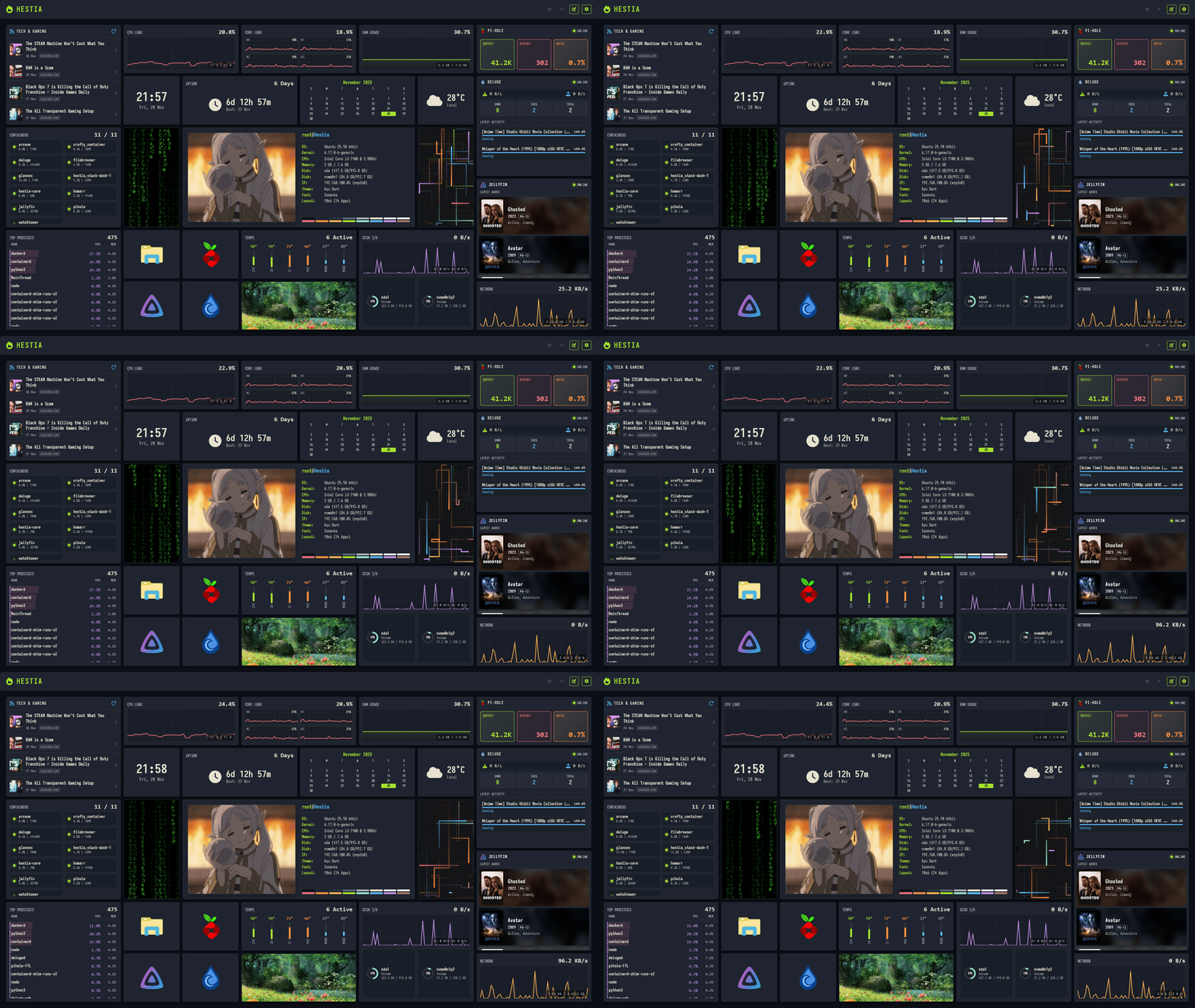
Project Hestia is a modular dashboard for homelab users that runs completely in the browser using vanilla HTML, CSS, and JavaScript. No backend is needed — settings persist in localStorage and IndexedDB. The interface uses a drag-and-drop grid with smooth animations via the View Transitions API. Theming supports the full Base16 palette (Dracula, Nord, Monokai, etc.) with granular control over spacing, radii, fonts, and shadows, plus custom preset creation in the UI. Built-in widgets cover essentials (clock, weather via Open-Meteo, calendar, Markdown notes, bookmarks), homelab monitoring (Glances for server metrics, Pi-hole stats, Deluge torrent queue, Jellyfin now-playing), and visuals (image frames, Matrix rain, pipes screensaver). Deployment options: Docker (recommended, bundles an Nginx reverse proxy that handles CORS for the API integrations) or any static file server. The project is MIT licensed and draws inspiration from Homarr, Dash., and Homepage.
Should you self-host hestia-core?
hestia-core scores 45/100 on selfhost.directory (how scoring works) and ranks #29 of 44 in Dashboard. It has 685 GitHub stars.
There was no stable release in the past 12 months, so check the repository's recent activity before you rely on it.
Setup is easy: most people get it running in one sitting. It is MIT-licensed and written mostly in JavaScript.
Its closest alternative on selfhost.directory is Homepage by gethomepage (84/100, 33 419 stars). It scores higher overall, so compare the two before you pick. See hestia-core vs Homepage by gethomepage side by side.
Features
- Base16 theming
- Built-in apps suite
- Configuration export/import
- Drag-and-drop grid layout
- Extensible widget framework
- Homelab API integrations
- LocalStorage persistence
hestia-core README
More in Homelab
 HomarrSelf-hosted, open-source homelab dashboard with 80+ service integrations, drag-and-drop boards, built-in OIDC/LDAP auth and a Docker Compose or Helm deployment.
 home-enterprise-labopsHELO is a self-hosted, open-source Kubernetes infrastructure for learning GitOps, service meshes, and production patterns in your homelab.
 HomeLabInfoSelf-hosted, open-source network scanner and visualization dashboard for homelab infrastructure with DHCP discovery, topology mapping, and container monitoring.
 homelab-monitorSelf-hosted homelab dashboard monitoring GPU, AI VRAM, Docker, systemd, disks, network and power costs across machines over SSH with a read-only MCP server.
 HomelabOSOpen-source Ansible toolkit for a self-hosted homelab: deploys 100+ Docker services behind Traefik with Let's Encrypt HTTPS, Tor access, and nightly restic backups.
 HomerA self-hosted, open-source static dashboard that lists your services from one YAML file, with fuzzy search, themes, and smart cards polling Pi-hole, Proxmox and more.
 IPMI-Fan-ControllerSelf-hosted web interface to manually control Dell server fan speeds through IPMI, replacing loud automatic fan curves with quiet manual control for homelab servers.
 jcorp-nomadOpen-source offline media server on an ESP32-S3: self-hosted browser streaming of movies, music, books, DLNA, offline Wikipedia, maps and games.
 JoulenapSelf-hosted scheduler that wakes Proxmox Backup Servers, runs backups, applies retention and GC, then powers them down — keeping servers asleep 23 hours a day.
 knockerKnocker is a self-hosted, open-source SPA gateway for homelabs that opens services on-demand via authenticated knock requests, integrating with Caddy or Firewalld.
 LabTetherSelf-hosted homelab control plane that unifies Proxmox, TrueNAS, Docker, and Home Assistant management with AI agent gateway via MCP.
 LAN-OrangutanSelf-hosted, open-source network scanner that discovers LAN devices, lets you label and group them persistently, supports multiple networks and Tailscale.
0 comments