
Self-host Homepage by gethomepage
v2.7.0Customizable app dashboard with 100+ service integrations
- Stars
- 33 550
- Rating
- 5.0 (1)
- Port
- 3000 (HTTP web interface)
ghcr.io/gethomepage/homepage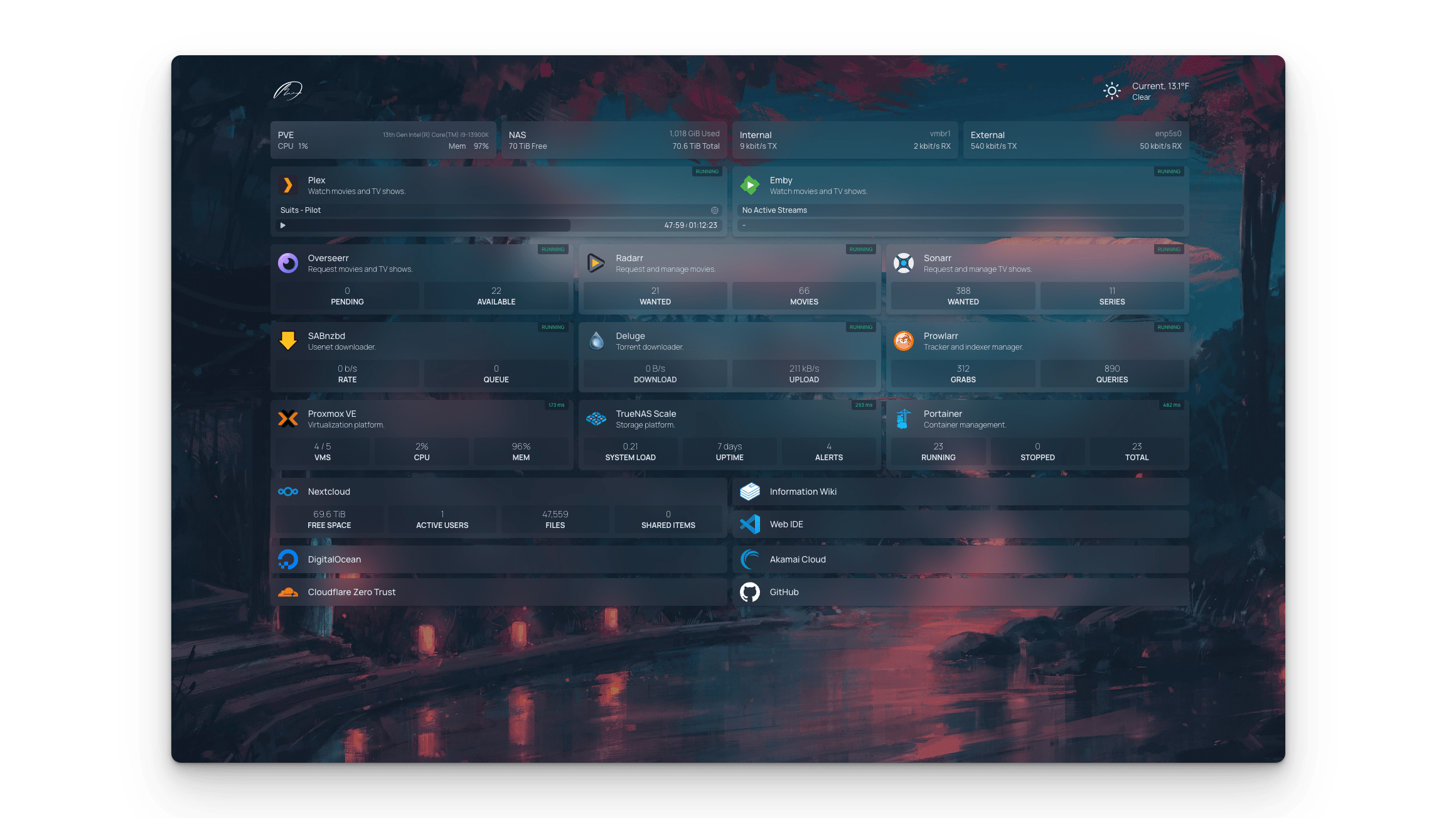
What is Homepage by gethomepage?
Homepage is a modern, fully static application dashboard built for self-hosters. It collects status and metrics from more than one hundred integrated services — such as *arr apps, media servers, download clients, infrastructure tools, and home automation — into one customizable page. The Next.js-based dashboard generates static HTML at build time for near-instant loads. Every API request to a backend service is proxied through the server so credentials never reach the browser. It offers automatic Docker service discovery via labels, plus Kubernetes and Proxmox integration. All configuration lives in YAML files stored in a mounted directory; no external database is needed. Optional built-in authentication provides either a simple password gate or an OIDC flow. The UI includes dark and light themes, supports over forty languages, and works as a Progressive Web App. The container image (ghcr.io/gethomepage/homepage) listens on port 3000 and ships for both AMD64 and ARM64 architectures.
Homepage by gethomepage alternatives
 homescreen-heroSelf-hosted Plex companion automating homescreen rotation with smart groups, per-user targeting, and third-party list sync. Web dashboard with widgets and Plex tools.Comparehomescreen-hero with Homepage by gethomepage
 NimbusNimbus is a self-hosted, open-source homelab dashboard for monitoring services with real-time health checks, multi-user auth, widgets, and app integrations.CompareNimbus with Homepage by gethomepage
 DashySelf-hosted homelab dashboard and startpage with status checks, dozens of widgets, themes, icon packs, multi-user auth and SSO, plus a live UI config editor.CompareDashy with Homepage by gethomepage
 GlanceSelf-hosted, open-source startpage dashboard that gathers RSS, YouTube, Reddit and server info into widgetized pages via one small Go binary or Docker container.CompareGlance with Homepage by gethomepage
 homedhomed is a lightweight self-hosted homepage with Authelia auth, light/dark themes, weather forecasts, and service status checks via YAML config.Comparehomed with Homepage by gethomepage
 server-homepageServer Homepage is a self-hosted, open-source dashboard for monitoring home servers with system metrics, custom links, and iOS/Firefox integrations.Compareserver-homepage with Homepage by gethomepage
 Starbase 80Starbase 80 is a self-hosted, open-source homepage dashboard for organizing Docker containers and service links with dark mode support and instant loading.CompareStarbase 80 with Homepage by gethomepage
 honeyhoney is a self-hosted, open-source dashboard for organizing your self-hosted services. Written in pure HTML, CSS, and JavaScript with no backend required.Comparehoney with Homepage by gethomepage
Should you self-host Homepage by gethomepage?
Homepage by gethomepage scores 84/100 on selfhost.directory (how scoring works) and ranks #1 of 44 in Dashboard. It has 33 550 GitHub stars, +584 in the last 30 days.
It shipped 19 stable releases in the past year. The latest, v2.7.0, came out on 23 October 2026. New versions land roughly every 7 days.
Setup is moderate: expect some configuration beyond a single command. An official Docker image is available. It is GPL-3.0-licensed and written mostly in JavaScript.
Its closest alternative on selfhost.directory is Dashy (83/100, 26 938 stars). Homepage by gethomepage scores higher overall. See Homepage by gethomepage vs Dashy side by side.
Features
- API Proxy
- Bookmarks & Quick Launch
- Custom Themes & CSS/JS
- Docker Service Discovery
- Information Widgets
- Kubernetes Integration
- Multi-language Support
- OIDC Authentication
- Password Authentication
- Progressive Web App
- Proxmox Integration
- Static Site Generation
Homepage by gethomepage README

A modern, fast, secure fully proxied, highly customizable application dashboard with integrations for over 100 services and translations into multiple languages. Easily configured via YAML files or through docker label discovery.


With features like quick search, bookmarks, weather support, a wide range of integrations and widgets, an elegant and modern design, and a focus on performance, Homepage is your ideal start to the day and a handy companion throughout it.
- Fast - Cached dashboard data and optimized assets keep page loads quick.
- Secure - All API requests to backend services are proxied, keeping your API keys hidden. Constantly reviewed for security by the community.
- For Everyone - Images built for AMD64, ARM64.
- Full i18n - Support for over 40 languages.
- Service & Web Bookmarks - Add custom links to the homepage.
- Docker Integration - Container status and stats. Automatic service discovery via labels.
- Service Integration - Over 100 service integrations, including popular starr and self-hosted apps.
- Information & Utility Widgets - Weather, time, date, search, and more.
- And much more...
Homepage has built-in support for Docker, and can automatically discover and add services to the homepage based on labels. See the Docker Service Discovery page for more information.
Homepage also has support for hundreds of 3rd-party services, including all popular *arr apps, and most popular self-hosted apps. Some examples include: Radarr, Sonarr, Lidarr, Bazarr, Ombi, Tautulli, Plex, Jellyfin, Emby, Transmission, qBittorrent, Deluge, Jackett, NZBGet, SABnzbd, etc. As well as service integrations, Homepage also has a number of information providers, sourcing information from a variety of external 3rd-party APIs. See the Service page for more information.
Homepage has built-in support for a number of information providers, including weather, time, date, search, glances and more. System and status information presented at the top of the page. See the Information Providers page for more information.
Homepage is highly customizable, with support for custom themes, custom CSS & JS, custom layouts, formatting, localization and more. See the Settings page for more information.
For configuration options, examples and more, please check out the homepage documentation.
Please note that when using features such as widgets, Homepage can access personal information (for example from your home automation system). To keep your information private, if Homepage is reachable from any untrusted network, it:
- must sit behind a reverse proxy (and/or VPN) that enforces authentication, TLS, and strictly validates Host headers.
- An optional built-in OIDC login flow or simple password login is available (opt-in) offering a simple “authenticated or not” guard.
Using docker compose:
services:
  homepage:
    image: ghcr.io/gethomepage/homepage:latest
    container_name: homepage
    environment:
      HOMEPAGE_ALLOWED_HOSTS: gethomepage.dev # required, may need port. See gethomepage.dev/installation/#homepage_allowed_hosts
      PUID: 1000 # optional, your user id
      PGID: 1000 # optional, your group id
    ports:
      - 3000:3000
    volumes:
      - /path/to/config:/app/config # Make sure your local config directory exists
      - /var/run/docker.sock:/var/run/docker.sock:ro # optional, for docker integrations
    restart: unless-stopped
or docker run:
docker run --name homepage \
  -e HOMEPAGE_ALLOWED_HOSTS=gethomepage.dev \
  -e PUID=1000 \
  -e PGID=1000 \
  -p 3000:3000 \
  -v /path/to/config:/app/config \
  -v /var/run/docker.sock:/var/run/docker.sock:ro \
  --restart unless-stopped \
  ghcr.io/gethomepage/homepage:latest
First, clone the repository:
git clone https://github.com/gethomepage/homepage.git
Then install dependencies and build the production bundle:
pnpm install
pnpm build
If this is your first time starting, copy the src/skeleton directory to config/ to populate initial example config files.
Finally, run the server in production mode:
HOMEPAGE_ALLOWED_HOSTS=gethomepage.dev:1234 pnpm start
Please refer to the homepage documentation website for more information. Everything you need to know about configuring Homepage is there. Please read everything carefully before asking for help, as most questions are answered there or are simple YAML configuration issues.
Install NPM packages, this project uses pnpm (and so should you!):
pnpm install
Start the development server:
pnpm dev
Open http://localhost:3000 to start.
This is a Next.js application, see their documentation for more information.
The homepage documentation is available at https://gethomepage.dev/.
Homepage uses Zensical for documentation. To run the documentation locally, first install the dependencies:
uv sync
Then run the development server:
uv run zensical serve # or build, to build the static siteIf you have any questions, suggestions, or general issues, please start a discussion on the Discussions page.
In addition to the docs, the troubleshooting guide can help reveal many basic config or network issues. If you're having a problem, it's a good place to start.
Contributions are welcome! Please see the CONTRIBUTING.md file for more information.
Thanks to the over 200 contributors who have helped make this project what it is today!
Especially huge thanks to @shamoon, who has been the backbone of this community from the very start.
More in Dashboard
 HomerA self-hosted, open-source static dashboard that lists your services from one YAML file, with fuzzy search, themes, and smart cards polling Pi-hole, Proxmox and more.
 home-screensSelf-hosted, open-source smart display turning a Raspberry Pi into a customizable family dashboard with 45 modules, visual editor, and zero cloud dependency.
- honeyhoney is a self-hosted, open-source dashboard for organizing your self-hosted services. Written in pure HTML, CSS, and JavaScript with no backend required.
 hubleys-dashboardHubleys is a self-hosted, open-source personal dashboard organizing services into per-user dashboards with link tiles, search, calendars, and weather.
 isoA self-hosted, open-source dashboard for organizing and accessing all your self-hosted services with multi-language support, customizable themes, and built-in search.
 JellydashJellydash is a self-hosted, open-source dashboard for Jellyfin that shows live streams, records play history, provides viewing statistics, and sends push notifications.
 JellyGlanceJellyGlance is a self-hosted, open-source dashboard for Jellyfin and Emby showing live sessions, playback history, statistics, media requests, and download queues.
 jumpSelf-hosted startpage for your homelab links with real-time site status monitoring, tag navigation, fast search, weather and Docker integration.
 karakeep-homedashSelf-hosted dashboard for KaraKeep bookmarks with masonry layout, real-time search, and drag-and-drop reordering. Runs in browser via SQLite WASM.
 lab-dashSelf-hosted dashboard for managing homelab applications with customizable grid layout, service health checks, and PWA support.
 linksnapperLinkSnapper is a self-hosted, open-source bookmark manager and sticky notes app with a Catppuccin Mocha dark theme, flat-file storage, and a REST API for homelab use.
 LobsterBoardSelf-hosted dashboard builder with drag-and-drop editing, 60+ widgets, templates, and custom pages on a single Node.js server.
0 comments