
Self-host electerm-web
Web-based terminal and SSH/SFTP client for self-hosting
- Stars
- 179
- Ports
- 5577 (Production HTTP server), 5580 (Development server)
zxdong262/electerm-web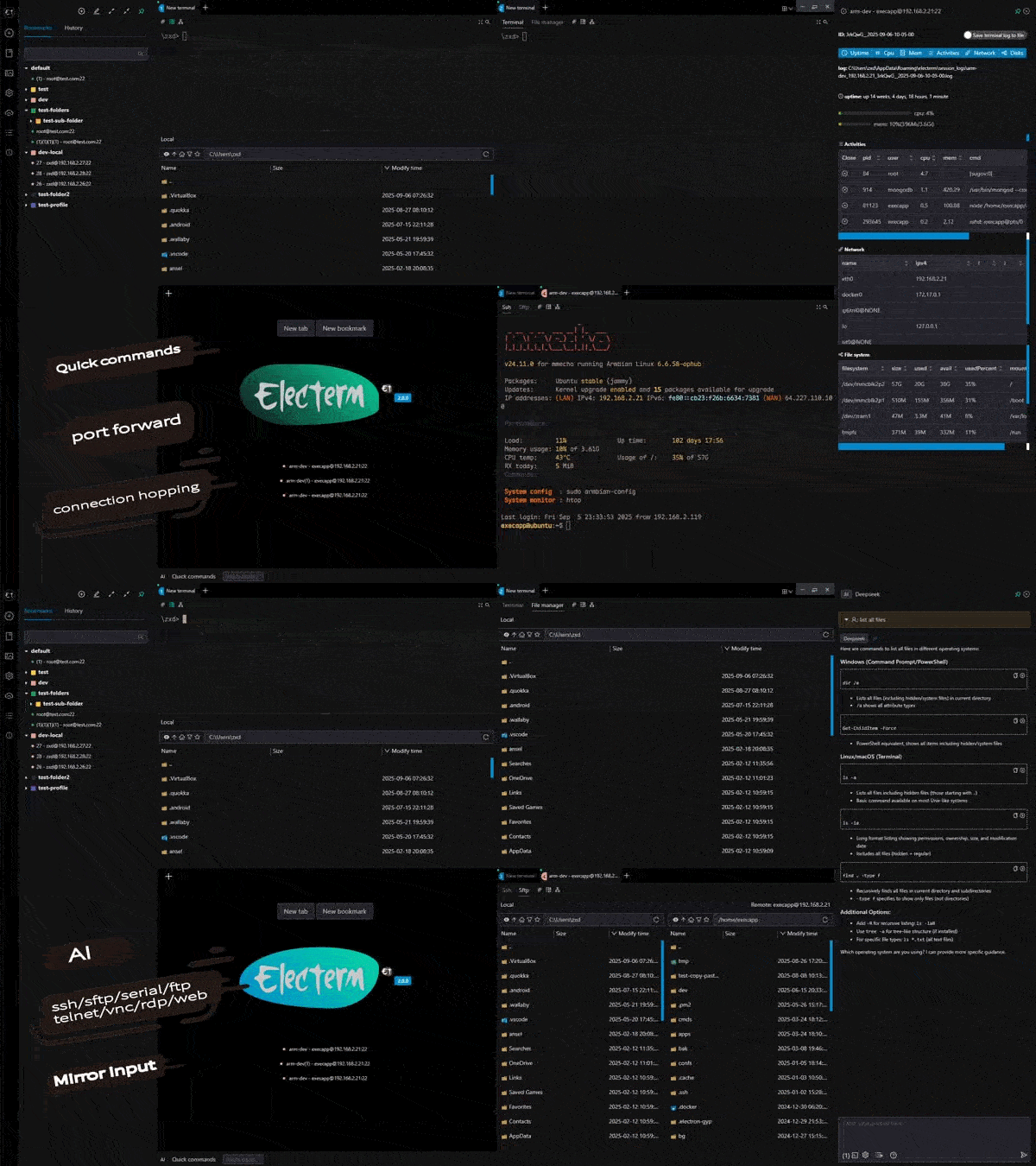

What is electerm-web?
electerm-web is the browser-based edition of the electerm terminal client, letting you run a complete terminal and remote connection manager in any web browser. It handles SSH, SFTP, FTP, Telnet, serial, RDP, VNC, and SPICE protocols with SSH tunneling, connection hopping, Zmodem/Trzsz transfers, and an AI assistant compatible with OpenAI and Anthropic APIs. The interface is customizable with themes and backgrounds, supports 14+ languages, and works responsively on mobile devices. Bookmarks, themes, and quick commands can be synchronized to GitHub or Gitee secret gists, WebDAV endpoints, or custom servers. Deployment options include Docker (image zxdong262/electerm-web), Docker Compose, or building from source with Node.js. SQLite stores data locally, and optional password authentication secures multi-user deployments.
Should you self-host electerm-web?
electerm-web scores 50/100 on selfhost.directory (how scoring works) and ranks #3 of 8 in Terminal. It has 179 GitHub stars.
There was no stable release in the past 12 months, so check the repository's recent activity before you rely on it.
Setup is moderate: expect some configuration beyond a single command. An official Docker image is available. It is MIT-licensed and written mostly in JavaScript.
Its closest alternative on selfhost.directory is cmux (80/100, 28 577 stars). It scores higher overall, so compare the two before you pick. See electerm-web vs cmux side by side.
Features
- AI Assistant
- Cloud Sync
- Customizable Themes
- FTP client
- Multi-language Support
- RDP client
- Serial port client
- SFTP file manager
- Spice client
- SSH client
- SSH Tunneling
- Telnet client
- Terminal Emulator
- VNC client
- Zmodem/Trzsz file transfer
electerm-web README
FAQ
How do I configure AI assistant in electerm?
Open AI settings, enter your API URL (e.g., https://api.openai.com/v1), select or type the model name, input your API key, and optionally define a system role prompt.
How do I make electerm start automatically when I log in?
Use the --autohide flag to start electerm minimized to the system tray, with platform-specific startup configuration.
Can I open SSH connections from a browser or external links?
Yes, electerm supports deep links using protocols like ssh://, telnet://, rdp://, vnc://, serial://, spice://, and the custom electerm:// protocol.
What is Batch Operation and how do I use it?
Batch Operation lets you define and run multi-step SSH/SFTP workflows using JSON with actions like connect, command, sftp_upload, and sftp_download.
How do I connect to a server without saving a bookmark?
Use Quick Connect from the sidebar with connection strings like ssh://user@host:22, rdp://user@host:3389, or serial://COM1?baudRate=115200.
What is the Workspace feature and how do I use it?
Workspace saves your current layout and open tabs as a preset. Only tabs opened from bookmarks are saved.
How do I use SSH tunnels in electerm?
SSH tunnels are configured when creating or editing an SSH bookmark, supporting both local-to-remote and remote-to-local port forwarding.
How do I keep my SSH session from timing out?
Configure SSH Keep Alive Interval in Settings or click the keep-alive icon in the terminal toolbar during an active session.
Can I hide the local file manager in the SFTP panel?
Yes, by adding custom CSS in Settings → Appearance → Custom CSS to hide the local section and expand the remote section.
Is electerm free and open-source?
Yes, electerm is completely free and open-source software released under the MIT License.
More in SSH
 ShellHubSelf-hosted, open-source SSH gateway to reach Linux and IoT devices from a web terminal or any SSH client, with session recording, audit logs and firewall rules.
 skiffSkiff is a self-hosted, open-source SSH manager with searchable command memory, persistent sessions, and encrypted vault. Runs via Docker or Node.js with SQLite.
 SSH & Web TerminalAdvanced SSH & Web Terminal is a self-hosted Home Assistant add-on providing secure SSH access and a web terminal with Mosh, SFTP, ZSH, and CLI tools.
 TermixThis open-source, self-hosted server manager turns SSH access, remote desktop, file transfers, container control and monitoring into toggleable plugins.
 UniSSHCross-platform SSH client with encrypted vaults that run locally. Optional self-hosted sync server for multi-device and team sharing. Built with Rust and Tauri.
 WebSSHSelf-hosted SSH/SFTP browser workspace with multi-user terminals, split panes, file transfers, and optional Passkeys/OIDC/LDAP. Deploy via Docker on your infrastructure.
 WeTTYSelf-hosted open-source web terminal with SSH access in the browser via xterm.js and websockets; runs file downloads, exposes metrics, installs from npm or Docker.
 winktermSelf-hosted AI terminal where an LLM writes commands directly into your PTY. Supports SSH, file transfer, BYO LLM, Docker and desktop apps.
 xpipe-webtopSelf-hosted, open-core desktop connection hub for SSH, Docker, Kubernetes, and VM connections from your local machine, with no remote agent setup needed.
 BastillionSelf-hosted bastion host with browser-based SSH terminal, centralized key management, and full session recording. Supports 2FA, SAML SSO, LDAP, runs as a single Java JAR.
 BifröstBifröst is a self-hosted, open-source SSH server with OIDC, Docker/Kubernetes sessions, SSH gatewaying, and verifiable recording — a drop-in OpenSSH replacement.
 C-SSHCross-platform SSH client with terminal, file management, monitoring, and AI. Optional self-hostable Creation Cloud for encrypted config sync.
0 comments