
Self-host Termix
sdk-v1.1.4Plugin-based server manager for SSH, RDP, files and Docker
- Stars
- 15 892
- CPU
- 1 core
- RAM
- 1 GB
- Storage
- 5 GB
- Ports
- 8080 (Web UI and API), 8443 (HTTPS, when ENABLE_SSL is on)
ghcr.io/termix-ssh/termixWhat is Termix?
Termix is a server management platform you install on your own hardware, useful for homelab users and small teams that want a single hub for reaching every machine they own. Its design splits duties between a core and a plugin layer: the core keeps your inventory of hosts and folders, saved credentials, accounts, role-based sharing and sessions, while tools such as the SSH terminal, a browser remote desktop, the SFTP file manager, container controls and live metrics are plugins an admin can enable, disable or delete. Roughly 34 official plugins cover RDP, VNC and Telnet, SSH port forwarding, session capture and live sharing, scheduled automations, fleets, Wake-on-LAN, importing virtual machines from Proxmox, Tailscale devices, certificate signing through HashiCorp Vault or a smallstep CA, plus sign-in via LDAP, OpenID Connect, passkeys or authenticator codes. Per-user encryption protects stored passwords and keys, and an option seals the SQLite database file on disk; PostgreSQL and MySQL can replace SQLite. The server is a single container paired with an optional guacd side for remote desktop, with Kubernetes and Proxmox LXC guides as well, listening on port 8080 by default. Clients include any browser (with PWA support), desktop builds for Windows, macOS and Linux, and mobile apps for iOS and Android. The desktop build can also work alone, linking to a server for an offline mirror of your account. The docs present it as a free Termius alternative with no paid plans, funded by donations.
Termix alternatives
 WebSSHSelf-hosted SSH/SFTP browser workspace with multi-user terminals, split panes, file transfers, and optional Passkeys/OIDC/LDAP. Deploy via Docker on your infrastructure.CompareWebSSH with Termix
 skiffSkiff is a self-hosted, open-source SSH manager with searchable command memory, persistent sessions, and encrypted vault. Runs via Docker or Node.js with SQLite.Compareskiff with Termix
 CortenDeskSelf-hosted RustDesk console bundling ID server, relay, and browser client in one Docker image. Fixes signed-in client issues, adds fleet management, access control.CompareCortenDesk with Termix
 reminalreminal is a self-hosted, open-source tool that streams windows, desktops, and terminals to any browser with end-to-end encryption and no open ports.Comparereminal with Termix
 xpipe-webtopSelf-hosted, open-core desktop connection hub for SSH, Docker, Kubernetes, and VM connections from your local machine, with no remote agent setup needed.Comparexpipe-webtop with Termix
 electerm-webelecterm-web is a self-hosted, open-source web terminal and SSH/SFTP client with AI assistance, multi-language support, cloud sync, and responsive mobile design.Compareelecterm-web with Termix
 TerminusTerminus is an open-source, self-hosted Ruby/Hanami server for managing TRMNL e-paper devices on your own network, a privacy-first alternative to hosted TRMNL Core.CompareTerminus with Termix
 tgbotvpscpSelf-hosted Telegram bot with web dashboard for monitoring and managing multiple VPS servers, featuring real-time metrics, service management, and web terminal.Comparetgbotvpscp with Termix
Should you self-host Termix?
Termix scores 77/100 on selfhost.directory (how scoring works) and ranks #1 of 27 in Server Management. It has 15 891 GitHub stars, +563 in the last 30 days.
It shipped 55 stable releases in the past year. The latest, sdk-v1.1.4, came out on 8 November 2026. New versions land roughly every 1 days.
Setup is easy: most people get it running in one sitting. An official Docker image is available. It is Apache-2.0-licensed and written mostly in Typescript.
Its closest alternative on selfhost.directory is ColliePWA (65/100, 1 612 stars). Termix scores higher overall. See Termix vs ColliePWA side by side.
Features
- Audit Log
- Desktop offline sync
- Docker and Podman management
- Encrypted secrets at rest
- Host inventory management
- Host metrics monitoring
- Plugin System
- Remote desktop (RDP, VNC, Telnet)Uses a separate guacd container.
- REST API
- Roles and sharing
- Session Recording
- SFTP file manager
- SSH Terminal
- SSH tunnels
Termix README

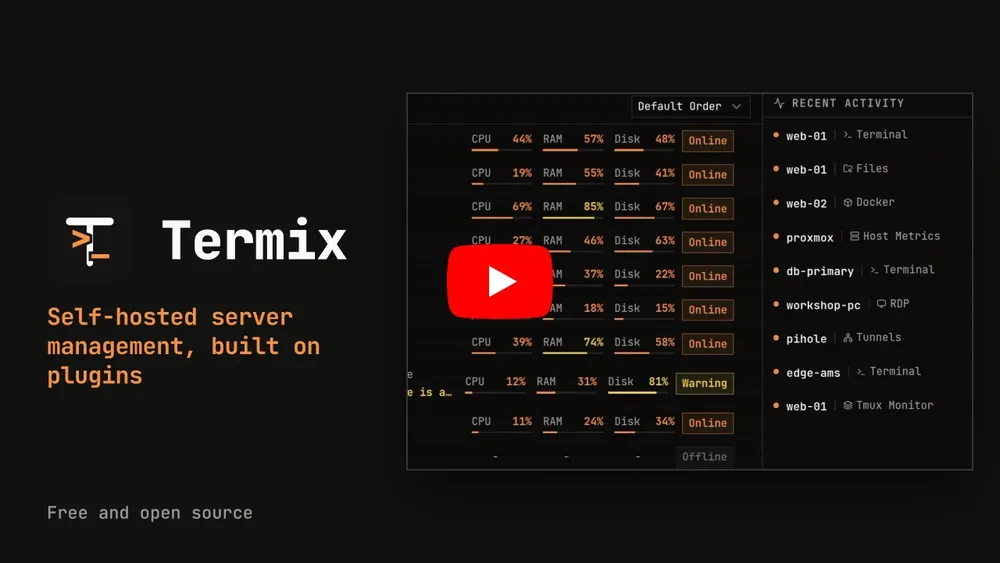
Termix is a free, open source, self-hosted server management platform built on plugins. The core keeps your hosts, credentials, users, sharing and sessions. Everything else, like the SSH terminal, remote desktop, file manager, Docker and metrics, is a plugin you can turn on, off or remove.
It runs on web, desktop and mobile. Think of it as a free, self-hosted Termius.
More in Server Management
- tgbotvpscpSelf-hosted Telegram bot with web dashboard for monitoring and managing multiple VPS servers, featuring real-time metrics, service management, and web terminal.
 TipiOpen-source homeserver manager that installs and updates around 300 self-hosted apps through a web dashboard, with Traefik handling networking and HTTPS automatically.
 tolatoSelf-hosted AI agent for managing server fleets via natural language chat in your coding agent. Uses MCP, includes audit logs, OIDC SSO, and per-node permissions.
- UBOSUBOS is a Linux distribution and platform for easily deploying, managing, and running self-hosted web applications on user-controlled servers. It provides tools (UBOS Gears) to install and manage apps like Mastodon, Nextcloud, and WordPress, along with middleware (UBOS PeerGraph) for social web interoperability.
 vein-serverSelf-hosted bash installer and Flask dashboard for running a VEIN multiplayer survival game server on Linux with automated setup, backups, and service management.
 vitoOpen-source, self-hosted server management panel: provision VPS clouds, deploy PHP/Laravel or Node.js apps, and manage databases, SSL, firewall, cron and monitoring.
 webminPowerful web control panel for Unix server management. Replaces command-line admin tasks with GUI for configuring users, services, disk quotas, Apache, MySQL, BIND DNS.
 WGDashboardSelf-hosted open-source dashboard to manage WireGuard and AmneziaWG VPN servers with web UI, peer management, QR codes, and 2FA.
 WolfStackA self-hosted platform for managing servers, containers, virtual machines, networking, storage, and backups with a 530+ app store, all from one Rust binary.
 Xen OrchestraXen Orchestra is a self-hosted, open-source web interface to manage, back up, and delegate XCP-ng and XenServer virtualization infrastructure from a single pane of glass.
 x-proberSelf-hosted, open-source PHP probe: drop one PHP file on any web server to view CPU, memory, disk, network, PHP extensions and run benchmarks.
 zentroxZentrox is a self-hosted, open-source web tool for Linux home server admin. Written in Rust, it manages packages, firewall, logs, files, and processes via browser.
0 comments