
Self-host Archivematica
v1.18.0Open-source digital preservation for long-term access
- Stars
- 522
- CPU
- 2 CPU cores
- RAM
- 2GB+
- Storage
- 7GB plus two to three times the disk space required for the collection being processed
- Ports
- 80 (nginx proxy to Archivematica Dashboard), 8000 (nginx proxy to Archivematica Storage Service), 3306 (MySQL database), 9200 (Elasticsearch), 4730 (Gearman job server), 3310 (ClamAV antivirus daemon)
- Requires
- Java
What is Archivematica?
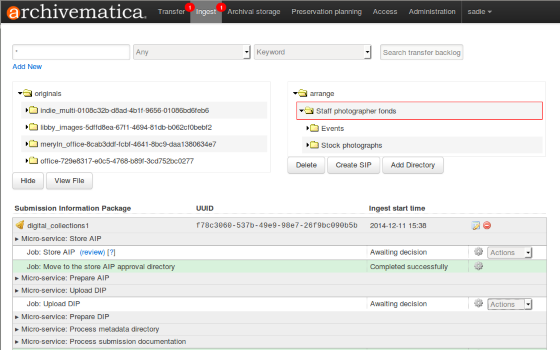
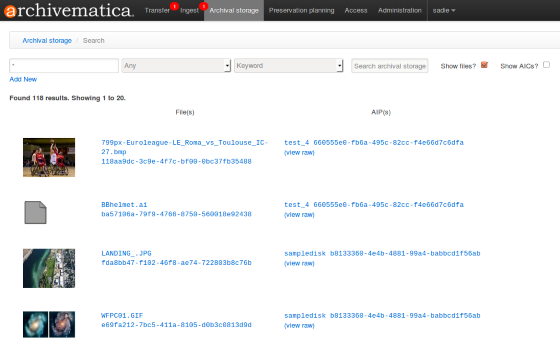
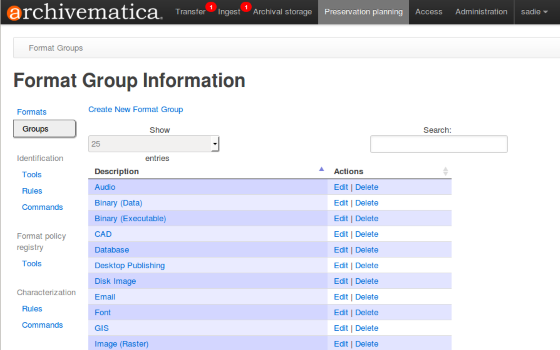
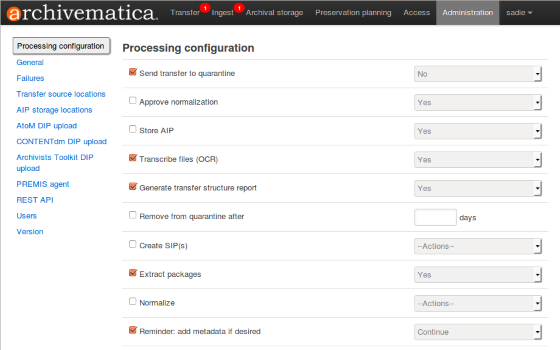
Archivematica is a web-based digital preservation application for archivists, librarians, and memory institutions. It processes digital objects from ingest through to access following the ISO-OAIS functional model, creating trustworthy Archival Information Packages using METS, PREMIS, Dublin Core, and BagIt standards. Users control preservation micro-services through a web dashboard. The system supports multiple ingest workflows including BagIt, digital forensic images, SIP arrangement, and dataset management. A Format Policy Registry handles format identification and normalization, linked to PRONOM. Production installations run on Ubuntu 24.04 or Rocky Linux 9 via Ansible or manual packages; Docker Compose is available for development. Optional Elasticsearch 8.x provides search across backlog, appraisal, and archival storage. Paid support, hosting, training, and consulting are offered by Artefactual Systems.
Should you self-host Archivematica?
Archivematica scores 57/100 on selfhost.directory (how scoring works) and ranks #5 of 12 in Archiving & Preservation. It has 522 GitHub stars.
There was no stable release in the past 12 months, so check the repository's recent activity before you rely on it.
Setup is advanced: plan for several services and some ongoing maintenance. It is AGPL-3.0-licensed and written mostly in Python.
Its closest alternative on selfhost.directory is ArchiveBox (79/100, 28 896 stars). It scores higher overall, so compare the two before you pick. See Archivematica vs ArchiveBox side by side.
Features
- Advanced search and storage management
- Anti-virus scanning (ClamAV)
- CAS authentication
- Digital preservation (ISO-OAIS compliance)
- Format Policy Registry (FPR)
- LDAP Authentication
- Multiple ingest workflows
- OIDC Authentication
- REST API
- SAML/Shibboleth authentication
- Standards-based packaging (METS, PREMIS, BagIt)
- Storage Service integration
- Third-party system integrations
- Web-based Dashboard
Archivematica README
FAQ
I try to create a new transfer, but nothing happens. What can I do?
Check file permissions in the transfer source directory, wait for large transfers to initialize, verify system timeouts aren't being exceeded, and if the transfer reached the shared directory but doesn't appear in the dashboard, restart services in order: gearmand, archivematica-mcp-server, archivematica-mcp-client, and archivematica-dashboard.
I am getting a white error page in the Dashboard. How can I find out what the error is?
Check the Archivematica logs stored in /var/log/archivematica/ which capture relevant events including warnings and errors from all services including the Dashboard.
Something is not working right, or I need to stop a hanging transfer. What can I do?
Restart the Gearman service and each Archivematica component (mcp-server, mcp-client, dashboard, storage-service) in that order. Other dependent services include ClamAV, Elasticsearch, MySQL/MariaDB, and Nginx.
My Archivematica disk filled up and now Archivematica won't work. How can I fix this?
Clean up the disk by removing failed or rejected transfers and excessive /tmp data. Reset the MySQL/MariaDB database, restart Archivematica components in order, and set Elasticsearch back into write mode using a curl command to remove the read-only block.
More in Archiving & Preservation
 ArchivesSpaceSelf-hosted, open-source archives management system for accessioning, arrangement and description, with a staff interface, public catalog, OAI-PMH and a REST API.
 ArchiveTeam WarriorSelf-hosted Docker image of the Archive Team Warrior: run the archiving worker on your own server, Compose or Kubernetes, and manage it via its port-8001 web UI.
 AtoMAtoM is a self-hosted, open-source web app for multilingual, multi-repository archival description. Implements ICA standards with EAD, EAC-CPF, CSV, SKOS import/export.
 Auto-ArchiverSelf-hosted, open-source Python tool to automatically archive videos, images, and social media from URLs, Google Sheets, and CSV files with S3 and Google Drive storage.
 bareosOpen-source, cross-platform network backup and recovery suite (a Bacula fork) with Director/File/Storage daemons, PostgreSQL catalog, tape, S3 and a web UI.
 BichonSelf-hosted, open-source email archiver written in Rust that pulls mail over IMAP or OAuth2, indexes it for full-text search, and serves a WebUI and REST API.
 EonvelopeOpen-source self-hosted email archive supporting IMAP, POP, Exchange, and JMAP with integrations for Paperless-ngx, Immich, Nextcloud, and Searxng.
 EspialOpen-source, self-hosted bookmark server with multiple accounts, tagging, a browser bookmarklet, REST API and snapshot archiving via ArchiveBox or the Wayback Machine.
 Fedora RepositoryFedora Repository is a self-hosted, open-source digital repository for managing and preserving digital content, used by libraries and archives worldwide.
 GanymedeSelf-hosted platform for saving Twitch VODs and live streams with synchronized chat, OIDC login, and Docker Compose deployment.
 genewebSelf-hosted, open-source genealogy app in OCaml with local web server for family trees, GEDCOM import/export, and relationship exploration.
 hoardy-webPassively capture, archive, and hoard your web browsing history, including the contents of the pages you visit, for later offline viewing, replay, mirroring, data scraping, and/or indexing. Your own personal private Wayback Machine that can also archive HTTP POST requests and responses, as well as most other HTTP-level data.
0 comments