
Self-host Agnes Video Generator
v7.2.2Free AI video generator with narration and subtitles
- Stars
- 596
- CPU
- Any (no GPU required)
- RAM
- No minimum stated
- Storage
- No minimum stated
- Port
- 8765 (Web UI and API)
ghcr.io/lcy362/free-short-video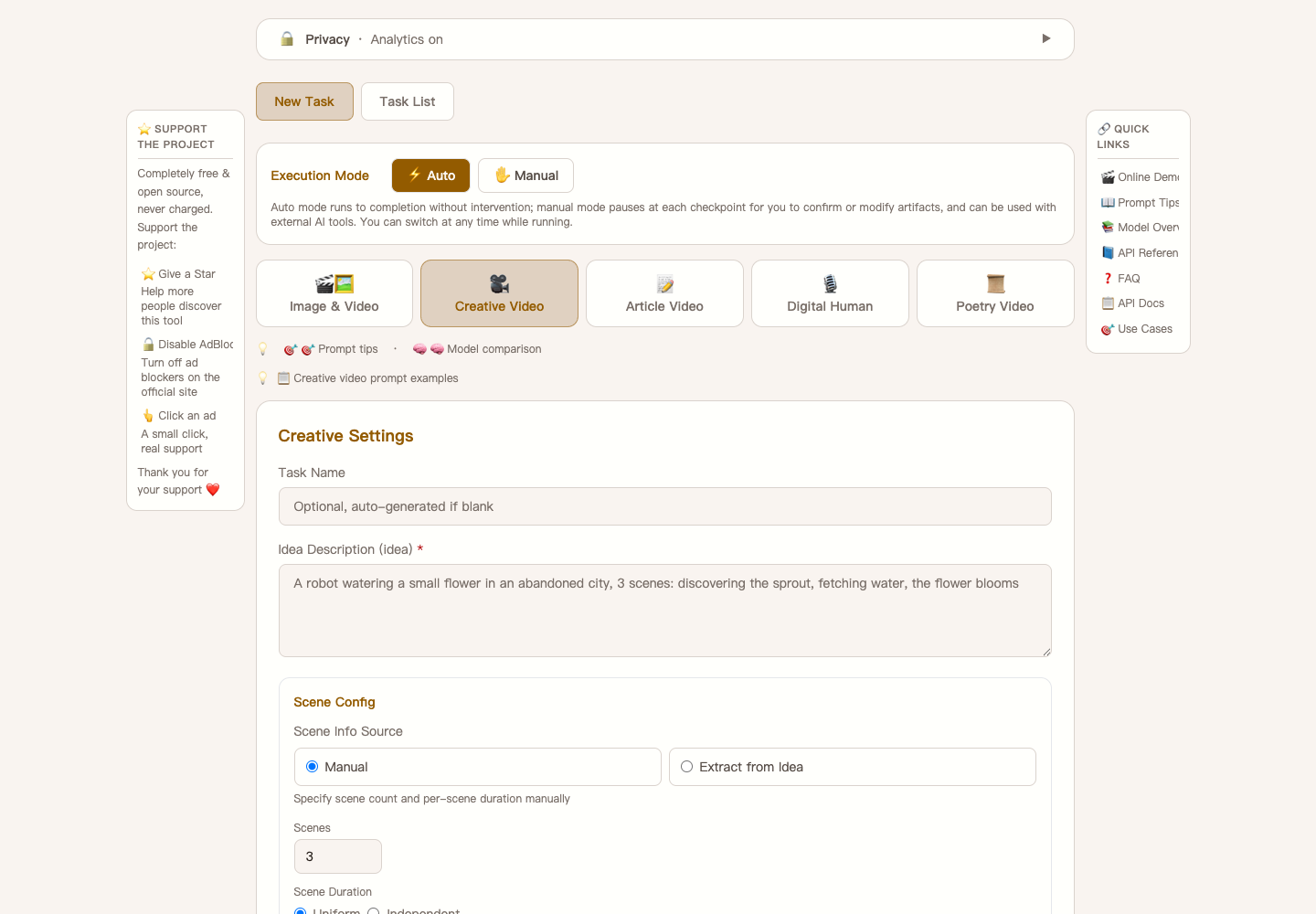
What is Agnes Video Generator?
Agnes Video Generator is a free, open-source tool for creating AI-generated videos on your own machine. All heavy AI processing runs in the cloud through the free Agnes AI API, so no local GPU is needed. It produces multi-scene videos complete with AI voice narration (via Microsoft Edge TTS), word-level subtitles, and optional virtual presenter avatars. Five creation modes handle everything from single clips to full stories, long-form scripts, poetry animations, and anchor-style presentations. The web interface supports 22 languages and runs on port 8765. You can deploy it via Docker, a simple start.sh script, an npm command (npx free-short-video), or an AI-agent skill. Manual installs need Python 3.10+ and ffmpeg. The code is MIT-licensed with no paid tiers or hidden fees.
Should you self-host Agnes Video Generator?
Agnes Video Generator scores 53/100 on selfhost.directory (how scoring works) and ranks #5 of 18 in Video Processing. It has 596 GitHub stars.
It shipped 10 stable releases in the past year. The latest, v7.2.2, came out on 23 October 2026. New versions land roughly every 1 days.
Setup is easy: most people get it running in one sitting. An official Docker image is available. It is MIT-licensed and written mostly in Python.
Its closest alternative on selfhost.directory is VideoHighlighter (51/100, 345 stars). Agnes Video Generator scores higher overall. See Agnes Video Generator vs VideoHighlighter side by side.
Features
- AI narration (TTS)
- Auto subtitles
- Checkpoint resume
- Custom reference images
- Digital anchor
- Image-to-video generation
- Keyframes animation
- Multi-API-key rotation
- Multi-language UI
- Multiple resolution and aspect ratio options
- Multi-scene video pipelines
- Poetry video mode
- REST API
- Text-to-video generation
Agnes Video Generator README
FAQ
What should I do when generation fails with 503 queue full?
The free video model has a shared inference queue that can stay saturated for 10+ minutes. The app handles this with a dedicated retry track (up to 15 retries, spaced 30–60s apart). Retry during off-peak hours or add more API keys.
Why do I get 401 / invalid token errors even though my API key looks correct?
A 401 usually means the API key does not match the domain it is being sent to (e.g., a global key used against the China endpoint). Each key can be bound to its own access domain in the Web config page, or use the Auto-detect domains button.
Can an AI agent operate this project for me?
Yes — it was designed for that. Install the standalone agnes-video skill once, then ask for outcomes — it installs the service, generates videos, diagnoses failures and can open a PR for a real defect.
Can I host this on my own server?
Absolutely. The project is designed for self-hosting. Just clone the repo, run ./start.sh, and the server starts on http://localhost:8765. No external dependencies, no cloud lock-in.
Can I run this with Docker?
Yes. Pre-built images are published to both GHCR and Docker Hub. Just pull the latest tag and run — no Python or ffmpeg installation needed.
What languages does the UI support?
The Web UI supports 22 languages including Chinese, English, German, French, Spanish, Japanese, Korean, Arabic, and more. Subtitles are generated in the source text language with font fallback for CJK, RTL, and Indic scripts.
Can I use my own images as references?
Yes. You can upload reference images for character or scene consistency across scenes, use custom end frames for precise visual transitions, or choose img2img to auto-generate end frames from your reference.
What video generation modes are supported?
Six task types: Simple Video, Creative Video, Manuscript Video, Digital Anchor, Poetry Video, and Simple Image. Additional options include text-to-video, image-to-video, keyframes animation, and image-to-image end frame generation.
How is this different from Runway, Pika, or Sora?
Unlike commercial tools that charge $10–$95/month, Agnes Video Generator is completely free and open-source (MIT). It offers built-in multi-scene pipelines, AI narration, auto subtitles, and digital anchor — features that require third-party tools or manual editing elsewhere.
Do I need a GPU to run this AI video generator?
No. All AI compute runs in the cloud via Agnes AI's free API. You just need a regular laptop or desktop that can run Python 3.10+ and ffmpeg.
Is Agnes Video Generator really free? Are there any hidden costs?
Yes, it is completely free. All AI model calls (Agnes Chat, Agnes Image, Agnes Video) are free with no trial period, no watermarks, and no usage limits. The only TTS integration (Microsoft Edge TTS) is also free and requires no extra API key.
More in Video Processing
 AICONAICON is a self-hosted, open-source AI video creation platform with an infinite canvas and natural-language workflow assistant for script-to-video production.
 app.enfugue.aiSelf-hosted open-source web app for studio-quality AI image/video generation with Stable Diffusion, unified pipeline, CivitAI browser, optional auth, and JSON API.
 automatic-ripping-machineOpen-source, self-hosted disc-ripping machine for Linux: insert a Blu-ray, DVD or CD and MakeMKV, HandBrake and abcde rip it automatically, with a Flask web UI for jobs.
 by2kbby2kb is a self-hosted CLI turning Bilibili/YouTube URLs into Markdown transcripts, abstracts, and study notes via local Whisper or cloud ASR.
 CliparrSelf-hosted, open-source tool that clips video from Plex, Jellyfin, or local files directly in your browser — no server-side FFmpeg needed.
 ClipForgeSelf-hosted AI turns product images into short videos for Douyin, Kuaishou, Xiaohongshu, TikTok Shop — product-preserving visuals, AI scripts, voiceovers, subtitles.
 cobaltA self-hosted, open-source media downloader that saves video, audio, gifs and photos from YouTube, TikTok, Instagram, Reddit and more, with no ads or trackers.
 ConcatAn open-source, self-hosted desktop and mobile video editor pitched as a CapCut replacement, with local Whisper captions, text-to-speech and 4K export.
 DigicutOpen-source, self-hosted web app that cuts an excerpt out of an audio or video file in the browser with FFmpeg.wasm, so media never reaches a server.
 DigimergeSelf-hosted open-source (AGPL-3.0) web app to merge audio, concatenate videos or build image slideshows with ffmpeg.wasm; files are processed locally in the browser.
 DigitranscodeSelf-hosted audio and video converter that transcodes in the browser with FFmpeg.wasm — nothing is uploaded. Offers bitrate, sample-rate and resolution options.
 dovi-convert-dockerA self-hosted Docker app with a browser interface that turns Dolby Vision Profile 7 rips into Profile 8.1 so they play on more devices.
0 comments