
Self-host VideoHighlighter
0.14.2Local AI video analyzer for highlights and visual search
- Stars
- 345
What is VideoHighlighter?
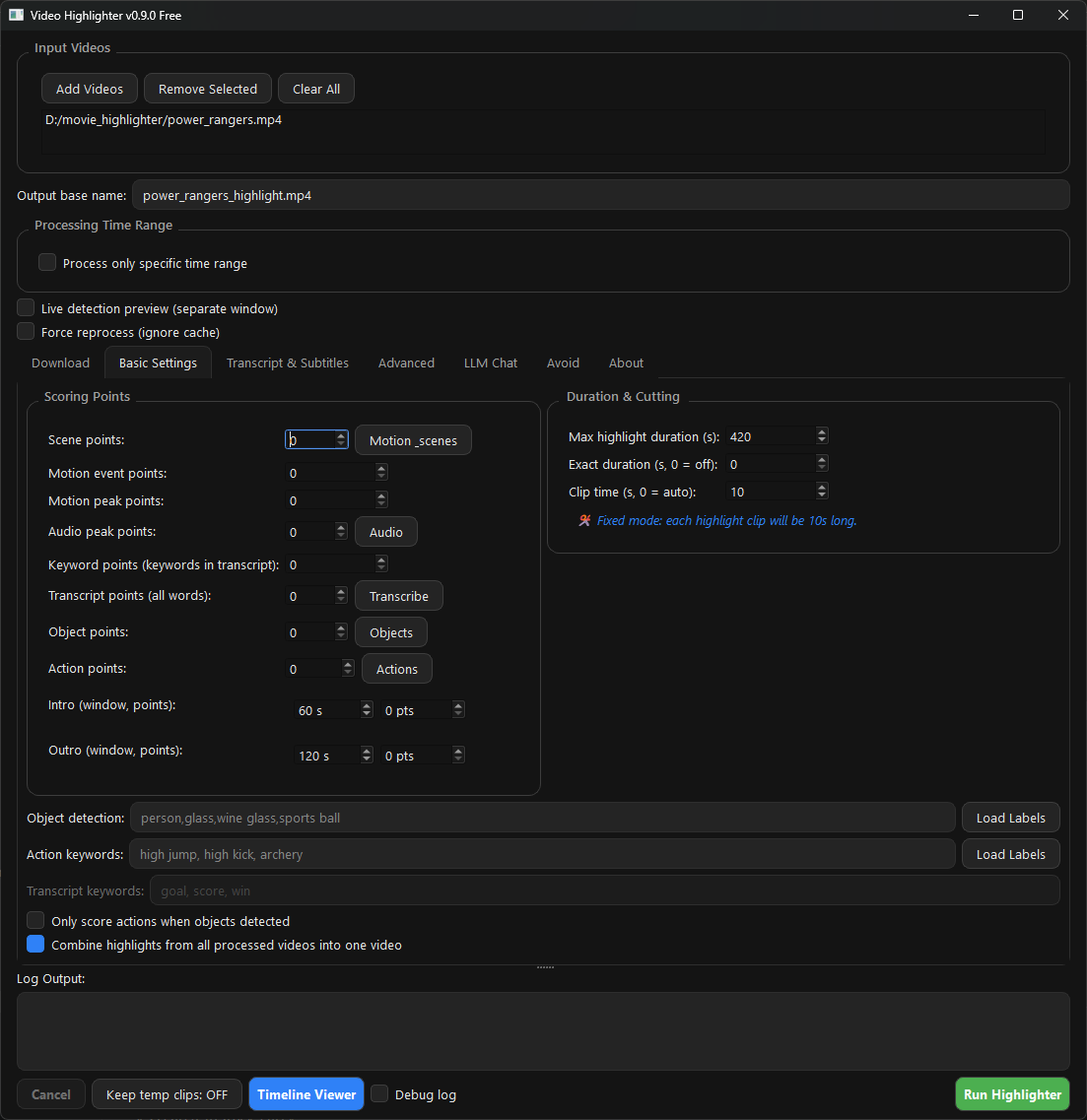
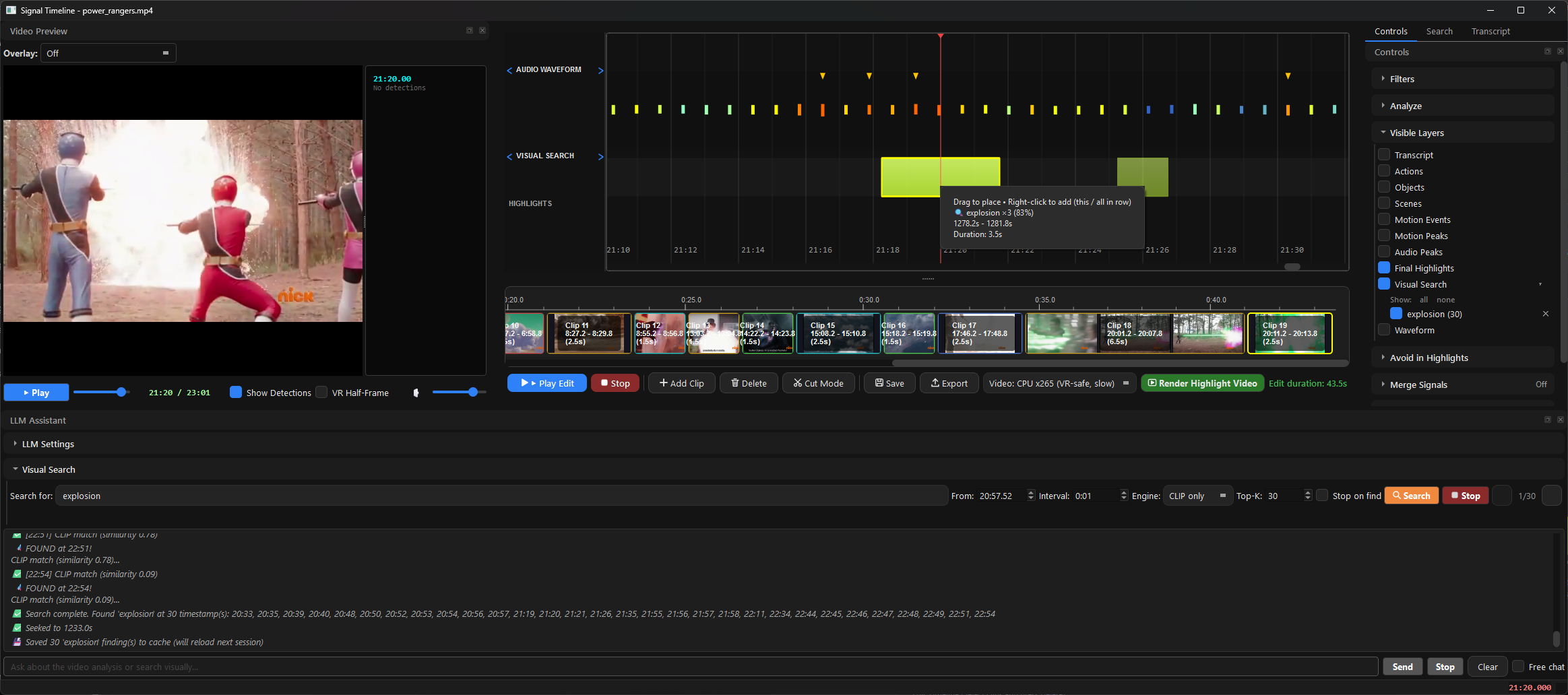
VideoHighlighter is a free, open-source desktop application for Windows, macOS, and Linux that performs local AI video analysis. It drops in raw video files and scores strong moments using scene detection, motion analysis, audio peaks, object detection (YOLOX), action recognition, and transcript analysis via Whisper. The app explains every decision with a detailed per-signal report showing why each moment was kept or dropped. It exports highlight reels and individual clips, supports composition rules to combine detections into custom events, and includes an automatic pipeline for GoPro/drone footage that ingests, scripts, adds music, and renders a finished reel. The core pipeline requires no API keys and runs entirely offline. Optional LLM features connect to a local Ollama instance. Two frontends are provided: a Qt desktop GUI with a full timeline viewer, and a Tauri v2 web UI with folder-at-once input and music mixing. Models can be trained in-app and shared via a Hugging Face model hub. The project is licensed under AGPL-3.0 with a commercial Pro edition available separately.
Should you self-host VideoHighlighter?
VideoHighlighter scores 51/100 on selfhost.directory (how scoring works) and ranks #6 of 12 in Video. It has 345 GitHub stars.
It shipped 9 stable releases in the past year. The latest, 0.14.2, came out on 25 October 2026. New versions land roughly every 2 days.
Setup is moderate: expect some configuration beyond a single command. It is AGPL-3.0-licensed and written mostly in Python.
Its closest alternative on selfhost.directory is Agnes Video Generator (53/100, 596 stars). It scores higher overall, so compare the two before you pick. See VideoHighlighter vs Agnes Video Generator side by side.
Features
- Action recognition
- Automatic highlight generation
- Auto pipeline for camera footage
- CLIP visual search
- Community model hub
- Composition engine
- Detailed explanation reports
- Model training in-app
- Object detection (YOLOX)
- Offline Operation
- Two frontend options
VideoHighlighter README
FAQ
Can I share my own models?
Yes, via the Community Models system. Requirements: permissive license (not AGPLv3), YOLOX-compatible format, README.md included in package.
Where do I ask questions?
General help in Discord #support, development discussion in Discord #dev, bug reports and ideas in GitHub Issues.
Is this really free?
Yes, AGPLv3 license — free to use, modify, and redistribute. Commercial (Pro) license also available from copyright holders for specific use cases.
What does the report contain?
Each run generates a self-contained HTML report with per-moment point breakdown, object/action detections, transcript claims with attribution, moments that scored well but didn't make the cut, and settings used.
Can I export just the highlights?
Yes, after analysis use "Open timeline" → select moments → export to folder. Individual clips are also available via "Export separate clips".
How do I create a custom detection rule?
Use the Composition Engine with YAML rules in composition_rules.yaml to combine existing detections (e.g., ball inside net, count players, player followed by ball).
Can I run this on CPU only?
Yes, the app works on any modern CPU. GPU acceleration is optional and speeds up processing but isn't required for basic functionality.
What detector should I use?
Start with CLIP search to explore footage, then add trained detectors (YOLOX for objects, action recognition for activities, composition engine for complex rules).
More in Video
 viewscreenViewscreen is a self-hosted, open-source video streaming server with built-in torrent client, automatic HTTPS via Let's Encrypt, and video transcoding to MP4.
 YouCastYouCast is a self-hosted desktop app that converts YouTube channels and playlists into podcast feeds for any podcatcher, running a local server on port 22703.
 youtube-dlSelf-hosted Docker image that automates yt-dlp to download YouTube subscriptions and watch later playlists with a web UI for configuration and manual downloads.
 YoutubeDL-MaterialSelf-hosted, open-source YouTube downloader with a Material Design web UI built on youtube-dl: subscriptions, downloads manager, categories, RSS feeds and an API.
 ytdl-sub-guiOpen-source, self-hosted CLI that drives yt-dlp to pull videos and music and format them for Plex, Jellyfin, Emby or Kodi with YAML presets and NFO or audio tags.
 µStreamerOpen-source, self-hosted MJPEG-HTTP streamer that broadcasts video from any V4L2 webcam or HDMI capture device with multithreaded and Raspberry Pi hardware JPEG encoding.
 AIEVSelf-hosted AI video editor where an AI director controls motion-graphics scenes and timeline assembly to produce MP4s with karaoke subtitles and brand styling.
 ArcReelOpen-source, self-hosted AI video workspace where agents turn novels, scripts or product shots into character assets, storyboards and short videos with cost tracking.
 capCap is a self-hosted, open-source screen recorder for Mac and Windows with instant shareable links, local editing, AI transcriptions, and full data ownership.
 Cartoon StudioOpen-source desktop app for creating 2D animated cartoons — write scripts, generate voices, animate SVG characters with lip-sync, render to MP4 locally.
 ChannelHoarderSelf-hosted, open-source tool that watches channels on multiple video sites and saves new uploads in a Plex-friendly layout with a modern web UI.
 ClipShareClipShare is a self-hosted, open-source screen recorder built with Electron that uploads recordings directly to S3-compatible storage without a backend server.
0 comments