
Self-host Concat
models-v1Free video editor with offline captions, voices, 4K export
- Stars
- 18 146
- CPU
- any 64-bit processor from 2013 or later
- RAM
- 4 GB
- Storage
- 500 MB
- Port
- 7420 (JSON-RPC API over TCP, on 127.0.0.1 by default, from concat-cli serve or the window's Settings > Remote page)
What is Concat?
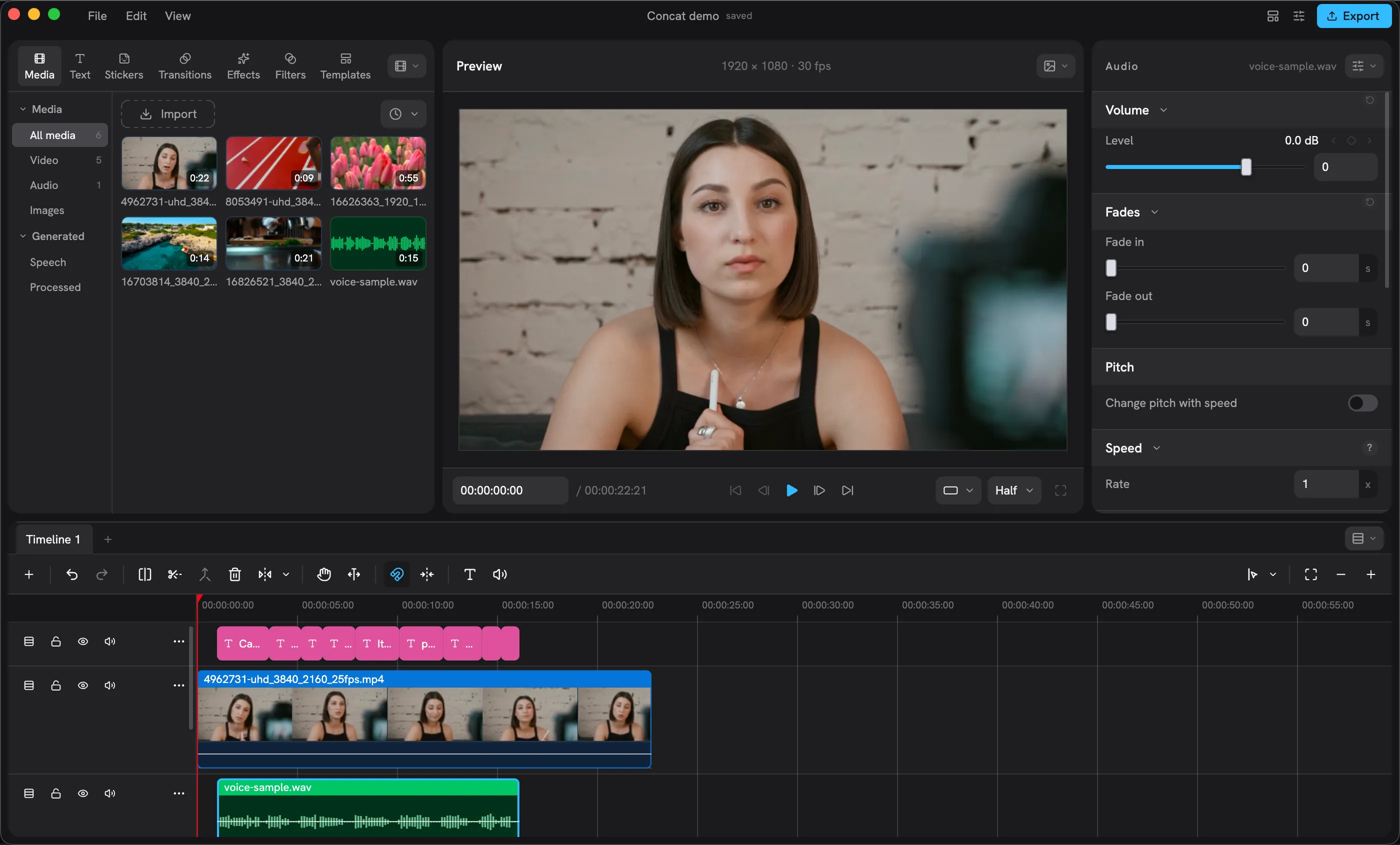
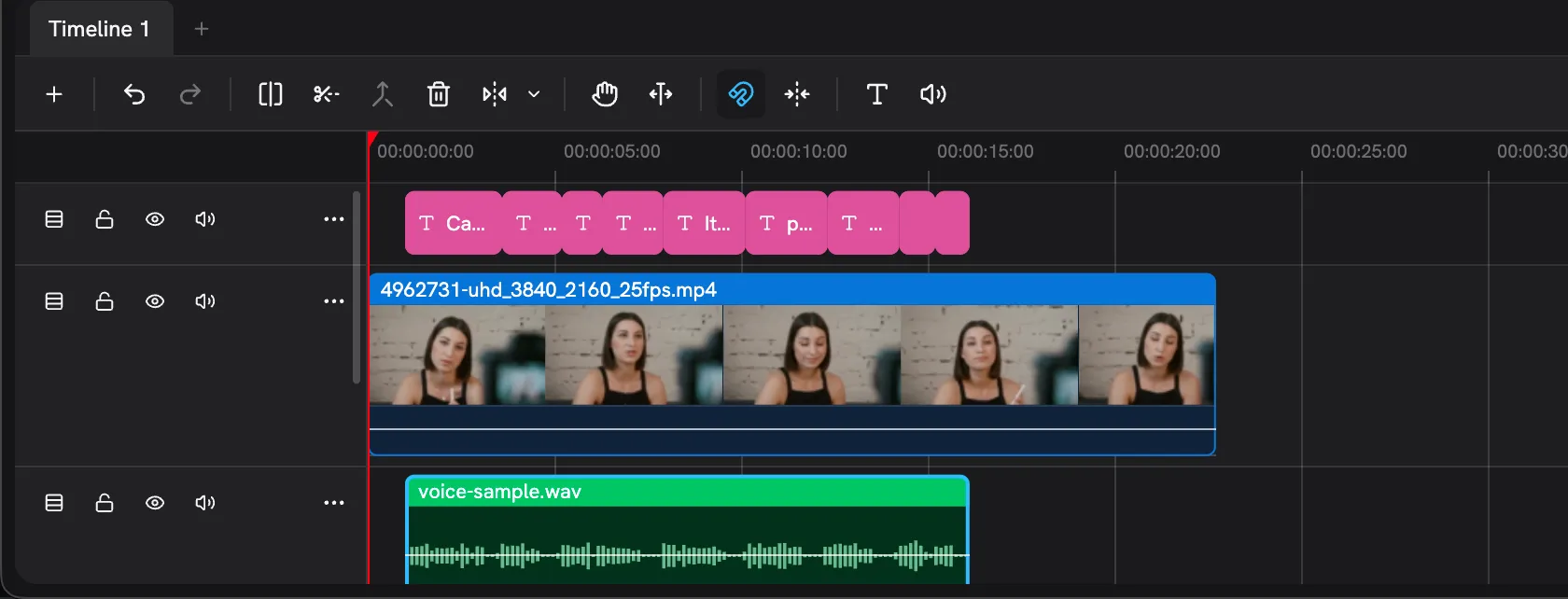
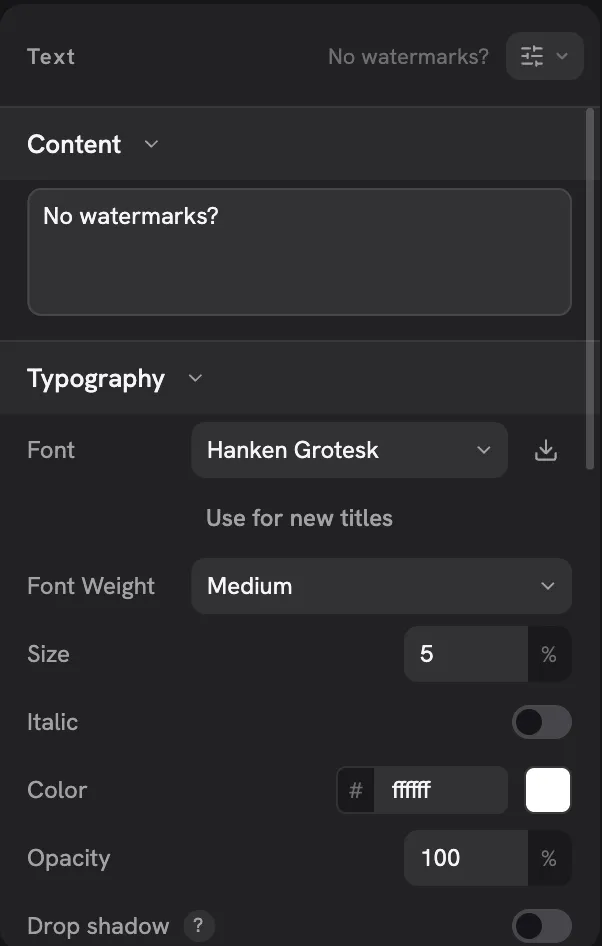
Concat is a free, AGPL-licensed non-linear video editor for Windows, macOS, Linux, Android and sideloaded iOS, aimed at people cutting Shorts, Reels, TikToks, YouTube videos, tutorials and podcast clips. All the work happens on your own hardware through a Rust core with GPU compositing, so footage never has to leave your disk: caption models (Whisper), speech voices and cutout or enhancement models are fetched once from Settings and then run without a network. The window gives you many tracks and more than one timeline inside a project, keyframing with a curve editor, roughly 170 GPU-rendered looks across effects, filters and transitions, chroma keying plus colour wheels and curves, styled title text, one-switch voice cleanup and magnetic cutting. Exports come out as H.264, HEVC or AV1 at up to 4K 60 with 10-bit colour, watermark-free. Automation reaches the same engine: JSON-RPC 2.0 lines served on standard input, over TCP or through a Unix socket, either from the concat-cli or from the app's Settings > Remote page, with gRPC behind a build feature and an MCP transport still unshipped. Running it yourself means downloading a checksummed installer, package or AppImage from GitHub Releases — there is no container image, no sign-in and no paid tier. It is beta at 0.2.x: Windows and macOS builds are still unsigned, ARM Windows builds are paused, and the iPhone/iPad build is a sideload beta.
Concat alternatives
 ComfyUISelf-hosted, open-source AI engine for visual creators with a node-based workflow system covering images, video, 3D, audio, and text.CompareComfyUI with Concat
 AIEVSelf-hosted AI video editor where an AI director controls motion-graphics scenes and timeline assembly to produce MP4s with karaoke subtitles and brand styling.CompareAIEV with Concat
 NextChat✨ Zero-config AI chat assistant. No API key needed — sign up and instantly chat with GPT-5, Claude 4, Gemini 2.5, DeepSeek & 100+ top models. Pay-as-you-go saves you more. Available on Web, iOS, macOS, Android, Linux, Windows.CompareNextChat with Concat
 Whisper-WebUISelf-hosted Gradio web UI that turns Whisper speech recognition into an easy subtitle generator: transcribe files, YouTube links or microphone.CompareWhisper-WebUI with Concat
 ArcReelOpen-source, self-hosted AI video workspace where agents turn novels, scripts or product shots into character assets, storyboards and short videos with cost tracking.CompareArcReel with Concat
 OpenBriefFree open-source desktop app for macOS, Windows, Linux that imports video/audio, extracts transcripts locally, generates grounded summaries, and lets you chat.CompareOpenBrief with Concat
 sdnextSelf-hosted, open-source Stable Diffusion web UI to generate, caption, upscale and edit images and video, with many GPU backends and model quantization for low VRAM.Comparesdnext with Concat
 VideoHighlighterVideoHighlighter is a self-hosted, open-source desktop app for local AI video analysis: automatic highlights, object/action detection, visual search, subtitles — offline.CompareVideoHighlighter with Concat
Should you self-host Concat?
Concat scores 85/100 on selfhost.directory (how scoring works) and ranks #1 of 18 in Video Processing. It has 18 146 GitHub stars, +8 147 in the last 30 days.
It shipped 10 stable releases in the past year. The latest, models-v1, came out on 15 November 2026. New versions land roughly every 5 days.
Setup is easy: most people get it running in one sitting. It is AGPL-3.0-licensed and written mostly in Rust.
Its closest alternative on selfhost.directory is opencut (75/100, 98 697 stars). Concat scores higher overall. See Concat vs opencut side by side.
Features
- 4K video export
- Auto-captions
- Background Removal
- Command-line toolDocumented from a source checkout (cargo run -p concat-cli).
- Effects, filters and transitions
- GPU-accelerated rendering
- Keyframe animation
- MCP server for AI agentsChecked against 0.2.6: not present in the source tree.
- Multi-track timeline
- Offline-first local processing
- REST-like JSON-RPC APIgRPC is available in a build made with the grpc feature.
- Text-to-Speech
- Titles and text styling
- Voice cleanup effects
- Voice Cloning
Concat README

🇬🇧 English · 🇩🇪 Deutsch · 🇪🇸 Español · 🇫🇷 Français · 🇮🇹 Italiano · 🇳🇱 Nederlands · 🇵🇱 Polski · 🇧🇷 Português (Brasil) · 🇷🇺 Русский · 🇺🇦 Українська · 🇹🇷 Türkçe · 🇦🇿 Azərbaycanca · 🇭🇷 Hrvatski · 🇮🇩 Bahasa Indonesia · 🇻🇳 Tiếng Việt · 🇹🇭 ไทย · 🇯🇵 日本語 · 🇰🇷 한국어 · 🇨🇳 简体中文 · 🇹🇼 繁體中文 · 🇸🇦 العربية · 🇮🇱 עברית · 🇮🇷 فارسی · 🇮🇳 हिन्दी · 🇵🇰 اردو · 🇧🇩 বাংলা
|
Proxyon Pay-as-you-go proxies for developers Use code JUB0T for 20% off
|
Contact to advertise Put your product in front of the people who edit with Concat. jub0trd@gmail.com |
FAQ
Where does sponsorship money go?
The roadmap sets out what sponsorship funds and its cost, and each sponsor is listed on the repository and the site for the months they sponsor.
What hardware do I need?
Minimum is a 64-bit CPU from 2013 or later, 4 GB RAM and 500 MB of storage with no GPU; for smooth 1080p and fast 4K exports, 6+ cores, a Metal/DirectX 12/Vulkan GPU and 16 GB RAM.
How do I install it on iPhone or iPad?
iOS is a sideload-only beta, not on the App Store: download the IPA from the picker and install it by sideloading.
macOS says the app is damaged or cannot be opened.
The macOS builds are unsigned, so clear the quarantine flag once after moving the app to Applications: xattr -dr com.apple.quarantine /Applications/Concat.app.
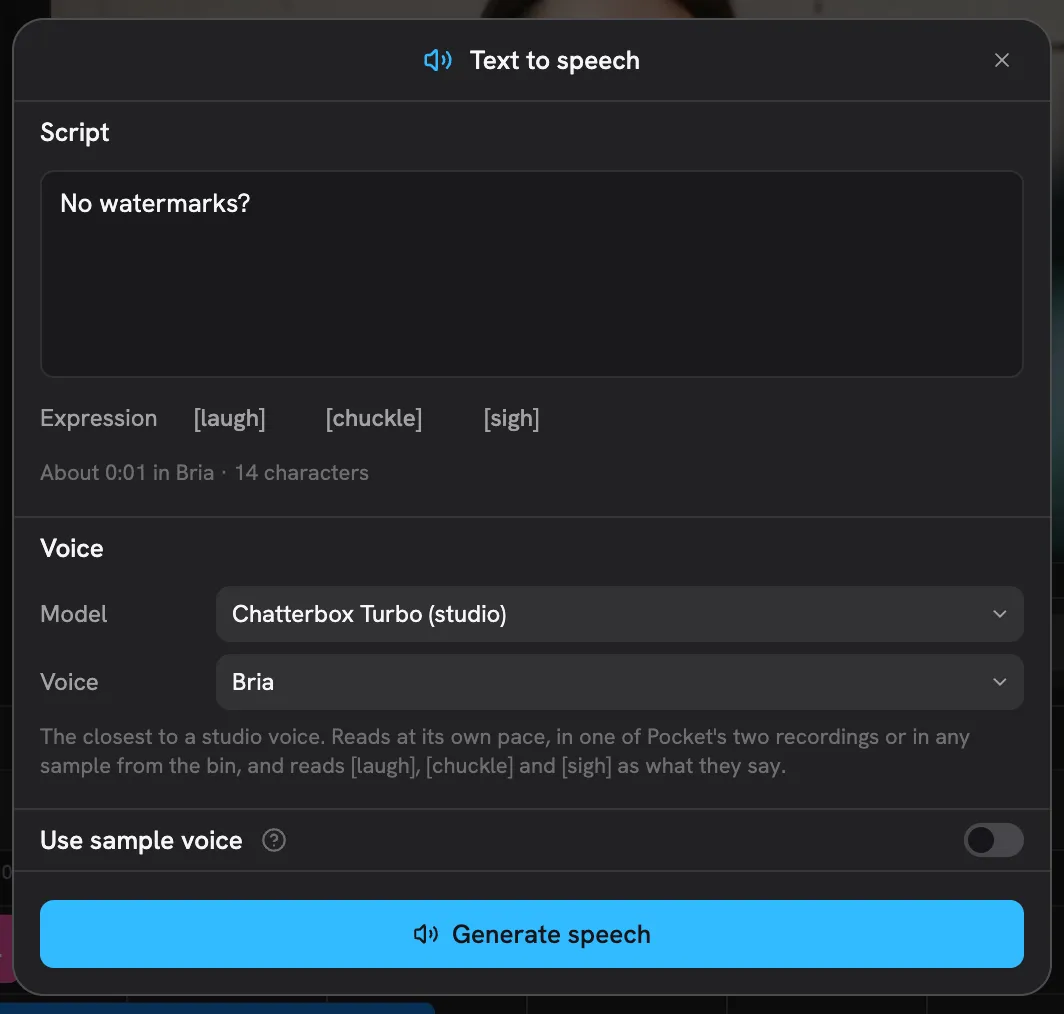
Where is the text-to-speech button?
In the tray row under the timeline tabs; the first use needs a voice model downloaded from Settings > Speech.
Does anything leave my machine?
No. Editing, captions, voices and cutout all run locally; optional models download once from Settings and then work offline, and logs stay on disk.
Is Concat really free?
Yes — no watermark, no account and no paid tier, with the code under AGPL-3.0; optional sponsorship replaces a subscription.
More in Video Processing
 DigicutOpen-source, self-hosted web app that cuts an excerpt out of an audio or video file in the browser with FFmpeg.wasm, so media never reaches a server.
 DigimergeSelf-hosted open-source (AGPL-3.0) web app to merge audio, concatenate videos or build image slideshows with ffmpeg.wasm; files are processed locally in the browser.
 DigitranscodeSelf-hosted audio and video converter that transcodes in the browser with FFmpeg.wasm — nothing is uploaded. Offers bitrate, sample-rate and resolution options.
 dovi-convert-dockerA self-hosted Docker app with a browser interface that turns Dolby Vision Profile 7 rips into Profile 8.1 so they play on more devices.
 Duix.AvatarSelf-hosted, open-source AI avatar toolkit that clones your face and voice offline to generate lip-synced talking videos from text or audio on your own GPU.
 EchoSyncEchoSync is a self-hosted AI video generator turning text into multi-scene prototypes with narration, subtitles, and a digital anchor — all running locally via Docker.
 ffmpeg-over-ipOpen-source, self-hosted client and server that run GPU-accelerated ffmpeg on a remote machine and tunnel file I/O back, dropping GPU passthrough and NFS/SMB shares.
 FlyReq Image StudioFlyReq Image Studio is a self-hosted, open-source AI image and video generation workspace with multi-model support, infinite canvas, agent mode, and PWA.
 HandBrake WebSelf-hosted, open-source web UI to manage HandBrake encoding jobs across multiple machines with job queue, presets, and hardware acceleration.
 KomaSelf-hosted AI video tool that creates summaries, chapters, searchable transcripts, and key frames from videos or MP4 links. Exports Markdown, SRT, JSON, CSV, and TXT.
 nexrenderOpen-source, self-hosted render automation for Adobe After Effects: feed JSON jobs to a CLI node or to a server-and-worker farm to produce data-driven videos.
 opencutOpen-source, self-hosted video editor pitched against CapCut: timeline editing in your browser with media kept on-device, Docker Compose stack with Postgres and Redis.
0 comments