
Self-host AICON
v2.0AI video studio with infinite canvas workflow
- Stars
- 1 641
- RAM
- 4GB
- Storage
- 20GB
- Ports
- 80 (Frontend (Nginx)), 8000 (Backend API)
- Requires
- Minio, PostgreSQL, Redis
qingshui869413421/aicon-backend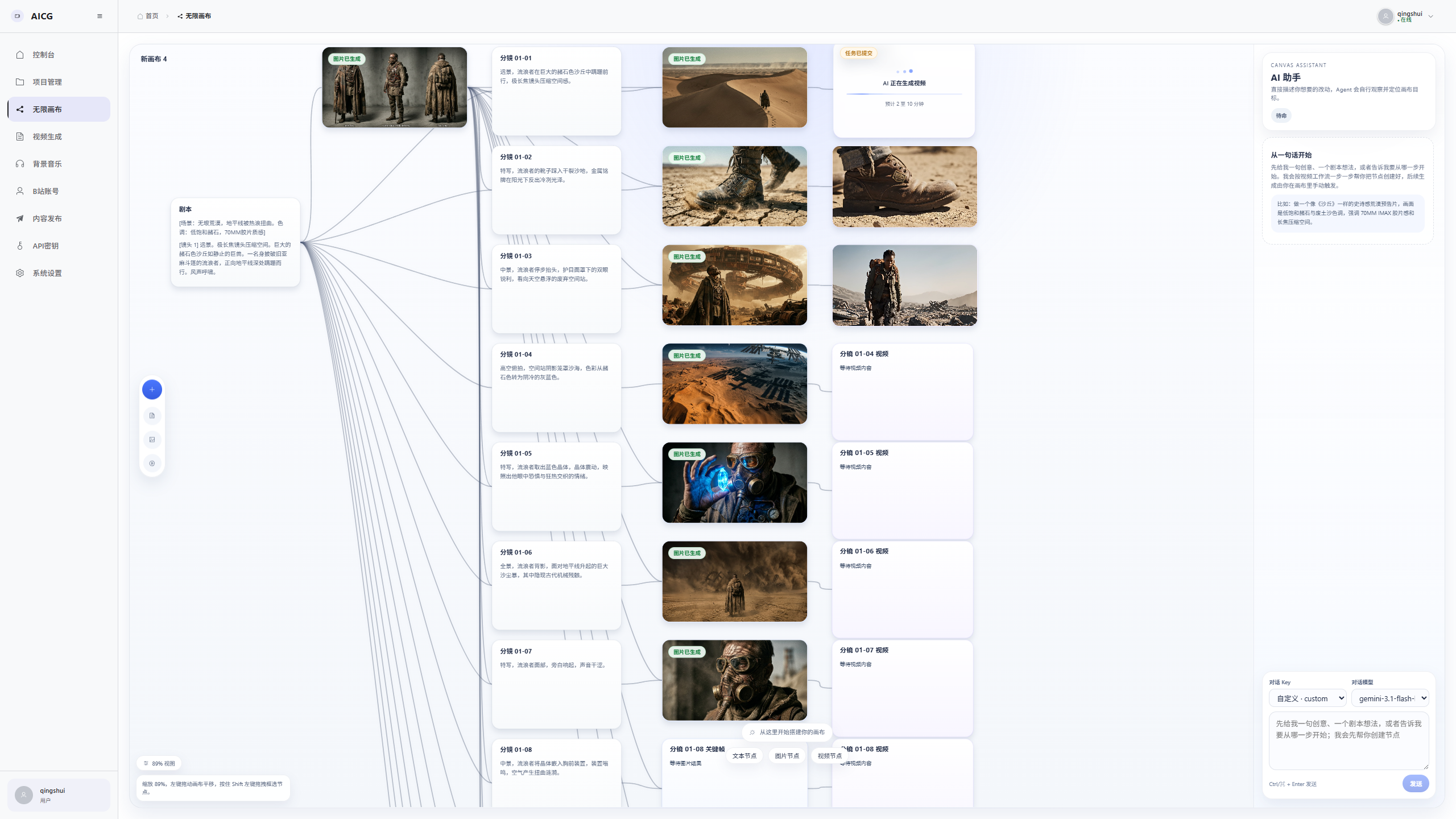
What is AICON?
AICON is an open-source AI video creation workbench designed for creators who want to turn scripts into finished videos. It provides an infinite canvas where you can organize text, image, and video nodes into editable workflows, guided by a natural-language assistant that builds the node graph for you. Core capabilities include script-to-storyboard breakdown with character reference images, keyframe and transition video generation, picture narration for short-form content, and automated Bilibili publishing. The stack runs via Docker Compose with a Vue 3 frontend, FastAPI backend, Celery workers, PostgreSQL, Redis, and MinIO. Model inference is not included — you bring your own API keys for compatible providers (OpenAI-compatible, MiniMax, etc.). The project is licensed under Apache-2.0 and actively developed.
Should you self-host AICON?
AICON scores 55/100 on selfhost.directory (how scoring works) and ranks #34 of 125 in AI. It has 1 641 GitHub stars.
It shipped 2 stable releases in the past year. The latest, v2.0, came out on 29 December 2025. New versions land roughly every 2 weeks.
Setup is advanced: plan for several services and some ongoing maintenance. An official Docker image is available. It is Apache-2.0-licensed and written mostly in Python.
Its closest alternative on selfhost.directory is ComfyUI (93/100, 143 752 stars). It scores higher overall, so compare the two before you pick. See AICON vs ComfyUI side by side.
Features
- API key encryption
- Bilibili distribution
- Character consistency
- Infinite canvas workflow
- Keyframe and transition video generation
- Multi-provider model gatewayModel inference costs are paid to the chosen provider; the self-hosted code does not include GPU inference.
- Natural-language workflow assistantAssistant only creates nodes and connections; generation tasks are manually triggered.
- Picture narration (short-form)
- Project and asset management
- Prometheus Metrics
- Real-time progress monitoring
- Script to storyboard
- Subtitle correction via LLM
- Video synthesis with smart caching
AICON README
More in Video Processing
 app.enfugue.aiSelf-hosted open-source web app for studio-quality AI image/video generation with Stable Diffusion, unified pipeline, CivitAI browser, optional auth, and JSON API.
 automatic-ripping-machineOpen-source, self-hosted disc-ripping machine for Linux: insert a Blu-ray, DVD or CD and MakeMKV, HandBrake and abcde rip it automatically, with a Flask web UI for jobs.
 by2kbby2kb is a self-hosted CLI turning Bilibili/YouTube URLs into Markdown transcripts, abstracts, and study notes via local Whisper or cloud ASR.
 CliparrSelf-hosted, open-source tool that clips video from Plex, Jellyfin, or local files directly in your browser — no server-side FFmpeg needed.
 ClipForgeSelf-hosted AI turns product images into short videos for Douyin, Kuaishou, Xiaohongshu, TikTok Shop — product-preserving visuals, AI scripts, voiceovers, subtitles.
 cobaltA self-hosted, open-source media downloader that saves video, audio, gifs and photos from YouTube, TikTok, Instagram, Reddit and more, with no ads or trackers.
 ConcatAn open-source, self-hosted desktop and mobile video editor pitched as a CapCut replacement, with local Whisper captions, text-to-speech and 4K export.
 DigicutOpen-source, self-hosted web app that cuts an excerpt out of an audio or video file in the browser with FFmpeg.wasm, so media never reaches a server.
 DigimergeSelf-hosted open-source (AGPL-3.0) web app to merge audio, concatenate videos or build image slideshows with ffmpeg.wasm; files are processed locally in the browser.
 DigitranscodeSelf-hosted audio and video converter that transcodes in the browser with FFmpeg.wasm — nothing is uploaded. Offers bitrate, sample-rate and resolution options.
 dovi-convert-dockerA self-hosted Docker app with a browser interface that turns Dolby Vision Profile 7 rips into Profile 8.1 so they play on more devices.
 Duix.AvatarSelf-hosted, open-source AI avatar toolkit that clones your face and voice offline to generate lip-synced talking videos from text or audio on your own GPU.
0 comments