Self-host automatic-ripping-machine
2.24.4Headless auto-ripper for Blu-rays, DVDs and audio CDs
- Stars
- 5 439
- Port
- 8080 (ARM Flask web UI)
- Requires
- MakeMKV
automaticrippingmachine/automatic-ripping-machine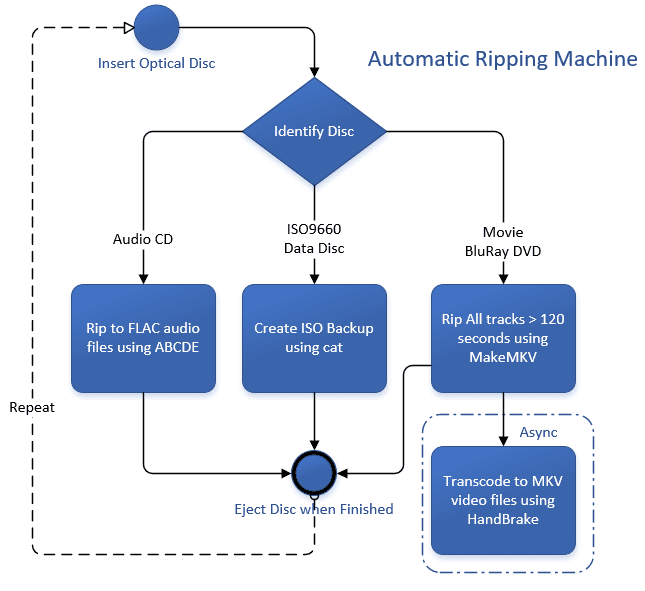
What is automatic-ripping-machine?
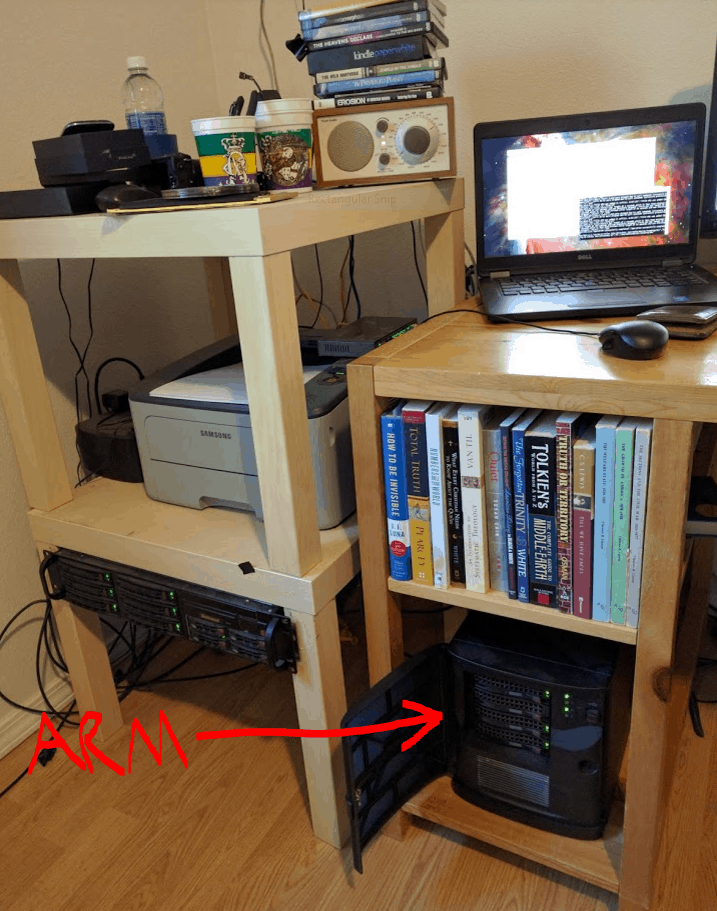
A.R.M. is a disc-ripping service for Linux home media libraries: a udev rule notices when an optical disc is pushed into a drive, decides whether it holds video, audio or files, and runs the matching rip with no further input. Blu-rays and DVDs are pulled off with MakeMKV and then transcoded by HandBrake, audio CDs are handled by abcde, and data discs are copied into an ISO image; titles plus the movie-versus-series decision come from OMDb so output folders are named the way Plex or Emby expect. Ripping and transcoding are decoupled, so the disc ejects as soon as raw files are on disk, and several drives can be worked in parallel. A Flask web UI guarded by a built-in admin account lists jobs and logs and lets you edit the arm.yaml settings in the browser, while finished rips can trigger notifications through Apprise or an Emby library refresh. Self-hosting needs real hardware: one or more optical drives, Linux, and plenty of fast storage for the raw, transcode and completed folders. Docker on Linux is the documented route, using the published image, an ARM_UID/ARM_GID pair matching the host arm user and a start script that binds the drives through; note that MakeMKV itself is trial-or-key software.
automatic-ripping-machine alternatives
 cli_debridSelf-hosted media automation that scrapes torrents/Usenet, uses debrid services, and organizes libraries for Plex/Jellyfin/Emby with auto quality upgrades.Comparecli_debrid with automatic-ripping-machine
 MediaManagerSelf-hosted, open-source media manager for TV and movie libraries: discover releases, score them, hand downloads to qBittorrent or SABnzbd, with OIDC sign-in.CompareMediaManager with automatic-ripping-machine
 AutoPlexxAutoPlexx is a self-hosted, open-source Docker Compose stack for a complete Plex Media Server with request handling, library automation, VPN torrent downloads, monitoringCompareAutoPlexx with automatic-ripping-machine
 TdarrSelf-hosted Tdarr runs media library transcode and remux automation with FFmpeg or HandBrake across distributed nodes, with GPU workers, plugin stacks and a web UI.CompareTdarr with automatic-ripping-machine
 MDCzOpen-source scraper fetches adult video metadata from multiple sites, creates NFO files, organizes libraries for Emby/Jellyfin/Kodi. Desktop app or Docker web UI.CompareMDCz with automatic-ripping-machine
 nomercy-media-serverSelf-hosted media server with automatic encoding, hardware transcoding (NVIDIA/Intel/AMD), and a polished web app plus mobile PWA for streaming movies, shows, and music.Comparenomercy-media-server with automatic-ripping-machine
 Upcoming-Movies-TV-Shows-for-KometaSelf-hosted tool creating Kometa overlays by checking Radarr/Sonarr for upcoming movies and TV shows, downloading trailers or creating placeholders.CompareUpcoming-Movies-TV-Shows-for-Kometa with automatic-ripping-machine
 ElvernElvern is a self-hosted media library for families with adaptive 4K streaming and VLC handoff behind a private Tailscale perimeter.CompareElvern with automatic-ripping-machine
Should you self-host automatic-ripping-machine?
automatic-ripping-machine scores 66/100 on selfhost.directory (how scoring works) and ranks #11 of 141 in Media Management. It has 5 439 GitHub stars, +148 in the last 30 days.
It shipped 16 stable releases in the past year. The latest, 2.24.4, came out on 3 October 2026. New versions land roughly every 6 days.
Setup is moderate: expect some configuration beyond a single command. An official Docker image is available. It is MIT-licensed and written mostly in Python.
Its closest alternative on selfhost.directory is Sonarr (80/100, 17 726 stars). It scores higher overall, so compare the two before you pick. See automatic-ripping-machine vs Sonarr side by side.
Features
- Asynchronous batched transcoding
- Automatic disc insertion detection
- Automatic transcoding queue after rip
- Blu-ray, DVD and CD ripping
- Hardware-accelerated transcoding
- Headless server operation
- In-browser settings editing
- ISO backup of data discs
- Media title and type lookup
- Movie vs TV show handling
- Parallel multi-drive ripping
- Push notifications on completion
- Web UI for jobs and logs


FAQ
Where do I look when something else goes wrong?
Check the per-disc log files, by default under /home/arm/logs/, filtering them with grep for ARM entries. Raising the log level to DEBUG in arm.yaml gives more detail, and the wiki asks you to re-run a disc in DEBUG mode before posting a log to an issue.
I can't get AMD VCE to work
Check that vce_h264 / vce_h265 appear in the HandBrakeCLI encoder list, install the amdgpu-pro drivers, the amf-amdgpu-pro package and the Vulkan SDK, and use the single built-in H.264 VCE 1080p profile. VCE is not enabled by any distro by default, so HandBrake must be compiled from source with the --enable-vce flag.
I can't get Intel QuickSync to work
Run HandBrakeCLI --help and look for the qsv_265 / qsv_264 encoders; if they are missing you need the Intel Media SDK, the right graphics driver and possibly a HandBrake build from source. If they are present, make sure you pick one of the two built-in QSV profiles.
Why won't ARM eject the disc until transcoding finishes?
To let discs stack up, set RIPMETHOD to "mkv" so MakeMKV writes raw files to disk first and turn MAINFEATURE off so the whole disc is taken. These are not defaults because the mkv rip method can cause problems with Blu-rays.
Is there a way to disable HandBrake encoding and just keep the .mkv rip?
Yes, set SKIP_TRANSCODE from false to true in arm.yaml, either by editing the file or through the settings page in the web UI.
My arm won't start when I insert a disc?
Check that udev is really launching the wrapper: look for entries in empty.log in your configured log directory, verify the symlink to the automedia rules and reload udev rules, and confirm the arm user can write to the paths in arm.yaml. Also make sure scripts/arm_wrapper.sh is executable and watch tail -f /var/log/syslog while inserting a disc.
More in Media Management
 avideoSelf-hosted, open-source video platform for on-demand libraries and live broadcasts, with HLS delivery, an encoder, plugins, and paid monetization options.
 AzuraCastSelf-hosted, open-source web radio suite bundling Liquidsoap, Icecast and a management panel in one Docker container, with multi-station support and listener analytics.
 Bangumi-syncerSelf-hosted tool that auto-syncs watch progress from Plex, Emby, Jellyfin, Trakt to Bangumi so you don't manually mark episodes.
 BazarrOpen-source, self-hosted subtitle manager that pairs with Sonarr and Radarr to find, download and upgrade subtitles across 60+ providers and 184 languages.
 BeetsOpen-source, self-hosted music library manager: the beet CLI auto-tags your collection from MusicBrainz and can serve a web UI or an MPD-protocol player.
 BlockbusterrBlockbusterr is a self-hosted media discovery tool that fetches trending movies and shows from TMDB, Simkl, Trakt and sends matches to Radarr, Sonarr, Jellyseerr, Seerr
 BookBountyBookBounty is a self-hosted, open-source tool that automatically searches Library Genesis for missing books in your Readarr library and downloads them.
 BookHavenBookHaven is a self-hosted, open-source EPUB reader that scans your local ebook library for reading and management in a responsive web UI with OPDS support.
 botdarrA self-hosted chat bot that connects Discord, Slack, Telegram, and Matrix to Radarr, Sonarr, and Lidarr for media management without a UI.
 boxarrBoxarr is a self-hosted, open-source app that automatically fetches box office charts and adds trending movies to Radarr with smart filters and a responsive web UI.
 bragibooksSelf-hosted web app for cleaning up and organizing audiobook libraries, with file merging, format conversion, and metadata fetching from Audible.
 Calibrecalibre is a free, open-source e-book manager for organizing, converting, and reading e-books. Supports all major formats with a built-in Content server for web access.
0 comments