
Self-host World Monitor
v2.11.8Real-time global intelligence dashboard with AI news
- Stars
- 90 701
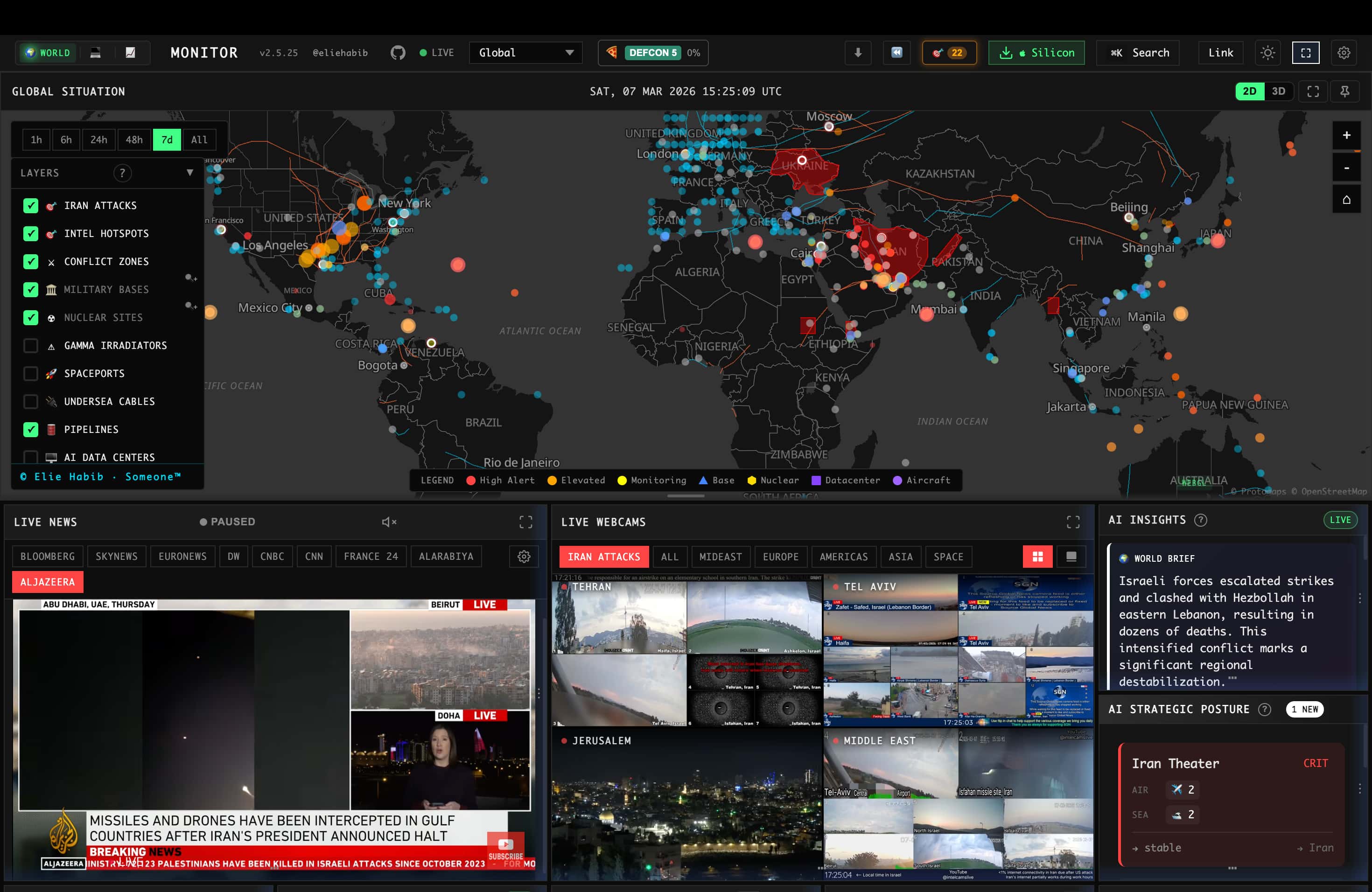
What is World Monitor?
World Monitor is a real-time global intelligence dashboard that aggregates curated news feeds, geopolitical monitoring, and infrastructure tracking into a unified situational awareness interface. It features a dual map engine (3D globe and WebGL flat map), cross-stream correlation across military, economic, disaster, and escalation signals, a live Country Instability Index covering 31 Tier-1 countries, finance radar covering stock exchanges, commodities, and crypto, local AI inference via Ollama with no API keys required, six site variants built from one codebase, native desktop apps for macOS, Windows, and Linux via Tauri 2, and a multilingual UI with 28 languages including RTL support. The project can be self-hosted via Docker Compose (dashboard, Redis cache, and AIS relay containers) or run locally with npm. Licensed under AGPL-3.0-only with commercial licensing available as an alternative.
World Monitor alternatives
 Market Research CockpitSelf-hosted open-source market dashboard for A-shares, HK, US stocks, commodities, treasuries, sector heat, money flow, news, industry chains, and AI token tracking.CompareMarket Research Cockpit with World Monitor
 God's Eye ViewSelf-hosted open-source CesiumJS globe with live flights, ships, satellites, weather and public camera feeds, voice AI control and an MCP server.CompareGod's Eye View with World Monitor
 AkashicSelf-hosted open-source geospatial intelligence workspace combining live aircraft, satellite, seismic, weather, radio, and OSINT data on an interactive map.CompareAkashic with World Monitor
 Traefik Log DashboardSelf-hosted, open-source dashboard for analyzing Traefik logs with IP geolocation, status codes, service metrics, and 3D globe visualization. Runs via Docker Compose.CompareTraefik Log Dashboard with World Monitor
 checkmateSelf-hosted, open-source uptime and infrastructure monitor: HTTP, ping, DNS, Docker and gRPC checks with incidents, status pages and Slack or email alerts.Comparecheckmate with World Monitor
 dashwiseAn open-source, self-hosted homelab dashboard with built-in auth and OIDC SSO, widgets, link groups with uptime monitoring, RSS news and Spotlight-style search.Comparedashwise with World Monitor
 PanWatchOpen-source, self-hosted AI stock monitor for A-share, HK and US markets: portfolios, TradingAgents research, price alerts and paper trading.ComparePanWatch with World Monitor
 monoscopeOpen-source, self-hosted observability that keeps logs, metrics and traces in your own S3 buckets, with plain-English queries, scheduled AI agents and session replay.Comparemonoscope with World Monitor
Should you self-host World Monitor?
World Monitor scores 85/100 on selfhost.directory (how scoring works) and ranks #5 of 105 in Monitoring & observability. It has 90 701 GitHub stars, +2 446 in the last 30 days.
It shipped 19 stable releases in the past year. The latest, v2.11.8, came out on 4 November 2026. New versions land roughly every 1 days.
Setup is advanced: plan for several services and some ongoing maintenance. It is AGPL-3.0-licensed and written mostly in Typescript.
Its closest alternative on selfhost.directory is prometheus (92/100, 67 634 stars). It scores higher overall, so compare the two before you pick. See World Monitor vs prometheus side by side.
World Monitor README
Real-time global intelligence dashboard — AI-powered news aggregation, geopolitical monitoring, and infrastructure tracking in a unified situational awareness interface.
The World Monitor name and wordmark identify the official site at www.worldmonitor.app, so please don't present a fork as the official site.
Documentation · Releases · Contributing

| Surface | Get it | Docs |
|---|---|---|
| Web app | worldmonitor.app and the tech, finance, commodity, happy and energy variants | Getting Started |
| Desktop app (Tauri) | Windows, macOS and Linux downloads above | Desktop App |
| Terminal dashboard | npx worldmonitor |
Terminal Dashboard |
| CLI | npm install -g worldmonitor or brew install worldmonitor |
Command-Line Client |
| SDKs | Python worldmonitor-sdk, Ruby worldmonitor, Go sdk/go |
SDKs |
| MCP server | https://worldmonitor.app/mcp |
MCP Overview |
The terminal dashboard runs the same live data in your shell: world map, news, markets, conflict, military flights, cyber, climate, prediction markets and live TV, with mouse support and colour themes. No API key needed.

- Curated news feeds across global and regional categories, AI-synthesized into briefs
- Dual map engine — 3D globe (globe.gl) and WebGL flat map (deck.gl) with a shared map-layer catalog
- Panel inventory — concrete panel implementations across specialized variants
- Cross-stream correlation — military, economic, disaster, and escalation signal convergence
- Country Instability Index (CII) — live CII v14 scores, bands, and approximate 24-hour movement for 31 Tier-1 countries
- Finance radar — stock exchanges, commodities, crypto, and a market composite
- Local AI — run everything with Ollama, no API keys required
- Site variants from a single codebase (world, tech, finance, commodity, happy, energy)
- Native desktop app (Tauri 2) for macOS, Windows, and Linux
- Multilingual UI with native-language feeds and RTL support
For the full feature list, architecture, data sources, and algorithms, see the documentation.
All site variants and desktop binaries are built from a single codebase and ship from the same release process. The table below clarifies maintenance status so you know which surfaces are safe to depend on.
| Surface | Status | Notes |
|---|---|---|
worldmonitor.app, tech., finance., commodity., happy., energy. |
Stable | Public deployments built from this repo, actively maintained |
| Desktop binaries (Windows / macOS Apple Silicon / macOS Intel / Linux AppImage x64 and ARM64) | Stable | One Tauri binary for every variant — install World Monitor and switch to tech, finance, commodity, energy, or happy in-app. There is deliberately no per-variant download |
worldmonitor npm package (terminal dashboard and CLI) |
Stable | Published from cli/ on every cli-v* tag |
Issues filed against any of the above are triaged from the same backlog — see the issues board for currently-open work.
One-line install (self-host the full stack with Docker — dashboard, Redis, AIS relay, seeded public data):
curl -fsSL https://www.worldmonitor.app/install.sh | bashThis clones into ./worldmonitor (or reuses your checkout), generates the required secrets, starts the stack, and seeds data. Then open localhost:3000. Options: --dir, --port, --no-seed, --no-build, passed after bash -s -- (see scripts/install.sh --help). API keys are optional. Details, production notes, and uninstall: SELF_HOSTING.md.
Local development (hot-reload Vite server):
Requires Node.js 24, the version pinned in .nvmrc. Distribution packages are often older. Debian 12 and Raspberry Pi OS ship Node.js 18 with npm 9.2.0, where npm install stops with Invalid comparator: file:vendor/braces. Install Node.js 24 with nvm (nvm install inside the checkout reads .nvmrc) or from nodejs.org.
git clone https://github.com/koala73/worldmonitor.git
cd worldmonitor
npm install
npm run dev
Open localhost:3000 (override the port with DEV_PORT in .env.local). The app runs with no environment variables.
Feature-specific data sources may require credentials. See .env.example for the full list.
For variant-specific development:
npm run dev:tech       # tech.worldmonitor.app
npm run dev:finance    # finance.worldmonitor.app
npm run dev:commodity  # commodity.worldmonitor.app
npm run dev:happy      # happy.worldmonitor.app
npm run dev:energy     # energy.worldmonitor.app
See the self-hosting guide for deployment options (Vercel, Docker, static).
| Category | Technologies |
|---|---|
| Frontend | Vanilla TypeScript, Vite, globe.gl + Three.js, deck.gl + MapLibre GL |
| Desktop | Tauri 2 (Rust) with Node.js sidecar |
| AI/ML | Ollama / OpenRouter, Transformers.js (browser-side) |
| API Contracts | Protocol Buffers and sebuf HTTP annotations |
| Deployment | Vercel Edge Functions, Railway relay, Tauri, PWA |
| Caching | Redis (Upstash), 3-tier cache, CDN, service worker |
Full stack details in the architecture docs.
World Monitor is built for agents and scripts as well as browsers:
-
MCP server —
https://worldmonitor.app/mcp(Streamable HTTP). Publictools/list;tools/callauthenticates with aX-WorldMonitor-Keyheader or OAuth. The server also publishes its Agent Skills through the draftio.modelcontextprotocol/skillsextension (skills/list,skills/get, andskill://…resource reads). -
Google Antigravity and Gemini listing preparation — install the bundled Antigravity plugin (
.antigravity-plugin/plugin.json+mcp_config.json) withagy plugin install ./worldmonitor. Gemini custom apps and Connected Apps sign in through Google's OAuth callbacks. See Gemini and Antigravity. -
REST API — base
https://api.worldmonitor.app, described by the OpenAPI spec. -
CLI — the official
worldmonitornpm package (source incli/). Run it with no arguments in a terminal for the terminal dashboard:npx worldmonitor tools # run ad-hoc — list every MCP tool (no key needed) npm install -g worldmonitor # or install the `worldmonitor` (alias `wm`) command brew install worldmonitor # or install it with Homebrew worldmonitor risk IR --api-key wm_xxx
-
SDKs — official zero-dependency client libraries mirroring the CLI: Python
worldmonitor-sdk(source insdk/python/), Rubyworldmonitor(sdk/ruby/), Gogithub.com/koala73/worldmonitor/sdk/go(sdk/go/). Guide: worldmonitor.app/docs/sdks.
Agent discovery files: llms.txt · agent-skills manifest · api-catalog. Get an API key at worldmonitor.app/pro.
Flight data provided graciously by Wingbits, the most advanced ADS-B flight data solution.
World Monitor's web app and API run on Vercel. Thank you to Vercel for their generous support of the project.
WorldMonitor aggregates attributed upstream sources across geopolitics, finance, energy, climate, aviation, cyber, military, infrastructure, and news intelligence. Curated feeds and freshness-tracked source groups are published in the full data sources catalog, with provider, feed-tier, license-posture, and collection-method details.
Contributions welcome! See CONTRIBUTING.md for guidelines.
npm run typecheck        # Type checking
npm run build:full       # Production build
AGPL-3.0-only for the source code. Commercial use is permitted under the AGPL when you comply with its copyleft and source-availability terms.
| Use Case | Allowed? |
|---|---|
| Personal / research / educational | Yes, under AGPL-3.0-only |
| Self-hosted instance | Yes, under AGPL-3.0-only |
| Fork and modify | Yes, share source under AGPL-3.0-only when required |
| Commercial use / SaaS | Yes, under AGPL-3.0-only when you comply with AGPL obligations |
| Private-source proprietary use or official branding rights | Separate commercial or trademark permission needed |
See LICENSE for the full code license and docs/license.mdx for a plain-language summary. Commercial licensing is available as an alternative option for teams that need non-AGPL terms.
Copyright (C) 2026 Elie Habib. All rights reserved.
Elie Habib — GitHub
We thank the following researchers for responsibly disclosing security issues:
- Cody Richard — Disclosed three security findings covering IPC command exposure, renderer-to-sidecar trust boundary analysis, and fetch patch credential injection architecture (2026)
See our Security Policy for responsible disclosure guidelines.
worldmonitor.app · docs.worldmonitor.app · finance.worldmonitor.app · commodity.worldmonitor.app
More in Monitoring & observability
 ZabbixZabbix is a self-hosted, open-source observability platform for monitoring networks, servers, VMs, and cloud infrastructure with distributed monitoring.
 AlertaSelf-hosted, open-source alert monitoring console that consolidates, de-duplicates and correlates alerts from many sources via an HTTP JSON API.
 app-glancesGlances is a self-hosted, open-source system monitoring tool packaged as a Home Assistant add-on with web dashboard and InfluxDB export.
 crowdsec-web-uiSelf-hosted dashboard for CrowdSec to explore alerts, manage decisions, view metrics, and configure multi-channel notifications.
 elasticsearchOpen-source distributed search engine that handles structured, unstructured, and vector data for real-time search, observability, and AI workloads.
 gatusSelf-hosted, open-source uptime monitor and status page: probe HTTP, TCP, ICMP or DNS endpoints with custom conditions and alert via Slack, Discord, PagerDuty, etc.
 GPONSelf-hosted Prometheus exporter scraping ~75 metrics from Realtek RTL960x GPON SFP ONUs over SSH, with pre-built Grafana dashboard.
 graphite-webA highly scalable real-time graphing system
 hastic-serverHastic Server is an open-source, self-hosted analytics engine adding pattern recognition and anomaly detection to Grafana dashboards.
 Kuvasz UptimeSelf-hosted, open-source uptime & SSL monitor with HTTP, ping, TCP, DNS and Docker checks, status pages, maintenance windows, REST API, and Prometheus export.
 laminarOpen-source observability platform for AI agents. Alternative to LangSmith with tracing, Signals failure detection, evals, dashboards, MCP/CLI access.
 missedrun-selfhostedMissedRun Self-hosted monitors scheduled jobs via ping URLs to catch silent failures and sends email alerts when jobs miss check-ins.
0 comments