
Self-host TREK
v5.1.4Real-time collaborative trip planner with maps and budgets
$ helm install trek trek/trek- Stars
- 15 578
- Port
- 3000 (Main web app and API (HTTP, also serves WebSockets on /ws))
mauriceboe/trek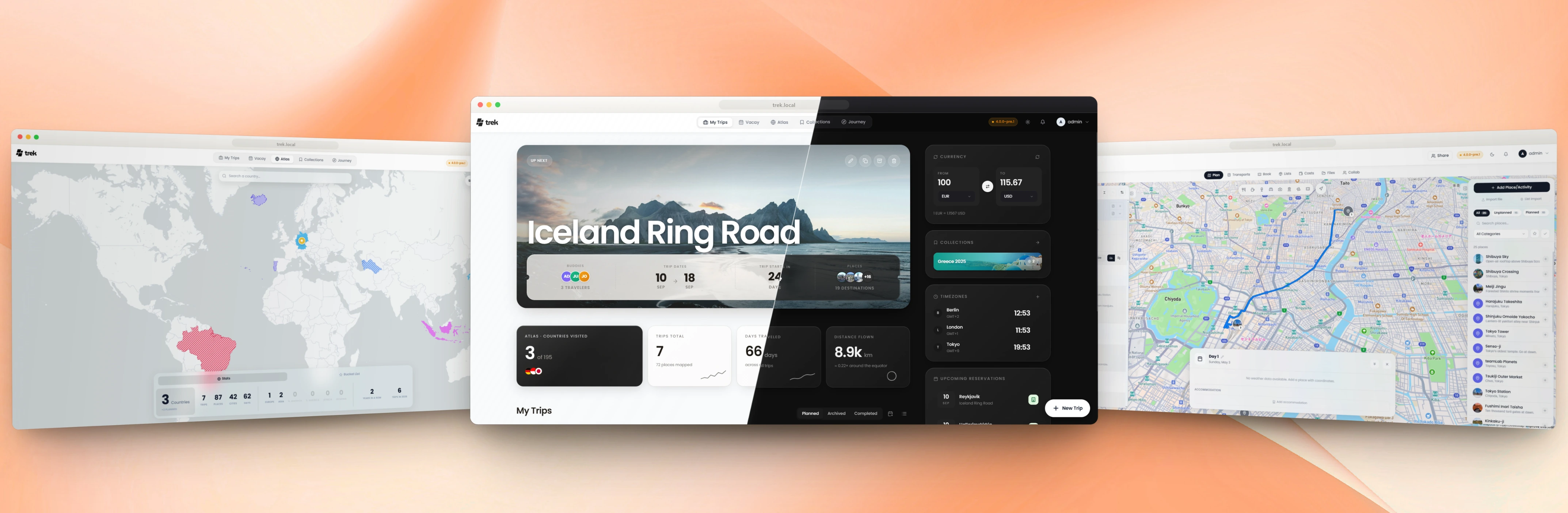
What is TREK?
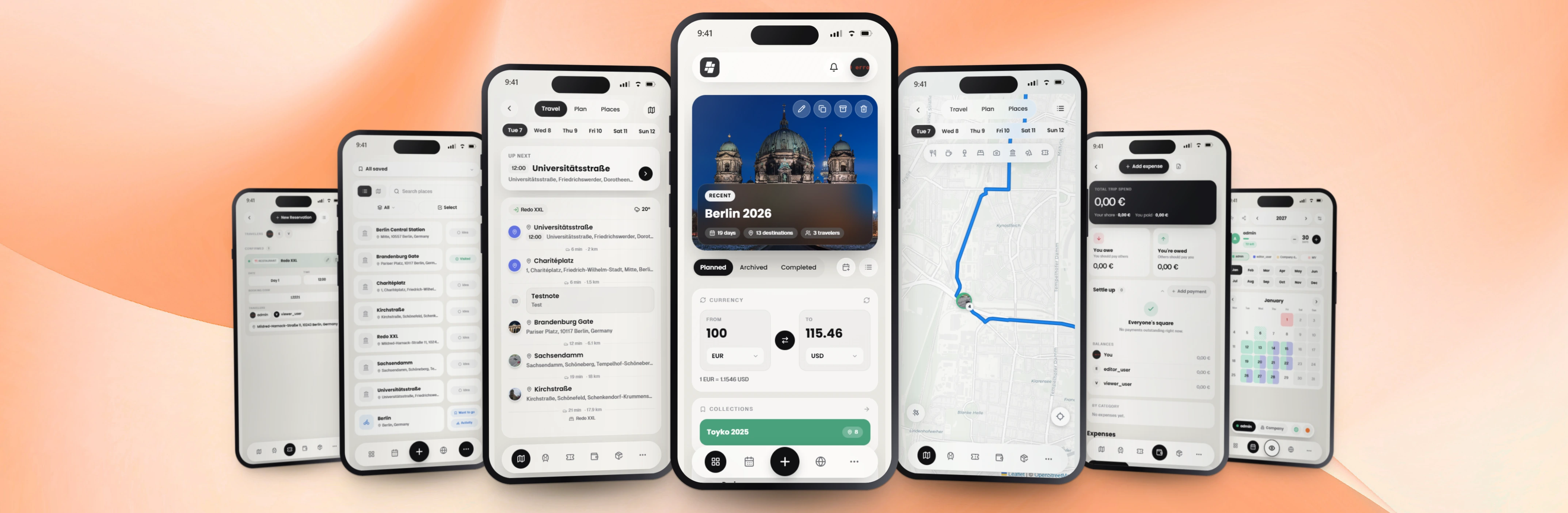
TREK is a travel and trip planner for individuals, families and teams who want to organize journeys together on their own server. Trips are arranged as day plans you can reorder by dragging, with interactive maps based on Leaflet, Mapbox GL / MapLibre and token-free OpenFreeMap tiles, route auto-sorting over OSRM, door-to-door public transport itineraries and keyless weather forecasts. It manages reservations across many booking types, splits costs with custom shares and rates frozen per entry, keeps packing lists and to-dos, and attaches files to trips, places or bookings. Edits sync live between collaborators over WebSockets, and read-only trip pages can be shared with people who have no account. Atlas marks visited countries from open boundary data, Vacay provides a leave calendar, and an optional journal addon stores dated entries with photos. Admins control feature addons, a permission matrix, users, backups, storage backends, an audit log and a sandboxed third-party plugin system; authentication covers passwords, OIDC single sign-on, passkeys and TOTP 2FA, and an optional MCP server exposes the app to AI agents. Self-hosting is a single Docker container listening on port 3000 with an encryption key (or the shipped Compose file, or a Helm chart); the app installs as a PWA on phones and works offline. Some capabilities (journey, collections, MCP, AI booking parsing, AirTrail sync) ship disabled by default, and the 5.x line is currently a pre-release.
TREK alternatives
 trip2gSelf-hosted knowledge base publishing Obsidian vaults as websites and MCP servers for AI agents with federation and Telegram.Comparetrip2g with TREK
 wandererSelf-hosted, open-source trail database to store, plan, and share GPX routes: ActivityPub federation, Valhalla routing, Meilisearch search, iOS/Android app.Comparewanderer with TREK
 TrailkeeprTrailkeepr is a self-hosted, open-source app for archiving hikes and climbs with GPX import, photos, notes, and an interactive map — all on your own hardware via Docker.CompareTrailkeepr with TREK
 surmaiSelf-hosted, open-source travel organizer for personal and family use with collaborative trip planning, offline access, privacy focus, and PWA mobile support.Comparesurmai with TREK
 smsSelf-hosted vector tile server serving OSM data from MBTiles with hiking/cycling routing, SAC ratings, and MCP for LLM agents to plan tours.Comparesms with TREK
 JournivA self-hosted private journal with moods, activities, goals, prompts, media uploads, full-text search and analytics, run with Docker Compose, SQLite or PostgreSQL.CompareJourniv with TREK
 DawarichSelf-hosted, open-source location history tracker and Google Timeline alternative with map layers, trips, visits, stats, family sharing and import/export.CompareDawarich with TREK
 OcularOcular is an open-source, self-hosted budgeting app for tracking personal finances across multiple years with dashboards, dark mode, PWA, and Google Sheets import.CompareOcular with TREK
Should you self-host TREK?
TREK scores 76/100 on selfhost.directory (how scoring works) and ranks #1 of 8 in Travel. It has 15 578 GitHub stars, +862 in the last 30 days.
It shipped 33 stable releases in the past year. The latest, v5.1.4, came out on 12 November 2026. New versions land roughly every 3 days.
Setup is easy: most people get it running in one sitting. An official Docker image is available. It is AGPL-3.0-licensed and written mostly in Typescript.
Its closest alternative on selfhost.directory is TRIP (60/100, 1 959 stars). TREK scores higher overall. See TREK vs TRIP side by side.
Features
- AI booking parsingAI booking extraction is off by default
- Booking & reservation management
- Budget & expense splitting
- Day-by-day itinerary planning
- Interactive maps3D buildings and terrain require Mapbox
- MCP server for AI agentsMCP addon is off by default
- Multi-language UI
- Offline Support
- Packing lists
- Plugin System
- Public trip sharing
- Real-time collaborative editing
- Route Planning
- Travel journalJourney addon is off by default
- Weather forecasts
TREK README

TREK has grown from a travel planner into a whole ecosystem for trips: plan together in real time on a live map, build hikes, tours and road trips, keep bookings and shared costs in order, pack, write the journal, lay out the photo book and hand the busy work to the built-in AI. Self-hosted, on the web, on your phone and offline.
PUBLIC SERVICES PROUDLY SPONSORED BY
How to install TREK
Install TREK with Docker
ENCRYPTION_KEY, ADMIN_EMAIL, ADMIN_PASSWORD, PORT, TZ, LOG_LEVEL, ALLOWED_ORIGINS, FORCE_HTTPS, TRUST_PROXY, OIDC_ISSUER, APP_URLENCRYPTION_KEY=$(openssl rand -hex 32) docker run -d -p 3000:3000 \
-e ENCRYPTION_KEY=$ENCRYPTION_KEY \
-v ./data:/app/data -v ./uploads:/app/uploads mauriceboe/trek
On first boot an admin account is seeded from ADMIN_EMAIL/ADMIN_PASSWORD or printed to the container log.
Install TREK with Docker Compose
The repository ships a ready-to-use docker-compose.yml
with secure defaults and every option documented inline. Download it, then:
docker compose up -d
Install TREK with Helm
helm repo add trek https://chart.liketrek.com
helm repo update
helm install trek trek/trek
Values documented in charts/README.md
How to configure TREK
PORT=Sources: 3001, Docker: 3000Server portNODE_ENV=productionEnvironment (production / development)ENCRYPTION_KEY=autoAt-rest encryption key — see resolution order belowTZ=UTCTimezone for logs, reminders, and cron jobs (e.g. Europe/Berlin)LOG_LEVEL=infoinfo = concise user actions; debug = verbose details
TREK releases & version history
5.1.4
This release keeps Vacay's public holidays working past January 2027, when the old holiday API ends, and fixes AirTrail sending its stored API key to a newly entered address. Update before February; the apps for iPhone, iPad, Apple Watch and Android are still in a closed test, and you can join: 👉 Sign up at liketrek.com/app-test.
Added
- Bakeries and groceries on the map and along a hike (#3026). The map's place search and a tour's stops along the route also find bakeries and supermarkets, for restocking on a multi-day hike.
- Settings say what they reach. On a phone and in the app the sections stand under "Your account", which follows you to every device, and "This device".
- An install guide for TrueNAS SCALE in the wiki (#3060), from the TrueNAS Community catalog, including updates.
Fixed
Security
- AirTrail kept its API key for a new address. Saving the settings with another host and the key field left as it was kept the stored key, and the next sync sent it to that host. A new host now needs its own key; a path change on the same host keeps it. Thanks to Jacob-Lasky for the report (GHSA-mwf5-5px8-c9h5).
Vacay and Atlas
- Public holidays in Vacay would have stopped working in February (#3057). The holiday provider ends its v3 API on 31 January 2027; Vacay now uses Nager.Holidays v4. Holiday names now show in English, because v4 no longer returns local names.
- Ireland showed four provinces in the Atlas (#2922). It now shows Ireland's 26 counties, from Tailte Éireann's statutory boundaries; places marked before keep their marks.
- The Atlas put Nice and Menton in Italy (#3048, #3049). A coastal point that no country polygon contains went to the country with the smallest bounding box; it now goes to the nearest border.
Planner and bookings
- A transport or booking form lost what was typed (#3069). Every re-read of the trip, which a WebSocket reconnect behind a proxy brings every few seconds, filled the open form in again; it now resets only when another entry is opened.
- A flight without airports lost its day and times on saving (#3070). Like a train without stations, it now takes them from the form's rows.
- Places could not be reordered by drag and drop in Firefox (#3041). Firefox took the first mouse move of a drag as its end; the day list also no longer replays its fade-in after a drop.
- Blank days while swiping quickly through a trip on iOS (#3067). The pager now also draws the days around the one a swipe is heading for.
- A recorded Dawarich route was barely visible on past trips. It is now drawn in full colour, wider and with longer dashes, on both map engines.
Sign-in
- An SSO account was locked out after the provider changed its subject (#3065). The admin user dialog now has "Remove SSO link", and the next SSO sign-in links the account again.
Assistant
- The assistant failed on Azure AI Foundry reasoning models (#3043). These deployments refuse tools at their default reasoning effort; the assistant now asks once more without reasoning.
- The assistant on Claude Sonnet 5.5 said it came back without an answer. Once it has asked for the answer, it now asks for it as plain text.
Plugins
- Plugins could not reach the network on Node 25 and newer (#3045, #3046). Plugin processes now get network access on the Node versions that know the flag.
- A plugin's page on a phone ran under the status bar and past the screen. It now fills exactly the visible area and scrolls on its own.
Phone layout
- A sheet let the page behind show through while it opened. The dim now fades in beside the sheet instead of around it.
Privacy
- A deleted chat message kept its text in the database and in every backup. The delete now clears the text, and the update clears what earlier deletes left behind.
Speed
- The first load fetched 187 icon files (#3055). The icons the first screen needs now ship as one file.
- Static files were compressed again on every request (#3053). The hashed assets are now written as Brotli copies at build time and served from those.
- Looking up the country of a place did needless work (#3054). Lists of many places, the Atlas and journeys load faster.
Internal
Work on the native iOS and Android apps, which are in a closed test and do not ship with this release.
- Native app: a way back from an error page in place of the server's. A proxy's block page or a refused client certificate left the app on a page without TREK and no way to change the server; any such page now shows the bar with a hint and "Change server", on iOS and Android.
- Native app: a black strip under the notch on iOS 27.0. That release lays the web view out below the status bar, and the strip above showed black; it now carries the page colour.
- Native app: the sign-in prompt on iOS said "App". The system prompt before SSO and passkey sign-in named the app by its bundle name, the Xcode target; it now says TREK.
- Native app: the done key closed nothing. The checkmark on the keyboard of a field outside a form did nothing; it now closes the keyboard unless the field acted on it, as a list that adds the next item does.
- Native app: no bounce on the dashboard, journeys and notifications. Screens with pull-to-refresh switched the iOS bounce off entirely; the pull now holds only the move down from the very top, and the page bounces everywhere else.
- Native app: the TREK Cloud deviations agreement before an in-app purchase. The claim screen shows the agreement the server holds with its own checkbox and buys nothing until it is ticked; the redeem carries the version that was shown.
- Native app: SSO on Android ended on "server not reachable". Android may end the app while the sign-in runs in the browser; the return then reached a new app that had lost the sign-in, and its first page load failed. The return is now kept and redeemed, and a page that fails on the network is loaded once more before the app gives up.
- Native app: a client certificate can be added before connecting. The address screen offered the import only after the proxy asked for a certificate during the handshake; it now also has "Add certificate file" below Connect.
- Native app: the top bar under a camera in the screen's corner. The iOS app passes the safe area it measures to the page as a floor under the one WebKit reports, and the bars on a phone keep clear of side insets too.
- Native app: one TREK Cloud subscription per store account. Choosing another plan with a subscription already running changed it in the App Store and then failed with "We could not set up your TREK"; the app now checks first and says the account already has TREK Cloud, with a way to open it and to manage the subscription.
- Native app: the first screens on a living landscape. Welcome, plans, address, an own server and the states between are light screens on an animated aerial landscape; choosing a plan flies the camera from an island over the coast and the farmland to the mountains, and the address writes itself on a glass card. iPad and unfolded phones get the landscape beside the content, and Arabic and Hebrew mirror the layout.
- Native app: "server not reachable" names the cause. The web view's own error (an HTTP status, a network error code, a client certificate the proxy asked for) shows small under the message, so a report carries it.
- Native app: the travel day's Live Activity from three hours before its first stop. It started with the first sync of the day and held the lock screen from the morning on even when the first stop was in the evening; it now appears three hours before the day's first timed stop.
- Native app: a failed SSO round trip still hands back on the retry. When the SSO callback failed (an expired or overwritten state), the login page dropped the way back to the app's handoff page, so the retry signed in to the web app inside the app's browser sheet; it now keeps that way back.
- Native app: a widget tap that starts the app opens what it points at. A tap on a widget or Live Activity with the app closed lost its path and opened the start page (the packing widget landed on the trip instead of its lists); the launch link is now followed once per launch.
- Native app: the app needs TREK 5.1.4 on the server. 5.1.4 serves the UI that follows a widget or Live Activity tap starting the app, so the app now refuses an older server with a hint to update, and checks a server it remembers once more.
5.1.3
This release fixes the SSO sign-in of the TREK apps, which kept many testers of the closed app test from signing in at all. If you run TREK with SSO and test the app, please update your server; the app itself needs no update for it. The next app build will ask for TREK 5.1.3 on the server, so it is worth updating now.
The apps for iPhone, iPad, Apple Watch and Android are still in a closed test, and you can join. 👉 Sign up at liketrek.com/app-test and connect the app to a TREK server on the newest version, such as this one, or to the demo; please don't test with TREK Cloud.
Fixed
Sign-in
- Signing in to the app with SSO or a passkey still ended in the web app for many. A browser that had run TREK before 5.1.1 keeps that version in its service worker, and the worker answered the app's handoff page from its cache with a version that has no such page, so the sign-in ended on the dashboard in the browser instead of in the app. The app now starts its sign-in on a page the server always answers itself; it takes the old worker off the browser, and until the user is back in the app no worker is registered and no new version reloads the page. The browser's TREK keeps working offline as before. The handoff page also goes straight on to the sign-in provider now, instead of showing TREK's own login first.
- Password managers offered nothing for the two-factor code. The code step now keeps the account in the form and marks the field as a one-time code, and its placeholder is translated.
Planner
- Tapping a day in the day rail did not always change the plan below. On a trip of up to five days the day turned active in the rail while the card underneath stayed on the old one; the pager now follows every tap.
- Quick swipes through the days stopped after two and sprang back until the animation was over. Every day now has its page, so a run of swipes goes on as far as the trip does.
Bookings
- A hotel booking showed no check-in or check-out on its card when only the stay had them, while the edit dialog did. Both cards now show the stay's times.
- Editing only a booking's notes took a booking whose time has no date off its day, so it vanished from the planner (#3025). Such an edit now keeps its day, through the API and the MCP tools too.
Assistant
- The assistant sometimes gave the same answer twice. Asked about the next trip, it answered, offered the trip's own chat in the same step, and then wrote the answer again below that card. An answer that hands the conversation on to a trip's or a journey's chat now ends there.
Internal
Work on the native iOS and Android apps, which are in a closed test and do not ship with this release.
- Native app: a sign-in proxy that lets /api through. With Authelia or authentik in front of the page and a bypass for the API, the address check saw no proxy and the app handed the proxy's sign-in to the browser, so it stayed black on every launch; a redirect away from the server while its first page loads is now kept as the proxy's sign-in and shown in the app.
- Native app: the app needs TREK 5.1.3 on the server. The fixes that keep its sign-in in the app live on the server, so the app now refuses an older one with a hint to update. A server it remembers is checked once after the update and loads again if it is new enough.
- Native app: a way out of a proxy's sign-in page. Behind Pangolin or authentik nothing on the proxy's page led back to the address screen. A bar now offers to change the server and says that passkeys and security keys cannot work there in the app, and on iOS the page gets room for the keyboard.
- Native app: maps in the iOS app drew no tiles. The server's CSP did not allow the app's own tile store for images; it does now.
- Native app: the Live Activity said all done with flights still ahead. A flight with a stopover is a stop per leg, and a flight counts as under way until it lands.
- Native app: the notification prompt never came on iOS. It now waits for the app's features and counts as asked only once answered.
- Native app: the password field hid under the keyboard on an iPhone. A page as tall as the screen, such as the login, now gets room as tall as the keyboard and scrolls the field above it.
- Native app: the iOS build moves to Xcode 27.1, so the app fills the inner display of an iPhone Duo instead of running letterboxed.
- Native app: swipe actions fit the cards. The actions under a swiped row are rounded tiles with a gap, icon only, and an expense no longer swipes to a second pair of the buttons it already shows.
- Native app: files open in a viewer. A PDF, image or document opens in Quick Look on iOS and in the app that views its type on Android, instead of the share sheet.
- Dependencies. The npm minor and patch group, @capacitor/cli 8.6 (which drops the old uuid 7), vite-plugin-pwa 2, @nestjs/schedule 12, vitest 5 in the plugin SDK and the GitHub Actions updates. mapbox-gl stays at 3.31 for now.
5.1.2
Test the TREK apps
The TREK apps for iPhone, iPad, Apple Watch and Android are in a closed test, and you can join. They run on your own TREK server and add what a browser cannot: home and lock screen widgets, an Apple Watch app, encrypted push notifications, offline maps, sharing from any app into a trip, Wallet passes, and layouts made for iPad, tablets and foldables.
👉 Sign up at liketrek.com/app-test: pick Apple or Android, tick the devices you can test on, and leave the email of your Apple ID or Google account. Connect the app to a TREK server on the newest version, such as this one, or to the demo; please don't test with TREK Cloud.
Fixed
Photos
- Synology Photos: journey photos took the capture date and place of the next photo. On libraries where Synology's item and thumbnail ids match, the metadata came from the neighbouring item; TREK now takes only the item the thumbnail belongs to. Photos attached before this release are asked again once after the update and get their own date and place back. (Closes #3019)
Trips and packing
-
The packing list's weight field dropped digits on a slow connection and saved the wrong weight. It saved on every keystroke, so a slow reply put the old value back under the cursor; it now keeps what is typed and saves once, on blur or Enter. (#3015, Closes #3005)
-
Opening a trip on a slow connection looked like the app had stopped. The phone held a still picture of the dashboard for up to 0.8 s and then showed an empty background; it now holds the dashboard for 0.35 s at most, and a trip that takes longer shows its loading screen right after.
-
Swiping between days on a phone took long to settle. The detent now ticks as soon as the swipe is decided, and a second swipe made while the first still snaps carries on to the next day.
-
On a phone, tapping a booking opened its editor straight away. A transport showed its details first, a stay, a table or a ticket did not; every booking now opens the same detail sheet with a pencil to edit, as on the desktop. Its Wallet and Map buttons read short.
Dashboard
- The dashboard jumped while it loaded, and the currency widget flickered through other pairs. The hero, the atlas cards and the collections widget now hold their size while they load, and the currency widget shows only the saved pair with its own rates, so "1 JPY = 1.0000 EUR" can no longer appear. (#3015, Closes #3009)
- The home screen app on an iPhone or iPad started on a black screen for seconds with many map tiles stored. iOS reads every stored tile before the app can start; the offline tiles there now keep to 2,048 and a fuller cache is trimmed once a day. (#3015, Closes #3008)
Assistant
- The assistant on Claude Sonnet 5.5 still came back without an answer at times. Asked for its answer, the model sometimes offered its follow-ups once more instead of writing; that step may now only be answered with text. (#3018, Closes #3016)
Sign-in
- The language picker on the login page sat under the status bar on a phone with a notch. It now stands below it.
Internal
Work on the native iOS and Android apps, which are in a closed test and do not ship with this release.
- Native app: client certificates (mTLS). A server behind a proxy that lets in only devices with a client certificate (Cloudflare, nginx, Caddy, Traefik, HAProxy) is recognised on the address screen, which offers to add a .p12 or .pfx file; the certificate is shown only to that server and can be replaced or removed in the settings.
- Native app: closing the plan pane on a tablet left the map half black. Mapbox GL measured its box only on window resizes; every GL map now follows its own box. (Closes #3023)
- Native app: a sign-in proxy in front of TREK. A server behind Cloudflare Access, Pangolin, authentik, Authelia, OAuth2 Proxy or Basic Auth was called "not TREK"; the app now names the proxy and signs in to it inside the app, or says how to let the app through. (#3017)
- Native app: SSO and passkeys. A sign-in that the provider finished in another tab now always returns to the app, the handoff button shows its label, a passkey sign-in asks for the passkey straight away, and on some Android phones the sign-in tab opens again. (Closes #3014)
- Native app: Android's back gesture on the first screens steps back as the screen's own back button does.
- Native app: feels native. No text selection on a long press, taps without hover tints or focus rings, fitting keyboards, haptics, system confirmations, swipe rows and long-press menus, placeholders while loading, iOS app icon quick actions, no double-tap zoom on the first screens, and a keyboard that closes on the claim screen.
- Native app: buying TREK Cloud ends signed in. The claim screen asks for the password of the new TREK and opens it signed in once it is ready.
- A centrally administered install can declare the routes it serves without a session. The managed attachment point exports them (empty in this repository), and the boot gate allows exactly those.
Sponsor
TREK runs on dataforest cloud. dataforest builds cloud servers made in Germany: enterprise hardware and a premium network in Frankfurt, up to 20 TB of traffic included, block storage, one-click apps and billing by the hour. They sponsor the servers behind TREK's public services, and they are a great home for your own TREK too. Get started with dataforest cloud.

5.1.1
Test the TREK apps
The TREK apps for iPhone, iPad, Apple Watch and Android are in a closed test, and you can join. They run on your own TREK server and add what a browser cannot: home and lock screen widgets, an Apple Watch app, encrypted push notifications, offline maps, sharing from any app into a trip, Wallet passes, and layouts made for iPad, tablets and foldables.
👉 Sign up at liketrek.com/app-test: pick Apple or Android, tick the devices you can test on, and leave the email of your Apple ID or Google account. Access goes out once the builds pass Apple's and Google's review. Connect the app to a TREK server on the newest version, such as this one, or to the demo; please don't test with TREK Cloud.
Fixed
Assistant
- The assistant on Claude Sonnet 5.5 came back without an answer. The model at times ended a turn on its follow-up suggestions alone; it is now asked for the answer, and the suggestions show under it. (#2930, Closes #2789)
- A chat failed with HTTP 400 after leaving the page. Leaving while the assistant was still running its tools left the chat in a state Anthropic and the OpenAI Responses API refused; the calls that never ran are now answered when the chat is sent again, and affected chats work on their next message. (#2930)
- The trip assistant failed Tours tools with an argument error. A tool from a group it had not loaded yet got its arguments as text; such a call now runs and loads the group, and a failing call tells the assistant to send its arguments again. (#2973, Closes #2967)
Maps and places
- Far from Europe, TREK could not reach its own services. Node gave each address only 250 ms to connect, less than a round trip from Australia, so place search fell back to OpenStreetMap and sharing place details stayed unavailable; the attempt now has 2 s, and the log names the reason behind "fetch failed". (#2943, Closes #2944)
- Sharing place details stayed unavailable until someone searched. An installation now asks for its TREK services key a few minutes after startup, and the daily check fetches a missing key. (#2945)
- Sharing place details left out what users typed before. When an admin agrees, the details typed since 5.1.0 are shared too, a few at a time and never replacing newer values; the consent prompt says so. (#2945)
- A place added on another copy of the world map stayed there. It was saved with a longitude like 274.9, without a name, and routes to it ran across the whole map; every point is now on the real world, and a migration moves the ones already saved. (#2977, Closes #2976)
- Places and flights showed on different copies of the world map. A trip across the date line is now drawn on one copy, with pins, routes and flights joined, and the map opens across the Pacific. (#2977, Closes #2975)
- Selecting a place fanned a whole city across the map. The selection now only opens small clusters or stops sharing one coordinate. (#2995, Closes #2990)
- The selected place was hard to find on the map. Its pin now has a white border inside a pulsing blue ring, and the map keeps it above the place card, also on portrait tablets. (#2995, Closes #2991)
- The places selection bar was cut off with a long list. "Select all" and "Delete selected" now stay at the foot of the panel however long the list is. (#2940)
- A map whose vector style could not load stayed empty under its markers. It now falls back to raster tiles.
Trips, bookings and tours
- Flights across time zones were out of order. Bookings with a known time zone are now ordered by when they actually leave, in every view of the day. (#2932, Closes #2929)
- Date first in day headings: a long title hid the date, and renaming replaced it. The title now gives way, and the rename pencil and input go with the title line under the date. (#2932, Closes #2920, Closes #2921)
- The day after a side trip started at the wrong hotel. A day now wakes up in the stay checked into last and ends at the one that runs on, and a taxi from the hotel no longer adds a road from the hotel to itself. (#2978)
- The Tour booking type read like the Tours tab. It is now Guided tour, and the empty Tours tab says that booked tours go under Bookings. (#2978)
- A transit booking on a day with a flight could not be moved. A timed booking now stays where it is dropped, and bookings that would then be out of order move next to it. (#2986, Closes #2983)
- Importing a GPX or KML file with a track lost its waypoints. The import preview now offers to add the points as places too, on by default. (#2970, Closes #2969)
- A flight imported through KItinerary lost its seat. Flight and ticket seats are both read now, and each leg of a connecting flight keeps its own seat. (#3000)
- The trip PDF could not be saved from the iOS Home Screen app. The preview there now offers "Open in Safari", which opens the trip with the export ready. (#2962)
- The packing list named only the first person bringing an item. The tooltip, the phone row and the item sheet now name everyone. (#2980)
- Dates always showed in one fixed format. There is now a date format setting per user with an admin default, and every numeric date and date picker follows it. (#2972, Closes #2971)
Costs
- An expense in the display currency did not count as typed. It went through the trip currency and back and could settle a few cents off; such rows now count exactly as typed. (#2974, Closes #2965)
- Budget categories written through the MCP split by case. A category in any case or a common name like Hotel or Flight is now stored as its fixed Costs key, and the tools name the real keys. (#2979)
Journey
- A newest-first journey link opened at the oldest day on a phone. It now opens on the latest day, and a running journey on today. (#2980)
- A planned place on the journey map offered no way to write it up. Its card now has New entry, which starts from the suggestion the trip left for it or a new entry at its time and spot.
- Swiping through a journey's entries jolted. The cards now keep their place and the middle one grows the moment the swipe lands. (Closes #3004)
- The journey map's zoom buttons sat under the bottom bar on a phone. Touch screens zoom with a pinch, so the buttons now show only with a mouse or trackpad. (Closes #3001)
- The map of a shared journey stopped short in mobile Safari. It now runs to the edge of the screen. (Closes #3002)
- A shared journey had no day picker on desktop. It now has the journal's, with every day one click away. (Closes #2998)
- The journey location search listed places only by their local names. It now suggests places as you type, with where each one is. (Closes #3003)
- The feed's entries showed half between the header pills. They now go under them cleanly.
- The journey editor offered External photos without a photo provider. It now offers them only when one is on. (#2957)
- The MCP described journal visibility wrongly. The tools now say that only a draft stays off the share link. (#2979)
Collections
- Long labels hid the place name. The name keeps its room, the row shows as many labels as fit with a +N for the rest, and the label strip over the map folds into a list. (#2987, Closes #2981)
- Switching lists slid a whole new page in on a phone. The list now changes in place.
On the phone
- The mobile web app felt like a website. Pages slide like a navigation stack, days, road trip stages and Vacay months swipe, sheets drag from anywhere, an edge swipe goes back and lists refresh by pulling. Maps keep working offline for Mapbox users too, through a stored fallback map. (#2996)
- A tooltip opened on a tap and stayed. Touch screens no longer open tooltips; a mouse or trackpad still does.
- A switch that was on was hard to see in the dark scheme. Its knob now takes the track's ink.
- Pictures in the chat could not be opened large. A tap now opens them full screen.
- Arabic did not read in its direction. Arrows turn round, Latin names keep their ends and figures stay whole.
- The demo's welcome was a desktop dialog on a phone. It is now a sheet from the bottom with a full-width start button.
Installation and server
- Docker and Helm: the container took minutes to start on a large volume. It now checks only each volume root and what sits directly in it, warns when chown is refused, and the chart gains
podSecurityContextandsecurityContext. (#2932, Closes #2918) - The Docker image shipped Debian packages with known security holes. It now takes the base image's pending security fixes, zlib among them.
- Deleting a trip left its files in storage. Files a delete or a replace leaves unused now go a day later, once nothing else names them; a nightly check shows older leftovers in Admin > Storage, and deleting them stays off until an admin switches it on. (#2934, Closes #2924)
- Rotating the encryption key or resetting the admin failed with SQLITE_READONLY. Both scripts now stop before doing anything and print the
docker exec -u nodecommand to run instead. (#2941, Closes #2933) - Web Push could not be turned on with Chrome on Android. Google's newer push host
jmt17.google.comis now accepted. (#2942, Closes #2939) - Notification settings listed events an install could not send. Rows for switched-off addons, photo providers and plugins no longer show, and their saved choices are kept. (#2957)
- A page opened while the server restarted kept the default configuration. It now asks again until the server answers. (#2957)
- New installs started with Journey and Collections off. They now start on, next to the other addons; existing installs keep theirs. (#2977)
- The README's sponsor section did not link dataforest cloud everywhere it named it. (#2930)
Internal
Groundwork for the native iOS and Android apps, which are in a closed test and do not ship with this release.
- Native app: the start screen. Photo and grid in light mode too, translated into every language, fitting a phone on its side and an upright iPad, and drawn the same on older Android web views. (#2994)
- Native app: device features. A Face ID and fingerprint lock, push notifications end-to-end encrypted through the TREK relay, "Open in TREK" for booking files, links into a trip's links through the share sheet, haptics, a cache of the map tiles viewed, and a single prompt for notifications. (#2996)
- Native app: widgets and Apple Watch. Home and lock screen widgets, a Live Activity for the travel day, and an Apple Watch app with complications whose ticks reach every watch on the trip at once through a silent push.
- Native app: iPad and the unfolded Duo. Sections in a rail beside the content, the trip, tours, road trip, journal, Studio and settings in columns side by side, and trips that open without a loading screen. (#3010)
- Native app: Android level with iOS. Widgets, the device's location, the tile store, Google Play billing and Google Wallet.
Sponsor
TREK runs on dataforest cloud. dataforest builds cloud servers made in Germany: enterprise hardware and a premium network in Frankfurt, up to 20 TB of traffic included, block storage, one-click apps and billing by the hour. They sponsor the servers behind TREK's public services, and they are a great home for your own TREK too. Get started with dataforest cloud.
AI summary TREK now runs its own map services with improved routing and faster search
5.1.0
Highlights
TREK now runs its own map services, on servers sponsored by dataforest cloud. Place search, address search and routing come from TREK's own servers instead of public services that limit, slow down or drop requests. Every installation is connected on its own, without any setup. A big thank you to dataforest, who make all of this possible for every TREK installation: cloud servers made in Germany, in Frankfurt, billed by the hour.
- Routes that match the road. Every day, road trip and assistant route is calculated by TREK's own planet-wide Valhalla with elevation data. It knows road classes, turns, tolls, ferries and climbs, so routes and driving times come far closer to what you will actually drive.
- The right place first. Search now finds the place you mean far more often, and answers three times faster.
- Place details in milliseconds, from TREK's own copy of OpenStreetMap instead of the public Overpass servers.
- Place details from the whole community. With the admin's consent, an installation shares the details its users add, and every TREK gets better places.
- Hebrew, TREK's 28th language, with right-to-left layout.
By the numbers
| 5.0 | 5.1 | |
|---|---|---|
| Right place first in search suggestions | 48 % | 70 % |
| Right place first in a full search | 53 % | 74 % |
| Countries first in suggestions | 44 % | 99 % |
| Cities first in suggestions | 65 % | 88 % |
| The same place twice in one list | 0.43 per list | never |
| Full search, 95th percentile | 640 ms | 203 ms |
| Details of an OpenStreetMap place | several seconds, often unavailable | milliseconds |
| Stops per road trip day | 10 | no limit |
| Distance per road trip day | 1,500 km | no limit |
Search figures measured on 5,000 searches from Wikidata: cities, countries, landmarks, museums, airports, stations, nature and venues, with and without a trip around them.
Your TREK services
| Service | 5.0 | 5.1 |
|---|---|---|
| Place search | TREK API | TREK API and OpenStreetMap in one ranked list |
| Address search | Public Nominatim, one request per second | TREK's Photon, in every TREK language |
| Routing | Public OSRM | TREK's Valhalla, planet-wide with elevation, OSRM as silent fallback |
| Place details | Public Overpass | TREK's own OpenStreetMap copy, Overpass only as fallback |
| Community place details | none | Shared between installations, with admin consent |
Note
Sharing place details is off until an admin turns it on. TREK asks the admin once in Admin > Settings; users are never asked and nothing about them is sent. Only the place detail itself leaves: the field, the value and the place it belongs to. No user, trip, note, file or search goes with it, and the Transmission log in Admin shows every value that was sent.
Tip
Please consider sharing. Every phone number, website, opening hours or picture you share makes TREK's own place data better for everyone and TREK less dependent on Google. We are grateful for each one.
Important
Nothing to configure: every installation gets its key for the TREK services in the background. To keep using your own services, set NOMINATIM_URL or choose FOSSGIS or your own Valhalla in Admin > Settings; to switch the TREK services off entirely, set TREK_SERVICES=off.
Note
Search for a place once after updating. 5.1.0 registers with the TREK services under its own release. If place search, address search or routing do not answer right after the update, search for any place once: that registers the installation, and everything works from then on.
Added
TREK services
- Address search through TREK's own geocoder. Searching for a street, a town or an address goes to TREK's Photon server, built from OpenStreetMap with every language TREK speaks, instead of the public Nominatim with its one request per second. If it cannot answer, TREK falls back to Nominatim without you noticing. An instance with its own
NOMINATIM_URLkeeps using it. (#2882) - Every route now runs on TREK's own Valhalla. Days in the planner, road trips and the routes the assistant and MCP plan are calculated by a planet-wide Valhalla with elevation data that TREK runs for every installation, reached through your TREK server. One engine per day, so a leg shows the same driving time in the day plan and the road trip; avoiding tolls, highways and ferries works everywhere; the old limits of 10 stops and 1,500 km per road trip day are gone. If TREK's router cannot answer, OSRM calculates the day as before, without a message. Admin > Settings can still choose FOSSGIS or an own Valhalla; with FOSSGIS everything stays as it was. (#2882)
- Every installation gets its own key for the TREK services, without any setup. It is requested in the background on the first search, renewed on its own, and tied to the TREK release it runs, and it keeps the services fair for everyone. Admin > API Keys shows how much of today's allowance each service has used and when it resets. Searches and places are never logged; only the number of requests is counted. Older TREK versions keep working without a key. To opt out, set
TREK_SERVICES=off; hosted setups can pass a fixed key withTREK_SERVICES_KEY. New variables:TREK_SERVICES,TREK_SERVICES_KEY,TREK_SERVICES_HOSTS,TREK_PHOTON_URL,TREK_VALHALLA_URL. (#2882, #2893)
Place details from the TREK community
- An admin can share place details with every TREK. Nothing is sent until the admin agrees to one question in Admin > Settings; users are not asked and nothing about them is sent. The installation then passes on what its users type about places: website, phone, e-mail, opening hours, description and pictures, each field switched on or off on its own. Only the value, its field and the place it belongs to go out, never a user, a trip, a note, a file, a search or anything a provider filled in, and every change is sent the moment it is saved. Pictures are re-encoded before they leave, so no camera data or location goes with them. A value for an empty field reaches every installation right away; a correction of an existing value, every description and every picture are checked by a person first. The new Place search and routing card in Admin > Settings shows what was sent and what became of it, and everything can be withdrawn. (#2913)
- Saved places learn what others shared. When you edit a place that has newer details than the ones it was saved with, a New place details pill in the dialog lists them field by field; empty fields are ticked, filled ones are yours to decide. Pictures the community shared show first under Pick a picture, and a shared description is credited to the TREK Community. (#2913)
Languages
- Hebrew, with right-to-left layout like Arabic. TREK now speaks 28 languages. (#2856)
Helm chart
extraVolumesandextraVolumeMountsfor the TREK container. (#2857)- Gateway API support: an
HTTPRouteas an alternative to the Ingress. (#2836)
MCP
create_transit_journeytakes a price, andcreate_budget_itemcan link the expense to a booking withreservation_id. (#2802)
Fixed
Place search and details
- Place search often put the wrong place first. The TREK API, TREK's Photon and OpenStreetMap now answer as one list: a city, an island, a landmark or an airport by its code comes first wherever it lies, a café or a shop comes from around the open day, and a place two sources know shows once. Addresses, a point picked on the map and the details of an OpenStreetMap place come from TREK's Photon. (#2912)
- Typing a search showed OpenStreetMap places only after it was sent. Search-as-you-type now asks TREK's Photon beside the TREK API. (#2890, Refs #2877)
- The details of an OpenStreetMap place took several seconds, or showed Nothing found when the public Overpass servers were down. They now come from TREK's own copy of OpenStreetMap first. (#2913)
- Use this text sat at the bottom of the place details, away from the description it copies. It now sits right under the description. (#2913)
Routing
- A day with many stops was routed piece by piece with a pause between the pieces, and one route that ran out of time, such as a long bike route, rested the router for every user for ten minutes. A day now goes to TREK's Valhalla with up to twenty stops at a time, and a slow route falls back to OSRM for that day only. (#2912)
- Public transit searched only the configured provider. When it finds no connection, TREK now asks the other one, Transitous or Google, before giving up. (#2860)
Admin
- The TREK API card listed the services without saying what each one does. It now names the place search, the address search and the routing, what each carries and where its data comes from, with each daily limit as its own badge. (#2912)
- Place search settings were spread over the API Keys card. TREK API, transit provider, search provider and the search log now share their own Place search and routing card; API Keys holds the Google, Unsplash and Amap keys only, and Allowed file types moved to the left column. (#2913)
Studio
- A long journey's book stopped at about 300 pages. A book held at most 150 spreads, and the auto layout cut the rest of the trip without a word, its last page and back cover with it; adding, copying or applying a designed page to a full book was refused. A book now has as many pages as its journey needs. (#2866)
Assistant and MCP
- Ollama entered without
/v1failed on every message. The chat went to/chat/completionsat the address as entered, which Ollama answers with a 404, while connecting worked because the model list comes from/api/tags. A bare server address now chats under/v1, and an address with a path is used as entered. (#2868) - ChatGPT rejected every TREK tool with the Journey addon on.
restore_book_pagedescribed map points as tuples, a schema form ChatGPT refuses; map points are now plain number pairs. (#2890, Closes #2879) - Every booking import through Anthropic failed on Claude Sonnet 5.5, Opus 5.5 and Fable 5.1. These models refuse a forced tool call, which the import used to get its answer; it now asks for the tool without forcing it and works with every Anthropic model. (#2915, Closes #2902)
Bookings and imports
- A rail ticket with several segments counted its fare once per segment. Segments of one ticket are now one booking with legs, imported or created through MCP, so the fare lands in the budget once. (#2896, Closes #2895)
- Two one-way car bookings on the same day gave an unclear distance. A hire car without a return day is now handed back on its pick-up day, so both legs are routed and counted correctly. (#2896, Closes #2894)
- The booking editor closed before attached files were uploaded. A failed upload lost the files and saving again created a duplicate; the editor now stays open until the uploads finish and keeps the failed files for a retry. (#2890, Closes #2883)
- A second GPX track with the same name was skipped as already in the trip. Two different hikes a watch named alike counted as one; a track is now a duplicate only of a track with that name that also starts, ends and reaches as far, so the same file imported again is still skipped. (#2871, Closes #2870)
- Logroño (RJL) and other newly coded airports could not be found. The bundled airport list predated their codes; it is refreshed, and every code it carried before still resolves. (#2916, Refs #2897)
Calendar
- Car and other transport events had no location. The route was only in the description, so calendar apps had nothing to navigate to; a transport event without a location of its own now takes it from its stops, the destination for a drive of your own and the departure for a ride you board, and a car's pickup and drop-off each where they happen. (#2915, Closes #2909)
Journey
- Photo thumbnails drifted away from their spot on Mapbox GL and MapLibre GL. The more photos a map held, the further down each thumbnail sat; every thumbnail now sits on its own coordinates, as on Leaflet. (#2914, Closes #2910)
- Dawarich tracks wore other colours than the entries of their day. A day's track now takes the colour of that day's entries. (#2914, Closes #2906)
- Photos popped in and pushed the story down on a shared entry. The main photo now keeps its room and shows its thumbnail while the full image loads, and the fullscreen viewer shows the thumbnail and a spinner instead of a black screen. (#2914, Closes #2907)
- The External photos button arrived late on phones and squeezed the other buttons. It is there as soon as an entry opens, and the icons keep their size. (#2914, Closes #2908)
- A selected neutral mood was hard to see in dark mode. A selected mood is now framed in its own colour. (#2914, Closes #2905)
- Photo groups on the map changed while panning. Groups now only change when zooming. (#2892, Closes #2889)
- The entry connection was drawn over recorded Dawarich routes. The dashed line between entries is now left out on days that already show the recorded way. (#2892, Closes #2888)
- Stop numbers differed between the journal and the share link. Both now number the map stops the same way. (#2892, Closes #2886)
- The entry card on the map could not be tapped on phones. Tapping it now opens the entry. (#2892, Closes #2885)
Atlas
- The server held the region outlines of every country in memory at once. Each country's regions are now read from their own file when they are asked for, and the country index and region cache are kept in compact number arrays, so Atlas needs far less memory with the same map. (#2823, #2841, #2843)
Everywhere else
- A tour over 24 hours a stage could not be saved, without saying why. The planned total now says what to do: make it a multi-day tour by ending a stage at a stop, or enter a shorter planned total. (#2872, Closes #2869)
- The Unsplash cover search on a VPS only said "Unsplash search unavailable". Unsplash turns datacenter addresses away without a key; the search now says that an administrator can add the free Unsplash Access Key in Admin > Settings, in the user's language. (#2873, Closes #1449)
- On the phone, the day rail stayed on day 1 for a running trip. The active day is now brought into view once the rail is shown. (#2890, Closes #2880)
- The PDF route overview of a long trip was mostly straight lines. The whole trip had 8 s to route; every leg is now routed with progress and a skip option, and legs left unrouted are marked. (#2890, Closes #2876)
- Countries like Vatican City were missing from the dashboard's visited countries. The dashboard now resolves countries the way the Atlas map does. (#2890, Closes #2875)
Sponsor
TREK runs on dataforest cloud. dataforest builds cloud servers made in Germany: enterprise hardware and a premium network in Frankfurt, up to 20 TB of traffic included, block storage, one-click apps and billing by the hour. They sponsor the servers behind TREK's public services, and they are a great home for your own TREK too. Get started with dataforest cloud.
@ Every self-hosted release, weekly
One Monday email with the week's stable releases across the directory.
More in Travel
 TRIPSelf-hosted, open-source (MIT) minimalist map and trip planner: keep points of interest on interactive maps, then plan multi-day itineraries together with friends.
 wonderrailA self-hosted trip planner for rail pass holders that auto-picks routes, tracks travel-day limits, and runs offline.
 AirTrailAirTrail is a self-hosted, open-source flight tracker that maps journeys, imports from multiple sources, and provides statistics while keeping data private.
 flight-finderSelf-hosted, open-source travel price tracker for flights, hotels, and car rentals using your own AI provider, with interactive charts and VPN price comparison.
 jetlogJetlog is a self-hosted, open-source flight tracker for aviation enthusiasts to log flights, view them on a world map, and see travel statistics.
 renfe-trackerSelf-hosted, open-source Renfe train price tracker with historical ranges, unpublished train predictions, and alerts via email, Home Assistant, Telegram, or browser push.
- surmaiSelf-hosted, open-source travel organizer for personal and family use with collaborative trip planning, offline access, privacy focus, and PWA mobile support.
0 comments