
Self-host Dawarich
1.22.0Location history tracker replacing Google Timeline
docker compose up -d- Stars
- 10 848
- CPU
- 1 CPU core
- RAM
- 2GB RAM
- Storage
- At least 10GB disk space
- Ports
- 3000 (Dawarich web application (Rails/Puma), mapped as ${DAWARICH_APP_PORT:-3000}:3000), 9394 (Prometheus metrics exporter, when PROMETHEUS_EXPORTER_ENABLED is true)
freikin/dawarich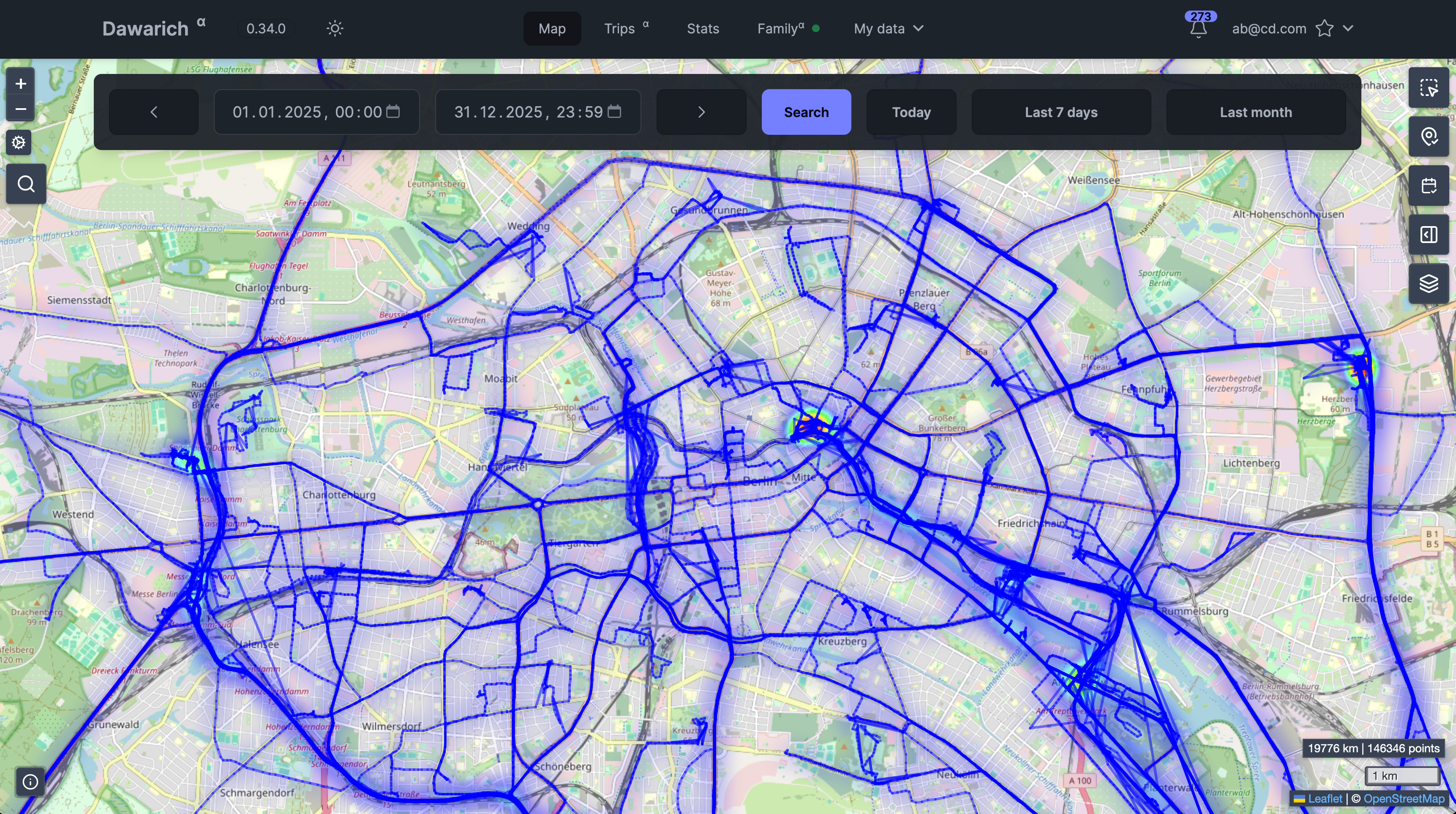
What is Dawarich?
Dawarich is a self-hostable web application meant to replace Google Timeline (Google Location History): it records where you have been, shows it on an interactive map and lets you analyse your travel history. Location data arrives either from the official Dawarich iOS and Android apps (which also record offline) or from tracking apps such as OwnTracks, GPSLogger, Overland, PhoneTrack and Home Assistant, and existing history can be imported from Google Takeout, GPX, GeoJSON, Strava, Immich and photo EXIF data. In the UI you get map layers (heatmap, points, lines, fog of war), drawn areas, suggested visits and places, trips with notes, statistics by year and month, insights, days-per-country counters, shared links and family location sharing, plus geotagged photos pulled from your own Immich or PhotoPrism instance. Data can be exported back to GeoJSON or GPX, and there is an API, a Prometheus exporter and optional OIDC login and TOTP two-factor authentication. An instance runs as a Docker Compose stack of four containers — the Rails web app, a Sidekiq worker, PostGIS and Redis — on a 64-bit x86 or ARM machine with 2 GB RAM, one CPU core and roughly 10 GB of disk; Synology setups are documented as well. The project is under heavy active development: the maintainers warn against automatic updates, tell you to read release notes and back up first, and a hosted Dawarich Cloud subscription exists as an alternative to running it yourself.
Dawarich alternatives
 ReittiReitti is a self-hosted, open-source personal location tracker: import GPX, Google Takeout or live OwnTracks feeds to get visit and trip detection, timelines and stats.CompareReitti with Dawarich
 AdventureLogA self-hosted travel tracker where users pin locations on an interactive world map, create itineraries, track countries visited, and share travel plans.CompareAdventureLog with Dawarich
 timelinizeTimelinize is a self-hosted, open-source personal archival suite that imports data from many sources into a unified timeline on your computer.Comparetimelinize with Dawarich
 TREKOpen-source, self-hosted trip organizer: map-based day plans, cost splitting, bookings, packing lists, live collaborative editing, SSO and offline PWA support.CompareTREK with Dawarich
 workout-trackerA self-hosted, open-source workout tracker for running and other GPX-based activities: upload GPX/TCX/FIT files, maps, stats, heatmap, multi-user.Compareworkout-tracker with Dawarich
 TRIPSelf-hosted, open-source (MIT) minimalist map and trip planner: keep points of interest on interactive maps, then plan multi-day itineraries together with friends.CompareTRIP with Dawarich
 OwnTracks RecorderOpen-source, self-hosted recorder that saves OwnTracks location data from MQTT or HTTP and serves it via REST API, live map, and the ocat CLI with CSV/GPX/GeoJSON export.CompareOwnTracks Recorder with Dawarich
 JournivA self-hosted private journal with moods, activities, goals, prompts, media uploads, full-text search and analytics, run with Docker Compose, SQLite or PostgreSQL.CompareJourniv with Dawarich
All self-hosted alternatives to Google Timeline → All self-hosted alternatives to Life360 → All self-hosted alternatives to OwnTracks →
Should you self-host Dawarich?
Dawarich scores 73/100 on selfhost.directory (how scoring works) and ranks #1 of 6 in Location Tracking. It has 10 848 GitHub stars, +261 in the last 30 days.
It shipped 40 stable releases in the past year. The latest, 1.22.0, came out on 7 November 2026. New versions land roughly every 4 days.
Setup is moderate: expect some configuration beyond a single command. An official Docker image is available. It is AGPL-3.0-licensed and written mostly in Ruby.
Its closest alternative on selfhost.directory is geopulse (64/100, 1 475 stars). Dawarich scores higher overall. See Dawarich vs geopulse side by side.
Features
- Areas
- Export to GeoJSON / GPX
- Family location sharing
- Import from Google Takeout and other sources
- Interactive map with layers
- MCP server for AI assistants
- OIDC Single Sign-OnSelf-hosted only.
- Prometheus Metrics
- REST API
- Reverse geocoding with Photon or Nominatim
- Statistics & insights
- Trips
- Two-factor authentication (TOTP)Requires OTP_ENCRYPTION_* variables.
- Visit & place suggestionsMarked Beta by the project.
Dawarich README
English | 简体中文
|
|
|
 Map View
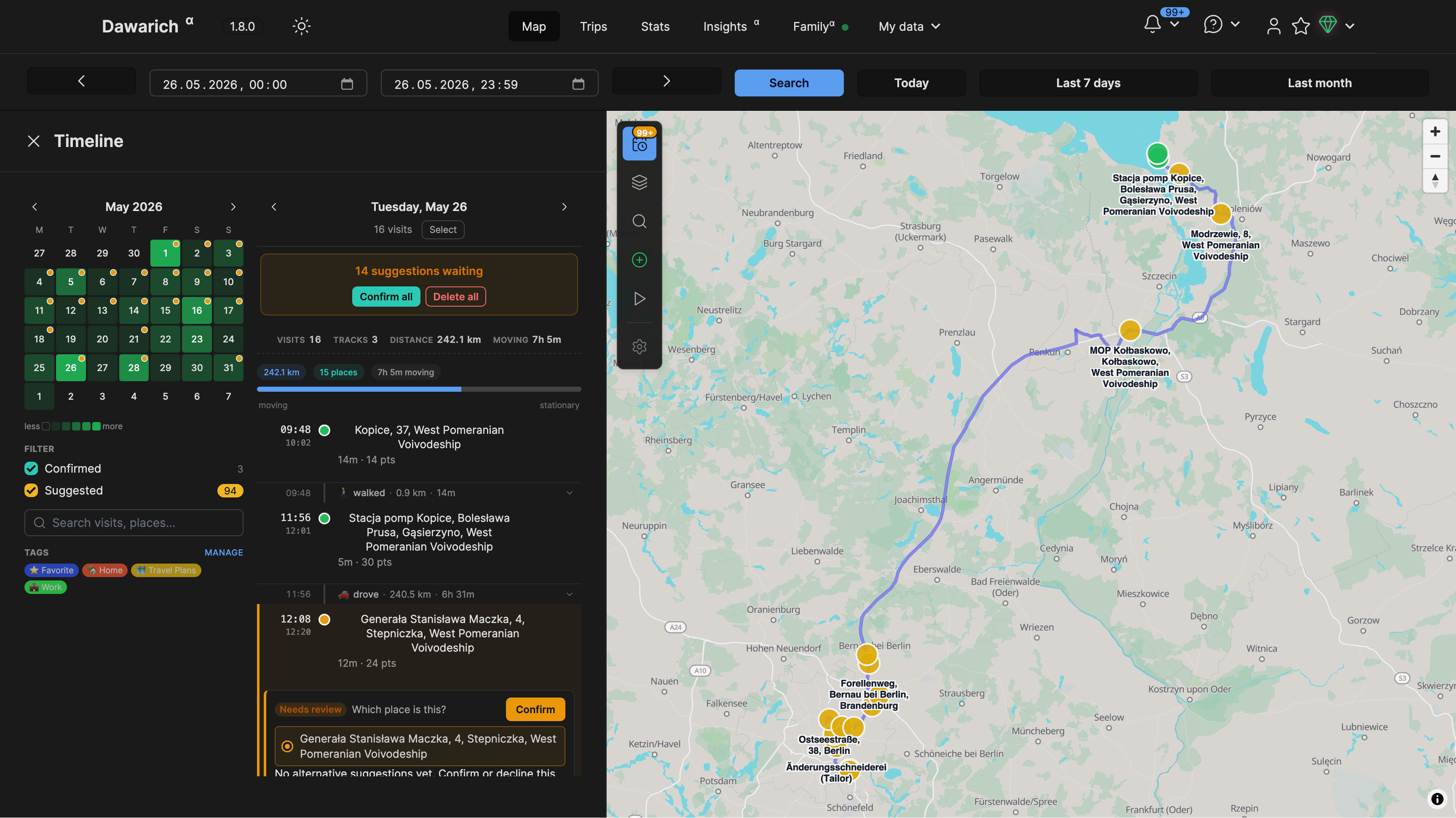
 Timeline View
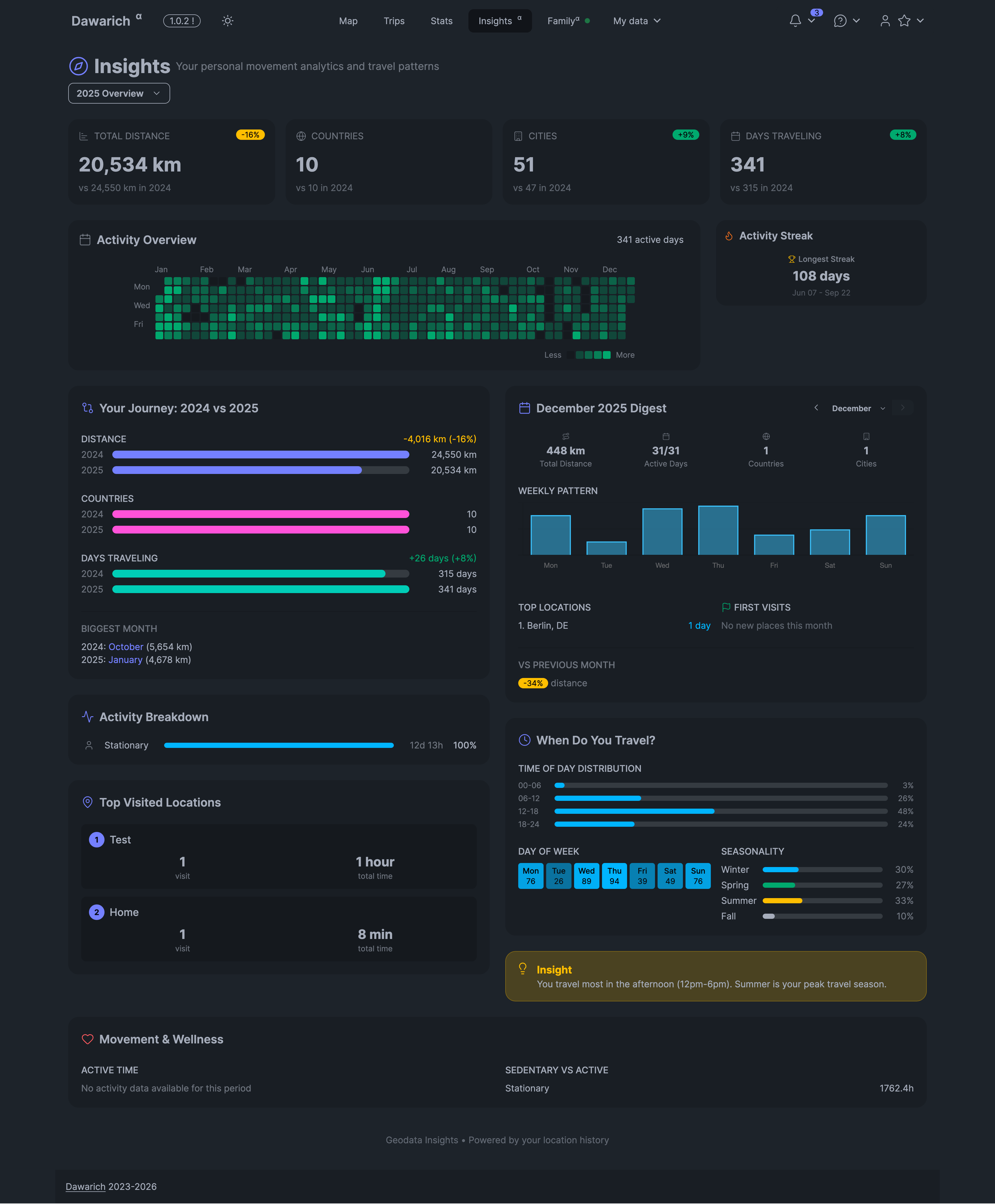
 Insights Page
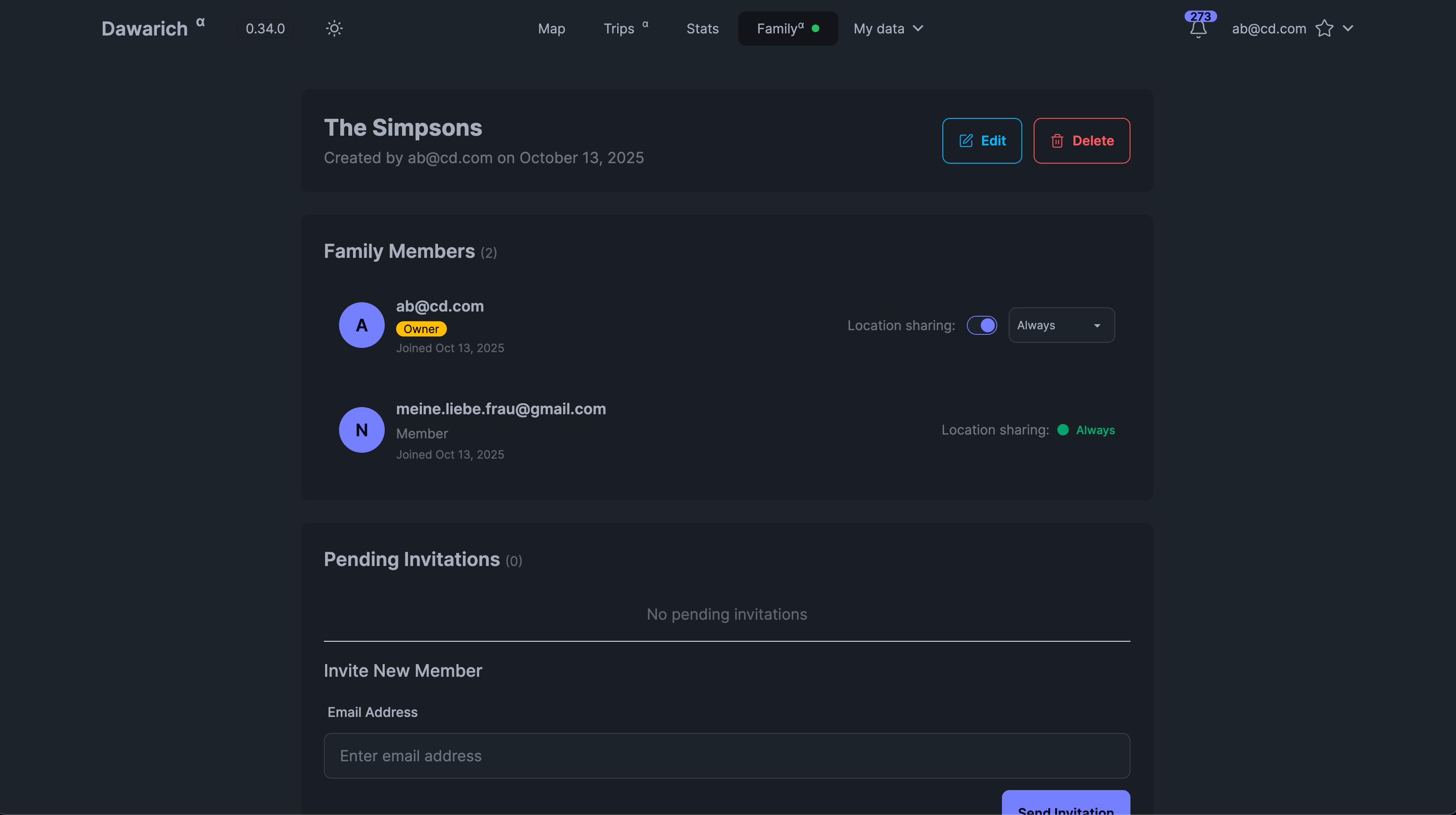
 Family Page
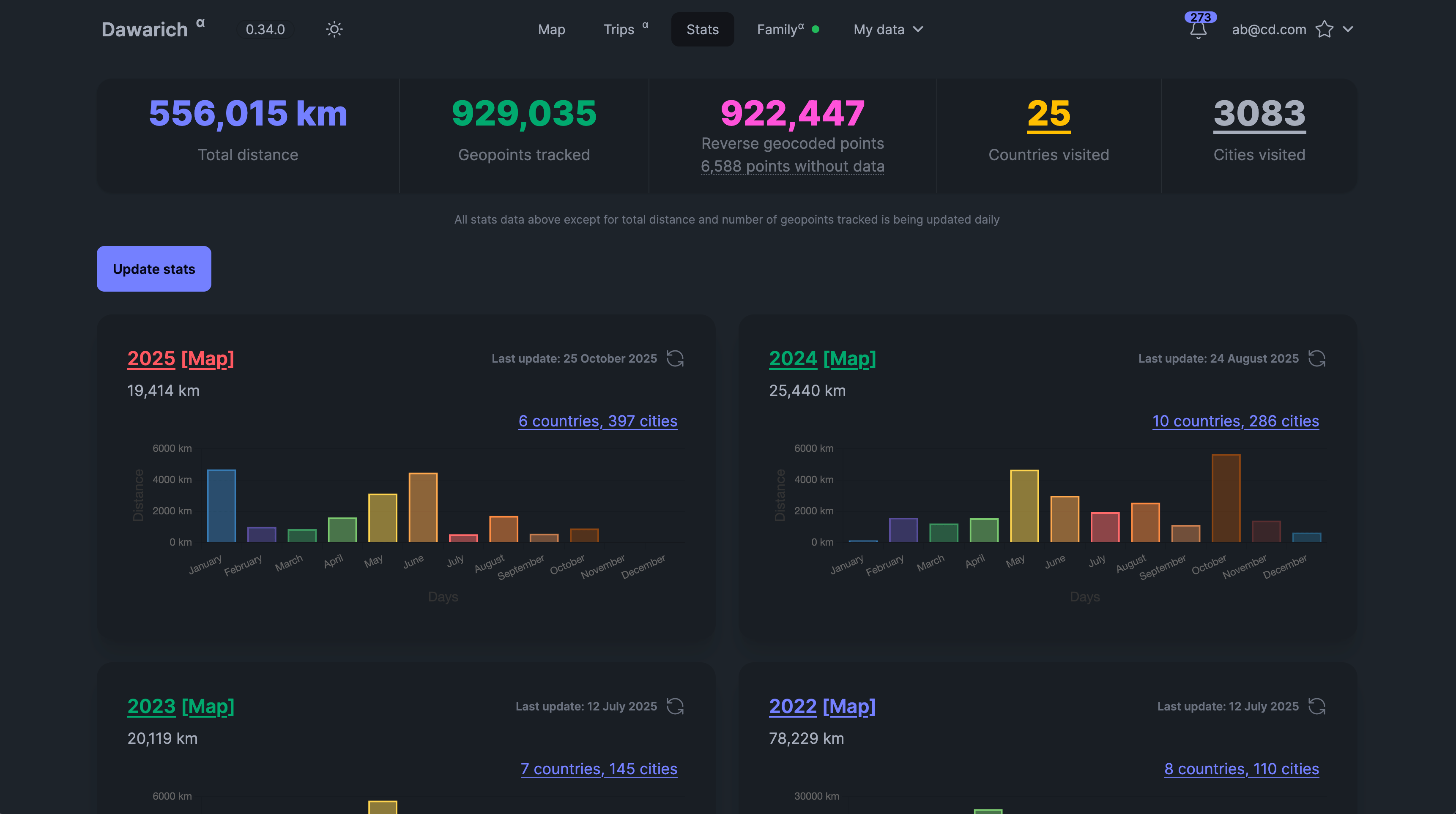
 Statistics Overview
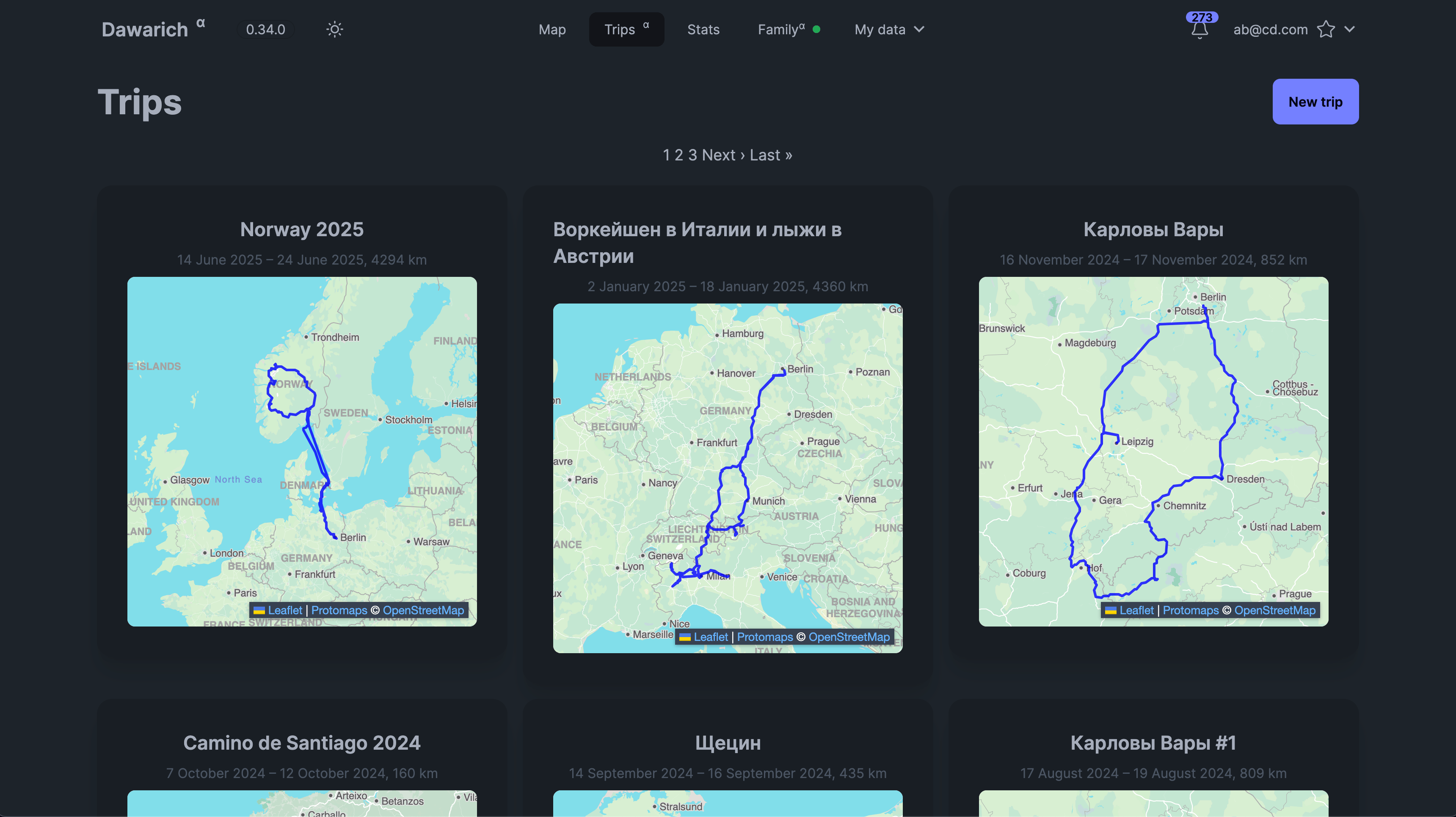
 Trips page
If you're looking for Dawarich Cloud, where everything is managed for you, check out Dawarich Cloud.
Dawarich is a self-hostable web app designed to replace Google Timeline (aka Google Location History). It enables you to:
- Track your location history.
- Visualize your data on an interactive map.
- Create trips and analyze your travel history.
- Share your location with family members.
- Integrate with photo management apps like Immich and Photoprism to visualize geotagged photos.
- Import your location history from Google Maps Timeline, OwnTracks, GPX, GeoJSON and some other sources
- Explore statistics like the number of countries and cities visited, total distance traveled, and more!
- Share your location with family members.
Changelog: Find the latest updates here.
Contribute: See CONTRIBUTING.md for how to contribute to Dawarich.
- DO NOT UPDATE AUTOMATICALLY: Read release notes before updating. Automatic updates may break your setup.
- Under active development: Expect frequent updates, bugs, and breaking changes.
- Do not delete your original data after importing into Dawarich.
- Backup before updates: Always backup your data before upgrading.
- Stay up-to-date: Make sure you're running the latest version for the best experience.
You can track your location with the following apps:
- 💫 Dawarich for iOS
- 🤖 Dawarich for Android
- 🗺️ Dawarich Community (Android)
- 🌍 Overland
- 🛰️ OwnTracks
- 🧭 GPSLogger
- 📱 PhoneTrack
- 🏡 Home Assistant
Simply install one of the supported apps on your device and configure it to send location updates to your Dawarich instance.
- Clone the repository.
- Run the following command to start the app:
docker compose -f docker/docker-compose.yml up
- Access the app at
http://localhost:3000.
To stop the app, press Ctrl+C.
You can use default values or create a .env file based on .env.example to customize your setup.
Default Credentials
- Username:
demo@dawarich.app - Password:
safepasswordFeel free to change them in the account settings.
- Track your live location using one of the supported apps.
- View your historical data on a map with customizable layers:
- Heatmap
- Points
- Lines between points
- Fog of War
- Share your location with family members.
- View locations of family members on the map (with their consent).
- Each family member can enable or disable location sharing individually.
- Save the places that matter to you, each with a visit radius, so Dawarich attributes your visits to them. Create a place from the map or straight from a visit.
- Dawarich can suggest places you've visited and allow you to confirm or reject them.
- Analyze your travel history: number of countries/cities visited, distance traveled, and time spent, broken down by year and month.
- Get insights about your location history, like "Your most visited place is home, with 120 visits", or "You spent 30 days in Paris in 2024".
- See how many days you've spent in each country. Useful for tax residency purposes or just to see where you spend most of your time.
- Create a trip to visualize your travels between two points in time. You'll be able to see the route, distance, and time spent, and also add notes to your trip. If you have Immich or Photoprism integration, you'll also be able to see photos from your trips!
- Provide credentials for Immich or Photoprism (or both!) and Dawarich will automatically import geodata from your photos.
- You'll also be able to visualize your photos on the map!
- Import from various sources:
- Google Maps Timeline
- OwnTracks
- Strava
- Immich
- GPX/GeoJSON files
- Photos’ EXIF data
- Export your data to GeoJSON or GPX formats.
- Set up Reverse Proxy
- Import Google Takeout
- Track Location with Overland
- Track Location with OwnTracks
- Export Your Data
More guides available in the Docs.
Check the documentation on the website for detailed information about environment variables and settings.
As you could probably guess, I like statistics.
FAQ
Why I have some points "without data" on Stats page?
Points in places the geocoder has no information about (rivers, lakes, forests) stay unprocessed and are counted as without data, typically about 1–1.5% of points.
Why I have so many failed jobs in Sidekiq?
They are usually failed reverse-geocoding attempts caused by reaching an API limit and can be ignored if the import itself finished.
Why my attempt to import Records.json fails?
Large Google Takeout files can be killed for using too much memory; raise the container memory limit or split the file into smaller parts.
How to speed up the import process?
Add extra Sidekiq service copies to your docker-compose.yml so more workers process the import, and scale them down again afterwards.
How to update user's password?
Update the user's password and password confirmation through the Rails console.
My distance is off, how can I fix it?
Look for points stored with 0,0 coordinates — those are points Dawarich could not process — and delete them from the Rails console.
How to make a user an admin?
In the Rails console, set the admin attribute to true for that user.
How to update a user's email?
Use the Rails console and call update on the user record found by email.
How to create a new user?
Sign in as an admin and use the Settings → Users page, then the "Add new user" button.
How to enter Dawarich console?
Dawarich is built with Ruby on Rails, so you open a shell inside the app container and run the Rails console.
Does location tracking work without an internet connection?
Yes. The official iOS and Android apps record points on the device and upload them to your instance automatically once you are back online.
More in Location Tracking
 geopulseA self-hosted, privacy-first location timeline platform: an open-source alternative to Google Timeline with automatic trip detection, Immich integration, and rich analytics.
 HaukHauk is an open-source, self-hosted real-time location sharing service with PHP backend and Android app. Run your own server and share location via generated links.
- OwnTracks RecorderOpen-source, self-hosted recorder that saves OwnTracks location data from MQTT or HTTP and serves it via REST API, live map, and the ocat CLI with CSV/GPX/GeoJSON export.
- ReittiReitti is a self-hosted, open-source personal location tracker: import GPX, Google Takeout or live OwnTracks feeds to get visit and trip detection, timelines and stats.
 Tile38Self-hosted, open-source in-memory geolocation store and spatial index with real-time geofencing, webhook alerts and a Redis-compatible API.
 ulogger-serverSelf-hosted, open-source PHP app to collect and view GPS tracks uploaded from the μlogger Android client, with live tracking, statistics and GPX/KML export.
0 comments