
Self-host TailGuard
v1.104.2Container bridging WireGuard hosts into Tailscale
docker compose up- Stars
- 611
- Port
- 41641 (UDP port used by Tailscale, exposed by Docker (-p 41641:41641/udp))
ghcr.io/juhovh/tailguard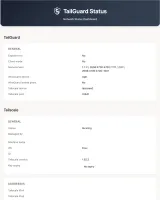
What is TailGuard?
TailGuard is a Docker container that links an existing WireGuard setup to a Tailscale network, aimed at machines whose WireGuard installation is locked down or cannot run Tailscale software. It keeps a permanent Tailscale peer and a WireGuard client in one container, usually on a VPS near the WireGuard endpoint, and relies on plain IP forwarding rather than any protocol translation. You give it a downloaded WireGuard config as wg0.conf, then tune behaviour with environment variables: a destination address for tailnet traffic, extra advertised routes, exit-node selection in client mode, fallback DNS, host-exposure toggles and per-peer isolation on the WireGuard side. Subnets found in AllowedIPs get published to the tailnet automatically; traffic back the other way needs routes added on your WireGuard side. The container joins the tailnet through the login link it prints at startup or via an auth key, and an optional status page shows Tailscale and WireGuard tunnel state once you set a port for it. Run it with the published ghcr.io image through docker run, or build it locally with docker compose; a self-managed control server can be used instead of Tailscale's hosted one.
Should you self-host TailGuard?
TailGuard scores 48/100 on selfhost.directory (how scoring works) and ranks #37 of 56 in VPN. It has 611 GitHub stars.
It shipped 10 stable releases in the past year. The latest, v1.104.2, came out on 21 October 2026. New versions land roughly every 2 weeks.
Setup is moderate: expect some configuration beyond a single command. An official Docker image is available. It is MIT-licensed and written mostly in Shell.
Its closest alternative on selfhost.directory is Tailscale (84/100, 38 215 stars). It scores higher overall, so compare the two before you pick. See TailGuard vs Tailscale side by side.
Features
- Auth key / interactive tailnet login
- Custom control server
- Destination IP forwarding
- Exit node support
- IPv6 Support
- Monitoring web UI
- Subnet route advertisement
- WireGuard peer isolation
- WireGuard to Tailscale bridge
TailGuard README
More in Network Management
 The-One-FileSelf-hosted offline-first network topology editor in a single HTML file with optional Docker collaboration.
 Traefik ManagerSelf-hosted web UI for managing Traefik reverse proxy — create routes, services, middlewares, certificates, and monitor logs and CrowdSec without editing YAML by hand.
 trishul-snmp-suiteSelf-hosted, open-source SNMP platform replacing Net-SNMP CLI with a web UI for agent simulation, device walking, trap handling, and MIB browsing.
 ubnt-updateSelf-hosted nginx TLS stream proxy routing Ubiquiti firmware updates through a VPN tunnel when official servers are blocked. Runs via Docker Compose or manual nginx.
 UniFi-API-BrowserSelf-hosted, open-source PHP tool to browse UniFi Controller API data: multiple classic or API-key controllers, site switching, JSON/PHP output.
 UniFi Docker ContainerSelf-hosted Docker container for UniFi Network Application to manage Ubiquiti devices. Open-source Apache-2.0 with multi-arch support.
 unifi-gatewaySelf-hosted Python daemon emulating a Ubiquiti UGW3 gateway so non-Ubiquiti routers appear in UniFi Controller with full network topology.
 Unifi-Network-ApplicationSelf-hosted Docker deployment scripts and compose files for UniFi Network Application with MongoDB, supporting generic systems, DietPi, and CasaOS.
 unifi-toolkitSelf-hosted, open-source toolkit for managing and monitoring UniFi networks with real-time dashboards, device tracking, threat monitoring, and firewall lockdowns.
 unifi-voucher-siteSelf-hosted web app for creating and managing UniFi guest vouchers with OIDC, REST API, thermal printing, email, and kiosk mode.
 WakupatorWakupator is a self-hosted Linux daemon that wakes up LAN machines via Wake-on-LAN when detecting traffic to spoofed IPs, reducing energy waste for home servers.
 WGDashboardSelf-hosted open-source dashboard to manage WireGuard and AmneziaWG VPN servers with web UI, peer management, QR codes, and 2FA.
0 comments