
Self-host Stirling-PDF
v3.3.0Open-source PDF editor and automation platform
- Stars
- 96 348
- RAM
- 2 GB (ultra-lite), 4 GB (latest), 6 GB (latest-fat)
- Port
- 8080 (HTTP web UI and API)
docker.stirlingpdf.com/stirlingtools/stirling-pdf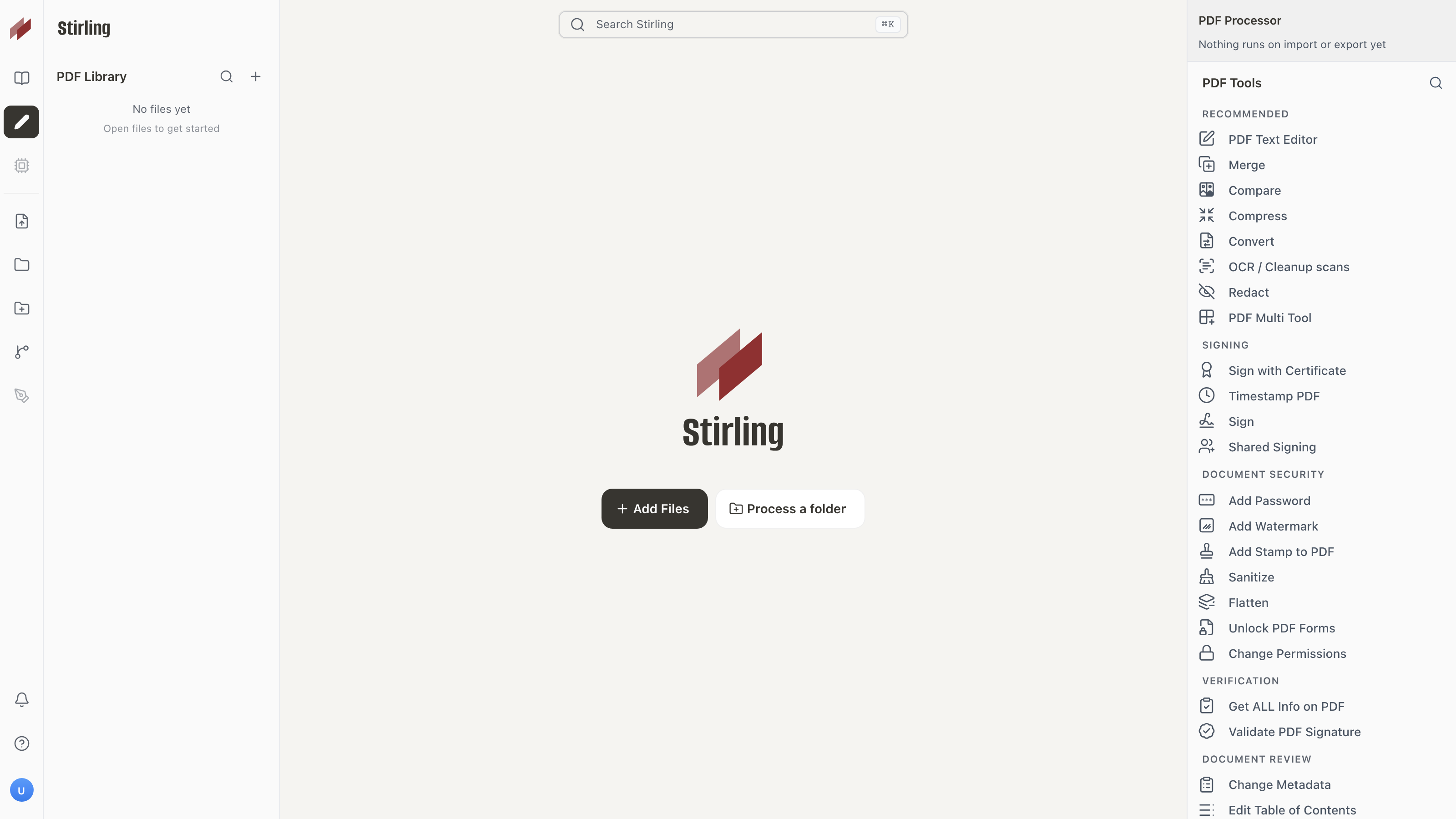


What is Stirling-PDF?
Stirling PDF is a self-hosted PDF platform for individuals and teams to modify, combine, split, sign, redact, convert, OCR, and compress PDFs without sending files elsewhere. It offers over 60 tools via a web UI, desktop apps for Windows, macOS, and Linux, and a REST API for automation. Deploy with Docker, Docker Compose, Kubernetes, or as a standalone JAR. Includes a built-in database, supports OAuth/OIDC (Google, GitHub, Keycloak, Authentik) and SAML 2.0 (Enterprise) for single sign-on, and provides no-code pipeline automation for batch processing. The project is open-core: core features are MIT-licensed while some enterprise capabilities live in proprietary directories. A free tier gives 1,000 monthly automation credits; paid Team and Enterprise plans add SSO, SCIM, audit logs, air-gapped deployment, and SLAs.
Stirling-PDF alternatives
 BentoPDFOpen-source, self-hosted PDF toolkit with 100+ browser-based tools to merge, split, edit, convert, OCR and sign PDFs - files never leave your device.CompareBentoPDF with Stirling-PDF
 Signature PDFWeb app for digital PDF signatures, organizing (merge, rotate), metadata editing, and compression. PHP Fat-Free with Bootstrap.CompareSignature PDF with Stirling-PDF
 OpenPdfSelf-hosted open-source PDF suite with 30 tools to merge, split, convert, OCR, secure docs. Privacy-first iLovePDF replacement, no limits or sign-ups.CompareOpenPdf with Stirling-PDF
 GotenbergSelf-hosted open-source Docker API that converts URLs, HTML, Markdown, and 100+ office formats into PDFs, and merges, splits, encrypts or watermarks them.CompareGotenberg with Stirling-PDF
 SnapOtterOpen-source, self-hosted file-processing suite with 200+ image, video, audio, PDF and document tools, local AI, a REST API and pipelines.CompareSnapOtter with Stirling-PDF
 OpenSignA self-hosted, open-source DocuSign alternative for e-signing PDFs: templates, sequential multi-signer flows, audit trails and a document vault.CompareOpenSign with Stirling-PDF
 DocusealOpen-source, self-hosted DocuSign alternative for creating fillable PDF forms and collecting digital signatures via a mobile-friendly web tool.CompareDocuseal with Stirling-PDF
 DocumensoOpen-source, self-hosted DocuSign alternative to create, send and sign PDFs with templates, teams, direct links and an API; deploy via Docker, Compose or Kubernetes.CompareDocumenso with Stirling-PDF
Should you self-host Stirling-PDF?
Stirling-PDF scores 87/100 on selfhost.directory (how scoring works) and ranks #1 of 47 in Document Management. It has 96 348 GitHub stars, +2 525 in the last 30 days.
It shipped 26 stable releases in the past year. The latest, v3.3.0, came out on 5 November 2026. New versions land roughly every 6 days.
Setup is moderate: expect some configuration beyond a single command. An official Docker image is available. It is MIT-licensed and written mostly in Typescript.
Its closest alternative on selfhost.directory is Paperless-ngx (87/100, 48 040 stars). Stirling-PDF scores higher overall. See Stirling-PDF vs Paperless-ngx side by side.
Features
- AI-assisted PDF processingRequires latest-fat image and additional memory
- Audit Logging
- Automation pipelines
- Compression
- Desktop applications
- Digital Signatures
- Multi-language UI
- OCR
- PDF conversion
- PDF Editing
- PDF merge and split
- Redaction
- REST API
- Single sign-on (OIDC/OAuth)Available on all plans
- Single sign-on (SAML)Requires Enterprise licence
Stirling-PDF README

Stirling PDF is a powerful, open-source PDF editing platform. Run it as a personal desktop app, in the browser, or deploy it on your own servers with a private API. Edit, sign, redact, convert, and automate PDFs without sending documents to external services.
FAQ
How do I add a line break in a stamp or watermark?
Type \n where you want the break in the text of Add Stamp to PDF or Add Watermark.
Can I remove an existing watermark?
No. Stirling PDF has no tool to remove a watermark that's already in a PDF.
Where are my files processed?
Files stay in your browser (Cloud), on your computer (Desktop app Local Only mode), or on your self-hosted server. They are only stored on a server if you explicitly save them there.
Does Stirling PDF track me?
Usage analytics are opt-in, and Stirling PDF never tracks the content of your documents. You can decline non-essential cookies.
How do I check the logs?
Run docker logs stirling-pdf, or open the logs folder (the /logs volume in Docker). The first error usually names the cause.
Why does my server make requests to js.stripe.com?
Only when an admin opens the checkout to buy a plan. No documents are sent to Stripe.
Why does Stirling PDF use so much memory when idle?
The Docker image sizes the Java heap from the container's memory limit, or from the host's RAM if there is no limit. Set a limit with mem_limit or --memory.
Why does uploading a large file download an .htm file or fail?
Your reverse proxy (e.g., nginx) is rejecting the upload due to default body size limits. Raise its body size limit and timeouts.
How do I turn login on or off?
Login is on by default. To turn it off, set SECURITY_ENABLELOGIN=false and restart.
docker pull from docker.stirlingpdf.com fails. What now?
Pull the same image from Docker Hub (stirlingtools/stirling-pdf) or GitHub (ghcr.io/stirling-tools/stirling-pdf) instead.
More in Document Management
 StruInfoStruInfo is a self-hosted, open-source personal knowledge workspace that turns documents into a traceable, searchable knowledge graph with optional AI.
 surfsenseSelf-hosted, open-source NotebookLM alternative: an air-gapped desktop AI agent that researches, edits and transforms your documents with any local or hosted model.
 SuryaOCR, layout analysis, reading order, table recognition in 90+ languages
 texlyreSelf-hosted open-source web editor for LaTeX and Typst with real-time co-editing, offline-first design, and in-browser compilation.
 ThesysSelf-hosted open-source research workspace for searching papers, uploading PDFs, on-PDF highlights with citations, reader mode Q&A, paper comparison, and citation export.
 tsailunTsailun is an open-source, self-hosted wiki for teams. Stores docs as HTML files, supports multiple spaces, full-text search, file attachments, and automatic versioning.
 twake-driveTwake Drive is a self-hosted, open-source file storage platform with encryption, OnlyOffice integration, and shared drives — an alternative to Google Drive for teams.
 UwaziUwazi is a self-hosted, open-source document management platform for human rights defenders to collect, organize, analyze, and publish document collections.
 veriworklyFree, open-source resume builder with no login. Create ATS-friendly resumes with modern templates your data stays on your device.
 WarrackerA self-hosted warranty tracker for organizing product coverage, monitoring expirations, storing receipts, and receiving alerts via email or push notifications.
 WikiDocs📗 Just a databaseless markdown flat-file wiki
 Wiki-GoOpen-source, self-hosted flat-file wiki in Go with Markdown editing, full-text search, version history, access rules, comments and kanban boards. No database needed.
0 comments