Self-host Paperless-ngx
v3.4.2Document management system for scanning and archiving
- Stars
- 48 043
- Rating
- 5.0 (1)
- Port
- 8000 (webserver)
ghcr.io/paperless-ngx/paperless-ngx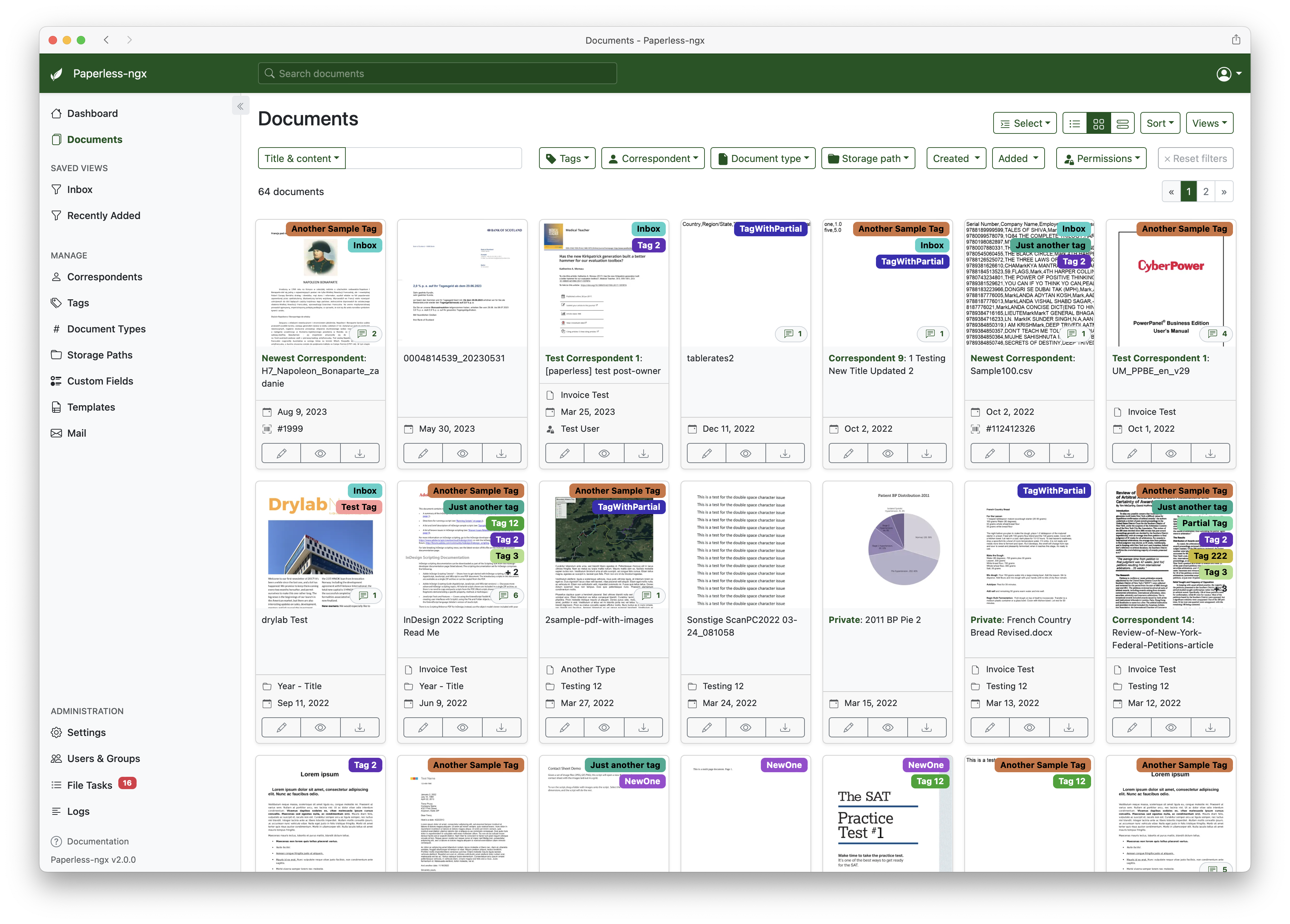
What is Paperless-ngx?
Paperless-ngx is a community-supported document management system that turns scanned paper documents into a searchable digital archive. It provides OCR for text extraction, automatic document classification with correspondents and tags, full-text search, multi-user support with permissions, email fetching, webhooks, and AI-powered suggestions using local or remote LLMs. It runs via Docker Compose with optional PostgreSQL or MariaDB databases and a Redis-compatible message broker (Valkey by default). The project is the official successor to Paperless and Paperless-ng.
Paperless-ngx alternatives
 DocspellDocspell is a self-hosted, open-source DMS that organizes scanned documents and emails using OCR, full-text search, and ML-powered metadata extraction.CompareDocspell with Paperless-ngx
 pdfscanexplorerSelf-hosted web app for previewing, renaming, and organizing scanned PDFs using OCR and optional AI, lightweight for NAS or server.Comparepdfscanexplorer with Paperless-ngx
 ReadurSelf-hosted OCR document management system with multi-language support, full-text search, and S3/WebDAV sync for individuals and teams.CompareReadur with Paperless-ngx
 DocsOpen-source collaborative text editor with live cursors, comments and version history — a self-hosted alternative to Notion or Google Docs, built on Django and React.CompareDocs with Paperless-ngx
 EonvelopeOpen-source self-hosted email archive supporting IMAP, POP, Exchange, and JMAP with integrations for Paperless-ngx, Immich, Nextcloud, and Searxng.CompareEonvelope with Paperless-ngx
 simpledmsSimpleDMS is a self-hosted, open-source DMS for small businesses using metadata-driven tagging and workspaces. Includes OCR, full-text search, versioning, PWA.Comparesimpledms with Paperless-ngx
 nextgptNextGPT is a self-hosted AI chatbot with document processing, RAG search, and web search. Deploys via Docker Compose or to AWS/GCP.Comparenextgpt with Paperless-ngx
 ocrmypdf-autoSelf-hosted Docker container that watches a folder for PDFs, runs OCRmyPDF with Tesseract to make them searchable, and saves results to an output folder.Compareocrmypdf-auto with Paperless-ngx
Should you self-host Paperless-ngx?
Paperless-ngx scores 87/100 on selfhost.directory (how scoring works) and ranks #1 of 47 in Document Management. It has 48 043 GitHub stars, +1 636 in the last 30 days.
It shipped 29 stable releases in the past year. The latest, v3.4.2, came out on 3 November 2026. New versions land roughly every 4 days.
Setup is moderate: expect some configuration beyond a single command. An official Docker image is available. It is GPL-3.0-licensed and written mostly in Python.
Its closest alternative on selfhost.directory is Stirling-PDF (87/100, 96 367 stars). Paperless-ngx scores higher overall. See Paperless-ngx vs Stirling-PDF side by side.
Features
- AI-powered suggestions
- Automatic document classification
- Barcode Support
- Email fetching
- Multi-Language OCR
- Multi-user support
- OCR
- PDF/A archive generation
- Remote OCR
- REST API
- SSO/OIDC authentication
- Webhooks
Paperless-ngx README


Paperless-ngx is a document management system that transforms your physical documents into a searchable online archive so you can keep, well, less paper.
Paperless-ngx is the official successor to the original Paperless & Paperless-ng projects and is designed to distribute the responsibility of advancing and supporting the project among a team of people. Consider joining us!
FAQ
What databases are supported?
SQLite (default), PostgreSQL (recommended for multi-user), and MariaDB.
Can I migrate from Paperless-ng?
Yes, migrating from Paperless-ng is easy - just drop in the new docker image.
More in Document Management
 papermarkAn open-source, self-hosted DocSend alternative: share documents through custom links, add your own domain and branding, and track views with built-in analytics.
 PapermergeOpen-source self-hosted app for organizing scanned files using OCR, search, tags, folders, and a desktop-style web interface.
 PapraThe minimalistic document archiving platform.
 pdfmanagerSelf-hosted PDF manager offering annotations, nested collections, OIDC authentication, multi-user libraries, sharing, full-text search, and OPDS access for e-readers.
- pdfscanexplorerSelf-hosted web app for previewing, renaming, and organizing scanned PDFs using OCR and optional AI, lightweight for NAS or server.
 Pen2PDFSelf-hosted productivity suite with AI document extraction, timetable, todos, notes, whiteboard, and multi-model AI assistant. Runs on Node.js with MongoDB.
 PetrichorPetrichor is an open-source, self-hosted platform turning Markdown into semantic wikis with agentic RAG for traceable, evidence-backed answers.
 PharosSelf-hosted, open-source RAG system with multi-format document ingestion, hybrid retrieval, enterprise ACL, and dual HTTP + MCP exits for team knowledge bases.
 PrivateBinA minimalist, open source online pastebin where the server has zero knowledge of pasted data. Data is encrypted/decrypted in the browser using 256 bits AES.
 PrivateDocBotPrivateDocBot is a self-hosted, open-source chatbot for querying PDF documents locally using LLMs like Llama 2 via Chainlit.
 PydioPydio Cells is a self-hosted file sharing platform with document management, 5TB transfers, WebDAV, sync, and no-code automation. Runs on your infra with MySQL/MariaDB.
 Pydio CellsFuture-proof content collaboration platform
0 comments