
Self-host socktop
v1.60.2TUI-first remote system monitor
- Stars
- 192
- Ports
- 3000 (Agent WebSocket endpoint (default)), 8443 (Agent WebSocket endpoint with TLS), 3231 (Demo mode temporary agent)

What is socktop?
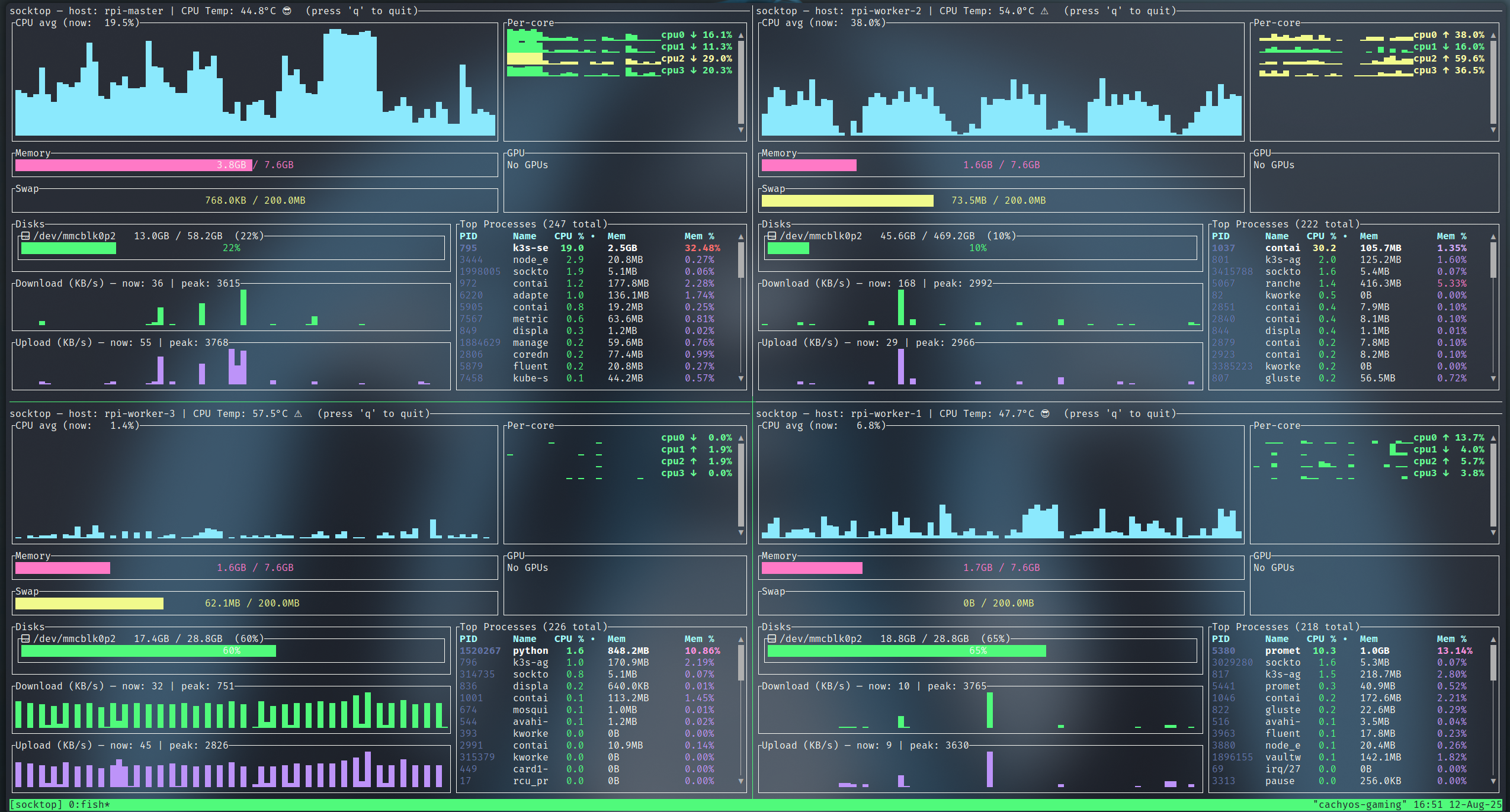
socktop provides a terminal interface for watching system metrics on remote machines. A small agent runs on each target host and streams data over WebSockets to the TUI client. The display covers CPU, memory, disks, network, GPU, and processes with per-thread details and journal logs. You can filter processes, kill them locally, and secure connections with token auth or TLS. Profiles let you save connection details. Multiple hosts can be viewed side-by-side using tmux or Zellij. Install via APT on Debian/Ubuntu, Cargo on any Rust-enabled system, or grab Windows binaries from GitHub Actions. The agent is Linux-focused but the client also works on macOS and Windows.
Should you self-host socktop?
socktop scores 48/100 on selfhost.directory (how scoring works) and ranks #28 of 51 in Monitoring & observability. It has 192 GitHub stars.
It shipped 6 stable releases in the past year. The latest, v1.60.2, came out on 24 August 2026. New versions land roughly every 1 days.
Setup is moderate: expect some configuration beyond a single command. It is MIT-licensed and written mostly in Rust.
Its closest alternative on selfhost.directory is GoAccess (75/100, 21 092 stars). It scores higher overall, so compare the two before you pick. See socktop vs GoAccess side by side.
Features
- Compact layout
- Connection profiles
- CPU temperatureMay be unavailable on Windows
- Cross-Platform SupportAgent primarily targeted at Linux; GPU metrics not on ARMv7/RISC-V
- Demo Mode
- Disk monitoring
- GPU MonitoringRequires libdrm libraries; not available on ARMv7 or RISC-V
- Journal entries
- Multi-Host Monitoring
- Network Monitoring
- Process managementKill only works on local agents; remote agents cannot be instructed to kill processes
- Real-time system monitoring
- TLS EncryptionAuto-generates self-signed cert on first run with --enableSSL
- Token Authentication
- WebSocket APIProtobuf for process list, JSON for others
socktop README
More in Terminal
 SSH & Web TerminalAdvanced SSH & Web Terminal is a self-hosted Home Assistant add-on providing secure SSH access and a web terminal with Mosh, SFTP, ZSH, and CLI tools.
 SshwiftySelf-hosted Web SSH & Telnet client enabling browser-based SSH and Telnet connections without additional software. Runs as Docker container with presets, TLS support.
 TermIDETermIDE is a self-hosted terminal workspace merging a code editor, file manager, terminal, git, database viewer, and AI agent into one static Rust binary.
 TermixThis open-source, self-hosted server manager turns SSH access, remote desktop, file transfers, container control and monitoring into toggleable plugins.
 UniSSHCross-platform SSH client with encrypted vaults that run locally. Optional self-hosted sync server for multi-device and team sharing. Built with Rust and Tauri.
 WebSSHSelf-hosted SSH/SFTP browser workspace with multi-user terminals, split panes, file transfers, and optional Passkeys/OIDC/LDAP. Deploy via Docker on your infrastructure.
 WeechatWeeChat is a fast, lightweight IRC chat client for the terminal with scripting in 8 languages and remote access via relay plugin. Self-hosted, open-source under GPL-3.0.
 WeTTYSelf-hosted open-source web terminal with SSH access in the browser via xterm.js and websockets; runs file downloads, exposes metrics, installs from npm or Docker.
 winktermSelf-hosted AI terminal where an LLM writes commands directly into your PTY. Supports SSH, file transfer, BYO LLM, Docker and desktop apps.
 agent-tmux-webSelf-hosted web UI for running AI coding agents in tmux sessions from any browser or Android device, with TTY/raw modes, file uploads, and notifications.
 AtuinOpen-source, self-hosted shell history tool: SQLite-backed context-rich history, a fuzzy search TUI, and end-to-end encrypted sync via your own sync server.
 Cloud CommanderSelf-hosted, open-source web file manager with twin panels, a browser console and terminal, built-in editors, archives and Dropbox support.
0 comments