
Self-host GoAccess
v1.12Real-time web log analyzer with terminal and HTML dashboard
- Stars
- 21 131
- Port
- 7890 (WebSocket server for real-time HTML output)
allinurl/goaccess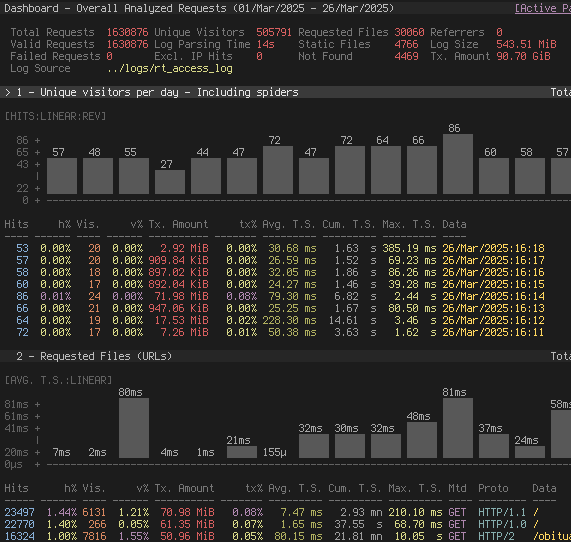
What is GoAccess?
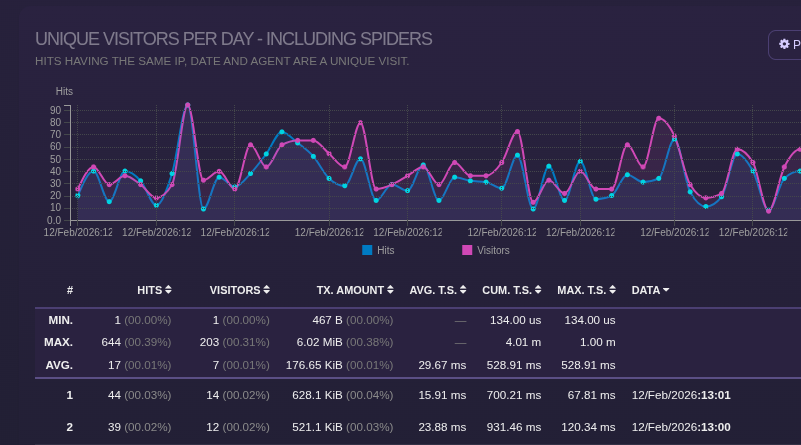
GoAccess is an open-source tool that analyzes web server logs in real time, displaying results either directly in a terminal via ncurses or through a browser-based HTML dashboard. It helps administrators monitor traffic patterns, spot security issues like brute-force attacks, and diagnose performance problems. The software parses numerous log formats including Apache Combined Log Format, Nginx, Amazon S3, CloudFront, Caddy, and Traefik. Results can be exported as static HTML, streaming HTML via WebSocket, JSON, or CSV. It runs on any *nix system where you can install from source or use official Docker images, plus packages for most major Linux distributions.
GoAccess alternatives
 GeoMetrikksGeoMetrikks is a self-hosted, open-source service that tails reverse proxy logs, performs GeoLite2 lookups, and displays requests on a live MapLibre map with analytics.CompareGeoMetrikks with GoAccess
 kubetailSelf-hosted, open-source Kubernetes logging tool that tails multiple pod logs in real-time via CLI or web dashboard, using your cluster's API directly.Comparekubetail with GoAccess
 checkmateSelf-hosted, open-source uptime and infrastructure monitor: HTTP, ping, DNS, Docker and gRPC checks with incidents, status pages and Slack or email alerts.Comparecheckmate with GoAccess
 homarr-iframesSelf-hosted Go API generating embeddable iFrames for 17+ services like Linkwarden, Vikunja, Overseerr, Sonarr, Radarr, Uptime Kuma — works in any dashboard.Comparehomarr-iframes with GoAccess
 OpenAnalyticsOpen-source, cookieless web analytics with realtime dashboards, funnels and revenue attribution, self-hosted via Docker Compose on Postgres and ClickHouse.CompareOpenAnalytics with GoAccess
 RybbitOpen-source cookieless web & product analytics replacing Google Analytics: session replays, funnels, retention, self-hosted with Docker, Postgres and ClickHouse.CompareRybbit with GoAccess
 monoscopeOpen-source, self-hosted observability that keeps logs, metrics and traces in your own S3 buckets, with plain-English queries, scheduled AI agents and session replay.Comparemonoscope with GoAccess
 lab-dashSelf-hosted dashboard for managing homelab applications with customizable grid layout, service health checks, and PWA support.Comparelab-dash with GoAccess
Should you self-host GoAccess?
GoAccess scores 75/100 on selfhost.directory (how scoring works) and ranks #1 of 52 in Monitoring & observability. It has 21 131 GitHub stars, +117 in the last 30 days.
There was no stable release in the past 12 months, so check the repository's recent activity before you rely on it.
Setup is moderate: expect some configuration beyond a single command. An official Docker image is available. It is MIT-licensed and written mostly in C.
Its closest alternative on selfhost.directory is LibreNMS (72/100, 5 009 stars). GoAccess scores higher overall. See GoAccess vs LibreNMS side by side.
Features
- ASN mappingrequires GeoIP2 database
- Bot and crawler classification
- GeoLocation supportrequires --enable-geoip at compile time
- HTML dashboard with WebSocket streaming
- Incremental log processing
- Multiple log format support
- Real-time terminal dashboard
- TLS/SSL reporting
- WebSocket authentication
GoAccess README

GoAccess is an open source, real-time web log analyzer and interactive viewer that runs in a terminal on *nix systems or directly in your browser. Designed with system administrators, DevOps engineers, and security professionals in mind, it delivers fast, actionable HTTP statistics and visual server reports on the fly. GoAccess parses your web server logs in real time and presents the data directly in the terminal or via a live HTML dashboard, making it easy to monitor traffic, detect anomalies, and troubleshoot issues instantly.
FAQ
How do I stay updated on new releases?
Follow Twitter @goaccess or use official Debian repo for updates. See official deb repo at https://goaccess.io/download#official-repo
How to make the HTML report work with Content Security Policy?
Set Content-Security-Policy with unsafe-inline and unsafe-eval: "script-src 'self' 'unsafe-inline' 'unsafe-eval'; style-src 'self' 'unsafe-inline'"
How do I generate a real-time HTML report?
Add `--real-time-html` flag: `goaccess access.log -o /path/report.html --real-time-html`. Connects via WebSocket to host name where report runs. Can specify with `--ws-url=<host>`.
How do I generate a static HTML report?
Run against web log file with `-a`: `goaccess /var/log/apache2/access.log -a -o report.html`
Where is the configuration file located?
Configuration file location: ~/.goaccessrc or %sysconfdir%/goaccess.conf (usually /etc/, /usr/etc/ or /usr/local/etc/). Pass --dcf to display actual path.
What's the memory footprint of GoAccess?
GoAccess footprint for 3,397,814 parsed lines is approximately 134.1 MiB with full features enabled. Removing query strings with -q can greatly decrease memory consumption.
How fast is GoAccess when parsing a log file?
Performance depends on processor, RAM, log size, etc. On an i7-8700K with 16GB RAM: ~101,245 lines/second with default hash tables, ~100,502 lines/second with full features enabled.
More in Monitoring & observability
 GPU-HotGPU Hot is a self-hosted, open-source web dashboard for real-time NVIDIA GPU monitoring with sub-second metrics, multi-GPU support, and cluster aggregation via hub mode.
 grafanaGrafana is a self-hosted, open-source observability platform for querying, visualizing, and alerting on telemetry data from many sources.
 Grafana-Image-RendererSelf-hosted backend service using headless Chromium to render Grafana panels as PNG, PDF, or CSV for sharing and alerts.
 Grafana LokiGrafana Loki is a self-hosted, open-source log aggregation system that indexes metadata instead of full log text for cost-effective operation.
 GrafanaMimirOpen-source, self-hosted long-term TSDB for Prometheus: multi-tenant, replicated metrics storage that scales past a billion active series.
 greptimedbSelf-hosted and open-source: one Rust columnar telemetry store keeps metrics, logs and traces in a single engine with SQL or PromQL queries over object storage.
 GumCPGumCP is a self-hosted, open-source Raspberry Pi web control panel with system monitoring, GPIO control, and command buttons with an HTTP API.
 HealthchecksOpen-source, self-hosted cron job and background task monitor: each job pings a unique URL, and alerts fire over 25+ integrations when a heartbeat is late.
 hearthSelf-hosted observability dashboard for home AI clusters monitoring vLLM, llama.cpp, SGLang, Ollama, LiteLLM with real metrics and training observability.
 HeatBlockHeatBlock is a self-hosted, open-source Minecraft server status checker with a REST API and web UI for Java and Bedrock servers.
 heliconeHelicone is a self-hosted, open-source LLM observability platform and AI gateway for 100+ models with cost tracking, agent tracing, prompt management, and a playground.
 heplifyheplify is a self-hosted, open-source HEP capture agent for SIP, RTCP, DNS, Diameter and logs. Runs as a single binary on Linux, macOS, Windows with Docker.
0 comments