
Self-host sharebox
v5.1.0Lightweight self-hosted media streaming server
- Stars
- 28
- RAM
- 256 MB
- Port
- 80 (HTTP web server)
- Requires
- Ffmpeg, nginx or Apache, PHP
ghcr.io/ohugonnot/sharebox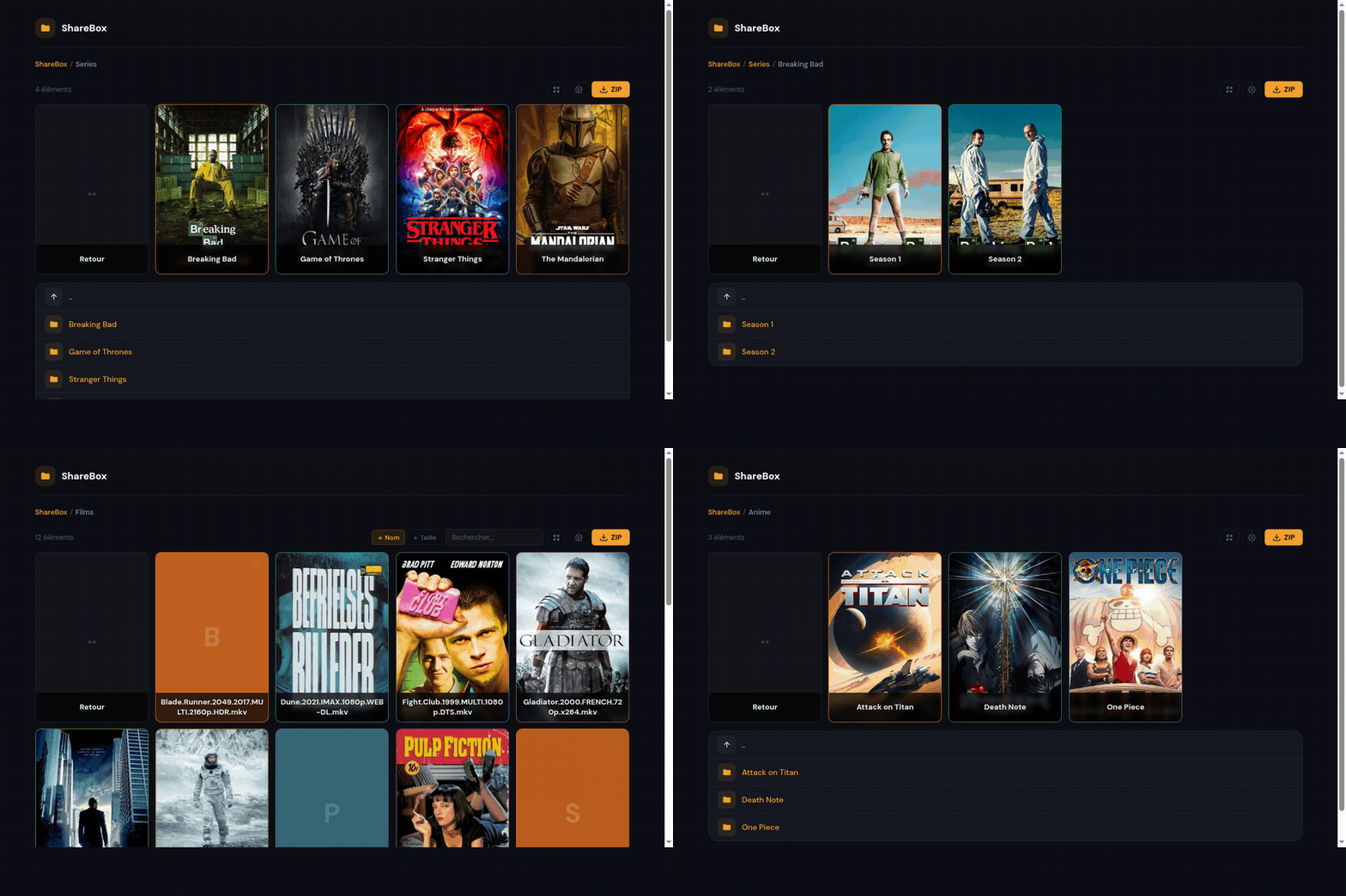

What is sharebox?
ShareBox is a PHP-based media server for streaming videos and sharing files by link, without the overhead of traditional media servers. It skips library scanning, uses SQLite instead of a database server, and requires no viewer accounts. Video transcoding happens on-the-fly via ffmpeg with three automatic modes: direct play for H.264/MP4, remux for H.264/MKV, and full transcode for HEVC/AV1. GPU acceleration works with Intel VAAPI, NVIDIA NVENC, and Raspberry Pi V4L2M2M. The UI includes a poster grid using TMDB metadata, a custom player with subtitles and quality options, a PDF reader, an audiobook player, password-protected share links with expiry, and an admin dashboard. It runs on minimal hardware — 256 MB RAM or a Raspberry Pi 4 — and deploys via Docker Compose, a one-line installer, or manual setup.
Should you self-host sharebox?
sharebox scores 38/100 on selfhost.directory (how scoring works) and ranks #48 of 54 in Media Streaming. It has 28 GitHub stars.
It shipped 2 stable releases in the past year. The latest, v5.1.0, came out on 20 June 2026. New versions land roughly every 4 weeks.
Setup is moderate: expect some configuration beyond a single command. An official Docker image is available. It is MIT-licensed and written mostly in JavaScript.
Its closest alternative on selfhost.directory is Jellyfin (88/100, 58 737 stars). It scores higher overall, so compare the two before you pick. See sharebox vs Jellyfin side by side.
Features
- Admin Panel
- Audiobook/album player
- Custom Video Player
- GPU hardware transcoding
- Netflix-style poster grid
- On-the-fly video transcoding
- PDF reader
- Secure file sharing
sharebox README
More in Media Streaming
 SiloA self-hosted, open-source media server for movies, shows, audiobooks, ebooks, podcasts, and manga with hardware transcoding and Jellyfin-compatible APIs.
 SnapcastSnapcast is an open-source, self-hosted multiroom audio system that syncs playback across clients with sub-millisecond precision.
 sonerezhSelf-hosted open-source web app to stream your music library from any browser. Auto-imports MP3, MP4, OGG, FLAC metadata with a beautiful web UI.
 StreamFlowSelf-hosted web app for live streaming to YouTube, Facebook, and RTMP with video gallery, scheduling, and real-time monitoring.
 StremioSelf-hosted browser UI for the Stremio media center: browse addon catalogs, cast to TV, sync your library and Continue Watching with your account.
 stremio-dockerA single-container Docker package for running Stremio media streaming on your own hardware, with built-in web player, ffmpeg transcoding, and automatic HTTPS.
 stremio-jellyfin-bridgeSelf-hosted, open-source Stremio addon bridging Jellyfin library and serving custom subtitles by IMDb ID on your LAN with zero-config HTTPS.
 STR (SoundTouch Reborn)STR restores internet radio, Spotify Connect, preset buttons, multiroom, and local media to Bose SoundTouch speakers after the cloud shutdown.
 subvertSelf-hosted tool to generate subtitles, chapters, and summaries from videos using OpenAI Whisper and ChatGPT. Works via Docker or from PHP source code.
 SuperstreamerSelf-hosted, open-source video streaming platform that handles transcoding, packaging, ad insertion, and playback with HLS. Built for developers who need video tooling.
 supysonicSelf-hosted, open-source Subsonic-compatible music streaming server with transcoding, scrobbling, jukebox mode, and internet radio support.
 SwiparrA self-hosted app for group movie decisions where everyone swipes to match on something to watch, supporting major media servers and TMDB.
0 comments