
Self-host StreamFlow
v2.2Web-based multi-platform live streaming manager
curl -fsSL https://deb.nodesource.com/setup_22.x | sudo -E bash -- Stars
- 406
- CPU
- 1 Core
- RAM
- 1GB
- Port
- 7575 (HTTP web interface)
- Requires
- Ffmpeg, Node.js
What is StreamFlow?
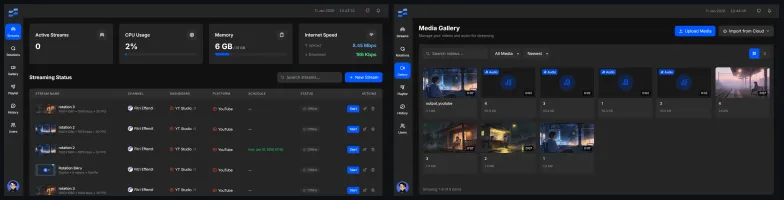
StreamFlow is a web-based live streaming platform that lets users broadcast to YouTube, Facebook, and custom RTMP destinations simultaneously from a single self-hosted application. It includes a video gallery for managing media, scheduled streaming with flexible timing, advanced encoding controls for bitrate, resolution, FPS, and orientation, real-time monitoring dashboards, and video analytics. The application runs on Node.js with SQLite for storage and requires FFmpeg for video processing. It can be deployed via Docker Compose, a manual Node.js installation on a VPS, or an automated install script. The project is licensed under MIT and actively maintained.
Should you self-host StreamFlow?
StreamFlow scores 50/100 on selfhost.directory (how scoring works) and ranks #19 of 36 in Video Streaming. It has 406 GitHub stars.
It shipped 1 stable release in the past year. The latest, v2.2, came out on 11 January 2026.
Setup is moderate: expect some configuration beyond a single command. It is MIT-licensed and written mostly in EJS.
Its closest alternative on selfhost.directory is piped (70/100, 10 293 stars). It scores higher overall, so compare the two before you pick. See StreamFlow vs piped side by side.
Features
- Advanced encoding settings
- Docker Compose Deployment
- Multi-platform streaming
- Password Reset
- Process management with PM2
- Real-time monitoring
- Scheduled streaming
- Timezone configuration
- Video Analytics
- Video gallery
- Video Upload
StreamFlow README
More in Video Streaming
 streamsphereStreamsphere is a self-hosted, open-source media library that downloads and organizes YouTube channels, playlists, and videos with a web UI for browsing and playback.
 StremioSelf-hosted browser UI for the Stremio media center: browse addon catalogs, cast to TV, sync your library and Continue Watching with your account.
 stremio-jellyfin-bridgeSelf-hosted, open-source Stremio addon bridging Jellyfin library and serving custom subtitles by IMDb ID on your LAN with zero-config HTTPS.
 StrixSelf-hosted, open-source IP camera stream finder: probes cameras, tests 100,000+ known stream URL patterns, and generates ready-to-use Frigate and go2rtc configs.
 subaticSelf-hosted video hosting platform with HLS streaming, S3-compatible storage, and transcoding pipeline. Open-source alternative to commercial video platforms.
 syncCyTube is a self-hosted, open-source platform for synchronized video playback and chat across YouTube, Twitch, Vimeo, and other providers.
 SyncTubeSyncTube is a self-hosted, open-source web service for synchronized video viewing with chat, supporting YouTube, Twitch, Vimeo, and direct media links.
 SyncWatch同步观影SyncWatch is an open-source, self-hosted watch party for synced video playback on Windows, Android, and web with chat, voice, and screen sharing.
 TorrinTorrin is a self-hosted, open-source debrid service turning magnet links, NZB files, and hoster links into instant HTTPS streams for Stremio, Kodi, WebDAV, and browsers.
 Tube ArchivistTube Archivist is a self-hosted, open-source YouTube media server for downloading, indexing, and playing videos offline with full-text search.
 tvheadendA self-hosted TV streaming server and DVR for Linux that handles DVB, ATSC, IPTV, and SAT>IP with a web interface.
 UHF ServerSelf-hosted DVR backend for UHF IPTV app on Apple devices. Runs via Docker or native binaries with web UI, commercial detection, and HLS playback.
0 comments