
Self-host Rescript
v1.2.4Local transcript-based video and audio editor
- Stars
- 1 004
What is Rescript?
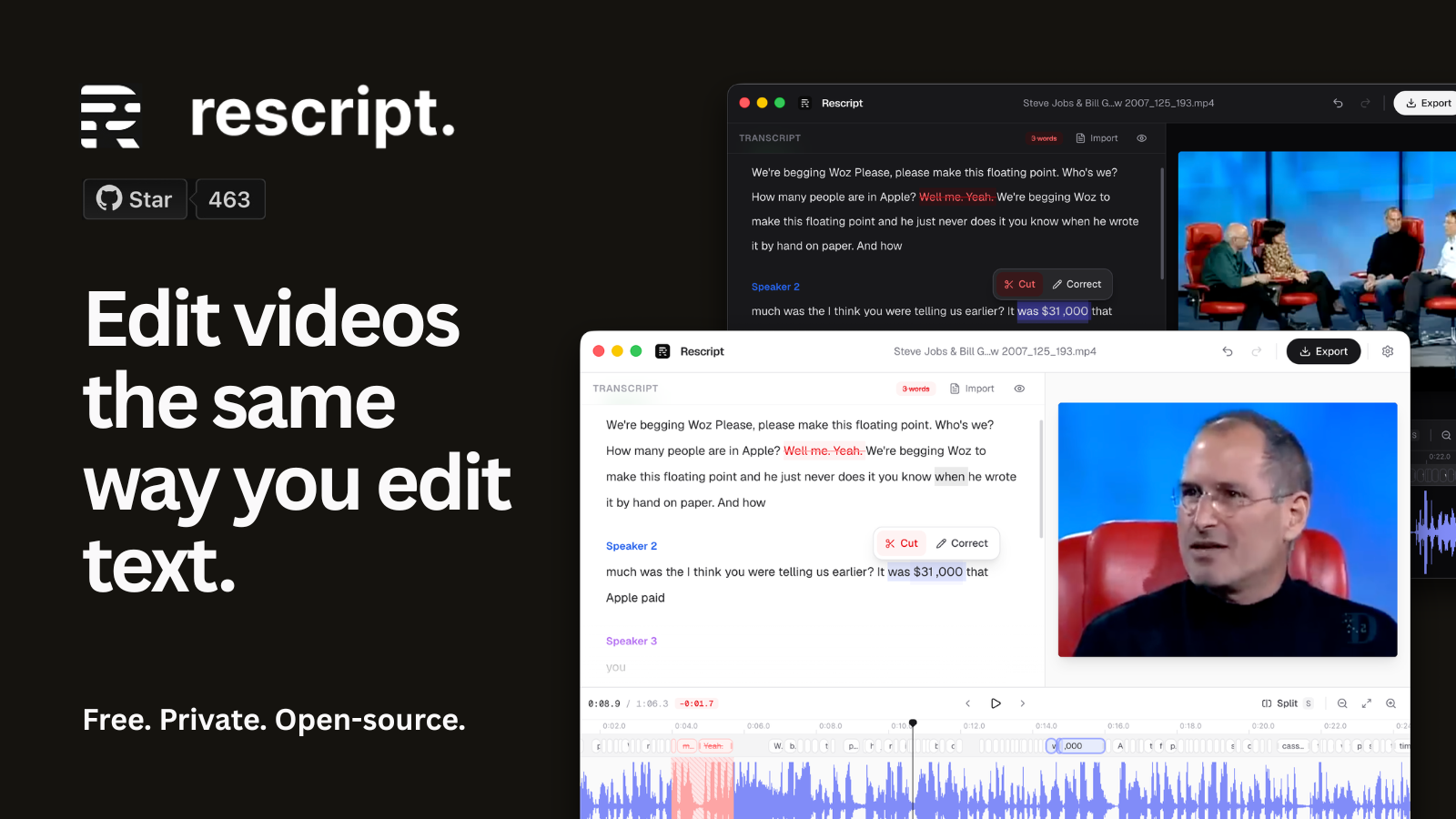
Rescript is a transcript-based media editor for video and audio that runs entirely on your device — either in a Chromium-based browser or as a signed Electron desktop app for macOS, Windows, and Linux. It transcribes media locally using Whisper via transformers.js with WebGPU/WASM, providing word-level timestamps and speaker diarization via pyannote. You edit by deleting words in the transcript, which cuts the corresponding media segments. Features include one-click filler word and silence removal, a timeline with waveform and wordbar for manual timing adjustments, live preview that skips cuts, and voice regeneration that clones a speaker's voice from their audio in the file to replace a line. Exports include video up to 4K, audio, transcripts, subtitles, and NLE/DAW timelines for Resolve, Premiere, Final Cut, Pro Tools, Reaper, and Samplitude. Licensed under PolyForm Noncommercial 1.0.0 (free for noncommercial use; commercial licensing available). No account or internet connection is required after initial model downloads. Telemetry is opt-out via Settings.
Should you self-host Rescript?
Rescript scores 51/100 on selfhost.directory (how scoring works) and ranks #7 of 18 in Video Processing. It has 1 004 GitHub stars.
It shipped 8 stable releases in the past year. The latest, v1.2.4, came out on 5 October 2026. New versions land roughly every 2 days.
Setup is easy: most people get it running in one sitting. It is Other-licensed and written mostly in Typescript.
Its closest alternative on selfhost.directory is Concat (82/100, 12 374 stars). It scores higher overall, so compare the two before you pick. See Rescript vs Concat side by side.
Features
- Cut edge trimming
- Desktop apps with auto-update
- Filler word removal
- Fully offline operation
- Import existing transcripts
- Live Preview
- Local Whisper Transcription
- Multi-format Export
- Silence removal
- Speaker Diarization
- Split and trim
- Timeline editing
- Transcript-based editing
- Voice regeneration
- Word timing adjustment
Rescript README
FAQ
Is it really open source?
Every line is on GitHub. You can audit the privacy claims, open issues, or contribute — there's no black box.
Which languages can Regenerate speak?
English, Spanish, French, German, Italian, and Portuguese, using Pocket TTS running locally through ONNX. Voice bundles download once (~140-360 MB) and are cached.
Does a regenerated line throw the rest of the edit out of sync?
No. A regenerated line occupies exactly the span it replaces: it grows into adjacent silence where there's room, pads with real silence if short, and only time-compresses as a last resort. A fit meter warns before generation.
Can I change what was said, not just cut it?
Yes — that's Regenerate. Select words, type what you meant, and Rescript synthesizes the new line in that speaker's voice, cloned on your device from ~10 seconds of their audio in the recording.
Does it identify different speakers?
Yes. Speaker diarization runs locally via pyannote-segmentation-3.0 and labels each block of the transcript, and you can rename speakers.
How accurate is the transcription?
It uses Whisper Base or Small, which handle clear speech well. Word timings and text are both editable, so you can correct anything the model gets wrong and the cuts follow your correction.
Can I bring my own transcript?
Yes. Skip transcription entirely and import an existing SRT, VTT, or JSON caption file, then edit the media against it.
Which browsers work best?
A Chromium-based browser is recommended. Rescript needs SharedArrayBuffer and uses WebGPU for transcription when available, with a WASM fallback otherwise.
Do I have to install anything?
Not unless you want to. The full editor runs in the browser. Desktop builds exist for offline-first use with auto-updates from GitHub Releases.
Do you collect any analytics?
The app reports anonymous page views and app opens to understand usage — no file names, transcripts, audio, or identifying information. It's visible in the source and blocked by content blockers.
Does my media ever leave my device?
No. Transcription, editing, and export all happen locally. The only network request is the one-time download of the Whisper model from Hugging Face, which is then cached.
Is Rescript free?
Yes, for noncommercial use under the PolyForm Noncommercial 1.0.0 license. The web app and all desktop builds are free with no account, trial, or usage meter. Commercial use requires a paid license.
More in Video Processing
 spectralSelf-hosted audio-reactive video editor with shared PixiJS rendering for preview and export. Uses Next.js, PostgreSQL, Redis, and MinIO.
 subvertSelf-hosted tool to generate subtitles, chapters, and summaries from videos using OpenAI Whisper and ChatGPT. Works via Docker or from PHP source code.
 SuperstreamerSelf-hosted, open-source video streaming platform that handles transcoding, packaging, ad insertion, and playback with HLS. Built for developers who need video tooling.
 TdarrSelf-hosted Tdarr runs media library transcode and remux automation with FFmpeg or HandBrake across distributed nodes, with GPU workers, plugin stacks and a web UI.
 trailarrTrailarr is a self-hosted, open-source app that auto-downloads and manages trailers for movie/TV libraries, integrating with Radarr, Sonarr, Plex, Emby, and Jellyfin.
 VERTdSelf-hosted FFmpeg conversion server for the VERT web UI, with GPU hardware acceleration, automatic CPU fallback and retries, and Docker, Compose or binary installs.
 ViralMintA locally-run, open-source desktop tool for short videos: discovers trends, cuts clips, builds AI videos, renders motion graphics — all with your own API keys.
 8mb.localSelf-hosted video compressor that shrinks clips to a chosen file size using GPU encoders (AV1/HEVC/H.264), with Docker, native Windows/macOS builds and an Android app.
 Agnes Video GeneratorSelf-hosted open-source AI video generator creating narrated multi-scene videos with auto subtitles via free Agnes AI cloud API — no GPU, no subscription.
 AICONAICON is a self-hosted, open-source AI video creation platform with an infinite canvas and natural-language workflow assistant for script-to-video production.
 app.enfugue.aiSelf-hosted open-source web app for studio-quality AI image/video generation with Stable Diffusion, unified pipeline, CivitAI browser, optional auth, and JSON API.
 automatic-ripping-machineOpen-source, self-hosted disc-ripping machine for Linux: insert a Blu-ray, DVD or CD and MakeMKV, HandBrake and abcde rip it automatically, with a Flask web UI for jobs.
0 comments