
Self-host netmon
0.1.0Network monitor with AI sarcastic reports
- Stars
- 287
- Requires
- Nmap, OpenAI-compatible API, Speedtest-cli
What is netmon?
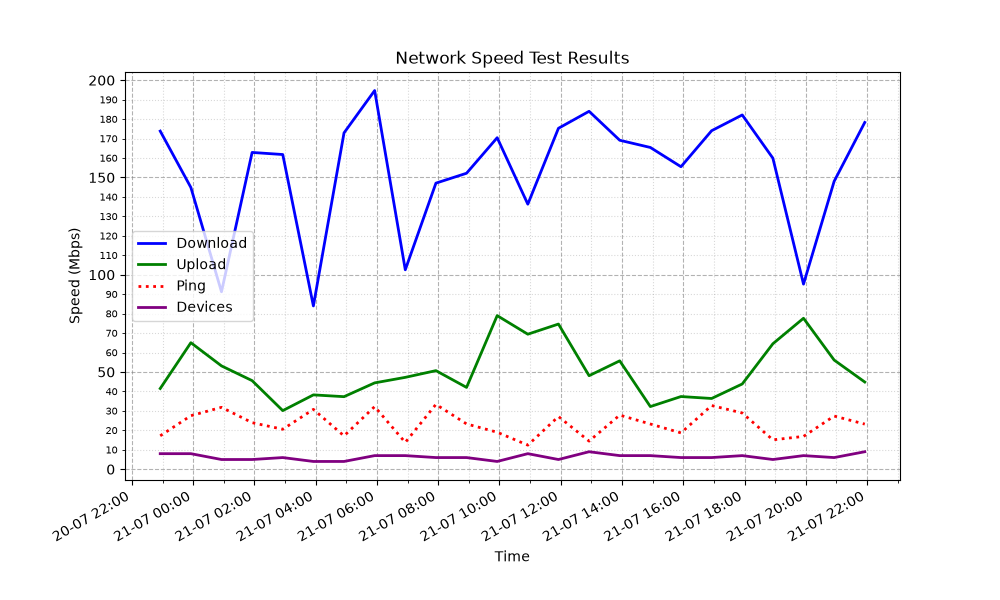
netmon is a Python-based network monitoring bot you run on your own macOS or Linux machine. It executes a single-threaded speed test every half hour using speedtest-cli and counts active LAN devices via nmap ARP scans. Results are kept in a local SQLite file. Every four hours the tool renders a matplotlib chart of the last 24 hours and ships a report with sarcastic AI commentary to Telegram or a Discord webhook. The LLM client works with any OpenAI-compatible endpoint, so you can point it at a local Ollama or LM Studio server. Setup relies on uv for Python and dependency management, plus system-installed nmap and speedtest-cli with passwordless sudo for nmap. The code is MIT-licensed.
Should you self-host netmon?
netmon scores 40/100 on selfhost.directory (how scoring works) and ranks #40 of 48 in Network Monitoring. It has 287 GitHub stars.
There was no stable release in the past 12 months, so check the repository's recent activity before you rely on it.
Setup is moderate: expect some configuration beyond a single command. It is MIT-licensed and written mostly in Python.
Its closest alternative on selfhost.directory is mitmproxy (86/100, 46 446 stars). It scores higher overall, so compare the two before you pick. See netmon vs mitmproxy side by side.
Features
- 24-hour trend graphs
- AI-generated sarcastic reports
- Data transfer tracking
- Discord Notifications
- Hourly status updates
- LAN device scanning
- Local SQLite storage
- OpenAI-compatible LLM Support
- Speed Testing
- Telegram Notifications
netmon README
More in Network Monitoring
 NetProbe_PythonA containerized network monitor that checks connectivity, DNS response times, and bandwidth, then shows results in a dark-themed web dashboard with historical graphs.
 netronomeOpen-source, self-hosted network speed testing and monitoring: Speedtest.net, iperf3 and LibreSpeed tests, packet loss and DNS monitors, and server agents.
 NetworkOptimizerSelf-hosted UniFi NMS with Wi-Fi optimization, security auditing, ISP health scoring, and multi-site management for up to 3 sites free.
 netxmsSelf-hosted, open-source network monitoring with L2/L3 topology discovery, distributed agents, NXSL scripting, and no node limits on Linux.
 nfsen-ngSelf-hosted NetFlow/sFlow/IPFIX analyzer replacing NfSen. Runs on Linux via Docker/bare metal. Real-time dashboards with RRD or VictoriaMetrics storage.
 nostr-watchnostr-watch is a self-hosted, open-source TypeScript monorepo for monitoring Nostr relays via NIP-66, with Docker Compose stacks for easy deployment.
 ntopngSelf-hosted, open-source (GPLv3) network traffic monitor: live flows, top talkers, nDPI layer-7 detection, NetFlow/sFlow collection and a REST API.
 OCS Inventory NGSelf-hosted IT asset inventory and software deployment with agents for Windows, Linux, macOS, Android. Web console, REST API, SNMP, LDAP/CAS, plugins.
 openITCOCKPITSelf-hosted open-source monitoring platform with web UI for Nagios, Naemon, Prometheus, featuring dashboards, alerting, Grafana, and native mobile apps.
 opnsenseSelf-hosted, open-source firewall and routing platform on FreeBSD: stateful filtering, VPN, Suricata IPS, multi-WAN failover, all managed from a web GUI.
 opnsense-exporterSelf-hosted Prometheus exporter for OPNsense metrics via REST API — ARP, WireGuard, Unbound, OpenVPN, IPsec, firewall, firmware, DHCP, temperature, CARP. Grafana dash.
 orbOrb is a self-hosted, open-source network observability platform that orchestrates a fleet of lightweight agents to analyze traffic at the edge.
0 comments