
Self-host mitmproxy
v12.3.1Interactive TLS-capable intercepting HTTP proxy
- Stars
- 46 988
- Ports
- 8080 (HTTP proxy listener), 8081 (Web interface (mitmweb))
mitmproxy/mitmproxy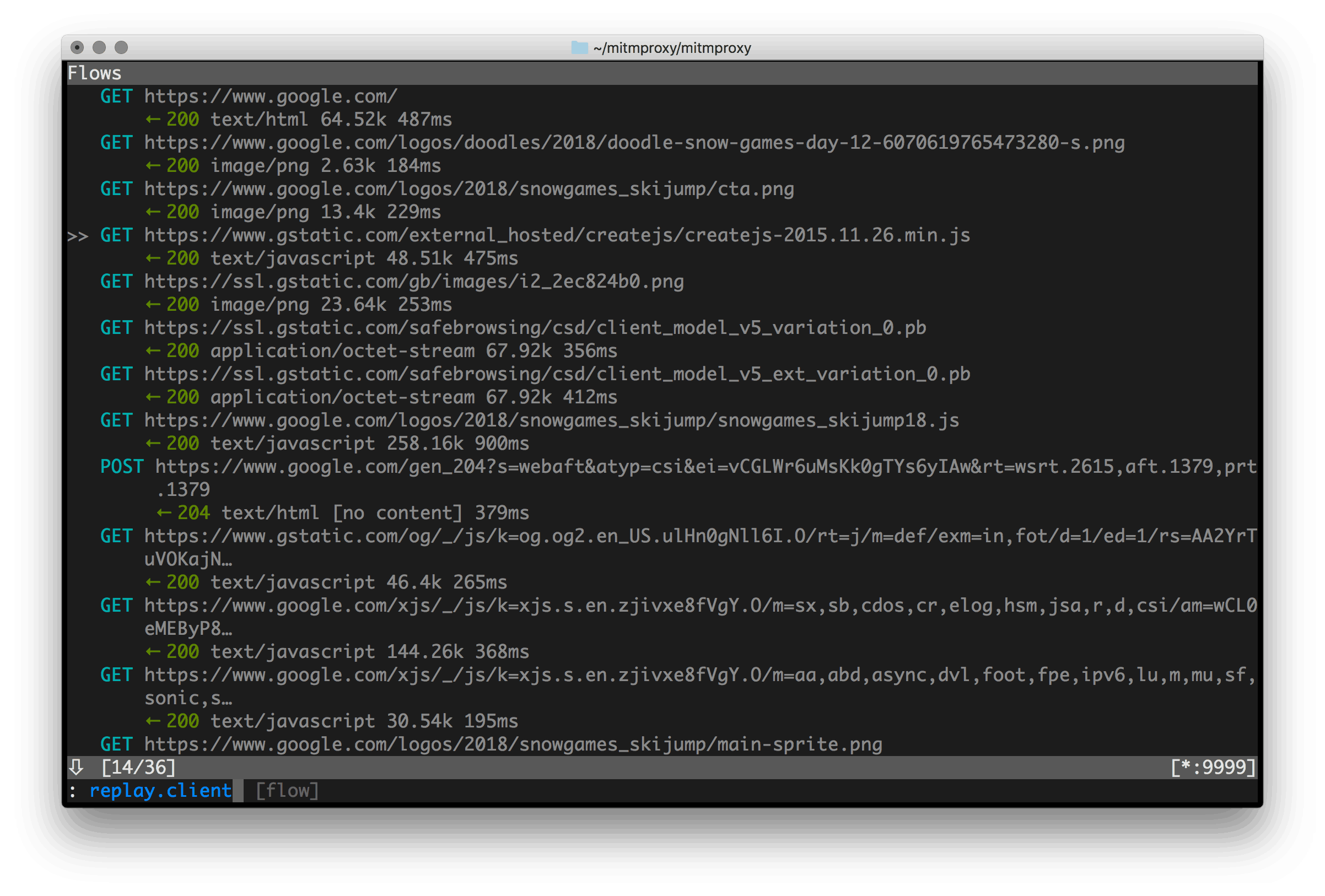
What is mitmproxy?
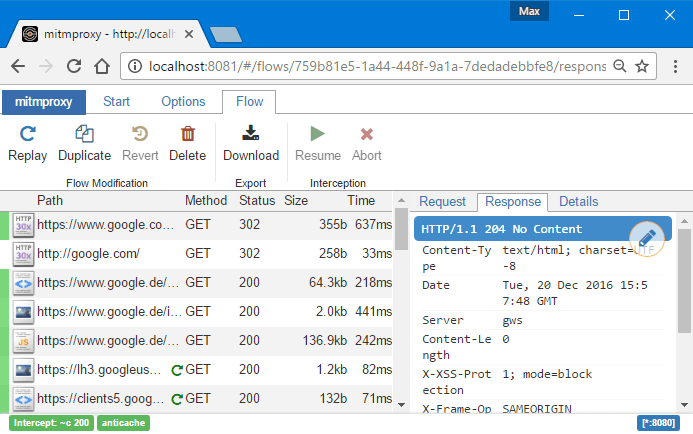
An interactive proxy that can intercept TLS-protected traffic, designed for penetration testers and developers. It offers three ways to work: a terminal UI, a command-line dumper similar to tcpdump, and a browser-based interface like Chrome DevTools. The software handles HTTP versions 1, 2, and 3 plus WebSocket protocols, allowing users to capture, examine, alter, and resend requests and responses in real time. A Python API lets you write extensions that automatically transform messages, redirect connections, or add custom commands. You can install it via Homebrew on macOS, as standalone binaries on Linux and Windows, through Docker, or from PyPI using uv. It creates its own CA certificates for HTTPS interception and supports transparent proxy modes. A core team maintains the project with sponsorship from organizations like NLnet.
mitmproxy alternatives
 hettyAn HTTP toolkit for security research.Comparehetty with mitmproxy
 tlsproxySelf-hosted TLS termination proxy with auto Let's Encrypt, SSO (OIDC/SAML/Passkeys), and reverse proxy for multiple services on one port.Comparetlsproxy with mitmproxy
 boringproxyOpen-source tunneling reverse proxy that exposes self-hosted services via public HTTPS URLs, managed through a simple web UI with automatic Let's Encrypt certificates.Compareboringproxy with mitmproxy
 g3proxyOpen-source, self-hosted enterprise forward proxy in async Rust: HTTP, SOCKS5, SNI and TPROXY modes, MITM auditing, proxy chaining, ICAP hooks and StatsD metrics.Compareg3proxy with mitmproxy
 3proxySelf-hosted, open-source tiny proxy server: HTTP/HTTPS, SOCKS4/5, FTP, DNS and port mapping with ACLs, bandwidth limits and parent chaining.Compare3proxy with mitmproxy
 nginx-proxySelf-hosted Nginx reverse proxy for Docker: this open-source container writes vhost configs from running containers and reloads them, with HTTPS and load balancing.Comparenginx-proxy with mitmproxy
 HysteriaSelf-hosted, open-source proxy server and client that rides a customized QUIC stack masquerading as HTTP/3, with SOCKS5, HTTP, forwarding, TProxy and TUN modes.CompareHysteria with mitmproxy
 TinyproxyCompact proxy server software handling web traffic on POSIX systems through buffering technology designed to minimize delays on shared internet links.CompareTinyproxy with mitmproxy
Should you self-host mitmproxy?
mitmproxy scores 85/100 on selfhost.directory (how scoring works) and ranks #1 of 47 in Network Monitoring. It has 46 988 GitHub stars, +1 565 in the last 30 days.
It shipped 5 stable releases in the past year. The latest, v12.3.1, came out on 25 October 2026. New versions land roughly every 3 months.
Setup is moderate: expect some configuration beyond a single command. An official Docker image is available. It is MIT-licensed and written mostly in Python.
Its closest alternative on selfhost.directory is ntopng (71/100, 8 348 stars). mitmproxy scores higher overall. See mitmproxy vs ntopng side by side.
Features
- Command-line interface (mitmdump)
- Console interface (mitmproxy)
- HTTP/1, HTTP/2, HTTP/3, and WebSocket support
- Intercept, inspect, modify, and replay traffic
- Message decoding and prettification
- Proxy modes (regular, transparent, reverse, upstream)
- Python scripting API
- TLS/SSL interception with CA certificate generation
- Transparent proxying support
- Web interface (mitmweb)
mitmproxy README

mitmproxy is an interactive, SSL/TLS-capable intercepting proxy with a console
interface for HTTP/1, HTTP/2, and WebSockets.
mitmdump is the command-line version of mitmproxy. Think tcpdump for HTTP.
mitmweb is a web-based interface for mitmproxy.
The installation instructions are here. If you want to install from source, see CONTRIBUTING.md.
More in Network Monitoring
 MonitorixSelf-hosted, open-source monitoring daemon for Linux and BSD servers that charts system, network, sensor and service statistics in a built-in web interface.
 muninOpen-source, self-hosted infrastructure monitor: a master polls nodes every five minutes, stores data in RRD files, and draws graphs in a web UI with 500+ plugins.
 MyIPOpen-source, self-hosted IP toolbox: look up IP and geolocation, detect WebRTC and DNS leaks, run speed, MTR, ping and Whois tests, all in one Docker container.
 nagiosOpen-source, self-hosted monitoring engine written in C that checks network services and host resources, alerts on problems, and adds an optional CGI web interface.
 NetAlertXSelf-hosted, open-source network monitoring tool that discovers devices via ARP, SNMP, Nmap and router imports, then alerts you on every change.
 NetMapNetMap is a self-hosted, open-source network monitoring and IPAM tool for home labs. Combines topology, inventory, monitoring, firewall logs, and alerting.
 netmonSelf-hosted network monitor running hourly speed tests, LAN ARP scans, and delivering sarcastic AI 24-hour reports with graphs to Telegram or Discord.
 NetProbe_PythonA containerized network monitor that checks connectivity, DNS response times, and bandwidth, then shows results in a dark-themed web dashboard with historical graphs.
 netronomeOpen-source, self-hosted network speed testing and monitoring: Speedtest.net, iperf3 and LibreSpeed tests, packet loss and DNS monitors, and server agents.
 NetworkOptimizerSelf-hosted UniFi NMS with Wi-Fi optimization, security auditing, ISP health scoring, and multi-site management for up to 3 sites free.
 netxmsSelf-hosted, open-source network monitoring with L2/L3 topology discovery, distributed agents, NXSL scripting, and no node limits on Linux.
 nfsen-ngSelf-hosted NetFlow/sFlow/IPFIX analyzer replacing NfSen. Runs on Linux via Docker/bare metal. Real-time dashboards with RRD or VictoriaMetrics storage.
0 comments