
Self-host hetty
v0.7.0HTTP proxy toolkit for security research
- Stars
- 12 541
- Port
- 8080 (HTTP server for MITM proxy and admin interface)
ghcr.io/dstotijn/hetty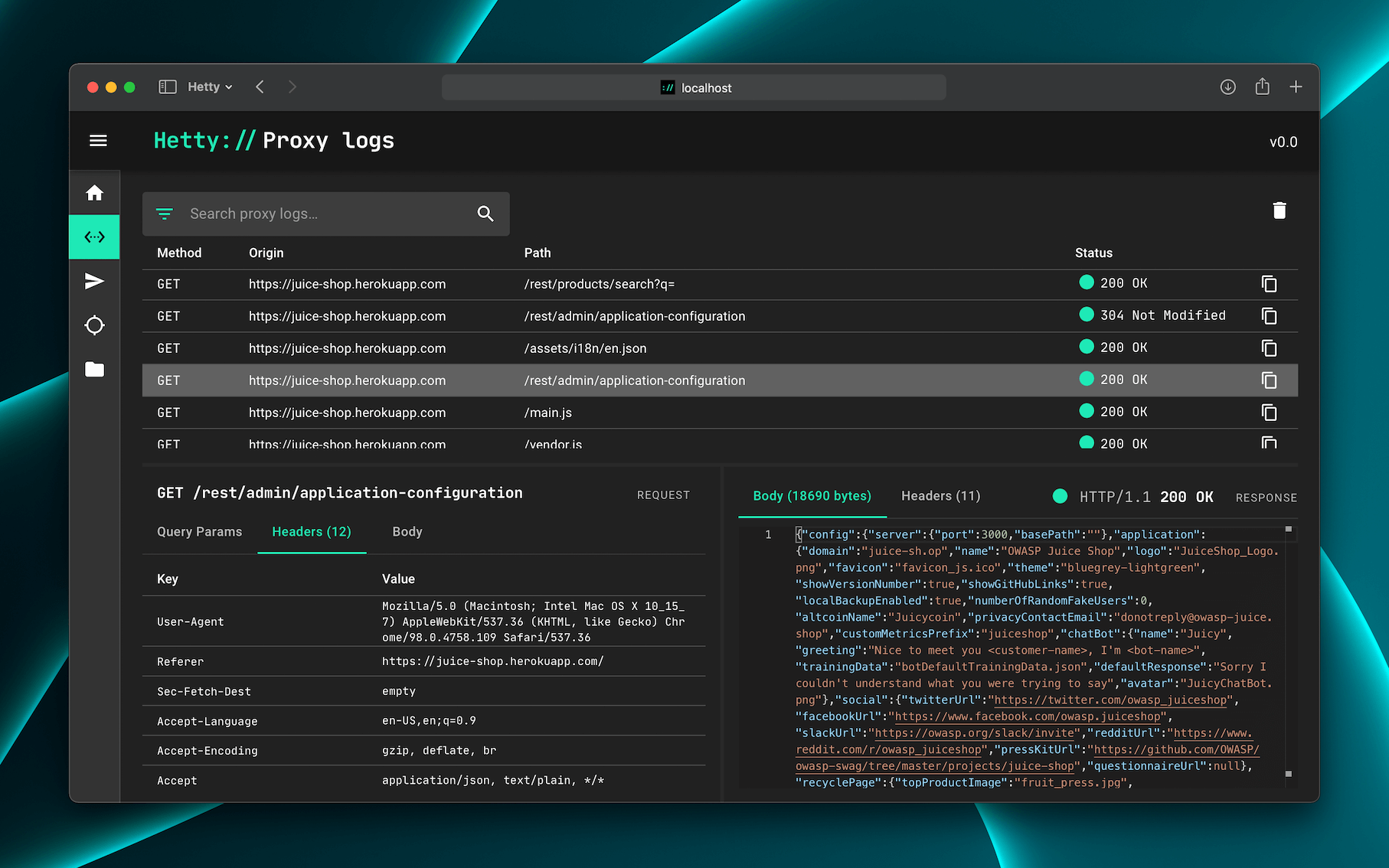

What is hetty?
Hetty is an HTTP toolkit designed for security research, offering a machine-in-the-middle proxy with request interception, replay capabilities, and a web-based admin interface. It targets penetration testers and bug bounty hunters who need a self-hosted, open-source alternative to commercial tools like Burp Suite Pro. The software creates its own root CA certificate and stores traffic logs in a project-based embedded database (BadgerDB). Operators run it as a single binary or Docker container that listens on port 8080 by default, serving both the MITM proxy and the admin UI. It can also launch Chrome preconfigured with proxy settings. Hetty is under active development and version 0.7.0 is the latest stable release.
hetty alternatives
 mitmproxySelf-hosted open-source HTTPS proxy for intercepting, inspecting, modifying, and replaying HTTP and WebSocket traffic.Comparemitmproxy with hetty
 httplaceholderHttPlaceholder is a self-hosted, open-source HTTP stub server for mocking web services with YAML stubs, REST API, web UI, and multiple storage backends.Comparehttplaceholder with hetty
 WeTTYSelf-hosted open-source web terminal with SSH access in the browser via xterm.js and websockets; runs file downloads, exposes metrics, installs from npm or Docker.CompareWeTTY with hetty
 HysteriaSelf-hosted, open-source proxy server and client that rides a customized QUIC stack masquerading as HTTP/3, with SOCKS5, HTTP, forwarding, TProxy and TUN modes.CompareHysteria with hetty
 web-checkOpen-source, self-hosted OSINT tool that runs 44 checks on any URL - DNS, TLS, headers, ports, CVEs, trackers - through a web UI or plain API.Compareweb-check with hetty
 CaddyFast and extensible multi-platform HTTP/1-2-3 web server with automatic HTTPSCompareCaddy with hetty
 pwnflowPwnflow is a self-hosted, open-source mind-mapping platform for cybersecurity professionals to visualize and track security testing methodologies with AI assistance.Comparepwnflow with hetty
 heplifyheplify is a self-hosted, open-source HEP capture agent for SIP, RTCP, DNS, Diameter and logs. Runs as a single binary on Linux, macOS, Windows with Docker.Compareheplify with hetty
Should you self-host hetty?
hetty scores 64/100 on selfhost.directory (how scoring works) and ranks #25 of 78 in Security. It has 12 541 GitHub stars, +28 in the last 30 days.
There was no stable release in the past 12 months, so check the repository's recent activity before you rely on it.
Setup is easy: most people get it running in one sitting. An official Docker image is available. It is MIT-licensed and written mostly in Go.
Its closest alternative on selfhost.directory is CyberChef (83/100, 36 396 stars). It scores higher overall, so compare the two before you pick. See hetty vs CyberChef side by side.
Features
- Advanced search
- Chrome Integration
- HTTP Client
- JSON log output
- MITM HTTP Proxy
- Project-based storage
- Request/Response Interception
- Scope support
- Web-based admin interface
hetty README


More in Security
 hiveboxSelf-hosted Linux sandbox isolating AI agents with kernel namespaces and cgroups, featuring a REST API, MCP bridge, and built-in web dashboard.
 homesocSelf-hosted, open-source SOC dashboard for home networks that unifies Wazuh alerts, AdGuard DNS logs, and CVE tracking with AI-powered alert explanations via Claude CLI.
 HoneyWireSelf-hosted open-source deception platform that turns any Linux machine into enterprise-grade canaries for detecting lateral movement with near-zero false positives.
 immich-public-proxySelf-hosted proxy that safely shares Immich photos and albums without exposing your Immich server to the internet, with optional visitor uploads.
 InfisicalInfisical is the open-source platform for securing secrets, certificates, access, and AI Agents.
 isms-builderSelf-hosted open-source ISMS tool for ISO 27001, NIS2, GDPR, BSI compliance. Policy, risk, audit, asset modules with local AI search.
 JauthSelf-hosted reverse proxy with SSL/TLS, SSH key and Telegram login auth, plus optional SSO for multiple domains.
 juice-shopA self-hosted, open-source vulnerable web app with OWASP Top Ten flaws and hacking challenges tracked on a score board, run via Docker, npm or packaged builds.
 jumpserverSelf-hosted, open-source PAM platform (GPL-3.0) giving IT teams browser access to SSH, RDP, Kubernetes and databases with session recording, RBAC and MFA.
 KanidmSelf-hosted, open-source identity management server in Rust: passkey/WebAuthn login, OAuth2/OIDC SSO, an app portal, read-only LDAPS, RADIUS, SSH keys and Unix auth.
 KasmVNCSelf-hosted, open-source web remote desktop: streams a Linux session to any browser over WebSocket or WebRTC, with DLP controls, multi-user permissions, and a REST API.
 Kerberos AgentSelf-hosted, open-source video surveillance agent for IP cameras with motion detection, recording, and cloud storage. Runs on Raspberry Pi, Docker, Kubernetes.
0 comments