
Self-host meshping
v1.0.1Network latency monitoring with histogram visualizations
- Stars
- 170
- Port
- 9922 (HTTP web UI and metrics endpoint)
svedrin/meshping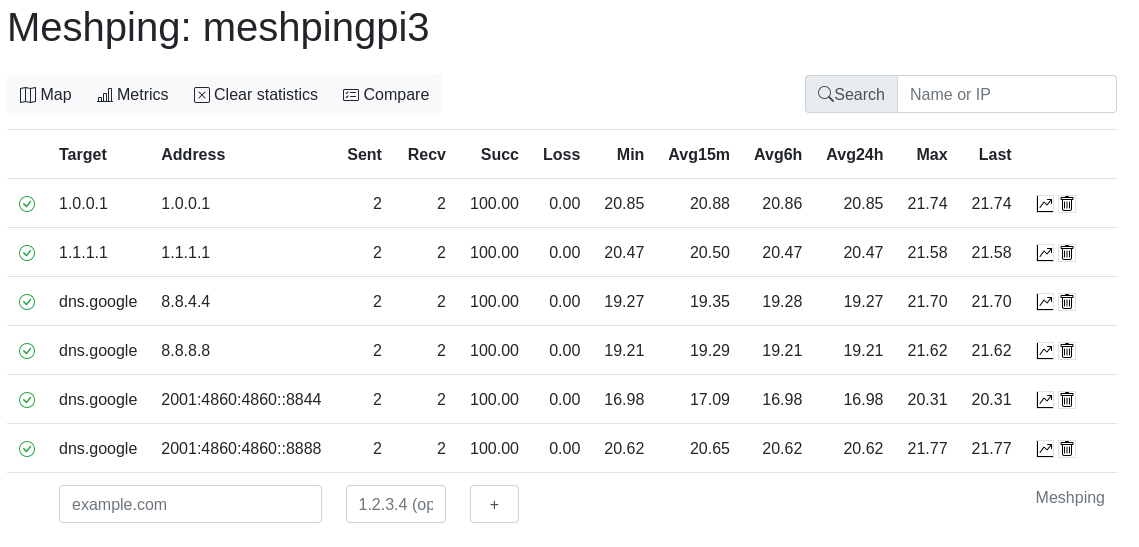
What is meshping?
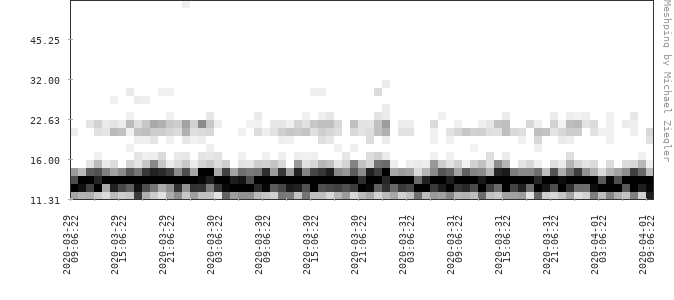
Meshping is a self-hosted network monitoring tool designed to detect weak links in your network topology. It pings multiple targets at once, collecting response times in histograms rather than simple averages, and runs traceroute to map network paths with Path MTU discovery and AS information. The web UI shows latency graphs, heatmaps over several days, network maps rendered as SVG, and can detect routing loops. Multiple Meshping instances can be peered to exchange target lists. It exposes a Prometheus metrics endpoint for alerting. Deployment is via Docker or docker-compose, with images on Docker Hub. The project is licensed under MIT and actively maintained.
Should you self-host meshping?
meshping scores 47/100 on selfhost.directory (how scoring works) and ranks #31 of 48 in Network Monitoring. It has 170 GitHub stars.
There was no stable release in the past 12 months, so check the repository's recent activity before you rely on it.
Setup is easy: most people get it running in one sitting. An official Docker image is available. It is MIT-licensed and written mostly in Python.
Its closest alternative on selfhost.directory is mitmproxy (86/100, 46 448 stars). It scores higher overall, so compare the two before you pick. See meshping vs mitmproxy side by side.
Features
- Dynamic target management
- Heatmap visualization
- Histogram-based latency visualization
- IPv6 Support
- Multi-target comparison
- Network Topology Mapping
- Peer-to-peer target exchange
- Prometheus metrics endpoint
- Routing loop detection
- Traceroute with Path MTU discovery
meshping README
More in Network Monitoring
 MeshSenseSelf-hosted, open-source desktop app for monitoring Meshtastic mesh networks via Bluetooth/WiFi with real-time mapping, traceroutes, and messaging.
 meshviewSelf-hosted open-source web app monitoring Meshtastic mesh networks via MQTT with interactive map, packet analysis, node stats, traceroute, and reliability reports.
 MikroDashSelf-hosted cockpit for MikroTik RouterOS v7 gear: live WebSocket monitoring, RBAC plus OIDC sign-in, alerting, config backups and templates, zero-touch provisioning.
 mikrotik-dnsSelf-hosted DNS analytics dashboard collecting MikroTik logs via UDP with real-time React UI, domain/client analysis, and live DNS search.
 Mikrotik RouterMikrotik router integration for Home Assistant
 mitmproxySelf-hosted open-source HTTPS proxy for intercepting, inspecting, modifying, and replaying HTTP and WebSocket traffic.
 MonitorixSelf-hosted, open-source monitoring daemon for Linux and BSD servers that charts system, network, sensor and service statistics in a built-in web interface.
 muninOpen-source, self-hosted infrastructure monitor: a master polls nodes every five minutes, stores data in RRD files, and draws graphs in a web UI with 500+ plugins.
 MyIPOpen-source, self-hosted IP toolbox: look up IP and geolocation, detect WebRTC and DNS leaks, run speed, MTR, ping and Whois tests, all in one Docker container.
 nagiosOpen-source, self-hosted monitoring engine written in C that checks network services and host resources, alerts on problems, and adds an optional CGI web interface.
 NetAlertXSelf-hosted, open-source network monitoring tool that discovers devices via ARP, SNMP, Nmap and router imports, then alerts you on every change.
 NetMapNetMap is a self-hosted, open-source network monitoring and IPAM tool for home labs. Combines topology, inventory, monitoring, firewall logs, and alerting.
0 comments