
Self-host LangGraph-GUI
v2.2.3Visual node-edge editor for LangGraph with local LLMs
- Stars
- 271
- Ports
- 3000 (Frontend (SvelteFlow UI)), 5000 (Backend (FastAPI server))
What is LangGraph-GUI?
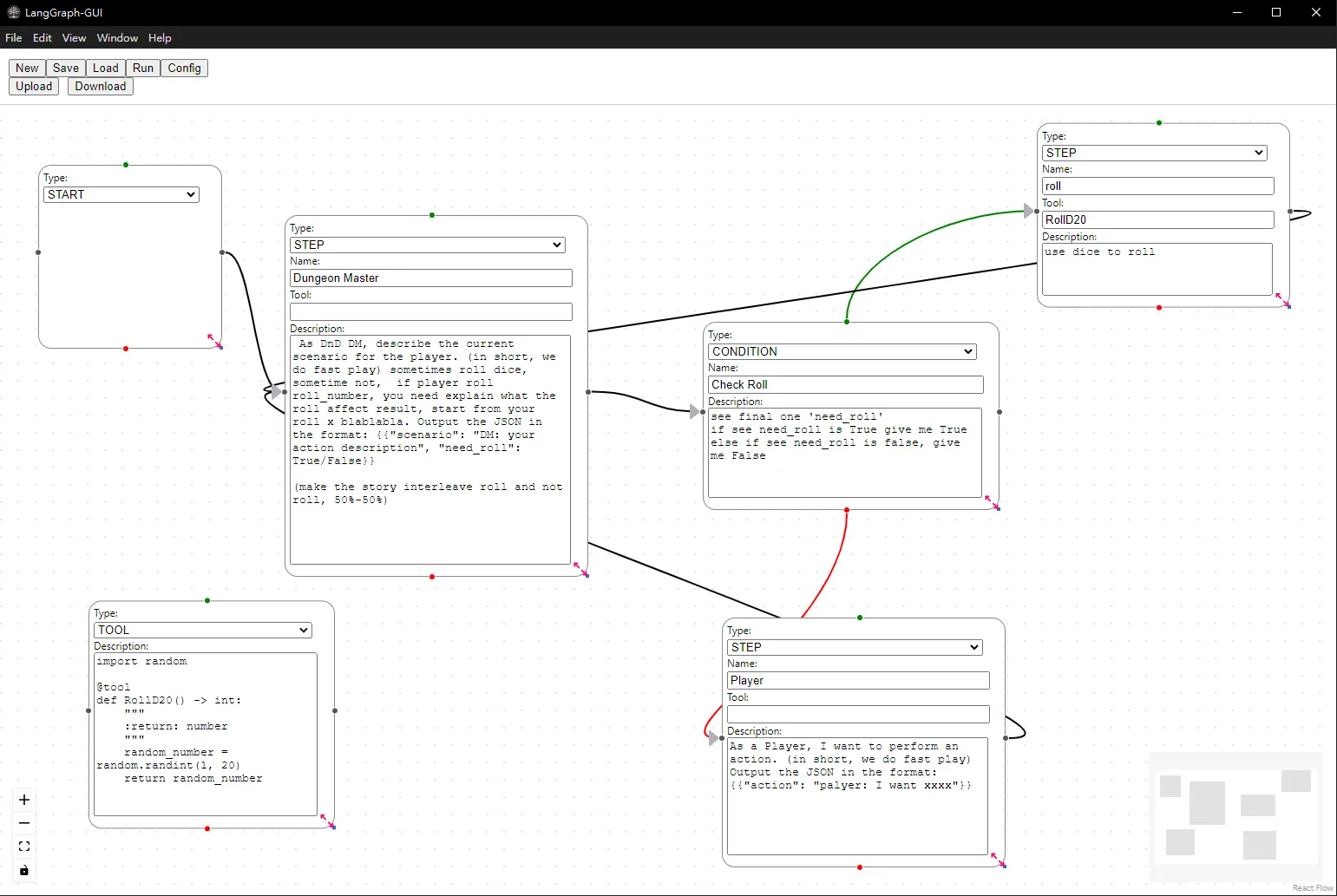
LangGraph-GUI is a self-hosted graphical interface for designing and executing LangGraph workflows through a visual node-edge editor built with SvelteFlow. The frontend communicates with a FastAPI backend that converts graph JSON into executable LangGraph workflows. Users can run workflows with local language models via Ollama (with NVIDIA GPU support) or configure external LLM APIs. The project supports multi-user deployments through nginx basic authentication, where each user gets an isolated workspace. Deployment options include Docker Compose (with separate frontend, backend, and Ollama containers), Kubernetes manifests, and manual installation on Windows or Linux. The software is licensed under MIT and maintained by HomunMage.
Should you self-host LangGraph-GUI?
LangGraph-GUI scores 43/100 on selfhost.directory (how scoring works) and ranks #6 of 7 in AI Workflows. It has 271 GitHub stars.
It shipped 1 stable release in the past year. The latest, v2.2.3, came out on 24 January 2026.
Setup is moderate: expect some configuration beyond a single command. It is MIT-licensed and written mostly in Typescript.
Its closest alternative on selfhost.directory is dify (90/100, 159 820 stars). It scores higher overall, so compare the two before you pick. See LangGraph-GUI vs dify side by side.
Features
- Docker Compose Deployment
- FastAPI backend
- Multi-user workspacesRequires nginx reverse proxy with auth_basic configuration
- NVIDIA GPU support
- Subgraph support
- Visual node-edge graph editor
- Workflow export to JSON
LangGraph-GUI README
More in AI Workflows
 llama-swapSelf-hosted model swapping proxy for running multiple AI models locally. Swaps between llama.cpp, vllm, stable-diffusion.cpp on demand via OpenAI/Anthropic endpoints.
 LoomFlowSelf-hosted AI workflow builder: write a prompt, get a runnable flow on a canvas, expose it as an API. Single Docker command to deploy.
 Manor AISelf-hosted AI workspace for small teams to run governed agents with bring-your-own keys, workflows, tools, and human approvals.
 markusSelf-hosted open-source AI workforce platform running autonomous agent teams locally with your own API keys.
 self-hosted-ai-starter-kitThis open-source Docker Compose template spins up a self-hosted AI stack with n8n, Ollama, Qdrant and PostgreSQL, auto-pulling Llama3.2 for local workflows.
 SimOpen-source, self-hosted AI workspace for teams designing, launching and observing agent workflows, with 1,000+ app connectors, tables, knowledge bases and run logs.
 1flowbaseAn open-source AI Gateway and app runtime you host yourself, unifying model access with PostgreSQL storage, workflows, APIs, and React apps via MCP.
 AgentaOpen-source, self-hosted workspace where teams build AI agents by chatting, run them in Slack, Telegram or WhatsApp, and schedule automations on any LLM.
 bifrostOpen-source, high-performance AI gateway that works as your LLM gateway, MCP gateway and agent gateway. One OpenAI-compatible API for 10,000+ models, with failover, load balancing, semantic caching, virtual keys, budgets and MCP Code Mode. Works with any SDK or agent and adds under 200µs of overhead at 5k RPS.
 bishengAn Apache-2.0, self-hosted LLM devops platform for enterprise AI: GenAI workflows, RAG knowledge bases, agents, model management, evaluation, SFT and OCR.
 DEEIX ChatDEEIX Chat is a self-hosted, open-source AI workspace unifying model routing, multimodal chat, RAG, MCP tools, billing, and identity into one deployable platform.
 deer-flowAn open-source long-horizon SuperAgent harness that researches, codes, and creates. With the help of sandboxes, memories, tools, skill, subagents and message gateway, it handles different levels of tasks that could take minutes to hours.
0 comments