
Self-host markus
v0.12.0Open-source AI workforce platform for autonomous agent teams
- Stars
- 209
- Port
- 8056 (Backend API and Web UI)
What is markus?
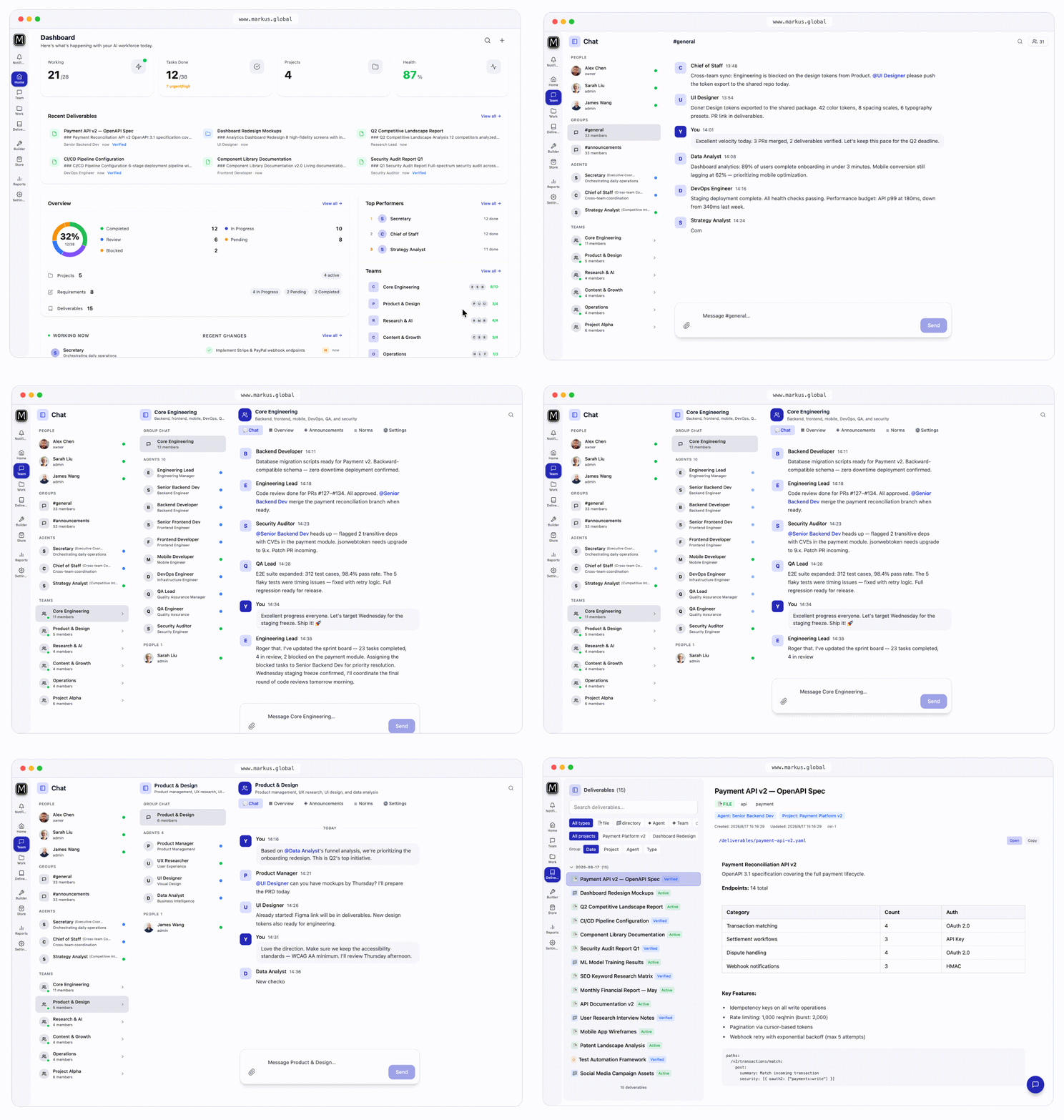
Markus is an open-source AI workforce platform that runs entirely on your own hardware. Instead of a single chatbot, it creates teams of specialized AI agents that plan, execute, and peer-review work autonomously — from research and content operations to software development and monitoring. You provide a high-level goal in natural language; Markus assembles the team, breaks down tasks, runs them in parallel with persistent memory, and gates every delivery through peer review. It runs as a desktop app (macOS, Windows, Linux) or via CLI on a server, with a web UI at localhost:8056. All data stays in a local SQLite database; you bring your own LLM API keys (Anthropic, OpenAI, Google, DeepSeek, Ollama, OpenRouter, etc.) or use local models for fully offline operation. The project is pre-1.0 (0.11.x) with frequent releases and breaking changes possible. A free tier with trial credits is available; paid plans add managed multi-model access, higher quotas, remote access, and multi-user collaboration.
Should you self-host markus?
markus scores 48/100 on selfhost.directory (how scoring works) and ranks #110 of 209 in AI Agents. It has 209 GitHub stars.
It shipped 6 stable releases in the past year. The latest, v0.12.0, came out on 27 October 2026. New versions land roughly every 2 weeks.
Setup is moderate: expect some configuration beyond a single command. It is Apache-2.0-licensed and written mostly in Typescript.
Its closest alternative on selfhost.directory is Orca (91/100, 108 642 stars). It scores higher overall, so compare the two before you pick. See markus vs Orca side by side.
Features
- Agent-to-agent protocol
- Autonomous Agents
- Bring Your Own Key (BYOK)
- Communication bridges
- Fully offline mode
- GUI and browser automation
- Local-first data
- Multi-agent Teams
- Multi-Provider LLM Support
- Peer review workflow
- Persistent memory
- REST + WebSocket API
- Skill ecosystem
- Web UI dashboard
markus README
FAQ
How do I upgrade?
Desktop: download the latest installer from GitHub Releases and reinstall. npm: npm install -g @markus-global/cli. From source: git pull && pnpm install && pnpm build.
How do I configure LLM models?
Everything is done visually in the Web UI Settings page — no config files or env vars. Any common provider works: Anthropic, OpenAI, Google, DeepSeek, MiniMax, Ollama, SiliconFlow, Moonshot, etc. Just add the provider and API key.
Where is the data stored? Do I need a separate database?
No. The platform uses a local SQLite database out of the box. The Hub marketplace stores its DB at ~/.markus-hub/hub.db by default (auto-created and migrated on first start).
What if a port is already in use?
Backend API defaults to port 8056; Web UI is bundled. From source: backend API :8056, frontend Vite Dev :8057. Ports can be adjusted in the Settings page of the Web UI — no config file edits required.
What are the default login credentials, and how do I change them?
After the first launch, sign in with admin@markus.local / markus123. The onboarding wizard will prompt you to set your real name, email, and a new password.
How do I get support?
Report bugs and request features on GitHub Issues. For real-time help and discussion, join the community on Feishu.
Can I self-host Markus?
Yes. Markus Core is open source under Apache-2.0. You can self-host it on any machine — macOS, Linux, or Windows. Enterprise plans offer private deployment support and custom SLAs.
Is my data private?
Markus runs entirely on your local machine. Your projects, agent memory, and conversations stay on your device. No data is sent to Markus servers unless you explicitly use optional cloud features like Markus Hub.
Which AI models are supported?
Markus supports Anthropic (Claude), OpenAI (GPT), Google (Gemini), DeepSeek, MiniMax, Ollama (local models), OpenRouter, Qwen, Seedance, and any OpenAI-compatible API. Switch providers in one line of config — no lock-in.
What's the difference between Free and paid plans?
All plans include unlimited agents, teams, and projects. The free tier (with your own API keys) will always be available. Paid plans unlock managed multi-model access, optimized model routing, higher credit quotas, premium community assets, the ability to publish and earn, remote access, and multi-user collaboration.
What does "Bring Your Own Key" mean?
You provide your own API keys from LLM providers like OpenAI, Anthropic, Google, or DeepSeek. Markus uses them to power your AI agents. You only pay the provider directly for the tokens you consume — Markus charges nothing on top.
Is Markus free?
Yes. The free tier includes trial credits or you can use your own API keys (Bring Your Own Key). Unlimited agents, teams, and projects are included. A free tier will always be available.
More in AI Workflows
 self-hosted-ai-starter-kitThis open-source Docker Compose template spins up a self-hosted AI stack with n8n, Ollama, Qdrant and PostgreSQL, auto-pulling Llama3.2 for local workflows.
 SimOpen-source, self-hosted AI workspace for teams designing, launching and observing agent workflows, with 1,000+ app connectors, tables, knowledge bases and run logs.
 1flowbaseAn open-source AI Gateway and app runtime you host yourself, unifying model access with PostgreSQL storage, workflows, APIs, and React apps via MCP.
 AgentaOpen-source, self-hosted workspace where teams build AI agents by chatting, run them in Slack, Telegram or WhatsApp, and schedule automations on any LLM.
 bifrostOpen-source, high-performance AI gateway that works as your LLM gateway, MCP gateway and agent gateway. One OpenAI-compatible API for 10,000+ models, with failover, load balancing, semantic caching, virtual keys, budgets and MCP Code Mode. Works with any SDK or agent and adds under 200µs of overhead at 5k RPS.
 bishengAn Apache-2.0, self-hosted LLM devops platform for enterprise AI: GenAI workflows, RAG knowledge bases, agents, model management, evaluation, SFT and OCR.
 DEEIX ChatDEEIX Chat is a self-hosted, open-source AI workspace unifying model routing, multimodal chat, RAG, MCP tools, billing, and identity into one deployable platform.
 deer-flowAn open-source long-horizon SuperAgent harness that researches, codes, and creates. With the help of sandboxes, memories, tools, skill, subagents and message gateway, it handles different levels of tasks that could take minutes to hours.
 difyDify is a self-hosted, open-source LLM app platform with visual workflows, RAG pipelines, agents, and model management for taking AI apps from prototype to production.
 duragraphDuraGraph is a self-hosted, open-source control plane for durable AI agent workflows. It uses event sourcing and CQRS to make every run replayable and crash-safe.
 EigentOpen-source desktop app to run single agents or multi-agent workforces; self-host the FastAPI backend with Docker and use any cloud or local model.
 ENZOENZO is a self-hosted AI workspace for 300+ models using your own API keys. Includes self-drafting agents, research, code generation, music player, encrypted vault.
0 comments