
Self-host Grok UI
v0.14.0Local-first dashboard for Grok Build sessions
- Stars
- 141
- Ports
- 4310 (Dashboard API and SSE), 4311 (Host agent)
- Requires
- Grok Build CLI, Node.js
What is Grok UI?
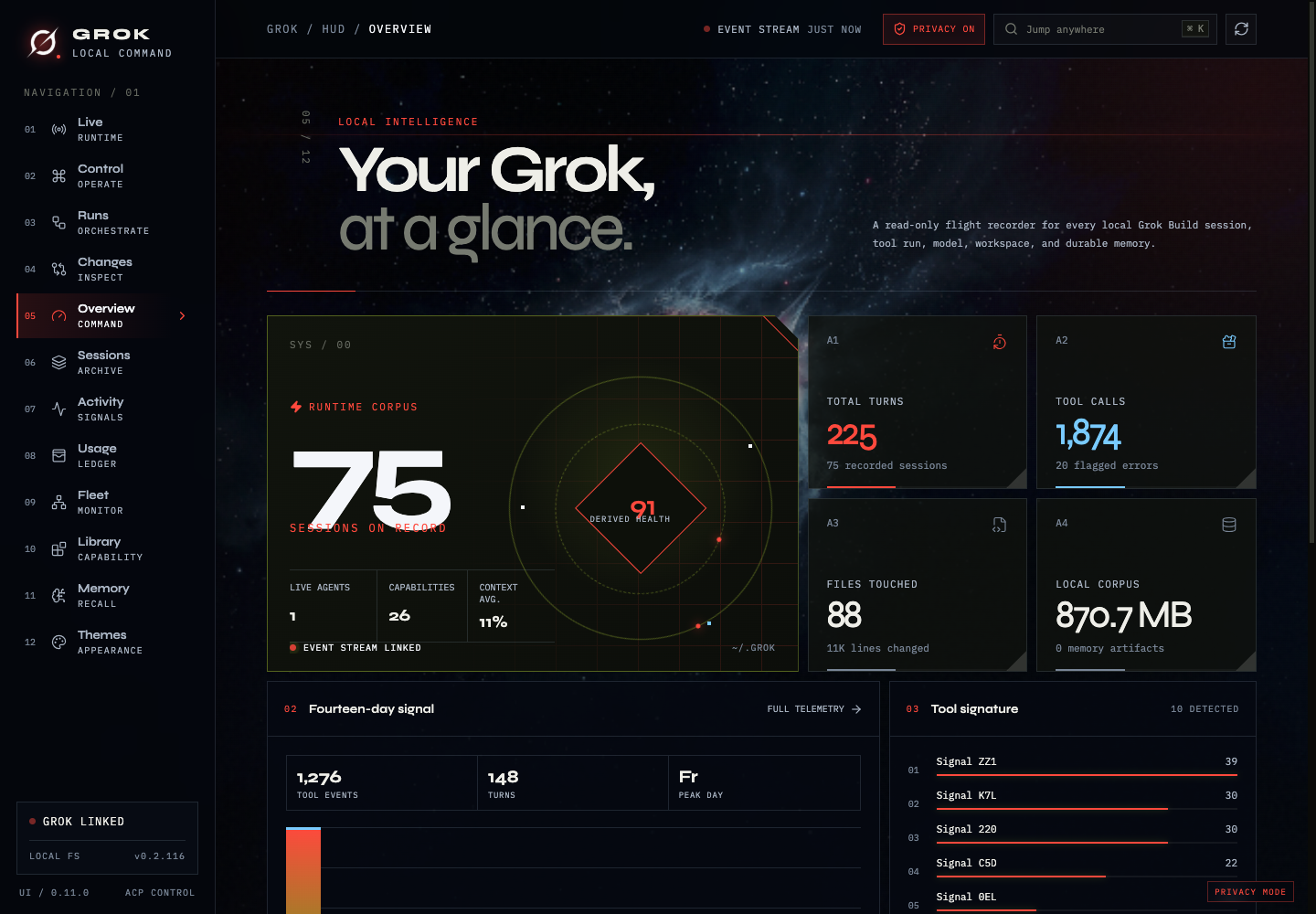
This tool runs as a Node.js Express supervisor on your own hardware, connecting to the Grok CLI through the Agent Client Protocol to deliver a live browser-based command center. It streams real-time agent state, turns, phases, reasoning, tool calls, context usage, and cost. You can start new sessions, load existing ones, send prompts, approve permission requests, and cancel runs with prompts shown exactly as Grok presents them. Each session gets its own console for chatting, reviewing activity, inspecting Git changes, managing permissions, and launching web previews. The dashboard watches repositories live, showing staged, unstaged, and untracked files with bounded diffs. A cross-session workflow field aggregates runs with phase details, per-agent token counts, models used, run duration, budgets, and pause/resume/stop controls. A durable local ledger tracks tokens and costs by project, model, session, and agent with optional budgets and JSON/CSV export. Runtime intelligence shows process trees and listening ports for active Grok processes. Fleet monitoring covers up to 32 hosts over SSH or Tailscale with health, latency, and telemetry. Secure remote sessions let you continue ACP-managed conversations from another device. Three visual themes ship built in, and a Privacy Mode redacts sensitive identifiers. Installation is via npx or from source, requiring Node.js 22+ and a working Grok Build setup. The server binds to loopback by default with optional token-protected remote access.
Should you self-host Grok UI?
Grok UI scores 46/100 on selfhost.directory (how scoring works) and ranks #104 of 166 in Developer Tools. It has 141 GitHub stars.
It shipped 9 stable releases in the past year. The latest, v0.14.0, came out on 12 October 2026. New versions land roughly every 2 days.
Setup is moderate: expect some configuration beyond a single command. It is MIT-licensed and written mostly in Typescript.
Its closest alternative on selfhost.directory is openhands (87/100, 92 105 stars). It scores higher overall, so compare the two before you pick. See Grok UI vs openhands side by side.
Features
- Cross-session workflow command field
- Live Git change inspection
- Live runtime monitoring
- Multi-machine fleet monitoring
- Native session control via ACP
- No analytics or telemetry
- Privacy mode
- Runtime intelligence
- Secure remote sessions
- Session Console per agent
- Session previews
- Three built-in themes
- Usage ledger with budgets
Grok UI README
More in Dashboard
 hashrate-autopilotSelf-hosted autopilot managing Braiins Hashpower bids with real-time dashboard, charts, and P&L tracking.
 HeimdallA self-hosted, open-source dashboard of tiles for your web apps and bookmarks, with a Google/Bing/DuckDuckGo search bar and live stats pulled from app APIs.
 Helical InsightHelical Insight is a self-hosted, open-source BI platform with AI analytics, pixel-perfect reporting, dashboards, SSO, multi-tenancy, embedding — all free under AGPL-3.0.
 hestia-coreSelf-hosted modular homelab dashboard with drag-and-drop grid, Base16 theming, and built-in Glances, Pi-hole, Deluge, Jellyfin integrations via Nginx proxy.
 HomarrSelf-hosted, open-source homelab dashboard with 80+ service integrations, drag-and-drop boards, built-in OIDC/LDAP auth and a Docker Compose or Helm deployment.
 homarr-iframesSelf-hosted Go API generating embeddable iFrames for 17+ services like Linkwarden, Vikunja, Overseerr, Sonarr, Radarr, Uptime Kuma — works in any dashboard.
 homedhomed is a lightweight self-hosted homepage with Authelia auth, light/dark themes, weather forecasts, and service status checks via YAML config.
 HomeDash2HomeDash is a self-hosted, open-source dashboard for monitoring services on a server via plugins. It offers customizable responsive layouts and kiosk mode.
 HomelabARR CEA free, open-source dashboard for one-click deployment of 100+ self-hosted apps like Plex, Jellyfin, and Sonarr on your own Linux server via Docker Compose.
 homelableOpen-source, self-hosted homelab canvas: map network and rack layouts, scan subnets with nmap, watch live device status, and keep lab documentation in markdown.
 homelab-monitorSelf-hosted homelab dashboard monitoring GPU, AI VRAM, Docker, systemd, disks, network and power costs across machines over SSH with a read-only MCP server.
 Homepage by gethomepageHomepage is a self-hosted, open-source application dashboard aggregating 100+ services into a fast static startpage with Docker discovery and optional auth.
0 comments