
Self-host fdm-monster
2.1.13D printer farm management platform
docker-compose up -d- Stars
- 195
- CPU
- modern CPU
- RAM
- 512MB minimum (2GB+ recommended)
- Storage
- 500MB - 1GB free space
- Port
- 4000 (HTTP web interface)
fdmmonster/fdm-monster
What is fdm-monster?
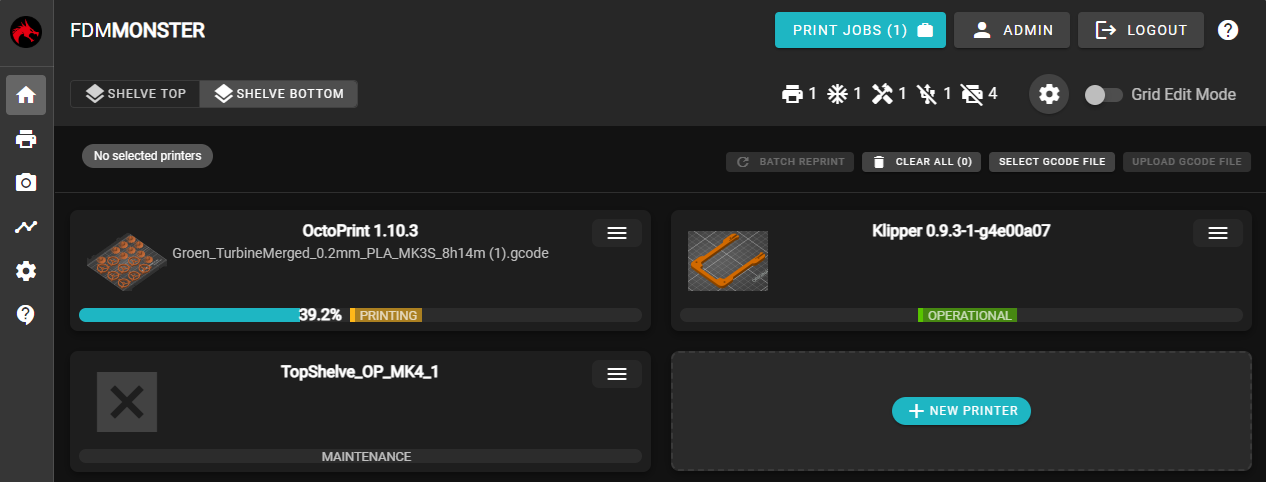
FDM Monster is a self-hosted platform for managing 3D printer farms. It provides a central dashboard to monitor and control multiple printers running OctoPrint, Klipper (via Moonraker), PrusaLink, or Bambu Lab. Key capabilities include real-time status with webcam feeds, drag-and-drop print queue management, batch printing to several printers at once, organizing printers on customizable floor grids, marking printers for maintenance, importing from OctoFarm, YAML configuration backup, and GCode thumbnail previews. The software uses SQLite for storage and runs on Linux, Docker, or a dedicated Raspberry Pi image called MonsterPi.
Should you self-host fdm-monster?
fdm-monster scores 51/100 on selfhost.directory (how scoring works) and ranks #12 of 22 in 3D Printing. It has 195 GitHub stars.
It shipped 10 stable releases in the past year. The latest, 2.1.1, came out on 14 May 2026. New versions land roughly every 3 days.
Setup is moderate: expect some configuration beyond a single command. An official Docker image is available. It is AGPL-3.0-licensed and written mostly in Typescript.
Its closest alternative on selfhost.directory is Octoprint (73/100, 9 167 stars). It scores higher overall, so compare the two before you pick. See fdm-monster vs Octoprint side by side.
Features
- Batch Printing
- Drag-and-drop GCode upload
- Extended webcam integration
- Maintenance mode
- Multiple printer protocol support
- Multi-printer dashboard
- OctoFarm import
- Printer organization on floors
- Print queue management
- Prometheus Metrics
- Spoolman integrationPlanned feature, not yet implemented
- Thumbnail Support
- User management with roles
- YAML backup and import
fdm-monster README
FAQ
Is there a demo instance I can try?
Yes, there is a demo instance available at https://demo.fdm-monster.net/ with username 'demo' and password 'demo2023'.
My printer shows as offline but it's running
Common causes: incorrect IP address or hostname, firewall blocking connection, invalid or expired API key.
How do I update FDM Monster?
For Docker Compose: run 'docker-compose pull && docker-compose up -d'. Your data is preserved across updates when using Docker volumes or persistent storage.
What about MongoDB support?
MongoDB is no longer supported since FDM Monster v2.0. The application now uses SQLite as its built-in database.
Do I need a separate database?
No, FDM Monster uses SQLite as its built-in database. No separate database server is required.
Which printer firmwares are supported?
OctoPrint (full support), Moonraker/Klipper (full support), PrusaLink (full support), Bambu Lab (work in progress).
What are the system requirements?
RAM: 512MB minimum (2GB+ recommended), Storage: 500MB - 1GB free space, Network: Stable connection to your printers.
Which platforms are supported?
Linux (Ubuntu/Debian) via one-click installer, Docker / Docker Compose, Raspberry Pi (3B+, 4, 5) via MonsterPi image, and Unraid.
What is FDM Monster?
FDM Monster is an open-source 3D print farm management tool for monitoring and controlling multiple printers from a single dashboard. It supports OctoPrint, Moonraker (Klipper), PrusaLink, and Bambu Lab printers.
More in 3D Printing
 filadexFiladex is a self-hosted, open-source filament manager for 3D printing enthusiasts to track inventory, monitor usage, and visualize statistics.
 FluiddOpen-source, self-hosted Klipper web UI for 3D printers: customizable dashboards, dark themes, G-code viewer, webcams, print history; runs via Docker or KIAUH.
 GyroidVaultSelf-hosted 3D model vault for makers: organize STL/3MF/STEP files, view real mm dimensions, assemble multi-part prints, and send G-code to Klipper or slicers.
 LinuxCNCOpen-source, self-hosted CNC machine controller for Linux with realtime kernels; interprets G-code and drives mills, lathes, 3D printers and robot arms.
 MainsailSelf-hosted web interface for Klipper 3D printers. Multi-printer support, print history, file management, customizable dashboards, webcam integration, power control.
 MainsailOSMainsailOS is a self-hosted, open-source prebuilt OS image for SBCs with Klipper, Moonraker, Mainsail UI, Crowsnest, and Sonar for 3D printer control.
 MakersVaultSelf-hosted web app for organizing 3D printing files with interactive 3D previews, folder tagging, and slicer integration.
 ManyfoldSelf-hosted, open-source catalogue for your 3D printing files: scan libraries, view models in interactive 3D, tidy them on disk, and share through the Fediverse.
 mkw2Self-hosted 3D printing commerce platform for print labs with storefront, instant quoting, checkout, and production backend integrating inventory and printer management.
 ObicoObico Server is the self-hostable backend of the open-source Obico 3D printing platform: remote monitoring, streaming and AI failure detection for OctoPrint/Klipper.
 OctoprintSelf-hosted open-source web UI to control and monitor 3D printers from a browser: webcam feed, GCODE viewer, slicing, timelapses, plugin system.
 Print Farm ManagerSelf-hosted web app to manage fleets of 3D printers from Prusa, Bambu Lab, Elegoo, and Klipper with live monitoring, automated job scheduling, and zero cloud reliance.
0 comments