
Self-host dish
v1.12.0Tiny one-shot monitoring service with remote config
- Stars
- 280

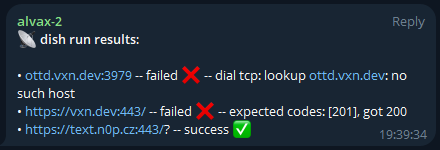
What is dish?
Dish is a lightweight Go utility that runs one-shot health checks against HTTP, ICMP, and TCP endpoints. It reads endpoint lists from a local JSON file or a remote REST API, with optional caching to reduce API calls on frequent runs. Checks execute concurrently and the tool exits with distinct codes for success or failure, making it cron-friendly. Alerting options include Telegram, Discord, Pushgateway for Prometheus, generic webhooks, and a remote results API. The single binary has no external runtime dependencies and installs via go install, Homebrew, direct download, or Docker. It suits decentralized setups where multiple instances fetch shared configuration.
Should you self-host dish?
dish scores 49/100 on selfhost.directory (how scoring works) and ranks #25 of 51 in Monitoring & observability. It has 280 GitHub stars.
There was no stable release in the past 12 months, so check the repository's recent activity before you rely on it.
Setup is easy: most people get it running in one sitting. It is MIT-licensed and written mostly in Go.
Its closest alternative on selfhost.directory is GoAccess (75/100, 21 094 stars). It scores higher overall, so compare the two before you pick. See dish vs GoAccess side by side.
Features
- Concurrent endpoint testing
- Cron-friendly one-shot execution
- Custom authentication headers
- Discord alerting
- HTTP health checks
- ICMP (ping) checksNot supported on Windows
- Local caching of remote config
- Local JSON file configuration
- Pushgateway (Prometheus) integration
- Remote configuration via JSON API
- Remote results API
- TCP port checks
- Telegram alerting
- Webhook Notifications
- Zero runtime dependencies
dish README
More in Network Monitoring
 docker-external-ipSelf-hosted Docker container that checks external IP via DIG/curl and sends Pushover or Apprise notifications on change.
 docker-fr24feed-piaware-dump1090Self-hosted Docker image running dump1090-fa, FR24feed, piaware, and feeders for ADS-B Exchange, Plane Finder, OpenSky, adsb.fi, Radarbox, ADSBHub with RTL-SDR.
 docsightSelf-hosted open-source app that captures DOCSIS signals, speed tests, and latency to document cable internet issues and prove them to your ISP.
 DStatusSelf-hosted server monitoring & AI ops panel: real-time metrics, 3-network TCPing, MTR, IP/streaming checks, alerts, WebSSH, renewals, AI assistant. Free: 3 nodes.
 EdMonEdMon is a self-hosted Java tool that monitors servers via ICMP ping and services via TCP, sending notifications through HTTP webhooks with master/secondary failover.
 Fail2Ban-ReportSelf-hosted web dashboard aggregating Fail2Ban logs from multiple servers into searchable JSON reports with UFW blocklist sync and role-based auth.
 Fail2NetworkBanFail2NetworkBan is a self-hosted, open-source Python client/server that sends Fail2Ban bans to Proxmox for network-wide IP blocking across all VMs.
 globalping-probeSelf-hosted network probe that joins the Globalping community network to run ping, traceroute, DNS, and HTTP tests from your location.
 gonzalesGonzales is a self-hosted, open-source internet speed monitor running automated 24/7 Ookla tests with a real-time dashboard, Home Assistant integration, and ISP grading.
 GPONSelf-hosted Prometheus exporter scraping ~75 metrics from Realtek RTL960x GPON SFP ONUs over SSH, with pre-built Grafana dashboard.
 heplifyheplify is a self-hosted, open-source HEP capture agent for SIP, RTCP, DNS, Diameter and logs. Runs as a single binary on Linux, macOS, Windows with Docker.
 HomeLabInfoSelf-hosted, open-source network scanner and visualization dashboard for homelab infrastructure with DHCP discovery, topology mapping, and container monitoring.
0 comments