
Self-host ContainerFlow
v0.1.10Docker architecture visualizer, monitoring & config checks
docker compose up -d- Stars
- 192
- RAM
- 80 MB
- Port
- 9470 (HTTP server and WebSocket)
- Requires
- Docker
ghcr.io/rgjorge/containerflow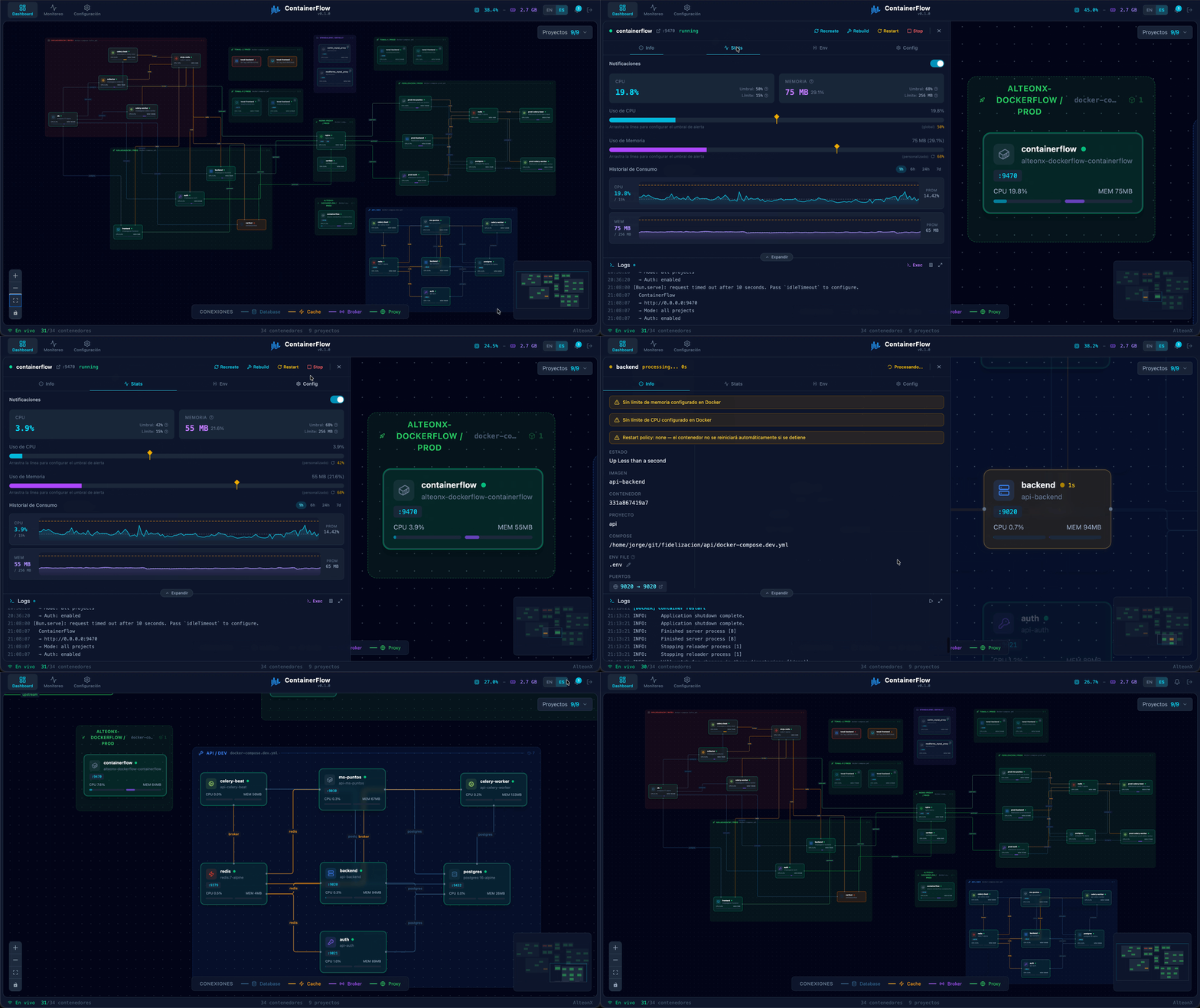
What is ContainerFlow?
ContainerFlow discovers Docker services through the socket, organizes them by project, and renders an interactive graph with detected links between applications, databases, caches, and proxies. Live CPU and memory readings refresh every few seconds, while a monitoring screen keeps historical charts for periods from one hour to a week in SQLite. Discord webhooks can send alerts when containers change state or exceed resource thresholds. The interface highlights containers that lack memory caps, CPU caps, or restart policies with warning banners. A side panel shows container details, statistics, environment variables, configuration, mounted volumes, live logs, and a built-in terminal for running commands inside containers. Container operations like starting, stopping, restarting, rebuilding, recreating, and removing work straight from the UI. Multi-tenant setups use ALLOWED_PATHS for path-based access control. The stack runs on Bun, Hono, React 19, and Tailwind CSS 4, consuming roughly 80 MB of RAM and starting in about half a second. It can be launched via Docker Compose using a prebuilt GHCR image, built locally with Bun, or run in development mode with hot reload.
Should you self-host ContainerFlow?
ContainerFlow scores 45/100 on selfhost.directory (how scoring works) and ranks #77 of 104 in Monitoring & observability. It has 192 GitHub stars.
It shipped 10 stable releases in the past year. The latest, v0.1.10, came out on 30 May 2026. New versions land roughly every 1 days.
Setup is moderate: expect some configuration beyond a single command. An official Docker image is available. It is AGPL-3.0-licensed and written mostly in Typescript.
Its closest alternative on selfhost.directory is dockge (76/100, 24 700 stars). It scores higher overall, so compare the two before you pick. See ContainerFlow vs dockge side by side.
Features
- Container Actions
- Container detail panel
- Discord Notifications
- Error toasts
- Inline terminal (docker exec)
- Monitoring page with history
- Path-based access control
- Project filter
- Real-time container logs
- Real-Time Metrics
- Smart connection detection
- Volumes and mounts listing
ContainerFlow README
More in Docker Management
 ContainerNurseryContainerNursery is a self-hosted Node.js reverse proxy that stops idle Docker containers and restarts them on demand with a loading page.
 Dock-DploySelf-hosted web app for visually building Docker Compose files, generating Homepage configs, and creating schedulers in cron, GitHub Actions, and systemd formats.
 docker-crontabdocker-crontab is a self-hosted, open-source cron scheduler that runs as a Docker container and executes scheduled jobs in other containers via the Docker socket.
 Docker Registry BrowserSelf-hosted, open-source web interface for browsing and managing Docker Registry HTTP API V2 repositories and tags, written in Ruby on Rails.
 Docker-SentinelSelf-hosted, open-source container update orchestrator in Go replacing Watchtower with per-container policies, snapshots, rollback, and 11 notification providers.
 dockgeA self-hosted, open-source web UI for Docker Compose stacks: create, edit and deploy compose.yaml files, with a live web terminal and multi-host agents.
 dockhandDockhand is a self-hosted Docker management platform with real-time container monitoring, Compose orchestration, Git deployments, and SSO. Free for homelabs under BSL 1.1
 dockpanelDockPanel is a free, self-hosted server panel in Rust/React managing sites, databases, Docker apps, SSL, backups, mail, DNS, security. ~49MB RAM, 147 templates
 dockprobeSelf-hosted Docker monitoring dashboard with real-time metrics, anomaly detection, and Telegram alerts in a single container.
 DockSTARTerAn open-source bash tool that generates Docker Compose files from a terminal menu for self-hosted media, download and monitoring containers, with Watchtower updates.
 dockwatchSelf-hosted Docker container manager with web UI for updates, notifications (Notifiarr, Telegram, Mattermost), multi-host control, auto-restart, and orphan cleanup.
 dokistryDokistry is a self-hosted, open-source web app for managing Docker registries, images, and users with multi-registry support and disk usage tracking.
0 comments