
Self-host dockge
1.5.0Stack-oriented Docker Compose manager with a web UI
docker compose up -d- Stars
- 24 792
- Port
- 5001 (Dockge web UI (container port 5001, mapped 5001:5001))
- Requires
- Docker socket (/var/run/docker.sock)
louislam/dockge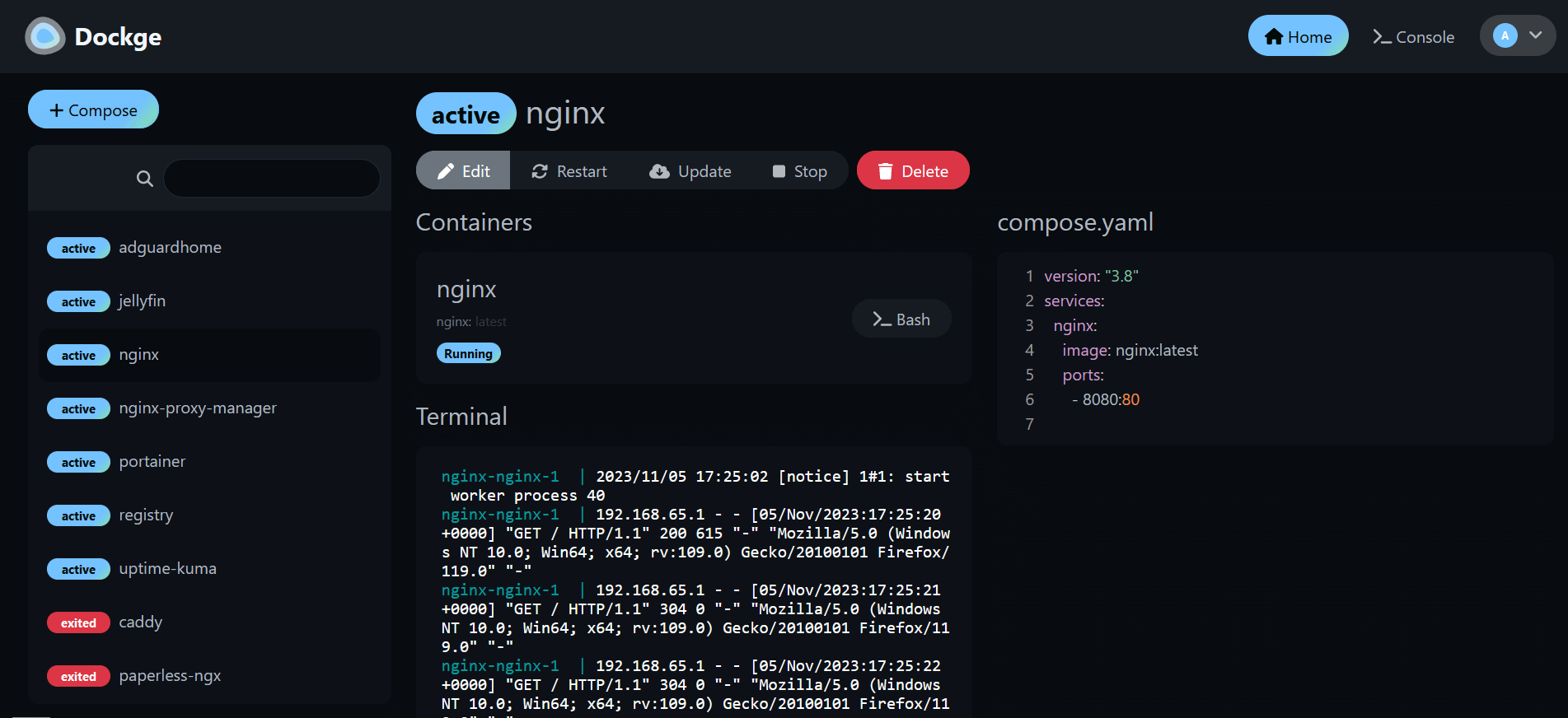
What is dockge?
Dockge is a browser-based manager for Docker Compose stacks. Rather than juggling individual containers, you work with named stacks made of compose.yaml files, and it drives them through the Docker socket. It creates, edits, deploys, stops, restarts and deletes stacks, pulls updated images, turns docker run command lines into Compose syntax, and opens a terminal in the browser for each stack. Nothing is locked away: your YAML files remain normal files in a directory on disk, so plain docker compose commands still work, and a folder-scan action picks up stacks you already had. Progress and log output stream live, and since 1.4.0 one interface can manage stacks on several Docker hosts through agents. To run it you launch one container with the docker socket and your stacks path bind-mounted; its site generates the compose file for your chosen port and directory, and updates are a docker compose pull plus re-up. It requires Docker 20+ or Podman on a mainstream Linux distribution; Debian/Raspbian Buster and older, and Windows, are not supported.
Should you self-host dockge?
dockge scores 77/100 on selfhost.directory (how scoring works) and ranks #1 of 5 in Docker Management. It has 24 792 GitHub stars, +235 in the last 30 days.
There was no stable release in the past 12 months, so check the repository's recent activity before you rely on it.
Setup is easy: most people get it running in one sitting. An official Docker image is available. It is MIT-licensed and written mostly in Typescript.
Its closest alternative on selfhost.directory is doco-cd (62/100, 1 773 stars). dockge scores higher overall. See dockge vs doco-cd side by side.
Features
- File-based stack storage
- Multi-host agent support
- Real-time deployment output
- Scan stacks folder
- Web Terminal
- YAML editor
dockge README


FAQ
Can I install both Dockge and Portainer?
Yes, both can be installed together.
Is Dockge a Portainer replacement?
Partly: for compose-only management yes, but Portainer also covers things like networks and single containers, so Dockge does not replace it there.
Can I manage existing stacks?
Yes, after moving the compose file into the stacks directory as <stackName>/compose.yaml and using the Scan Stacks Folder action.
Can I manage a single container without compose.yaml?
No — Dockge is built around compose.yaml for everything, so for single containers it suggests the Docker CLI or Portainer.
What does the name Dockge mean?
It is a made-up word coined by the author, originally meant to sound like "Dodge", inspired by Twitch emotes ending in -ge.
More in Docker Management
 dockhandDockhand is a self-hosted Docker management platform with real-time container monitoring, Compose orchestration, Git deployments, and SSO. Free for homelabs under BSL 1.1
 dockpanelDockPanel is a free, self-hosted server panel in Rust/React managing sites, databases, Docker apps, SSL, backups, mail, DNS, security. ~49MB RAM, 147 templates
 dockprobeSelf-hosted Docker monitoring dashboard with real-time metrics, anomaly detection, and Telegram alerts in a single container.
 DockSTARTerAn open-source bash tool that generates Docker Compose files from a terminal menu for self-hosted media, download and monitoring containers, with Watchtower updates.
 dockwatchSelf-hosted Docker container manager with web UI for updates, notifications (Notifiarr, Telegram, Mattermost), multi-host control, auto-restart, and orphan cleanup.
 dokistryDokistry is a self-hosted, open-source web app for managing Docker registries, images, and users with multi-registry support and disk usage tracking.
 ha-dockermonHA Dockermon is a self-hosted, open-source Node.js REST API for Home Assistant to monitor and control Docker containers via HTTP endpoints.
 HomelabOSOpen-source Ansible toolkit for a self-hosted homelab: deploys 100+ Docker services behind Traefik with Let's Encrypt HTTPS, Tor access, and nightly restic backups.
 MCSManagerSelf-hosted, open-source game-server control panel for Minecraft, Palworld, Terraria and Steam servers, with Docker, multi-user permissions and distributed nodes.
 minepanelSelf-hosted Minecraft server manager for Java and Bedrock. Run isolated servers via Docker with a web UI, live metrics, backups, and proxy networking.
 monockerMonocker is a self-hosted, open-source Docker container monitor that watches for state changes and sends notifications via Telegram, Discord, Slack, and other platforms.
 oxkerAn open-source, self-hosted terminal UI, written in Rust, for watching Docker containers, tailing logs, and running start/stop/exec commands from the keyboard.
0 comments