
Self-host botwave
v1.2.13-ostodesFM radio broadcasting system for Raspberry Pi networks
- Stars
- 145
- Ports
- 9938 (WebSocket server for client-server communication), 9921 (HTTP file server for file transfers), 9939 (Remote CLI port for remote management)
- Requires
- Aiofiles, Bw_custom, Cryptography, Dlogger, Morse-talk, Piwave, Prompt_toolkit, Pyalsaaudio, Python, Websockets
What is botwave?
BotWave is a self-hosted FM radio broadcasting system built for Raspberry Pi hardware. It lets you transmit audio files over FM frequencies using a wire or antenna attached to GPIO pin 4. The software works in two modes: a local client that runs on a single Pi without any server, and a server-client setup that lets one central machine control multiple Pis. It handles common audio formats like MP3, WAV, FLAC, AAC, and OGG, converting them automatically. Additional capabilities include live streaming from any application, playlist queues, remote control over WebSocket, passkey-based authentication, RDS for showing station info on radios, and SSTV for sending images over FM. Installation uses a shell script on Linux distributions including Raspberry Pi OS, Ubuntu, Fedora, and Arch. The system needs Python 3.10 or newer, root privileges, and the bw_custom backend on each Pi. It is licensed under GPL-3.0 and maintained by DPIP Studio.
Should you self-host botwave?
botwave scores 47/100 on selfhost.directory (how scoring works) and ranks #12 of 14 in Audio Streaming. It has 145 GitHub stars.
It shipped 22 stable releases in the past year. The latest, v1.2.13-ostodes, came out on 11 October 2026. New versions land roughly every 7 days.
Setup is advanced: plan for several services and some ongoing maintenance. It is GPL-3.0-licensed and written mostly in Python.
Its closest alternative on selfhost.directory is Snapcast (72/100, 8 038 stars). It scores higher overall, so compare the two before you pick. See botwave vs Snapcast side by side.
Features
- File Upload
- FM Audio Broadcasting
- Live Broadcasting
- Multiple Audio Formats
- Passkey Authentication
- Protocol versioning
- Queue System
- RDS Support
- Remote Management
- Server-Client Architecture
- SSTV Support
- Standalone Local Client
- Task Automation
botwave README
FAQ
What is local mode?
Local Mode lets you broadcast directly from a Raspberry Pi without a server. Useful for standalone setups or testing.
What SSTV modes are supported?
BotWave supports all PySSTV modes (Robot36, Martin1, Martin2, Scottie1, Scottie2, etc.). If not specified, it auto-selects the best mode.
What is SSTV?
SSTV is a method of transmitting images over radio. BotWave can convert images to SSTV audio and broadcast them over FM.
What is RDS?
RDS (Radio Data System) displays text information on FM radios. BotWave supports PS (station name), RT (radio text), and PI (program identification) settings.
What audio format should I use?
BotWave works with WAV files at 44.1kHz, 16-bit, mono or stereo. Other formats may need conversion using ffmpeg or online tools.
What frequency should I use?
Choose an unused FM frequency in the range 76.0-108.0 MHz. Use an FM radio to scan for empty frequencies in your area.
How do I uninstall BotWave?
Run 'curl -sSL https://botwave.dpip.lol/uninstall | sudo bash' - this deletes /opt/BotWave/ so backup important files first.
How do I update BotWave?
Run 'bw-update' in a shell to update to the latest release.
Can I run the server on a Raspberry Pi?
Yes, the server can run on any Linux system including a Raspberry Pi, though dedicated server hardware may offer better performance for many clients.
Should I use a band-pass filter?
Strongly recommended for wide ranges to minimize interference and keep signal within intended frequency range, preventing harmonics from affecting other frequencies.
Do I need an antenna?
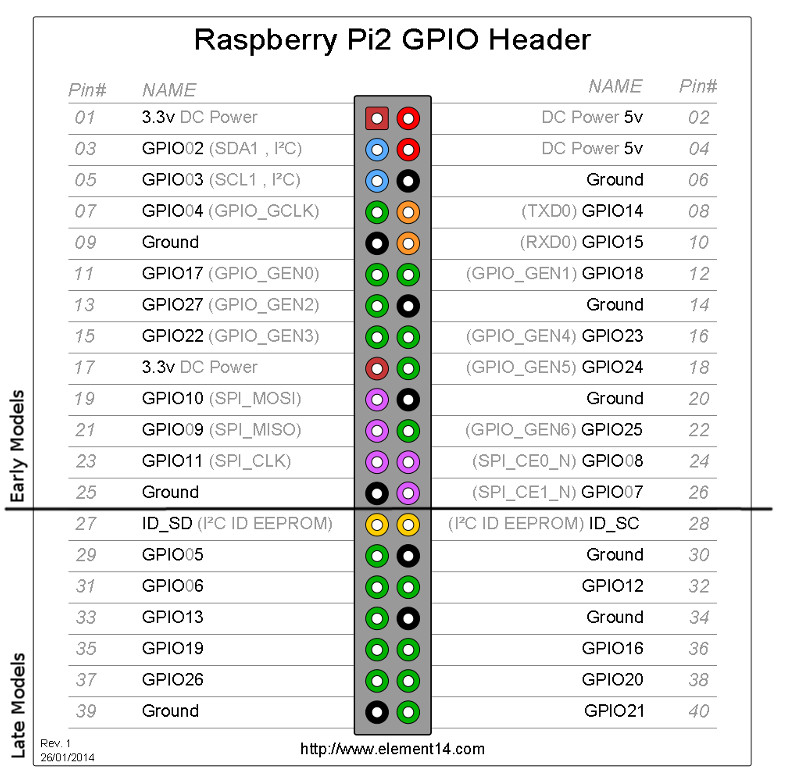
Not necessarily. GPIO headers can act as a very tiny antenna for ~1 meter range. For more range, connect a wire or antenna to GPIO 4 (pin 7).
What Raspberry Pi models are supported?
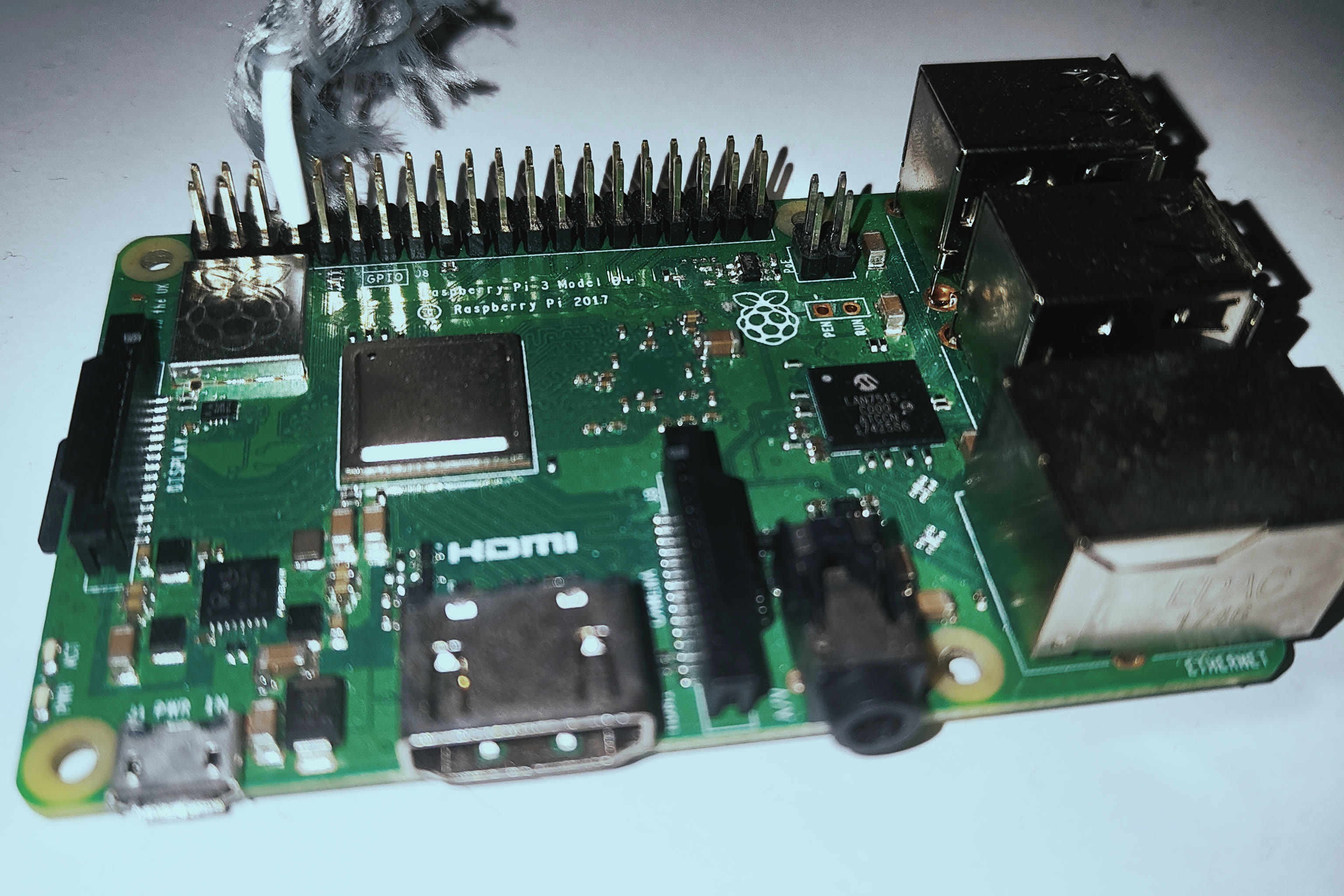
BotWave works on Raspberry Pi 2, 3, 4, and Zero models. Raspberry Pi 5 and Pico are not supported.
Is BotWave legal to use?
Broadcasting on FM frequencies may be subject to local regulations. Users are responsible for compliance with applicable laws. Unauthorized broadcasting may result in fines. The Raspberry Pi generates harmonics at 3x, 5x, 7x, and 9x the desired frequency which can interfere with emergency services.
What is BotWave?
BotWave is a server-client system that allows you to broadcast audio files over FM radio using Raspberry Pi devices, with support for both standalone and multi-Pi network setups.
More in Audio Streaming
 deadairSelf-hosted AI radio station that picks your music, writes presenter scripts, speaks in character voices, and streams live to all listeners simultaneously.
 DeaftoneLightweight Rust music server for self-hosted streaming. Simple API, FLAC/MP3/Ogg support, SQLite storage. Alternative to Subsonic.
 DiscordSoundboardSelf-hosted Discord bot that plays sound clips in voice channels via chat commands or web UI. Requires Java 25+ and a Discord bot token. Open-source under Apache-2.0.
 downtifyHost your own music downloader that grabs tracks from Spotify and YouTube Music, tags them automatically, and plays them in a browser-based player with playlist watching.
 euterpeEuterpe is an open-source, self-hosted music streaming server for your personal library. Runs as a single binary with web UI, REST API, and native mobile apps.
 foamSelf-hosted PHP web player for Ampache music servers with Fomantic UI, featuring library browsing, playlists, queue management, and FLAC support.
 koelKoel is a self-hosted, open-source music streaming server that turns your own audio collection into a slick web player with playlists, podcasts, radio and a Subsonic API.
 LavalinkLavalink is a self-hosted, open-source audio node based on Lavaplayer: it streams music to Discord voice servers for your bot, with REST and WebSocket APIs.
 LibreTimeSelf-hosted open-source radio broadcast platform for online/terrestrial stations with scheduling, playlists, podcasts, and live broadcasting.
 Lyrion Music ServerLyrion Music Server is a self-hosted, open-source audio server for Squeezebox players, serving local libraries, internet radio, and streaming services.
 mcp-spotify-playerMCP Spotify Player is a self-hosted, open-source MCP server letting AI assistants control Spotify playback, search music, and manage playlists via natural language.
 Melodia FlowSelf-hosted music acquisition: searches Spotify/Deezer, downloads from YouTube/SoundCloud/Bandcamp, tags metadata, syncs to Navidrome. Multi-user, 2FA, plugins.
0 comments