
Self-host Calibre
v9.18.0E-book library manager with conversion and web access
- Stars
- 26 455
- Port
- 8080 (Content server web interface)
What is Calibre?
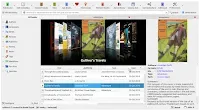
calibre is a comprehensive e-book library manager for personal use. It lets you organize your e-book collection, convert between dozens of formats (EPUB, MOBI, PDF, AZW3, etc.), edit book metadata and content, download news from hundreds of sources, and sync with virtually any e-reader device. The built-in Content server provides web-based access to your library from phones, tablets, or any browser, with offline reading support. It runs natively on Linux, Windows, and macOS, with portable and mobile companion options. The software is licensed under GPL-3.0 and developed by Kovid Goyal with a community of contributors.
Calibre alternatives
 LibrumA cross-platform, open-source e-book reader and library manager that syncs your books across devices and can be self-hosted with your own Librum-Server backend.CompareLibrum with Calibre
 docker-calibre-webSelf-hosted web application for managing and reading eBooks through a clean browser interface. Works with Calibre databases and supports Google Drive integration.Comparedocker-calibre-web with Calibre
 Calibre Web AutomatedSelf-hosted ebook library with automated ingest, conversion, metadata, and KOReader sync. Combines Calibre-Web UI with Calibre power.CompareCalibre Web Automated with Calibre
 AutocaliwebSelf-hosted, open-source web app to browse, read and manage eBooks, eComics and PDFs on a Calibre database, with OPDS, Kobo sync and automated ingest and conversion.CompareAutocaliweb with Calibre
 koodo-readerOpen-source, cross-platform ebook manager and reader you can self-host with Docker; reads EPUB, PDF, MOBI and CBZ, with notes, OPDS and cloud sync.Comparekoodo-reader with Calibre
 dir2opdsA lightweight OPDS 1.2 ebook server you host yourself that turns a folder into a digital library. Serves EPUB, PDF, MOBI, AZW3, and FB2 to OPDS readers or a web browser.Comparedir2opds with Calibre
 KindleEarSelf-hosted, open-source app that turns RSS feeds and Calibre recipes into ebooks or mp3 pushed to Kindle devices, with an e-ink reader, AI summaries and translation.CompareKindleEar with Calibre
 KavitaSelf-hosted, open-source reading server that organizes and serves your comics, manga, ebook and PDF collection with built-in readers, OPDS and OIDC multi-user logins.CompareKavita with Calibre
Should you self-host Calibre?
Calibre scores 83/100 on selfhost.directory (how scoring works) and ranks #1 of 19 in Ebook Management. It has 26 455 GitHub stars, +314 in the last 30 days.
It shipped 19 stable releases in the past year. The latest, v9.18.0, came out on 6 November 2026. New versions land roughly every 2 weeks.
Setup is easy: most people get it running in one sitting. It is GPL-3.0-licensed and written mostly in Python.
Its closest alternative on selfhost.directory is Calibre Web Automated (73/100, 6 628 stars). Calibre scores higher overall. See Calibre vs Calibre Web Automated side by side.
Features
- Command Line Interface
- Content Server
- Cross-platform
- Device synchronization
- E-book editing
- E-book library management
- E-book Viewer
- Format Conversion
- Metadata Management
- News/magazine download
- Offline reading
- OPDS Support
- Plugin System
- Portable mode
Calibre README
calibre is an e-book manager. It can view, convert, edit and catalog e-books in all of the major e-book formats. It can also talk to e-book reader devices. It can go out to the internet and fetch metadata for your books. It can download newspapers and convert them into e-books for convenient reading. It is cross platform, running on Linux, Windows and macOS.
FAQ
How do I use calibre with my iPad/iPhone/iPod touch?
Use the Content server via Safari or OPDS-compatible apps like Marvin, Mapleread, and iBooks. Set output format to EPUB and output profile to iPad in calibre preferences.
What devices does calibre support?
calibre directly connects to all major e-readers, smartphones, and tablets. It also supports any device that appears as a USB disk via 'Connect to folder', and any device with a web browser via the Content server.
How do I run calibre from my USB stick?
A portable version of calibre is available for download that runs directly from a USB stick without installation.
How is calibre licensed?
calibre is licensed under the GNU General Public License v3 (GPL-3.0), an open source license that requires source code availability when redistributing.
What formats does calibre support conversion to/from?
calibre supports conversion between dozens of formats including AZW, AZW3, EPUB, MOBI, PDF, DOCX, HTML, FB2, LIT, LRF, PDB, RTF, TXT, and many more. Input and output format lists are extensive.
More in Ebook Management
- Calibre Web AutomatedSelf-hosted ebook library with automated ingest, conversion, metadata, and KOReader sync. Combines Calibre-Web UI with Calibre power.
 ChaptarrSelf-hosted audiobook and eBook manager forked from Readarr with narrator-aware metadata, dual libraries, and *arr integrations.
 ComiGoSelf-hosted, open-source comic/manga reader supporting CBZ, CBR, EPUB, PDF with web UI, PWA offline reading, progress sync, and Docker deployment.
- dir2opdsA lightweight OPDS 1.2 ebook server you host yourself that turns a folder into a digital library. Serves EPUB, PDF, MOBI, AZW3, and FB2 to OPDS readers or a web browser.
 eloranEloran is a self-hosted, open-source comics and ebook web library in Rust with folder-based library view, reading progress tracking, bookmarks, and multi-user support.
 GrimoireA self-hosted web app for organizing and reading your tabletop RPG PDF collection with full-text search, maps, tokens, audio, and campaign management.
 InkWeaverInkWeaver is a self-hosted manga download manager with desktop GUI and CLI. Organizes downloads with metadata, cover art, and export formats (CBZ, PDF).
 KOllectorSelf-hosted Flask app that aggregates KOReader highlights from multiple devices via Syncthing, enriches metadata via Open Library, and exports to blog posts.
 KomgaKomga is a self-hosted, open-source media server for comics, manga, and eBooks with responsive web UI, REST API, OPDS, Kobo/KOReader sync, and multi-user management.
 kompanionKOmpanion is a self-hosted, open-source backend for KOReader e-readers providing OPDS catalog, reading progress sync, and book statistics without a web reading interface.
 KoShelfSelf-hosted web dashboard combining KOReader notes, highlights, and reading statistics with library browsing, in-app reader, calendar, and optional auth.
 news2readerSelf-hosted OPDS catalog that fetches articles from Hacker News, Tildes, and Karakeep, converts them to EPUB, and serves them to e-reader software like KOReader.
0 comments