
Self-host SUB/WAVE
v1.28.0AI-powered internet radio station with automated DJ
curl -fsSL https://cli.getsubwave.com | sh # installs, then offers to init + start- Stars
- 1 548
- Ports
- 7700 (Web UI), 7701 (Controller API), 7702 (Icecast stream)
- Requires
- Liquidsoap
ghcr.io/perminder-klair/subwave-caddy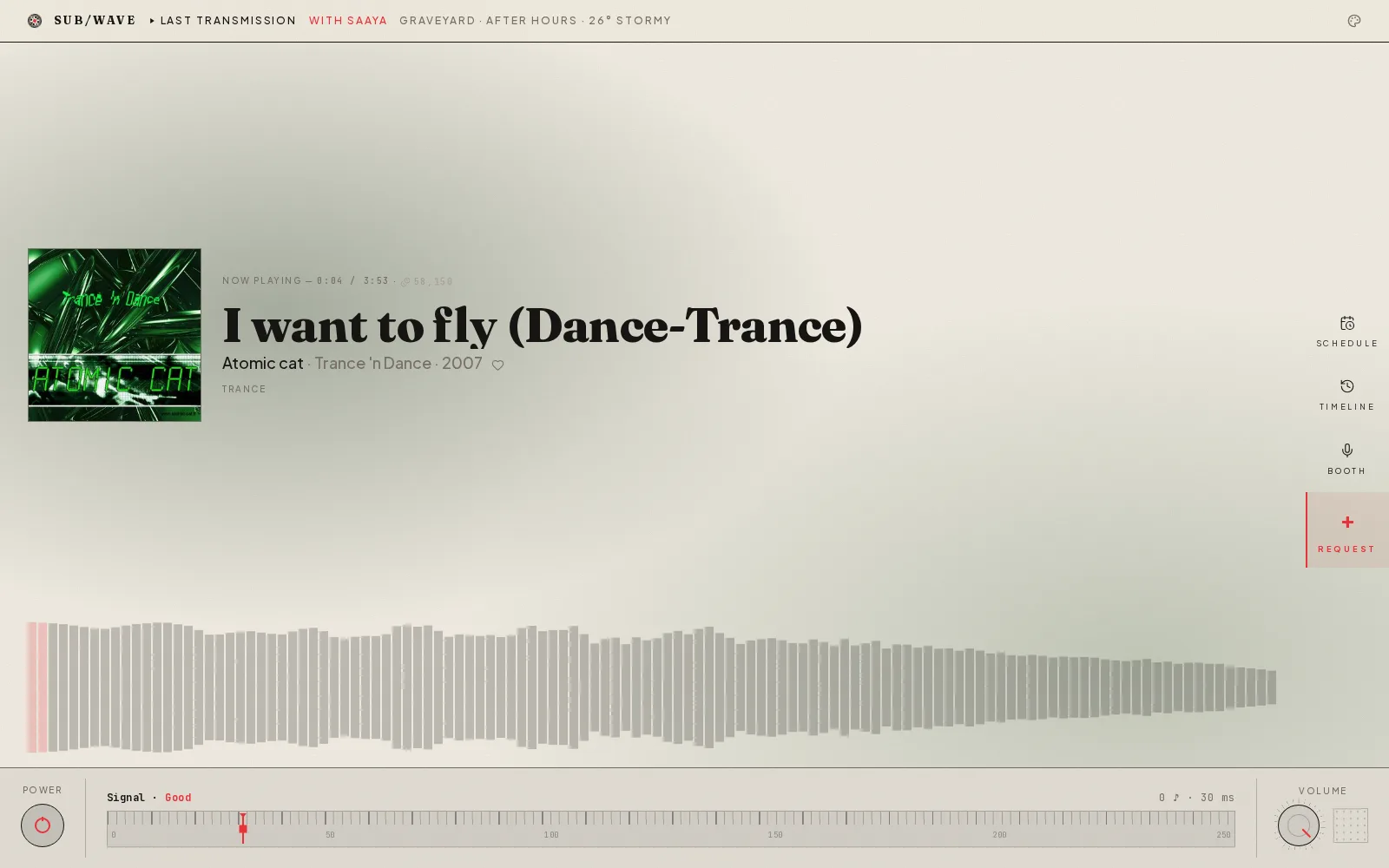


What is SUB/WAVE?
SUB/WAVE is a personal internet radio station with an AI DJ that curates tracks and provides commentary including station idents, time checks, weather updates, and song intros. Users connect their own music library via Navidrome's Subsonic API—the DJ selects what plays based on moods, time of day, weather, and listener requests. The software runs entirely on a user's hardware through Docker Compose, broadcasting a single Icecast stream where every listener hears the same audio simultaneously. It supports multiple LLM providers (Ollama, Anthropic, OpenAI, Google) and six TTS engines for voice output.
SUB/WAVE alternatives
 AzuraCastSelf-hosted, open-source web radio suite bundling Liquidsoap, Icecast and a management panel in one Docker container, with multi-station support and listener analytics.CompareAzuraCast with SUB/WAVE
 TLDR RadioSelf-hosted, open-source tool that converts daily TLDR tech newsletters into chapterized audio using local TTS (Kokoro-82M), no cloud or accounts needed.CompareTLDR Radio with SUB/WAVE
 Navidrome Music Server🎧 Your Personal Streaming ServiceCompareNavidrome Music Server with SUB/WAVE
 KimaKima is a self-hosted, open-source music server for your own files, adding podcasts, audiobooks and vibe-based matching that maps your library in 3D.CompareKima with SUB/WAVE
 Whisper-WebUISelf-hosted Gradio web UI that turns Whisper speech recognition into an easy subtitle generator: transcribe files, YouTube links or microphone.CompareWhisper-WebUI with SUB/WAVE
 botwaveBotWave is a self-hosted FM radio broadcasting system for Raspberry Pi. Supports standalone and multi-Pi setups with live streaming and remote management.Comparebotwave with SUB/WAVE
 AudioMuse-AIOpen-source, self-hosted sonic-analysis tool that builds playlists, a 2D music map and semantic search for Navidrome, Jellyfin, Emby, Plex, LMS and Lyrion libraries.CompareAudioMuse-AI with SUB/WAVE
 subplayerSubplayer is a self-hosted, open-source web music player for Subsonic backends like Navidrome, with playback, playlists, search, and dark mode theming.Comparesubplayer with SUB/WAVE
Should you self-host SUB/WAVE?
SUB/WAVE scores 57/100 on selfhost.directory (how scoring works) and ranks #36 of 118 in Media Server. It has 1 548 GitHub stars, +12 in the last 30 days.
It shipped 10 stable releases in the past year. The latest, v1.28.0, came out on 26 October 2026. New versions land roughly every 2 days.
Setup is moderate: expect some configuration beyond a single command. An official Docker image is available. It is MIT-licensed and written mostly in Typescript.
Its closest alternative on selfhost.directory is Jellyfin (88/100, 58 793 stars). It scores higher overall, so compare the two before you pick. See SUB/WAVE vs Jellyfin side by side.
SUB/WAVE README
A personal internet radio station. One Icecast stream, one broadcast. Every listener hears the same thing at the same time. An AI DJ picks the tracks and talks between them: station idents, time checks, the weather, a quick intro for whatever's going out next. You can ask for music in plain language; the DJ works out what you meant and slots it in.
It's radio, not a playlist. No per-listener shuffle, no skip button, no "up next for you." You tune in and hear whatever is on.
More in Media Server
 SuperstreamerSelf-hosted, open-source video streaming platform that handles transcoding, packaging, ad insertion, and playback with HLS. Built for developers who need video tooling.
 Suwayomi-ServerManga reader server running Tachiyomi/Mihon extensions with library management, automated updates, OPDS support, tracking via MyAnimeList, AniList, MangaUpdates
 Swing Music Swing Music is a beautiful, self-hosted music player for your local audio files. Like a cooler Spotify ... but bring your own music.
 SwingMusicSelf-hosted, open-source music streaming server for your local audio files, with daily mixes, metadata normalization, multi-user support and an Android client.
 syncloungeSyncLounge is a self-hosted, open-source tool that synchronizes Plex playback across multiple clients in different locations for shared viewing.
 TautulliTautulli is a self-hosted, open-source Python web app that monitors Plex Media Server, providing analytics, watch history, and customizable notifications.
 tautulli-notification-digestSelf-hosted tool that consolidates Tautulli's 'Recently Added' events into scheduled Discord digest notifications, replacing individual alerts with timed summaries.
 teddycloudteddyCloud is an open-source self-hosted replacement for the Boxine Cloud, running Toniebox audio services locally with web UI and MQTT/Home Assistant integration.
 Telegram-StremioA powerful, self-hosted Telegram Stremio Media Server built with FastAPI, MongoDB, and PyroFork — seamlessly integrated with Stremio for automated media streaming and discovery.
 ThreadfinSelf-hosted M3U proxy for Plex, Emby, Jellyfin Live TV. xTeVe fork with Bootstrap UI, RAM buffer, channel mapping via Docker/Helm/binary.
 trailarrTrailarr is a self-hosted, open-source app that auto-downloads and manages trailers for movie/TV libraries, integrating with Radarr, Sonarr, Plex, Emby, and Jellyfin.
 Tube ArchivistTube Archivist is a self-hosted, open-source YouTube media server for downloading, indexing, and playing videos offline with full-text search.
0 comments