
Self-host stable-diffusion-webui
v1.10.1Web interface for Stable Diffusion image generation
- Stars
- 165 321
- Port
- 7860 (Web UI and API server)
- Requires
- Git, Python


What is stable-diffusion-webui?
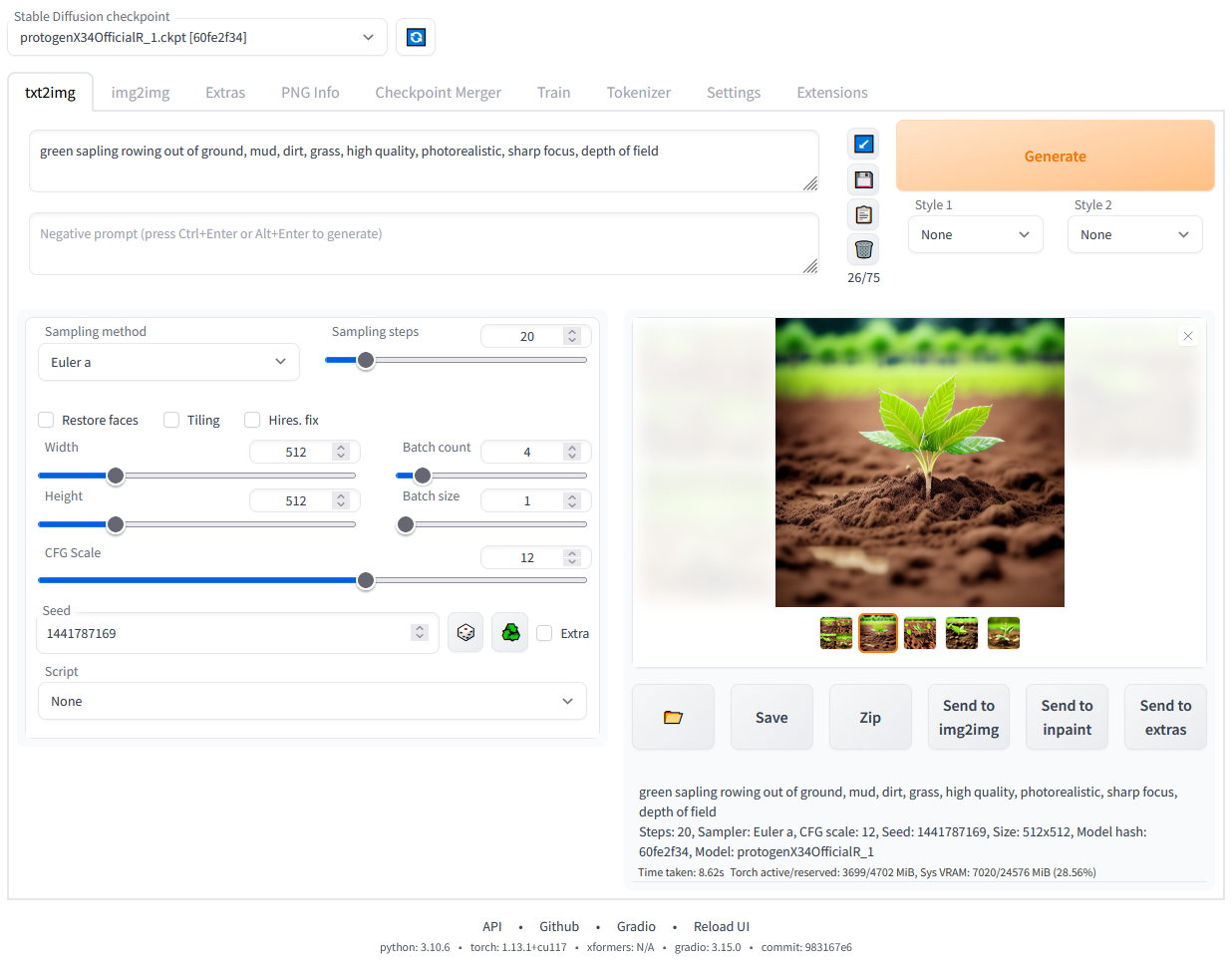
Stable Diffusion web UI is a comprehensive browser-based interface for running Stable Diffusion models locally. It supports text-to-image and image-to-image generation, inpainting, outpainting, upscaling, and advanced features like textual inversion, LoRA, hypernetworks, checkpoint merging, and parameter exploration through X/Y/Z plots. The software runs on Windows, Linux, and macOS with NVIDIA, AMD, or Intel GPUs, plus Apple Silicon and CPU-only configurations. It offers a REST API, extension system, custom scripts, and frequent updates under the AGPL-3.0 license.
stable-diffusion-webui alternatives
 ChatGPT Web Midjourney ProxySelf-hosted open-source web UI that combines ChatGPT, Midjourney, Suno, Luma, Runway, Pika, and other AI models into a single interface with PWA support.CompareChatGPT Web Midjourney Proxy with stable-diffusion-webui
 Text Generation WebUIAn open-source, self-hosted LLM chat app you run on your own machine: vision input, tool-calling, LoRA fine-tuning, and an OpenAI/Anthropic-compatible API.CompareText Generation WebUI with stable-diffusion-webui
 unslothSelf-hosted, open-source UI and framework to run, fine-tune and export LLMs, GGUF/MLX and diffusion models on your own GPU or Mac.Compareunsloth with stable-diffusion-webui
 Mix StudioSelf-hosted, open-source AI workspace built on ComfyUI that runs curated image and video workflows locally with a touch-friendly web interface.CompareMix Studio with stable-diffusion-webui
 airunnerSelf-hosted, open-source desktop AI engine: local LLM chat companions, Stable Diffusion art generation, TTS/STT voice, and a headless Ollama/OpenAI-compatible API.Compareairunner with stable-diffusion-webui
 Whisper-WebUISelf-hosted Gradio web UI that turns Whisper speech recognition into an easy subtitle generator: transcribe files, YouTube links or microphone.CompareWhisper-WebUI with stable-diffusion-webui
 llama-swapSelf-hosted model swapping proxy for running multiple AI models locally. Swaps between llama.cpp, vllm, stable-diffusion.cpp on demand via OpenAI/Anthropic endpoints.Comparellama-swap with stable-diffusion-webui
 LocalAILocalAI is the open-source AI engine. Run any model - LLMs, vision, voice, image, video - on any hardware. No GPU required.CompareLocalAI with stable-diffusion-webui
Should you self-host stable-diffusion-webui?
stable-diffusion-webui scores 88/100 on selfhost.directory (how scoring works) and ranks #1 of 11 in Image Generation. It has 165 321 GitHub stars, +287 in the last 30 days.
There was no stable release in the past 12 months, so check the repository's recent activity before you rely on it.
Setup is moderate: expect some configuration beyond a single command. It is AGPL-3.0-licensed and written mostly in Python.
Its closest alternative on selfhost.directory is InvokeAI (81/100, 29 099 stars). stable-diffusion-webui scores higher overall. See stable-diffusion-webui vs InvokeAI side by side.
Features
- Checkpoint merging
- Extension System
- Hires. fix
- Hypernetworks
- Image-to-image generation
- Inpainting
- LoRA support
- Outpainting
- Prompt attention/emphasis
- Prompt Editing
- REST API
- Text-to-image generation
- Textual Inversion
- Upscaling
- X/Y/Z plotting
stable-diffusion-webui README
A web interface for Stable Diffusion, implemented using Gradio library.

Models stable-diffusion-webui runs
Popular open-weight models with stable-diffusion-webui support, with VRAM needs and licence at a glance.






More in Image Generation
 Stable Diffusion WebUI DockerSelf-hosted Docker container bundling 14 Stable Diffusion WebUIs like Automatic1111, ComfyUI, Fooocus, and InvokeAI, each on its own port via docker-compose profiles.
 Stable Diffusion WebUI ForgeSelf-hosted, open-source Stable Diffusion web UI that improves GPU memory management and speeds up inference, with ControlNet, IP-Adapter and Flux quant support.
 Sygil-webuiSelf-hosted open-source web UI for Stable Diffusion with dual Streamlit/Gradio interfaces, dynamic previews, VRAM optimization, upscalers, and text-to-video.
- Text Generation WebUIAn open-source, self-hosted LLM chat app you run on your own machine: vision input, tool-calling, LoRA fine-tuning, and an OpenAI/Anthropic-compatible API.
- airunnerSelf-hosted, open-source desktop AI engine: local LLM chat companions, Stable Diffusion art generation, TTS/STT voice, and a headless Ollama/OpenAI-compatible API.
 app.enfugue.aiSelf-hosted open-source web app for studio-quality AI image/video generation with Stable Diffusion, unified pipeline, CivitAI browser, optional auth, and JSON API.
 avatarSelf-hosted open-source Node.js service generating random geometric or initials-based avatars via REST API with configurable shapes, colors, and symmetry.
 BelullamaSelf-hosted AI app bundling Ollama, Open WebUI, and Automatic1111 for local LLMs and image generation with one-command Docker install.
- ChatGPT Web Midjourney ProxySelf-hosted open-source web UI that combines ChatGPT, Midjourney, Suno, Luma, Runway, Pika, and other AI models into a single interface with PWA support.
 ComfyUISelf-hosted, open-source AI engine for visual creators with a node-based workflow system covering images, video, 3D, audio, and text.
 ComfyUI Agent PanelSelf-hosted ComfyUI sidebar with AI agent powered by your Claude/ChatGPT sub. Edits workflows live, installs nodes, one-shot loads, rewind/rollback — no API keys.
 comfyui-mcpLocal-first agent for ComfyUI generating images, video, audio via MCP server and Claude Code plugin. Works with Claude, ChatGPT, Gemini, or local LLMs.
0 comments