
Self-host Spotlight_Storage
3.0.0Inventory management with LED locator system
- Stars
- 223
- Port
- 5000 (web UI)
mellowlabs/spotlight_storage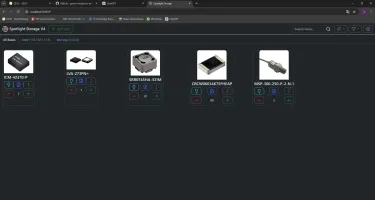
What is Spotlight_Storage?
Spotlight Storage (formerly MIMOSA) is a self-hosted inventory management system for organizing parts and components. It integrates with ESP32 devices running WLED firmware to control addressable LED strips (WS2812) that light up to show the physical location of items in storage bins. Features include item search, categorization with tags, multiple storage locations across different rooms (only Wi-Fi needed), image uploads for items, and a web interface accessible on port 5000. The system runs via Docker or Docker Compose with a SQLite database, and a Windows installer script is also provided. The project is open source under the MIT license.
Should you self-host Spotlight_Storage?
Spotlight_Storage scores 41/100 on selfhost.directory (how scoring works) and ranks #11 of 11 in Inventory Management. It has 223 GitHub stars.
There was no stable release in the past 12 months, so check the repository's recent activity before you rely on it.
Setup is moderate: expect some configuration beyond a single command. An official Docker image is available. It is MIT-licensed and written mostly in JavaScript.
Its closest alternative on selfhost.directory is Homebox (74/100, 7 664 stars). It scores higher overall, so compare the two before you pick. See Spotlight_Storage vs Homebox side by side.
Features
- Image Upload
- Inventory Management
- Item tagging
- LED effects
- LED location finding
- Multi-language Support
- Multi-Location Support
- REST API
Spotlight_Storage README
More in Home Management
 sprout-trackSelf-hosted baby tracker for logging feeds, naps, diapers, and milestones with multi-caretaker PINs, dark mode, PWA, and webhook integrations.
 TidyQuestSelf-hosted web app that turns chores into RPG quests with health bars, coins, streaks, and family leaderboards.
 TracktorSelf-hosted vehicle tracking app for managing fuel logs, maintenance history, insurance and PUCC compliance, reminders, and expenses across a fleet.
 VoucherVaultSelf-hosted Django app to manage digital coupons, vouchers, loyalty cards and gift cards with PWA offline access, expiry alerts, OIDC login, and stats API.
 wardrobeWardrobe is a self-hosted, open-source web application for managing personal clothing collections and creating outfits with weather-based recommendations.
 yuvomiYuvomi is a self-hosted, open-source family planner replacing multiple paid apps with one private server for tasks, calendar, meals, shopping, budget, and documents.
 yuzukamYuzukam is a self-hosted, open-source baby monitor running entirely on your local network with no cloud, no recording, and no accounts needed.
 AtticSelf-hosted home inventory app to catalog belongings with locations, categories, warranties, and automated imports from external databases.
 Baby BuddyOpen-source, self-hosted baby tracker for feedings, sleep, diapers and growth measurements, with a REST API, signed webhooks and multi-user roles.
 barcodebuddyOpen-source companion for Grocy that turns barcode scans into inventory actions: consume, purchase, chores and shopping-list updates.
 chore_plannerSelf-hosted chat bot for Telegram and Signal that fairly assigns shared-apartment chores using a score-based probability system.
 Christmas CommunitySelf-hosted, open-source web app for families to manage Christmas wishlists, track gifts, and avoid duplicates. Supports Google/OIDC SSO, themes, Docker/Node.js.
0 comments