
Self-host Spodcast
v0.5.2Spotify podcast to RSS proxy with caching
- Stars
- 374
- Requires
- PHP
heywoodlh/spodcast

What is Spodcast?
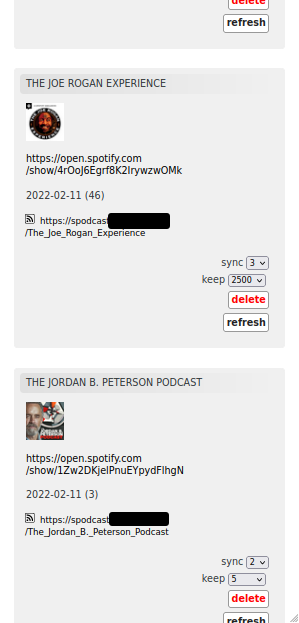
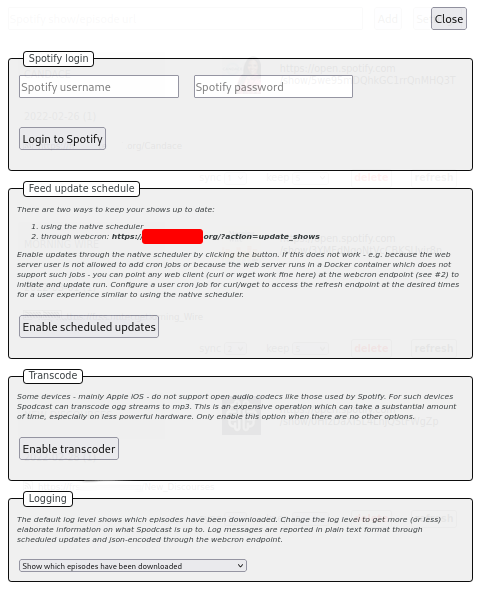
Spodcast turns Spotify-exclusive podcasts into standard RSS feeds that work with any podcast app. It has a Python CLI tool and a PHP feed generator. You can run it via Docker, Docker Compose, pip, or from source. It fetches episodes from Spotify's API, stores them locally, and serves them through RSS. A web feed manager lets you add shows, set how many episodes to sync and keep, and schedule updates via cron or an HTTP endpoint. Optional MP3 transcoding (via ffmpeg) helps on devices like iOS that don't support open audio formats. Licensed under GPL-3.0; latest release v0.5.2 from July 2022.
Should you self-host Spodcast?
Spodcast scores 47/100 on selfhost.directory (how scoring works) and ranks #7 of 18 in Podcasts. It has 374 GitHub stars.
There was no stable release in the past 12 months, so check the repository's recent activity before you rely on it.
Setup is moderate: expect some configuration beyond a single command. An official Docker image is available. It is GPL-3.0-licensed and written mostly in Python.
Its closest alternative on selfhost.directory is Pinepods (61/100, 1 032 stars). It scores higher overall, so compare the two before you pick. See Spodcast vs Pinepods side by side.
Features
- CLI standalone mode
- Cron Scheduling
- Episode caching
- MP3 transcodingRequires ffmpeg installed on host
- Per-show sync and keep settings
- Skip existing episodes
- Spotify podcast to RSS conversion
- Web-based feed manager
- Webcron endpoint
Spodcast README
More in Podcasts
 TLDR RadioSelf-hosted, open-source tool that converts daily TLDR tech newsletters into chapterized audio using local TTS (Kokoro-82M), no cloud or accounts needed.
 vod2pod-rssSelf-hosted open-source tool that converts YouTube or Twitch channels into podcast RSS feeds with on-the-fly MP3 transcoding, requiring no server storage for VODs.
 YouCastYouCast is a self-hosted desktop app that converts YouTube channels and playlists into podcast feeds for any podcatcher, running a local server on port 22703.
 airsonic-advancedSelf-hosted, open-source web media streamer forked from Airsonic: faster scanning, websocket UI updates, Sonos, Chromecast and ListenBrainz support.
 AudiobookshelfOpen-source, self-hosted media server for audiobooks and podcasts with on-the-fly audio streaming, progress syncing and podcast auto-downloads.
 BokeBoxSelf-hosted private AI podcast studio turning videos, links, articles, and meetings into spoken episodes with customizable persona, voice, and MCP/plugin extensibility.
 clean-castSelf-hosted Go app converting YouTube playlists/channels to podcast RSS feeds with on-demand audio download and SponsorBlock sponsor removal.
 EasyPodcastSelf-hosted PHP app for managing multiple podcasts with websites, RSS, stats, SEO, and REST API. Runs on PHP 8+ with SQLite, no external deps.
 gonicSelf-hosted, open-source Subsonic server API implementation in Go for streaming your own music: transcoding, podcasts, multi-user, Last.fm and ListenBrainz scrobbling.
 gpodder2gogpodder2go is a self-hosted, open-source Go implementation of the gpodder.net API for syncing podcast subscriptions across devices, replacing gpodder/mygpo server.
 KimaKima is a self-hosted, open-source music server for your own files, adding podcasts, audiobooks and vibe-based matching that maps your library in 3D.
 koelKoel is a self-hosted, open-source music streaming server that turns your own audio collection into a slick web player with playlists, podcasts, radio and a Subsonic API.
0 comments